


Comment trouver des contacts sur Instagram et rester connecté en ligne

Les réseaux sociaux sont un excellent moyen de rester en contact avec d’anciens amis, des parents éloignés et des personnes que l’on ne voit pas souvent. Mais il arrive parfois qu’il soit difficile de retrouver ces personnes sur Instagram et d’autres plateformes en ligne. Si vous ne disposez que de leur ancien numéro de téléphone ou de leur ancienne adresse e-mail, est-il possible de les retrouver en ligne ? Poursuivez la lecture de ce guide rapide pour découvrir comment retrouver des contacts sur Instagram.

Pouvez-vous trouver des contacts sur Instagram?
Il est facile de retrouver quelqu’un en ligne si vous connaissez son nom d’utilisateur sur les réseaux sociaux, mais pouvez-vous retrouver des contacts sur Instagram? Oui, c’est tout à fait possible, à condition que vous acceptiez de synchroniser les contacts de votre téléphone avec la plateforme.
Selon Oberlo, 49,7 % des internautes utilisent les réseaux sociaux pour suivre la vie de leurs amis et de leur famille. Instagram est un excellent moyen d’y parvenir. Vous pouvez y découvrir les dernières nouvelles de leur vie grâce à leurs publications et à leurs Stories Instagram, ou même prendre de leurs nouvelles par messages privés. Et quoi de mieux que la liste de contacts déjà enregistrée sur votre téléphone pour reprendre contact avec d’anciens amis et collègues ?
Heureusement, Instagram simplifie considérablement ce processus grâce à une fonctionnalité appelée « synchronisation des contacts ». Concrètement, lorsque vous activez cette fonctionnalité, vous accordez à Instagram un accès complet aux contacts de votre téléphone. À partir de là, l’algorithme recherche sur la plateforme les comptes associés à ces numéros et adresses e-mail. Il vous propose ensuite de suivre ces utilisateurs dans la section « Personnes que vous pourriez connaître » de l’application.
Comment trouver des contacts sur Instagram iPhone et Android
Êtes-vous prêt à synchroniser vos contacts avec Instagram pour reprendre contact avec de vieux amis et des collègues que vous ne suivez pas encore ? Voici comment trouver des contacts sur Instagram (iPhone et Android) :
1. Ouvrez l'applicationInstagram .
2. Cliquez sur votre photo de profil dans le coin inférieur droit de la page pour accéder à votre flux.
3. Appuyez sur l'icône hamburger (trois lignes horizontales) en haut de votre profil pour accéder aux paramètres.
4. Appuyez sur Centre de comptes en haut du menu.
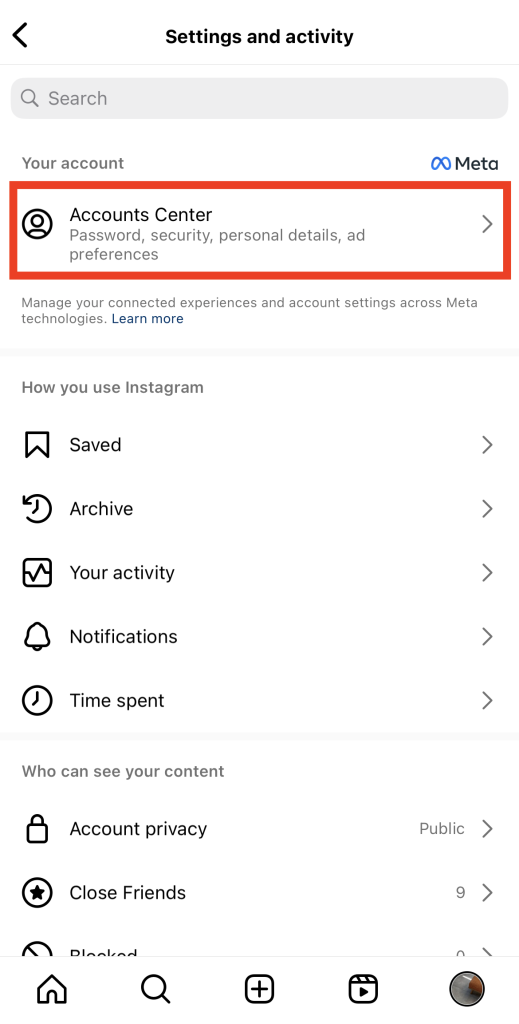
5. Dans le Centre des comptes Meta, cliquez sur « Vos informations et autorisations ».
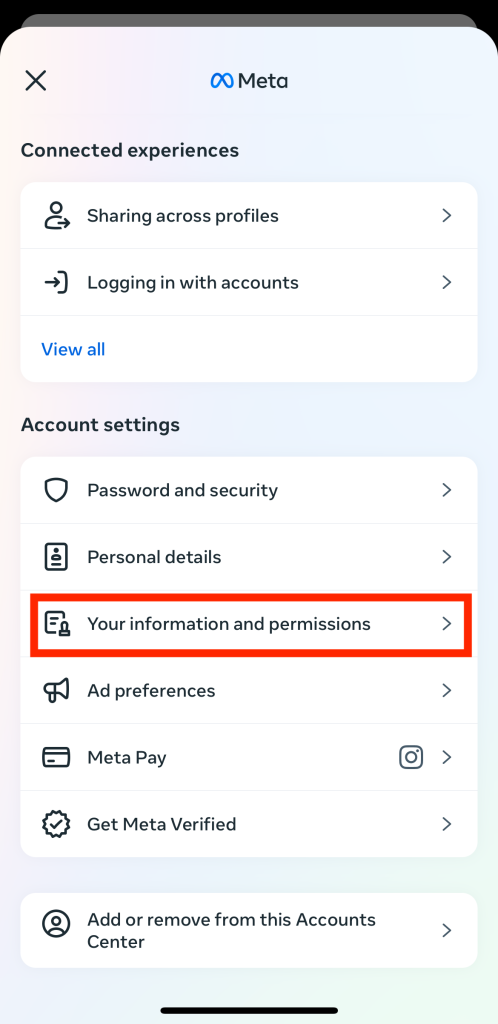
6. Sélectionnez Télécharger les contacts.
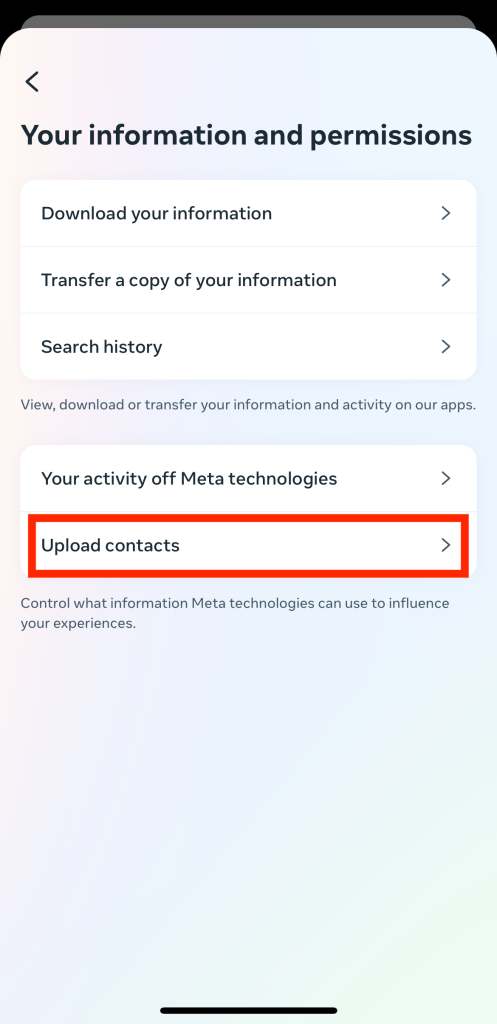
7. La page suivante devrait afficher tous vos comptes Meta existants. Cliquez sur votre profil Instagram .
8. Activez la case à cocher Connecter les contacts pour synchroniser la liste des contacts de votre téléphone avec Instagram.
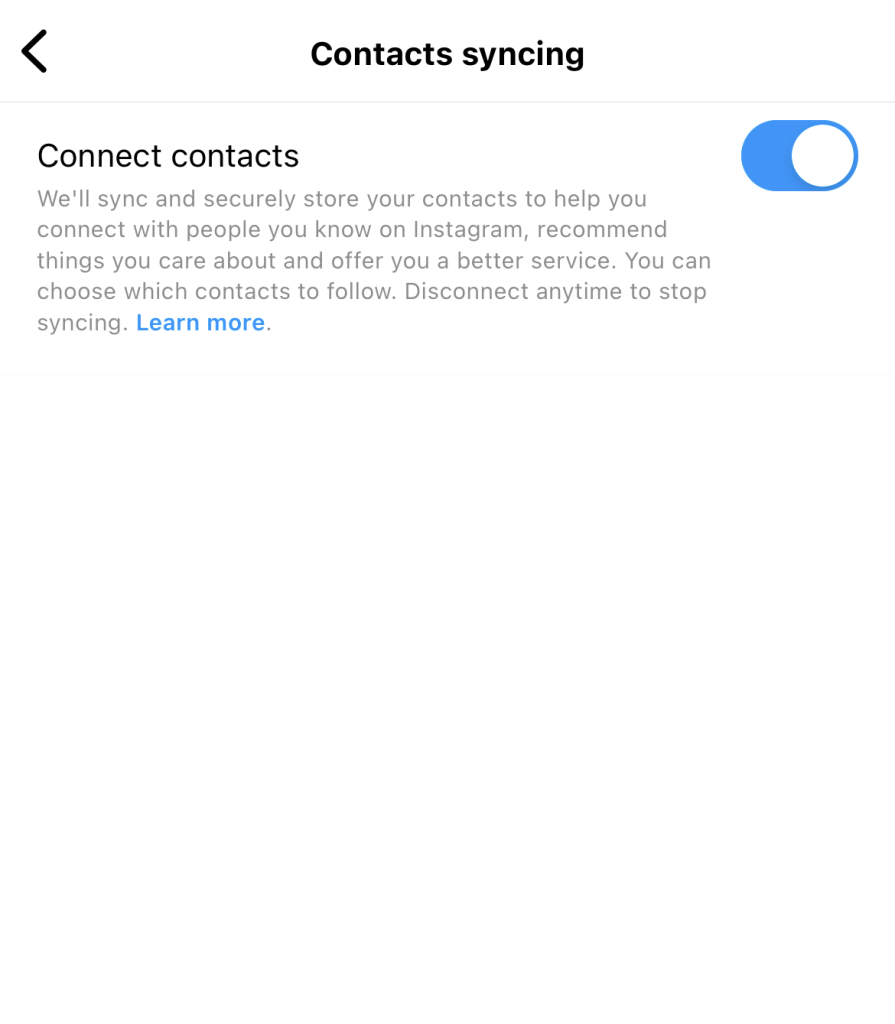
Et voilà ! Vous pouvez désormais saisir le nom d’un contact dans la barre de recherche de Instagrampour vérifier s’il est présent sur la plateforme. Instagram commencera également à vous suggérer de suivre des personnes figurant dans vos contacts que vous ne connaissez pas encore.
Voulez-vous recevoir des notifications sur les contacts téléphoniques qui sont sur Instagram? Activez les notifications pour recevoir ces mises à jour ! Voici comment procéder :
1. Dans l'application « Instagram », cliquez sur l'icône de profil située en bas à droite de l'écran d'accueil.
2. Sur votre profil, cliquez sur l'icône en forme de hamburger.
3. Dans la section « Comment utilisez-vous Instagram? », cliquez sur « Notifications ».
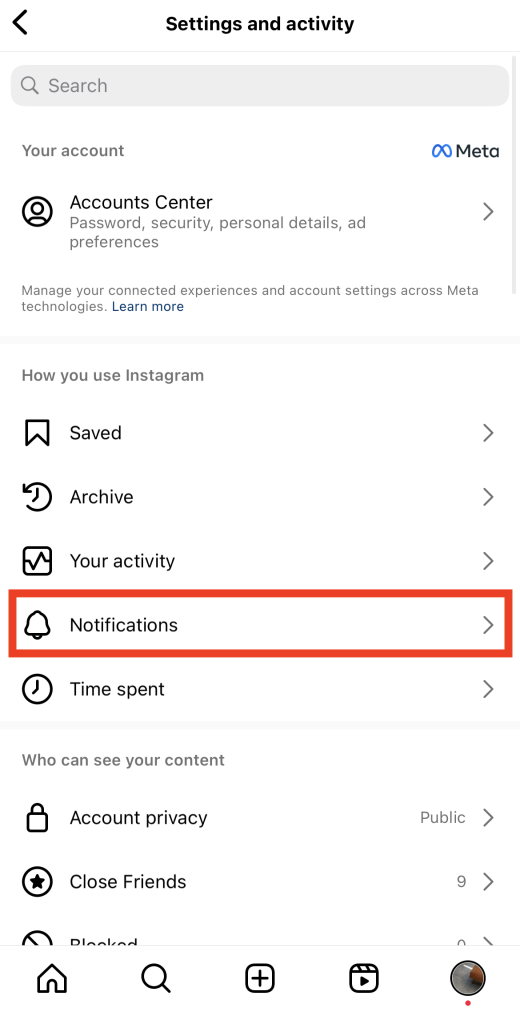
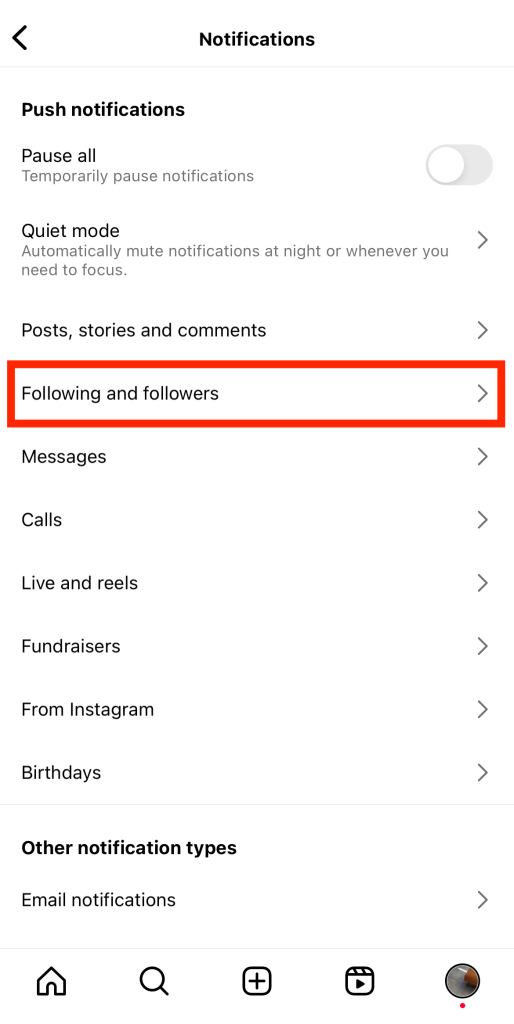
4. Dans le menu des notifications push, appuyez sur « Abonnements et abonnés ».
5. Sélectionnez la case à cocher Activé sous Suggestions de compte.
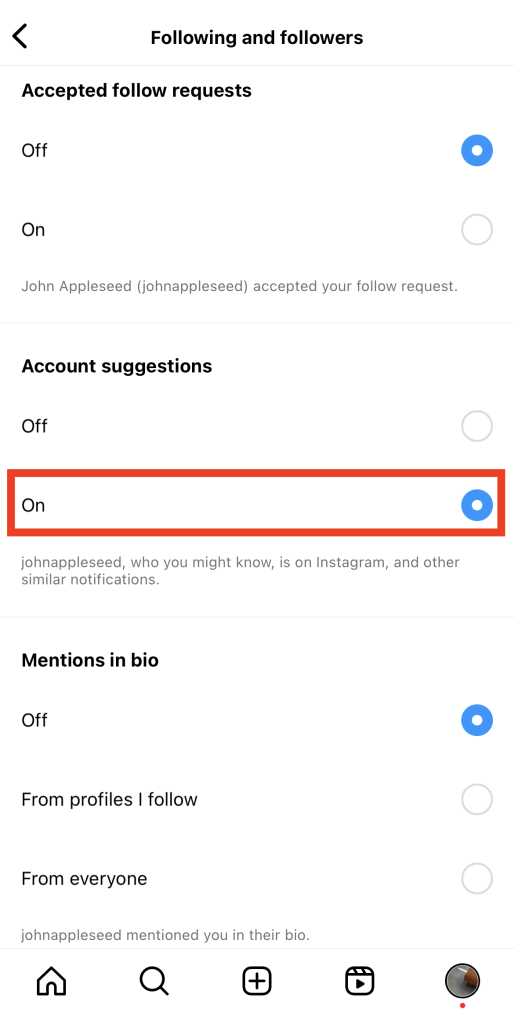
Et voilà ! Vous allez désormais recevoir des notifications concernant vos contacts sur Instagram.
Comment déconnecter vos contacts de Instagram
Imaginons qu’après avoir sans cesse cherché sur Google « comment retrouver mes contacts sur Instagram », un jour, vous changiez d’avis. Existe-t-il un moyen de dissocier les contacts de votre téléphone du Centre des comptes Meta ?
Oui, il est facile de dissocier votre liste de contacts d'Instagram. Il suffit de suivre toutes les étapes ci-dessus, mais dans l'ordre inverse. Voici comment procéder :
1. Allez dans le centre de comptes de Meta sur l'application Instagram .
2. Cliquez sur « Vos informations et autorisations », puis sur « Importer des contacts ».
3. Désactiver la bascule étiquetée Connecter les contacts.
Notez que la désactivation de la synchronisation des contacts ne supprime pas les contacts que vous avez déjà importés. Elle empêche simplement l'application de synchroniser régulièrement les nouveaux contacts. Pour supprimer définitivement tous les contacts que vous avez importés, vous devez utiliser un ordinateur. Voici comment procéder :
1. Allez sur le site web Instagram et connectez-vous avec vos identifiants.
2. Cliquez sur votre photo de profil dans la partie inférieure gauche de l'écran pour accéder à votre profil.
3. Sélectionnez Modifier le profil en haut de la page.
4. Dans le menu des paramètres, cliquez sur « En savoir plus » dans le Centre des comptes.
5. Appuyez sur Vos informations et autorisations.
6. Appuyez sur Gérer les contacts. La page suivante affiche une liste de tous les contacts que vous avez synchronisés avec Instagram.
7. Cliquez sur Supprimer tout en haut de la liste des contacts.
8. Confirmez dans le message contextuel qui s'affiche que vous souhaitez supprimer tous vos contacts.
Veuillez noter que le processus de suppression par Instagram peut prendre jusqu’à trois mois. D’ici là, il se peut que vous continuiez à recevoir des notifications et des suggestions concernant les comptes associés aux personnes figurant dans votre liste de contacts.
Autres moyens de trouver des personnes que vous pourriez connaître sur Instagram
Voulez-vous trouver des personnes que vous connaissez dans la vraie vie sur Instagram sans télécharger vos contacts ? Voici quelques méthodes sournoises de recherche de comptes pour trouver des personnes que vous pourriez connaître IRL sur Instagram:
- Utilisez la barre de recherche. Vous pouvez taper n'importe quoi, de l' adresse Instagram au nom complet d'une personne, en passant par les hashtags qui incluent son nom.
- Vérifiez vos amis communs avec les personnes que vous connaissez. Vous pouvez tomber sur les profils de personnes de votre cercle en vérifiant qui vos amis suivent.
- Explorez le de votre ville. Faites défiler les comptes des utilisateurs de votre quartier ou de votre communauté. C'est un excellent moyen de rencontrer de nouvelles personnes et peut-être de trouver quelqu'un que vous connaissez lorsqu'ils publient des messages sur votre ville.

Comment trouver des contacts sur Instagram Mises à jour en 2024
Vous vous demandez s’il y a eu cette année une nouvelle mise à jour concernant la procédure « comment retrouver ses contacts sur Instagram» ? Malheureusement, nous n’avons pas eu connaissance de nouvelles informations concernant les méthodes permettant de retrouver ses contacts sur Instagram. Il semble donc que l’importation de vos contacts via le Centre des comptes Meta reste la méthode par défaut.
Mais n'hésitez pas à consulter régulièrement notre blog ! Nous vous tiendrons informés des dernières fonctionnalités d'Instagram, y compris des nouvelles méthodes pour retrouver vos contacts sur Instagram.
La recherche de contacts n'est pas le seul moyen de développer votre marque en ligne Instagram
La synchronisation des contacts est un excellent moyen de retrouver rapidement des amis sur Instagram, même si vous ne disposez que de leur numéro de téléphone. En important vos contacts sur Instagram, vous pouvez découvrir davantage de personnes à suivre. Ensuite, il ne vous reste plus qu’à croiser les doigts pour voir s’ils reconnaissent votre nom et s’ils vous suivent en retour. C’est une astuce pratique pour renouer avec de vieux amis tout en augmentant le nombre de vos abonnés.
Bien sûr, trouver les comptes Instagram de vos contacts n’est pas le seul moyen de développer votre audience et d’attirer davantage d’abonnés. Il est utile de savoir comment trouver des contacts sur Instagram. Mais si votre objectif principal est d’attirer un grand nombre de nouveaux abonnés, se contenter de suivre quelques contacts ne suffira pas. Pour développer véritablement et de manière authentique votre présence sur la plateforme, faites appel aux services de Path Social.
Notre équipe vous aide à établir un lien entre vous et votre public cible. Nous mettons en œuvre des stratégies promotionnelles pour diffuser votre contenu de haute qualité auprès des personnes les plus susceptibles de l'apprécier. Vos publications toucheront le public adéquat, et votre page gagnera de nouveaux abonnés intéressés par votre contenu. Cela se traduira par une portée et un engagement accrus à l'avenir. Gagnez dès aujourd'hui plus d'abonnés grâce à Path Social!





Vous souhaitez développer naturellement votre Instagram ?
Découvrez une plateforme conçue pour aider les créateurs à toucher un public authentique et engagé, sans prendre de raccourcis.
Explorez la plateforme




