


Cómo encontrar contactos en Instagram y seguir conectado en línea

Las redes sociales son fantásticas para mantener el contacto con viejos amigos, parientes lejanos y personas a las que no ves a menudo. Pero, a veces, resulta difícil encontrar a estas personas en Instagram y otras plataformas en línea. Si lo único que tienes es su antiguo número de teléfono o dirección de correo electrónico, ¿es posible localizarlas en Internet? Sigue leyendo esta guía rápida para descubrir cómo encontrar contactos en Instagram.

¿Se pueden encontrar contactos en Instagram?
Es fácil encontrar a alguien en Internet si conoces su nombre de usuario en las redes sociales, pero ¿se pueden encontrar contactos en Instagram? Sí, es perfectamente posible siempre y cuando estés dispuesto a sincronizar los contactos de tu móvil con la plataforma.
Según Oberlo, el 49,7 % de los usuarios de Internet utiliza las redes sociales para estar al día de las vidas de sus amigos y familiares. Instagram es una forma estupenda de hacerlo. Aquí puedes ver novedades sobre sus vidas a través de publicaciones e historias de Instagram, o incluso ponerte al día mediante mensajes directos. ¿Y qué mejor manera de conectar con viejos amigos y compañeros de trabajo que a través de la lista de contactos que ya tienes en tu móvil?
Por suerte, Instagram facilita muchísimo este proceso gracias a una función llamada «sincronización de contactos». Básicamente, al activar esta función, le concedes a Instagram acceso completo a los contactos de tu teléfono. A partir de ahí, el algoritmo busca en la plataforma cuentas vinculadas a esos números y direcciones de correo electrónico. A continuación, te sugiere que sigas a esos usuarios en la sección «Personas que quizá conozcas» de la aplicación.
Cómo encontrar contactos en Instagram iPhone y Android
¿Estás listo para sincronizar tus contactos con Instagram y reconectar con viejos amigos y colegas a los que aún no sigues? A continuación te explicamos cómo encontrar contactos en Instagram (iPhone y Android):
1. Abra la aplicaciónInstagram .
2. Haz clic en tu foto de perfil en la esquina inferior derecha de la página para ir a tu feed.
3. Toca el icono de la hamburguesa (tres líneas horizontales) en la parte superior de tu perfil para ir a la configuración.
4. Pulse Centro de cuentas en la parte superior del menú.
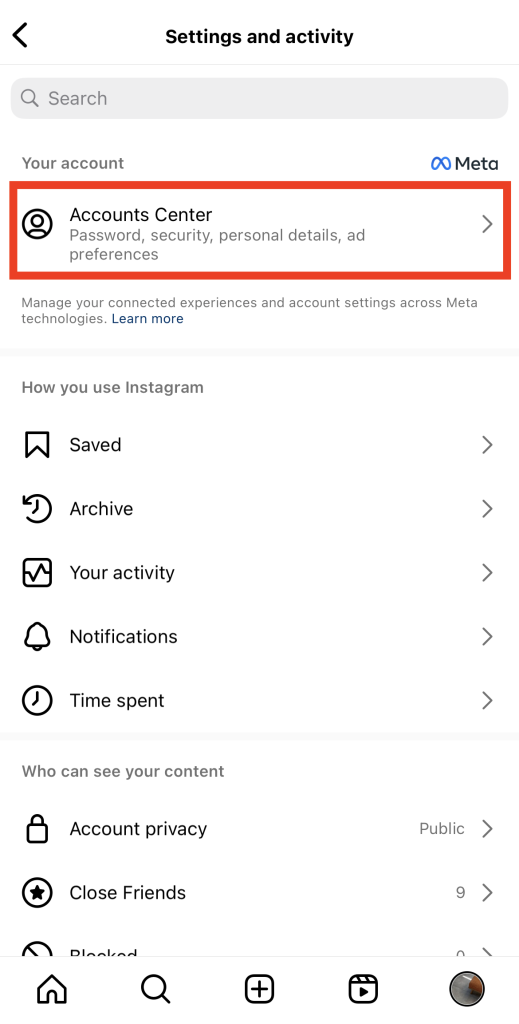
5. En el Centro de cuentas de Meta, haz clic en «Tu información y permisos».
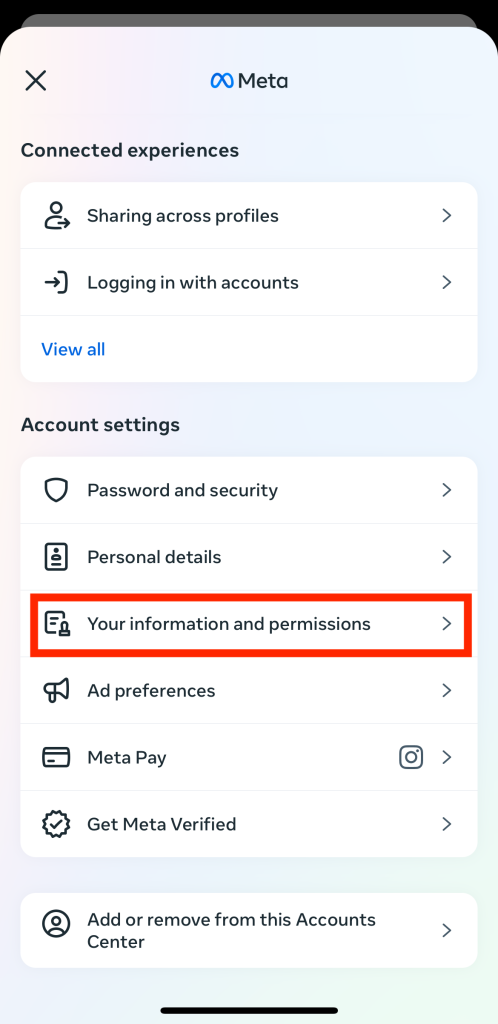
6. Seleccione Cargar contactos.
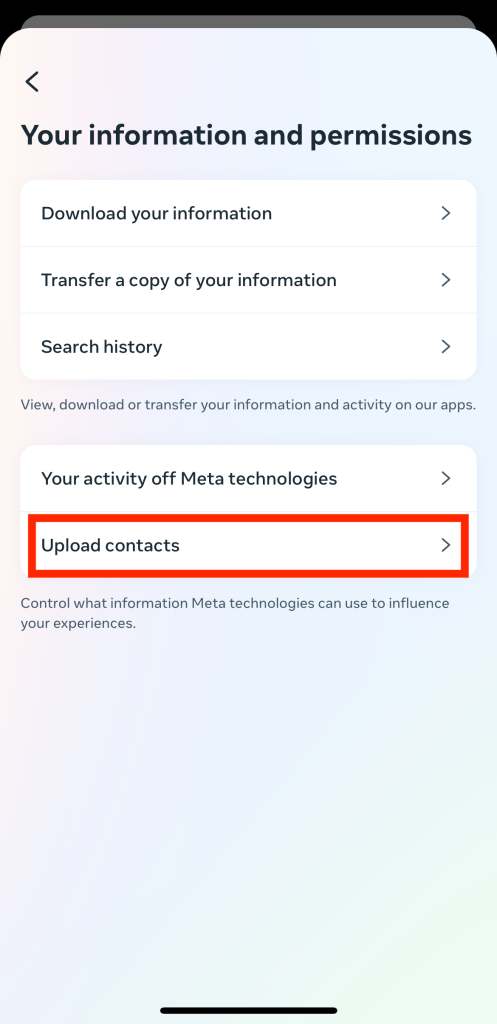
7. La siguiente página debería mostrarte todas tus cuentas Meta existentes. Haz clic en tu perfil Instagram .
8. Activa el botón Conectar contactos para sincronizar la lista de contactos de tu teléfono con Instagram.
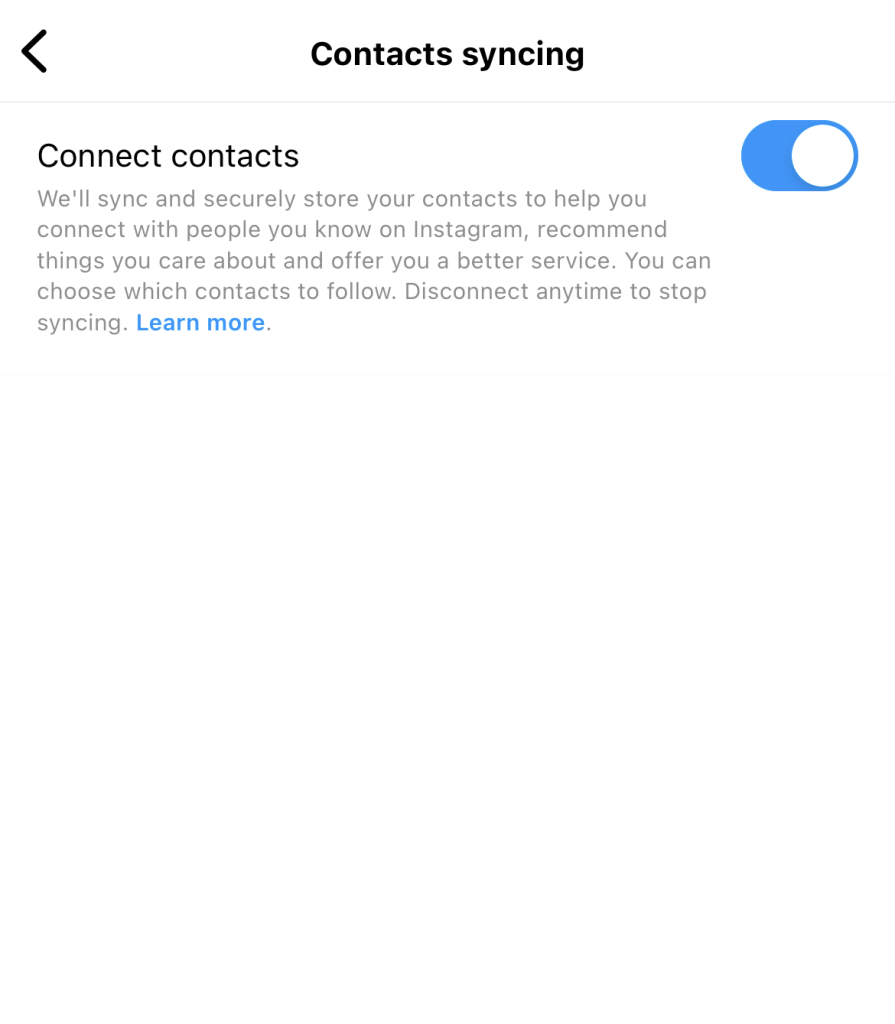
¡Y ya está! Ahora puedes escribir el nombre de un contacto en la barra de búsqueda de Instagramy comprobar si está en la plataforma. Instagram también empezará a sugerirte que sigas a personas de tus contactos que aún no conoces.
¿Quieres recibir notificaciones sobre los contactos telefónicos que están en Instagram? Activa las notificaciones para recibir estas actualizaciones. Te explicamos cómo:
1. En la aplicación « Instagram », haz clic en el icono de perfil situado en la esquina inferior derecha de la pantalla de inicio.
2. En tu perfil, haz clic en el icono de la hamburguesa.
3. En la sección «Cómo utilizas Instagram», haz clic en «Notificaciones».
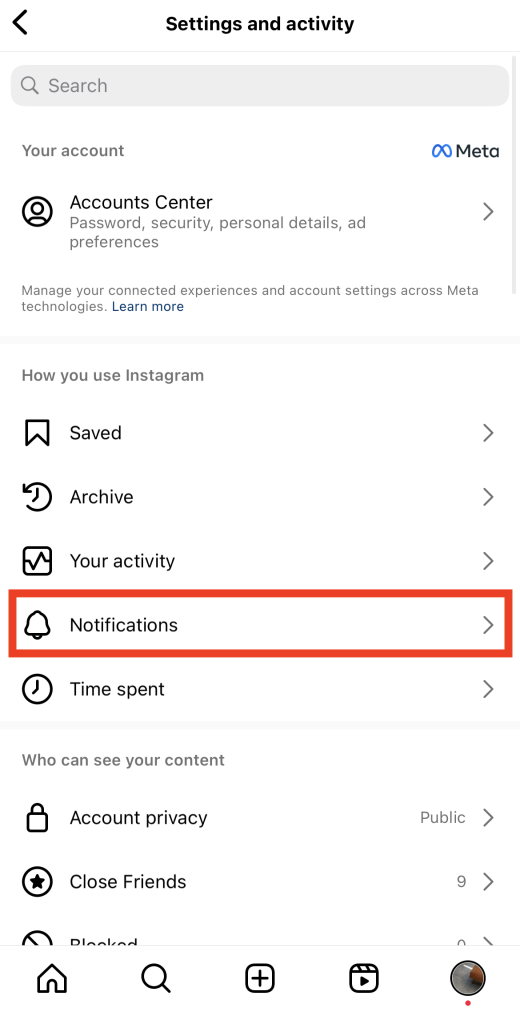
4. En el menú de notificaciones push, pulsa en «A quienes sigues y seguidores».
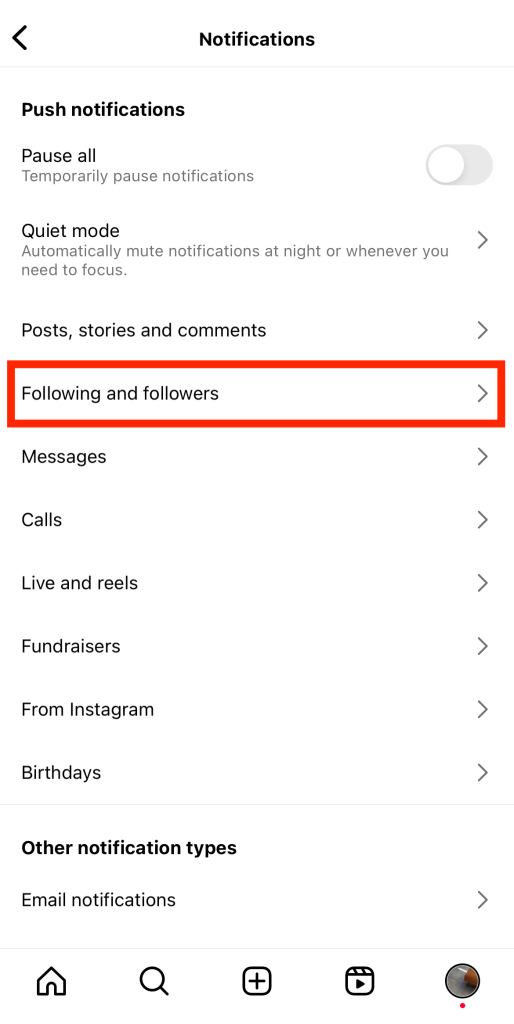
5. Seleccione la opción Activado en Sugerencias de cuenta.
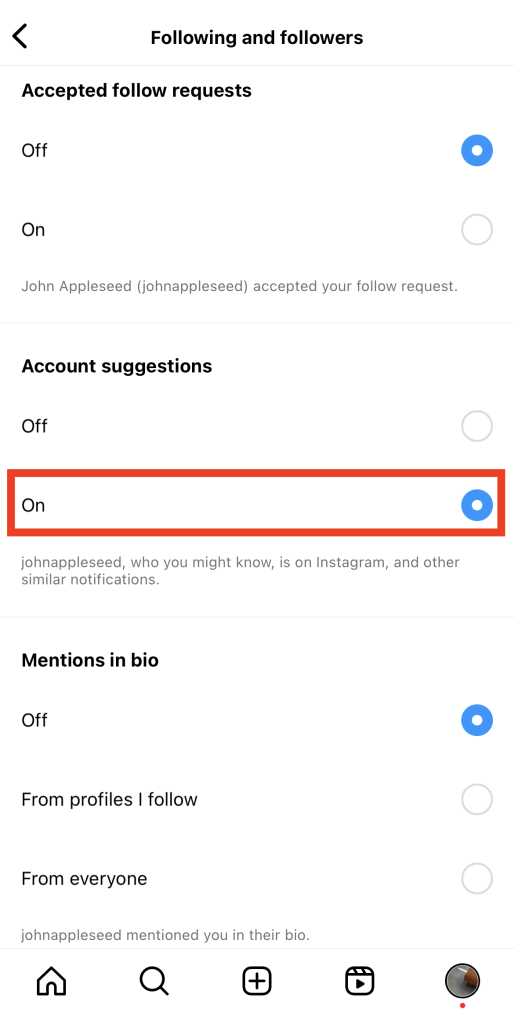
¡Y ya está! A partir de ahora, empezarás a recibir notificaciones sobre tus contactos en Instagram.
Cómo desconectar tus contactos de Instagram
Supongamos que, tras buscar constantemente en Google «cómo encontrar mis contactos en Instagram », un día simplemente cambias de opinión. ¿Hay alguna forma de desvincular los contactos de tu teléfono del Centro de cuentas de Meta?
Sí, es fácil desvincular tu lista de contactos de Instagram. Solo tienes que seguir todos los pasos anteriores, pero en orden inverso. A continuación te explicamos cómo hacerlo:
1. Ve al Centro de cuentas de Meta en la aplicación Instagram .
2. Haz clic en «Tu información y permisos» y, a continuación, en «Subir contactos».
3. Desconecte el conmutador con la etiqueta Conectar contactos.
Ten en cuenta que desactivar la sincronización de contactos no elimina los contactos que hayas subido anteriormente. Simplemente impide que la aplicación sincronice nuevos contactos de forma periódica. Para eliminar definitivamente todos los contactos que hayas subido, debes utilizar un ordenador. A continuación te explicamos cómo hacerlo:
1. Vaya al sitio web Instagram e inicie sesión con sus credenciales.
2. Haz clic en tu foto de perfil en la parte inferior izquierda de la pantalla para ir a tu perfil.
3. Seleccione Editar perfil en la parte superior de la página.
4. En el menú de configuración, haz clic en «Ver más» en el Centro de cuentas.
5. Pulse Sus datos y permisos.
6. Pulse Gestionar contactos. La página siguiente le mostrará una lista de todos los contactos que ha sincronizado con Instagram.
7. Haga clic en Eliminar todo en la parte superior de la lista de contactos.
8. Confirma en el mensaje emergente que aparece que deseas eliminar todos tus contactos.
Ten en cuenta que « Instagram » podría tardar hasta tres meses en completar el proceso de eliminación. Hasta entonces, es posible que sigas recibiendo algunas notificaciones y sugerencias sobre cuentas vinculadas a personas de tu lista de contactos.
Otras formas de encontrar a gente que quizá conozca en Instagram
¿Quieres encontrar a gente que conoces en la vida real en Instagram sin subir tus contactos? Aquí tienes algunos métodos furtivos de búsqueda de cuentas para encontrar a gente que quizá conozcas en la vida real en Instagram:
- Utiliza la barra de búsqueda. Puedes escribir cualquier cosa, desde el nombre de alguien en Instagram hasta su nombre completo e incluso hashtags que incluyan su nombre.
- Comprueba quiénes son tus amigos comunes con la gente que conoces. Puedes tropezarte con los perfiles de gente de tu círculo viendo a quién siguen tus amigos.
- Explore la etiqueta de ubicación. Desplázate por las cuentas de los usuarios de tu barrio o comunidad. Es una forma estupenda de conocer gente nueva y, posiblemente, de encontrar a alguien conocido cuando publique sobre tu ciudad.

Cómo encontrar contactos en Instagram Actualizaciones en 2024
¿Te estás preguntando si este año ha habido alguna novedad sobre «cómo buscar contactos en Instagram»? Por desgracia, no hemos tenido noticias de ninguna novedad sobre los métodos para buscar contactos en IG. Por lo tanto, parece que subir tus contactos a través del Centro de cuentas de Meta sigue siendo el método predeterminado para hacerlo.
¡Pero no pierdas de vista nuestro blog! Te mantendremos al día sobre las últimas novedades de Instagram, incluyendo cualquier método nuevo para encontrar a tus contactos en Instagram.
Encontrar contactos no es la única forma de hacer crecer su marca en Instagram
La sincronización de contactos es una forma estupenda de encontrar rápidamente amigos en Instagram, incluso si solo tienes su número de teléfono. Al subir tus contactos a Instagram, podrás encontrar a más gente a la que seguir. Después, solo tienes que cruzar los dedos para ver si reconocen tu nombre y te siguen a su vez. Es un truco genial para volver a conectar con viejos amigos y, al mismo tiempo, aumentar tu número de seguidores.
Por supuesto, encontrar las cuentas de Instagram de tus contactos no es la única forma de crecer y conseguir más seguidores. Es bueno saber cómo encontrar contactos en Instagram. Pero si tu objetivo principal es conseguir montones de nuevos seguidores, limitarte a seguir a un montón de contactos no será suficiente. Para crecer de forma auténtica y real en la plataforma, recurre a los servicios de Path Social.
Nuestro equipo te ayuda a conectar contigo y con tu público objetivo. Utilizamos estrategias promocionales para dar a conocer tu contenido de alta calidad a las personas que más probablemente lo disfrutarán. Tus publicaciones llegarán al público adecuado y tu página ganará nuevos seguidores interesados en tu contenido. Eso se traduce en un mayor alcance y una mayor interacción de cara al futuro. ¡Consigue más seguidores hoy mismo con Path Social!





¿Quieres aumentar tu Instagram de forma natural?
Descubre una plataforma diseñada para ayudar a los creadores a llegar a seguidores reales y comprometidos, sin atajos.
Explora la plataforma




