


Comment faire un demi-swipe sur Instagram: Voir les DM et les Stories en cachette

Instagram possède de nombreuses fonctionnalités qui permettent aux utilisateurs de savoir si vous avez vu quelque chose qu'ils ont envoyé ou posté. Il s'agit notamment de la liste des spectateurs sur Instagram Stories et des accusés de lecture sur les messages instantanés.
Mais que faire si vous ne voulez pas qu’une autre personne sache que vous avez vu son message ou sa Story ? Existe-t-il un moyen de contourner ces fonctionnalités ? Oui, bien sûr. Vous connaissez peut-être cette astuce sous le nom de « demi-glissement ». Et aujourd’hui, nous allons vous expliquer en détail comment effectuer un demi-glissement sur Instagram.

Qu'est-ce que le Half Swipe sur Instagram?
Sur Instagram , un « demi-glissement » Instagram à faire glisser partiellement votre doigt sur l'écran pour ouvrir un contenu spécifique. Comme vous ne l'ouvrez pas complètement sur votre appareil mobile, l'application ne le marque pas comme lu ou consulté. Ainsi, la personne ne sait pas que vous avez déjà vu son message privé ou sa Story.
Les accusés de lecture et les listes de lecteurs sont des fonctionnalités très pratiques qui permettent aux utilisateurs de savoir si quelqu'un a consulté leur contenu ou leurs messages. Ces fonctionnalités s'avèrent utiles dans de nombreux cas. Cependant, beaucoup de gens n'apprécient pas que la technologie surveille leur activité en ligne.
Le fait d'ouvrir un message et que l'autre personne voie que vous l'avez déjà fait est source de pression. Elle s'attend peut-être à ce que vous lui répondiez immédiatement. Il en va de même pour la consultation du contenu d'autres personnes. Certains amis peuvent s'attendre à ce que vous réagissiez et répondiez immédiatement à leur contenu et se vexent si vous ne le faites pas.
Mais cette anxiété est réciproque. Un spécialiste du comportement a expliqué à Business Insider que le fait de constater qu'une personne a lu vos messages sans y répondre peut susciter un fort sentiment de rejet.
Ainsi, même si les confirmations de lecture et les listes de personnes ayant consulté un contenu sont formidables pour la transparence, elles peuvent aussi être source d'anxiété et d'appréhension. Ces fonctionnalités poussent certaines personnes à éviter d'ouvrir leurs messages et leurs Stories jusqu'à ce qu'elles se sentent prêtes. C'est pourquoi d'autres utilisateurs rusés ont mis au point une astuce pour consulter les messages privés et les Stories sans déclencher de confirmation de lecture : l'astuce du « demi-glissement ».
Le « demi-glissement » est extrêmement utile pour consulter discrètement les messages et les Stories sans subir la pression de devoir y réagir immédiatement. Cela vous laisse plus de temps pour trouver une réponse sans inquiéter les autres. Dans l'ensemble, c'est un excellent moyen de gérer vos interactions avec les autres sur Instagram.

Comment faire un demi-balayage sur Instagram Stories
Vous avez hâte de consulter Instagram de quelqu’un, mais vous ne voulez pas qu’il s’en rende compte ? Maintenant que vous savez ce qu’est un « demi-glissement » sur Instagram, voici comment procéder pour ne pas apparaître dans la liste des personnes ayant consulté sa Story après avoir vu son contenu :
1. Ouvrez l'application Instagram .
2. En haut de votre page d'accueil, vous verrez toutes les Stories des personnes que vous suivez. Faites défiler les icônes jusqu'à ce que vous trouviez celle que vous souhaitez consulter.
3. Au lieu de cliquer sur cette Story, appuyez sur celle qui suit.
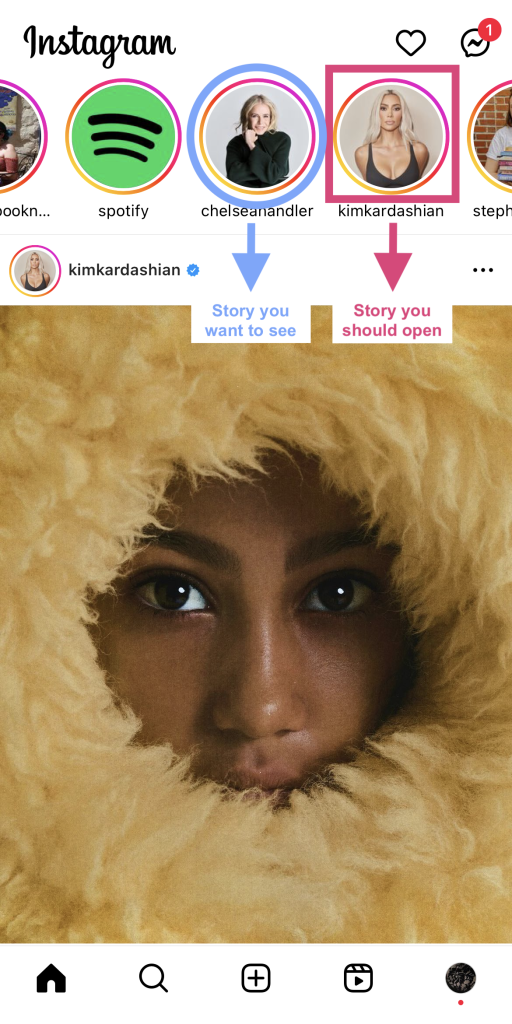
4. Appuyez longuement sur la Story qui s'affiche à l'écran. Ensuite, faites glisser votre doigt vers la droite sans relâcher la pression. L'écran affichera alors la Story précédente, celle que vous souhaitez visionner.
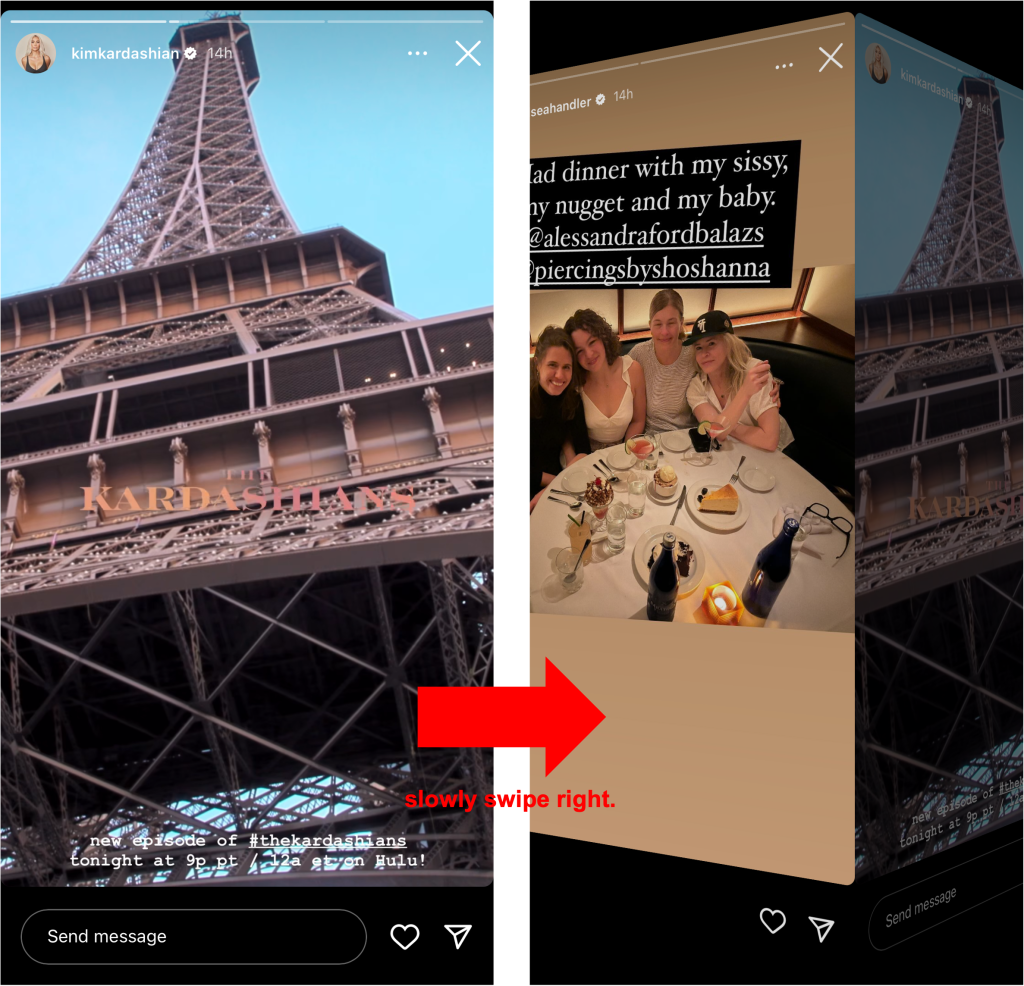
5. Une fois que vous avez terminé, faites glisser votre doigt vers la gauche pour revenir à la première Story. Ne relâchez pas votre doigt tant que la Story précédente n'a pas disparu de l'écran. Si vous le relâchez trop tôt, cela comptera comme une vue.
Cette méthode comporte toutefois quelques limites. Tout d'abord, elle ne fonctionne qu'avec le contenu statique des Stories. Vous ne pourrez pas visionner de Stories vidéo avec cette technique. Ensuite, vous devrez suivre la personne dont vous souhaitez consulter Instagram . Sinon, ses Stories n'apparaîtront pas sur votre page d'accueil.
Comment passer à moitié sur les messages Instagram
Vous voulez prendre le temps de réfléchir à une réponse avant de répondre aux messages directs de quelqu'un ? Affichez-les en les balayant à moitié pour qu'ils ne voient pas que vous avez déjà ouvert leurs messages. Voici comment faire un demi-swipe sur les messages Instagram :
1. Ouvrez l'application Instagram et accédez à votre boîte de réception DM.
2. Recherchez le chat contenant des messages non lus que vous souhaitez consulter.
3. Cliquez sur la conversation pour l'ouvrir, puis faites immédiatement défiler vers le haut. L'objectif est de remonter jusqu'aux anciens messages avant que les plus récents ne s'affichent. Ainsi, le système ne détectera pas que vous avez lu leur dernier message.
4. Faites défiler vers le bas jusqu’à ce que vous puissiez lire la majeure partie du nouveau message. Ne descendez pas trop bas, au risque d’atteindre la fin de la bulle du message, car cela déclencherait les confirmations de lecture.
5. Une fois que vous avez fini de lire le message, appuyez sur la flèche qui vous ramène à votre boîte de réception. Et voilà !
Comment faire un demi-swipe sur les messages Snapchat
Le « demi-glissement » n'est pas vraiment une fonctionnalité exclusive à Instagram. Vous pouvez également l'utiliser sur d'autres réseaux sociaux, comme Snapchat. Voici comment effectuer un demi-glissement sur les messages Snapchat, étape par étape :
1. Ouvrez l'application Snapchat.
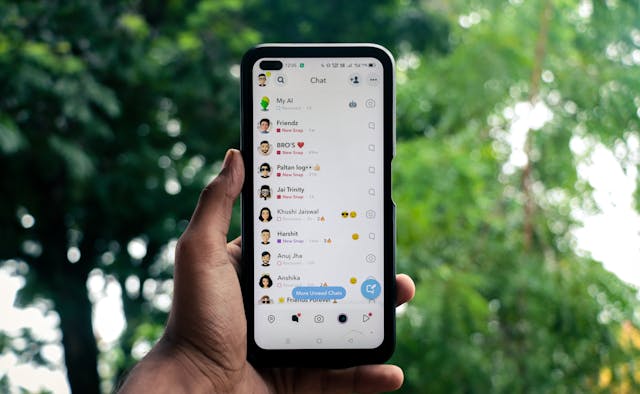
2. Cliquez sur l'icône de la bulle de message en bas de l'écran pour accéder à vos messages non vus.
3. Appuie sur le Bitmoji d'une personne qui t'a envoyé un message non lu, et ne relâche pas.
4. Faites glisser lentement vers la droite pour afficher autant de messages que possible sans relâcher votre doigt. Vous pourrez alors lire les messages qu'ils vous ont envoyés.
5. Une fois que vous avez terminé, faites glisser votre doigt vers la gauche et relâchez lorsque l'écran revient à la boîte de réception des messages. Si vous relâchez trop tôt, vous risquez que Snapchat envoie un accusé de lecture à cette personne.
Comment faire un demi-swipe sur Instagram sur Android
D'après certains tutoriels en ligne consacrés au « demi-glissement », cette méthode pourrait ne pas fonctionner sur Snapchat si vous utilisez un appareil Android. De nombreux utilisateurs se demandent donc peut-être comment effectuer un « demi-glissement » sur Instagram Android, si tant est que cela soit possible.
Heureusement, les utilisateurs d'Android peuvent faire des tours de demi-balayage sur Instagram de la même manière qu'un utilisateur d'iOS. Rappelez-vous simplement de glisser rapidement pour les DM et lentement et soigneusement pour les Stories.
Veuillez noter que la technique du « demi-glissement » peut cesser de fonctionner à tout moment sur ces applications, quel que soit votre appareil. Les nouvelles mises à jour des applications peuvent rendre inopérantes les anciennes astuces de « demi-glissement » ; soyez donc attentifs à ces changements !
Autres façons d'ouvrir des DM et des Stories discrètement
Vous avez besoin d'autres astuces pour ouvrir des SMS et des Stories en secret ? Voici d'autres façons de le faire, en plus du demi-swipe :
- Activez vos notifications de messages privés. Ainsi, les nouveaux messages s'afficheront sur votre téléphone sans que vous ayez à ouvrir l'application.
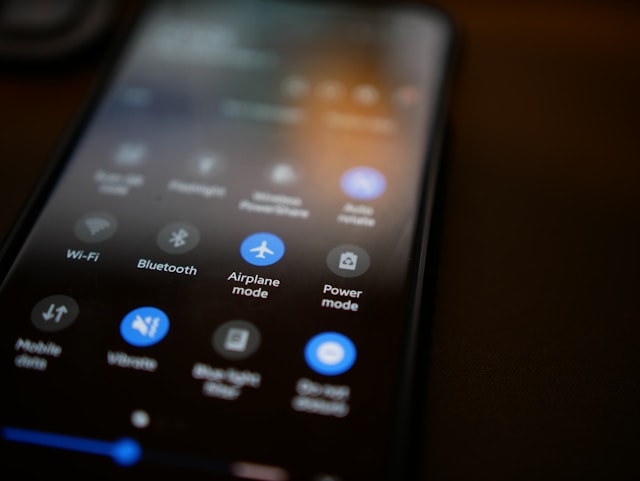
- Activez le mode avion avant d'ouvrir un message non lu ou une Story non visionnée. Comme il n'y a pas de connexion Internet, Instagram considérera Instagram que vous l'avez consulté.
- Utilisez des applications et des sites tiers pour consulter les Stories. Le site Path Social Story Viewer est réputé et gratuit.
Une autre astuce IG géniale : Utilisez Path Social pour développer votre page !
Vous détestez cette sensation de ouvrir par inadvertance un message ou une Story dans laquelle quelqu’un vous a tagué, sous la pression de devoir répondre au plus vite ? Maîtriser le « demi-glissement », cette astuce très pratique, est exactement ce qu’il vous faut pour éviter ce genre de situation gênante. Grâce à un demi-glissement discret et efficace, vous pouvez facilement contourner les confirmations de lecture et apparaître dans la liste des personnes ayant visionné la Story de quelqu’un.
Vous souhaitez que votre page cartonne sur Instagram? Si c'est le cas, il vous faudra plus que de simples astuces, comme savoir comment faire un « demi-swipe » sur Instagram. Voici une autre astuce sympa que nous aimerions vous partager : utilisez Path Social gagner plus d'abonnés et développer rapidement votre page.
Chez Path Social, nous utilisons un outil de ciblage exclusif pour promouvoir votre page auprès du public adéquat. Vous nous indiquez qui est votre public cible, et nous diffusons votre contenu afin qu’il apparaisse dans leurs fils d’actualité. Cela renforce la notoriété de votre marque et sa visibilité, ce qui vous permet de gagner de nouveaux abonnés et d’augmenter l’engagement sur vos publications. Prêt à créer une communauté active de fans sur Instagram? Collaborez avec Path Social gagner plus d’abonnés dès aujourd’hui !





Vous voulez une promotion puissante sur Instagram ?
Amplifiez votre portée grâce à des stratégies ciblées qui attirent un engagement réel et des adeptes.
Commencez dès maintenant votre promotion sur Instagram




