


Comment voir qui aime quoi sur Instagram

Il est tout à fait naturel d'être parfois curieux de savoir ce que les gens aiment sur les réseaux sociaux. Peut-être souhaitez-vous savoir quelles photos votre partenaire « aime ». Ou peut-être êtes-vous chef d'entreprise ou influenceur et souhaitez-vous en savoir plus sur le contenu que votre public cible apprécie. Aujourd'hui, nous allons voir comment savoir qui « aime » quoi sur Instagram.
On va être francs : Instagram propose Instagram fonctionnalités pratiques qui vous permettent de voir les « J'aime » des autres à volonté. Mais on est ravis de vous proposer des astuces qui vous aideront à découvrir quels contenus plaisent aux utilisateurs sur l'application. Si vous voulez en savoir plus, continuez à faire défiler la page !
Comment voir les Likes des autres sur Instagram: Est-ce possible ?
Vous vous demandez peut-être comment voir les likes des autres sur Instagram. La réponse est simple : vous ne pouvez pas. Instagram ne dispose pas actuellement d'une fonctionnalité vous permettant de voir le contenu aimé d'un utilisateur spécifique.
Il y a quelques années, l'application Instagram un onglet « Activité ». Dans cet onglet, on pouvait consulter l'activité de toutes les personnes que l'on suivait. Chaque fois que quelqu'un aimait une publication, cela s'affichait à cet endroit. C'était un moyen simple de voir qui aimait et commentait quelles publications. Mais aujourd'hui, cet onglet n'existe plus.
Vous pourriez tomber sur certaines applications tierces prétendant pouvoir vous montrer les publications qu’un utilisateur a aimées. Cependant, comme Instagram rend Instagram publiques les publications aimées par ses utilisateurs, ces informations ne sont pas accessibles en ligne. Ces applications tierces n’ont aucun moyen de récupérer ces données et font probablement des promesses qu’elles ne peuvent en aucun cas tenir. Méfiez-vous donc toujours de ces applications lorsque vous cherchez des astuces pour voir les « j’aime » d’une personne sur Instagram.

Comment voir qui aime quoi sur Instagram en vérifiant les posts individuels
Beaucoup de personnes qui parcourent quotidiennement les réseaux sociaux distribuent Instagram à tout va. Elles cliquent sur l'icône en forme de cœur lorsqu'elles tombent sur un contenu qu'elles trouvent intéressant, utile ou divertissant. Et même s'il est impossible de voir en temps réel quand quelqu'un « aime » une publication, vous pouvez tout de même obtenir cette information. Comment ? En consultant chaque publication pour vérifier le nombre de « j'aime », bien sûr. Voici quelques instructions simples, étape par étape, pour y parvenir :
- Ouvrez Instagram sur l'appareil cible de votre choix (que ce soit sur mobile ou sur ordinateur, la procédure est la même).
- Recherchez le poste qui vous intéresse.
- Cliquez sur le compteur de « J'aime » situé en bas de la publication. Il peut s'afficher sous la forme « [nombre total] J'aime ». Selon vos paramètres, vous pourriez également voir une mention du type « [utilisateur] et d'autres ont aimé ».
- Sélectionnez Autres. Vous accéderez ainsi à la liste complète des personnes qui ont aimé ce message.

- Faites défiler la liste pour voir qui a aimé ce contenu. Vous pouvez également utiliser la barre de recherche en haut de l'écran pour voir si des utilisateurs spécifiques l'ont aimé.
Et voilà : vous savez désormais comment découvrir ce que les gens aiment en ligne. Ce n’est pas parfait et c’est fastidieux, mais c’est une méthode fiable pour savoir ce qu’une personne aime sur Instagram.
Comment vérifier vos propres J'aime sur IG
Vous connaissez désormais enfin la réponse à la question : « Comment voir ce qu'une personne a aimé sur Instagram? » Mais Instagram une autre fonctionnalité pratique sur Instagram que vous devriez connaître : comment voir vos « J'aime ».
Oui, vous avez bien entendu. Même si Instagram permet Instagram aux utilisateurs de voir les publications que les autres ont aimées, vous pouvez parcourir celles que vous avez vous-même aimées.
Il y a d’énormes avantages à savoir comment parcourir les contenus que vous avez aimés par le passé. Peut-être cherchez-vous une vidéo sympa ou une publication en carrousel importante que vous n’avez jamais enregistrée ni ajoutée à vos favoris. Parcourir vos contenus aimés peut être un excellent moyen de les retrouver. De plus, c’est sympa de voir tous les contenus que vous avez aimés réunis sur une seule page !
Voici donc, étape par étape, comment consulter les publications que vous avez aimées sur Instagram:
1. Ouvrez l'application Instagram et accédez à votre profil.
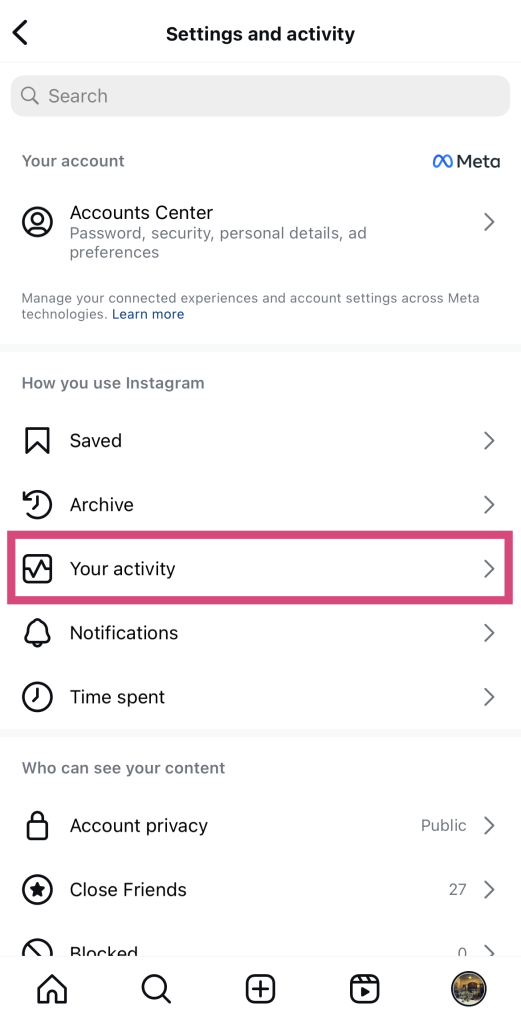
2. Cliquez sur les trois lignes horizontales dans le coin supérieur droit de votre écran pour ouvrir vos paramètres.
3. Dans la section « Comment utiliser Instagram », cliquez sur « Votre activité ».
4. Dans la section « Interactions », appuyez sur « J'aime ». Vous accédez alors à une page où vous pouvez voir tous les contenus que vous avez aimés par le passé.
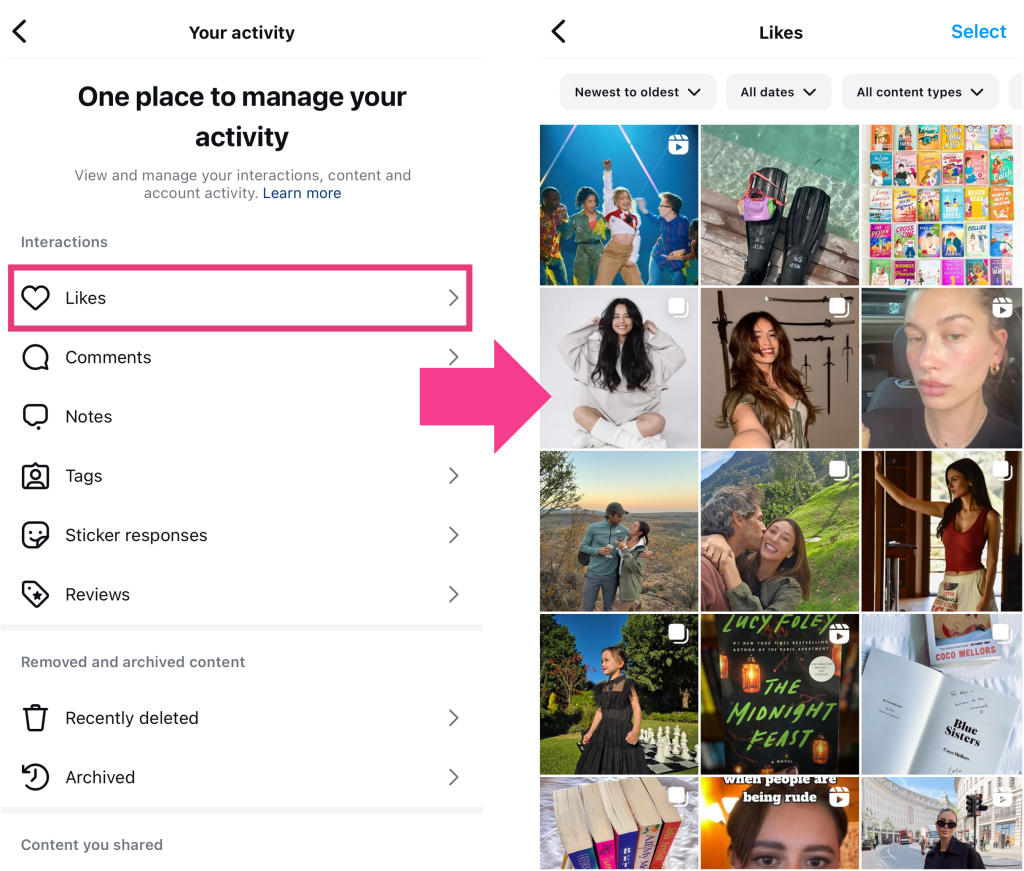
Conseil de pro: utilisez les filtres situés en haut de la page pour naviguer plus efficacement. Vous pouvez trier les publications que vous avez aimées de la plus récente à la plus ancienne, et même choisir une plage de dates. Vous pouvez également les filtrer par type de contenu, qu'il s'agisse de publications du fil d'actualité ou de Reels.
Les J'aime d'IG ne s'affichent pas - Pourquoi ne puis-je pas voir le nombre de J'aime de quelqu'un ?
Vous rencontrez un problème : les « J'aime » sur Instagram ne s'affichent pas et vous ne savez pas d'où cela vient ? Eh bien, il se peut que vous ne voyiez pas la liste complète des personnes ayant aimé une publication si l'auteur de celle-ci a masqué le nombre de « J'aime ».
Vous vous souvenez peut-être qu’en 2019, CNN avait annoncé Instagram commencer à masquer le nombre de « j’aime » sur les publications de son application. Cette mesure visait à réduire la pression liée à la recherche du plus grand nombre possible de « j’aime » sur Instagram. Ce faisant, Instagram à contribuer à améliorer l’impact des réseaux sociaux sur la santé mentale et l’anxiété des utilisateurs. Son objectif était également de recentrer l’application sur un contenu esthétique et percutant, plutôt que sur la course aux « j’aime ».
Désormais, chacun a la possibilité de masquer le compteur de « J'aime » sur les publications qu'il publie sur Instagram. Si une personne choisit de le faire, les autres utilisateurs ne pourront pas voir le nombre total de « J'aime ». Ils ne pourront pas non plus consulter librement la liste de tous les utilisateurs ayant aimé cette publication. Ainsi, si tous les « J'aime » n'apparaissent pas sur la publication de quelqu'un, c'est peut-être pour cette raison.
Une fois que vous aurez appris à voir les « J'aime » d'une personne sur Instagram, vous risquez de vous laisser emporter par l'envie de vérifier le nombre de « J'aime » de chaque publication. Mais il est important de garder à l'esprit Instagram également des limites à cet égard. Le masquage de la liste complète des personnes ayant « aimé » une publication dont les « J'aime » sont masqués en fait partie.
Questions fréquemment posées
Comment vérifier l'activité d'une personne sur Instagram?
Il n'existe actuellement aucun moyen de suivre l'activité d'un utilisateur en particulier sur Instagram. Auparavant, c'était très facile grâce à l'ancien onglet « Activité ». Mais depuis sa suppression, personne ne peut plus suivre tous les faits et gestes des autres utilisateurs sur l'application.
Pouvez-vous voir les likes privés sur Instagram ?
Oui, vous pouvez voir si quelqu'un a « aimé » une publication spécifique, même si cette personne est en mode privé. Que vous ayez un compte privé ou public, le fait d'« aimer » une publication publique rend votre « j'aime » visible par les autres. Vous figurez tout de même dans la liste des personnes ayant « aimé » cette publication publique.
Puis-je cacher ce que j'aime sur Instagram?
À l'heure actuelle, il n'est pas possible de masquer les « J'aime » que vous attribuez sur Instagram. Même si votre profil est privé, vos « J'aime » apparaîtront sur les publications avec lesquelles vous interagissez. Si vous ne souhaitez pas que votre entourage voie les publications que vous appréciez, pensez à créer un compte secondaire ou un « finsta ».
Comment voir les bobines aimées par quelqu'un sur Instagram?
Vous ne pouvez pas voir une liste de toutes les bobines qu'un utilisateur a aimées ou avec lesquelles il a interagi. En revanche, vous pouvez consulter la liste des personnes qui ont aimé une bobine spécifique.
Il vous suffit d'ouvrir le Reel sur votre appareil. À droite du Reel, vous verrez une icône en forme de cœur, avec soit la mention « J'aime », soit un chiffre en dessous. Ce dernier correspond au nombre total de « J'aime » reçus par ce Reel. Cliquez sur « J'aime » ou sur le nombre de « J'aime » pour afficher la liste complète des personnes qui ont aimé ce Reel.
Pouvez-vous voir ce que les gens aiment sur Instagram?
Au final, est-il possible de savoir ce que les gens aiment sur Instagram? Oui et non. Vous pouvez tout à fait découvrir qui a aimé une publication spécifique en consultant le nombre de « J'aime » de cette publication. Cependant, il n'existe pas d'onglet « Activité » sur Instagram vous permette de voir ce que les gens aiment en temps réel.
En vérifiant régulièrement quelles publications plaisent à votre public cible, vous pourrez créer un contenu de meilleure qualité pour votre Instagram . Vous pourrez ainsi attirer de nouveaux abonnés et en faire de fidèles fans de votre page. C’est pourquoi il est Instagram de savoir comment voir qui aime quoi sur Instagram .
Mais ce n’est pas la seule façon de renforcer votre Instagram . Vous pouvez également développer efficacement votre compte grâce à un service de croissance tel que Path Social. Nous sélectionnons vos contenus les plus engageants et les mettons en avant auprès de votre public cible spécifique. Cela attire de nombreux nouveaux abonnés intéressés vers votre page, ce qui augmente votre portée, l’engagement et le nombre total d’abonnés.
Vous souhaitez développer votre communauté d'adeptes fidèles qui s'engagent dans votre contenu ? Travaillez avec Path Social dès aujourd'hui !





Vous souhaitez développer naturellement votre Instagram ?
Découvrez une plateforme conçue pour aider les créateurs à toucher un public authentique et engagé, sans prendre de raccourcis.
Explorez la plateforme




