


Comment voir qui quelqu'un suit sur Instagram: IG Basics

De temps en temps, vous vous demandez peut-être comment savoir qui une personne suit sur Instagram. Peut-être êtes-vous pris dans le tourbillon des scandales people, ou bien vous recherchez des influenceurs associés à des marques spécifiques. C’est aussi un moyen détourné de surveiller vos amis ou votre partenaire pour voir s’ils suivent quelqu’un qu’ils ne devraient pas suivre.
Quelle que soit la raison pour laquelle vous souhaitez le faire, vous pouvez toujours aller jeter un œil sur Instagram et parcourir la liste des abonnés d’un utilisateur. Dans ce guide, nous allons vous montrer comment procéder étape par étape. De plus, nous vous proposerons des conseils pratiques pour consulter des informations essentielles sur vos abonnés et vos abonnements, ainsi que ceux des autres utilisateurs. Restez avec nous et découvrez tout cela et bien plus encore !
Comment voir qui quelqu'un suit sur Instagram: Un guide facile à suivre
Vous êtes curieux de savoir qui une personne suit sur les réseaux sociaux ? Bonne nouvelle : il est très facile de consulter la liste des abonnés de n'importe qui sur Instagram. Voici comment procéder, étape par étape :
1. Ouvrez l'application Instagram .
2. Cliquez sur l'icône de la loupe en bas de l'écran d'accueil.
3. Dans la barre de recherche en haut de la page, saisissez le nom d'utilisateur de la personne dont vous souhaitez consulter la liste des abonnés. Cliquez ensuite sur son profil.
4. Vous devriez voir le nombre de personnes qu’ils suivent en haut de leur page. Il se trouve dans la même section que leur photo de profil, le nombre de publications et la liste de leurs abonnés. Cliquez sur ce chiffre, sous lequel figure la mention « abonnés ».
5. Vous accédez ainsi à la liste des utilisateurs qu'ils suivent. Vous verrez également les hashtags qu'ils suivent en haut de la liste.
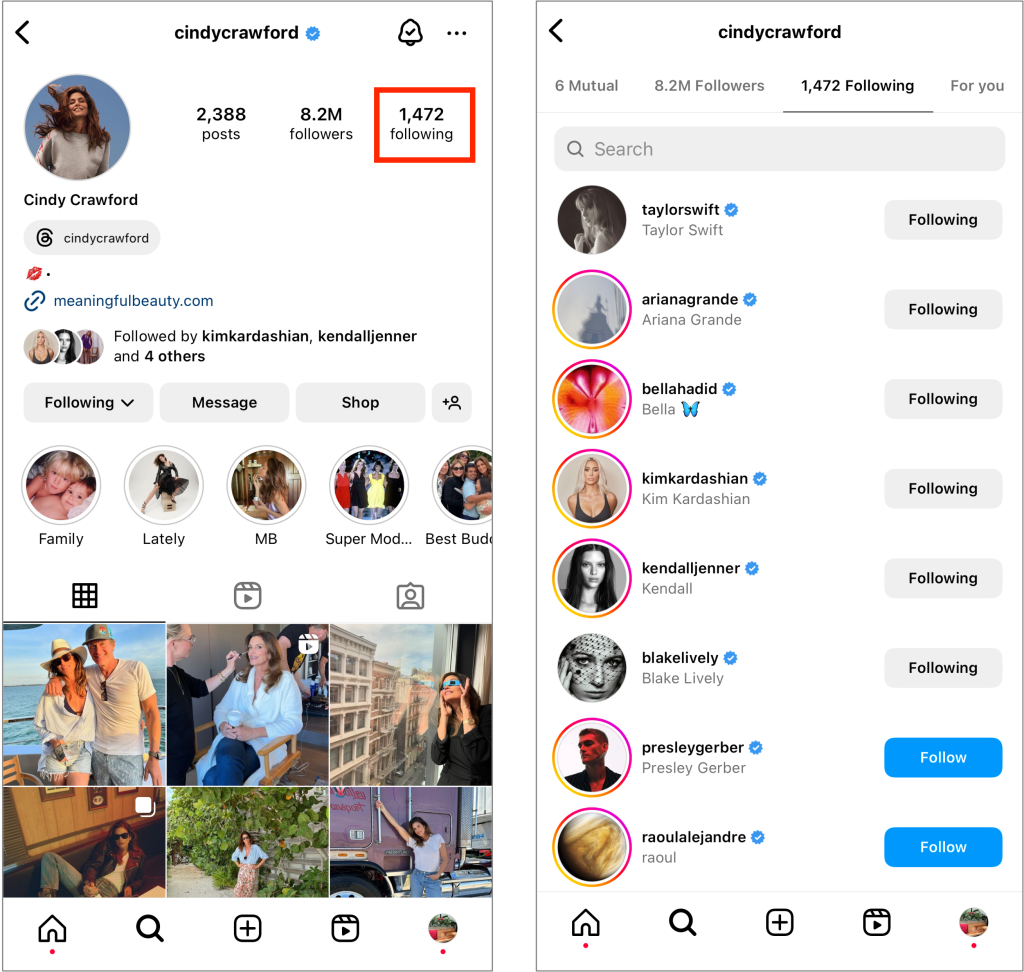
Lorsque vous consultez la liste des personnes qu'un utilisateur suit sur Instagram, vous remarquerez qu'elle est classée selon un ordre bien précis. Mais ce n’est pas par ordre chronologique, non. Les premiers noms que vous verrez sont ceux des personnes avec lesquelles vous avez également un lien. Il s’agit notamment des abonnés communs et des personnes que vous suivez vous-même, le cas échéant. Ensuite, ces personnes sont également classées en fonction de leur pertinence par rapport à vous, c’est-à-dire de la fréquence à laquelle vous interagissez avec elles. Cet agencement permet de repérer plus facilement les personnes que vous connaissez dans la liste des abonnés de quelqu’un.
Conformément aux règles de la plateforme de réseaux sociaux en matière d’abonnements, le nombre maximal de personnes que l’on peut suivre est fixé à 7 500. Selon Instagram, cette limite a été mise en place pour réduire le spam sur l'application.
Comment voir l'ordre de passage sur Instagram
Vous souhaitez consulter la liste des abonnés récents d'un utilisateur sur Instagram? Malheureusement, il s'agit d'informations privées qui ne sont pas accessibles au public. Vous pourrez voir qui cette personne suit, mais pas l'ordre dans lequel elle s'est abonnée à ces comptes.
Cependant, vous pouvez voir l'ordre des personnes que vous avez suivies sur la plateforme. Voici comment voir l'ordre des personnes suivies sur Instagram pour votre profil. Voici comment procéder :
1. Dans l'application « Instagram », accédez à votre profil.
2. Cliquez sur le nombre de personnes que vous suivez en haut de la page pour afficher la liste des personnes que vous suivez.
3. En haut de la liste, cliquez sur l'icône représentant deux flèches. Triez ensuite la liste par ordre chronologique. Vous avez le choix entre deux options : « Le plus récent » et « Le plus ancien ».
Déterminer la date à laquelle qui a suivi qui : 3 situations clés
Vous essayez de vous rappeler quand vous avez commencé à suivre quelqu’un sur Instagram ou quand cette personne vous a suivi en retour ? Grâce à ces conseils, vous pourrez retracer qui suit qui depuis longtemps, ce qui vous permettra de vous souvenir plus facilement de la date anniversaire d’un « suivi ».
1. Comment savoir si vous avez suivi quelqu'un sur Instagram
La seule méthode précise pour savoir quand vous avez suivi quelqu'un sur Instagram consiste à télécharger vos données d'activité. C'est l'une des principales fonctions disponibles pour déterminer exactement qui a suivi qui. Voici comment demander ces données :
1. Dans votre profil, cliquez sur le menu « hamburger » pour ouvrir la page des paramètres.
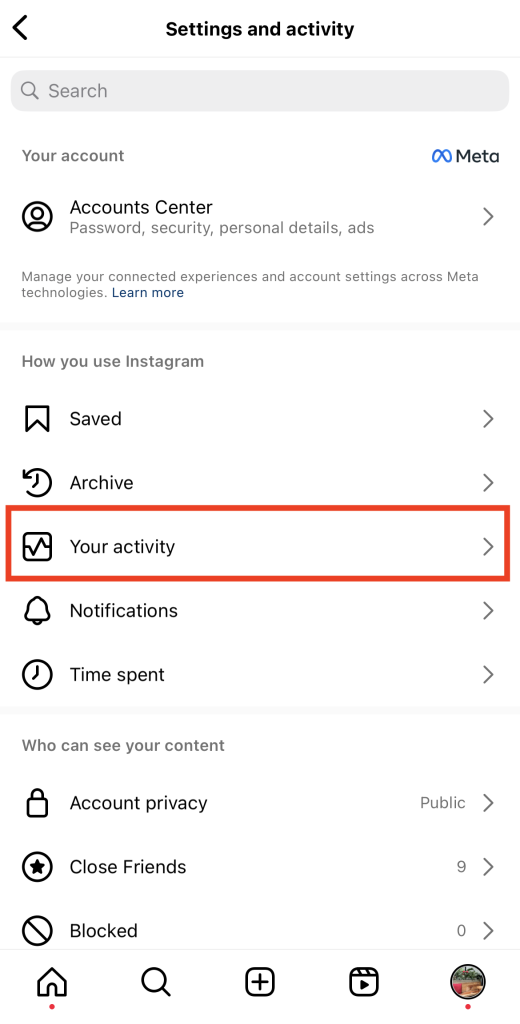
2. Cliquez sur Votre activité.
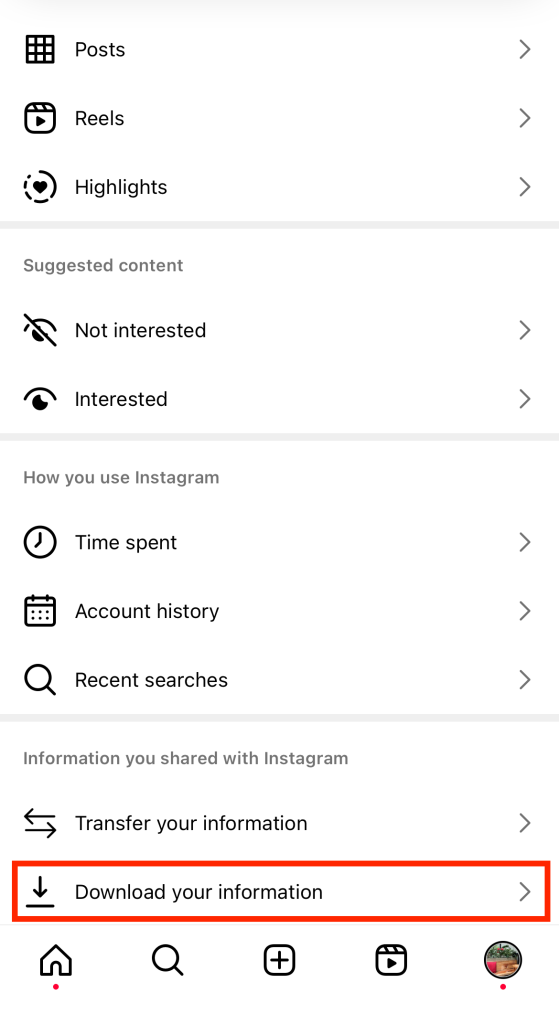
3. Faites défiler vers le bas et cliquez sur Télécharger vos informations.
4. Dans le Centre de gestion des comptes Meta, cliquez sur « Télécharger ou transférer des informations ».
5. Sélectionnez les comptes dont vous souhaitez télécharger les informations d'activité. Appuyez ensuite sur « Suivant ».
6. Choisissez d'extraire toutes vos informations ou seulement certaines d'entre elles. Nous vous recommandons de ne télécharger que les données dont vous avez besoin pour un traitement plus rapide.
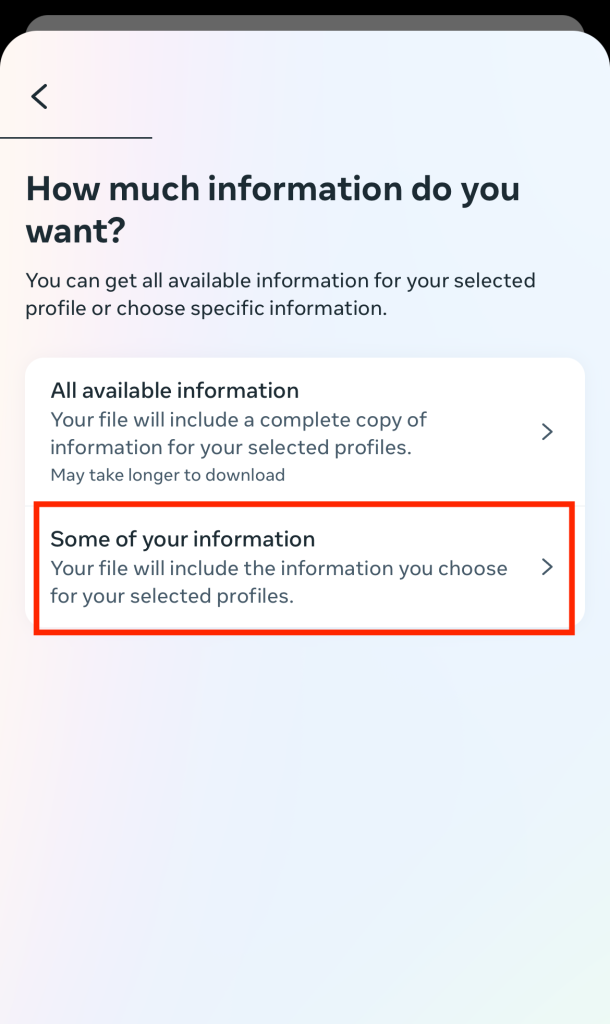
7. Sur la page suivante, faites défiler jusqu’à la section « Connexions » et cochez la case intitulée « Abonnés et abonnements ». Cliquez ensuite sur « Suivant ».
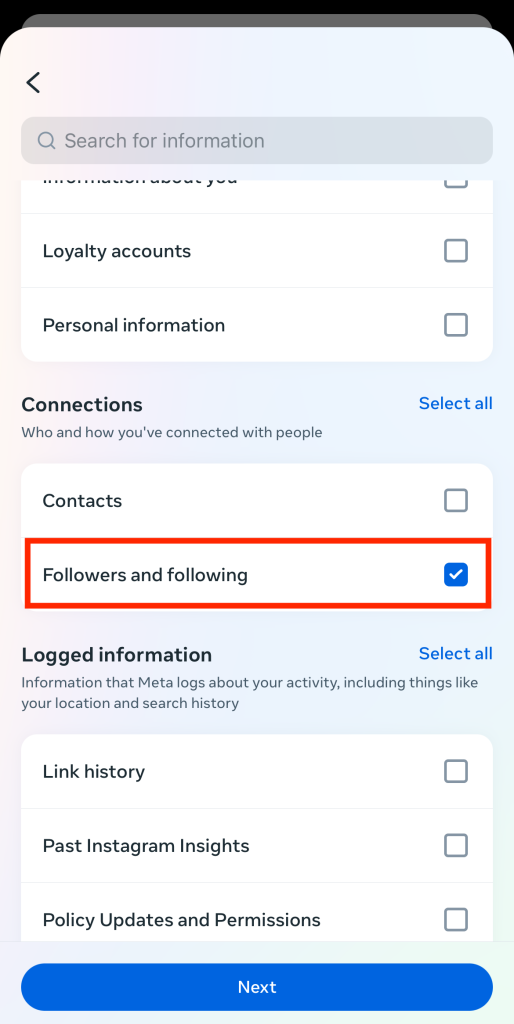
8. Assurez-vous que l'option « Télécharger sur l'appareil » est sélectionnée. Cliquez ensuite sur Suivant.
9. Vérifiez bien vos coordonnées, puis cliquez sur « Créer les fichiers ».
Une fois votre fichier prêt, téléchargez-le. Il vous indiquera la date et l'heure exactes auxquelles vous avez commencé à suivre chacun des utilisateurs que vous suivez actuellement.
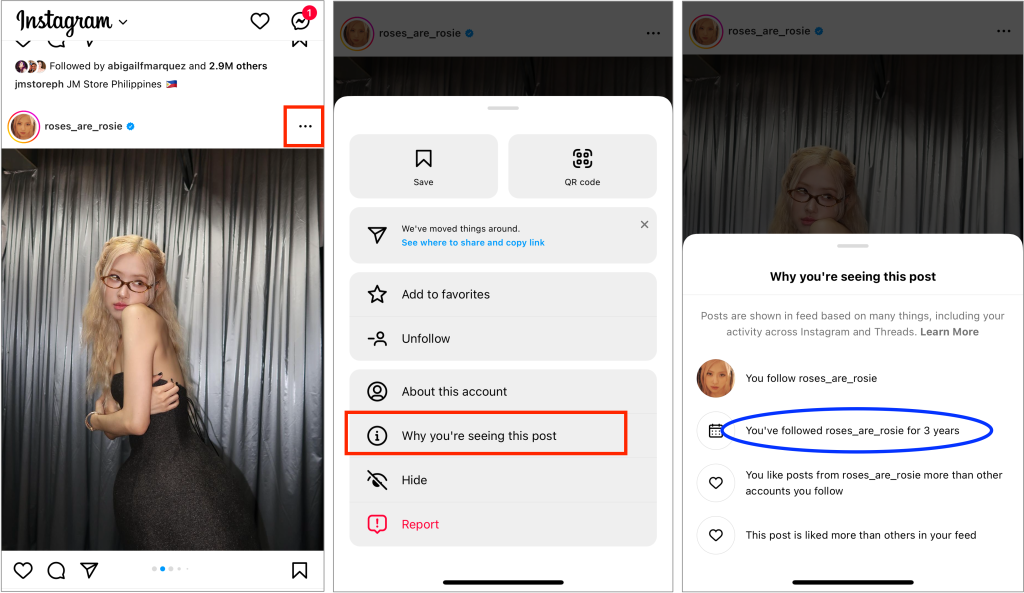
Un autre moyen de savoir depuis combien de temps vous suivez quelqu'un est de consulter un message qu'il a publié dans son fil d'actualité.
1. Parcourez votre fil d'actualité jusqu'à ce que vous tombiez sur un message qu'ils ont téléchargé.
2. Cliquez sur les trois points dans le coin supérieur droit.
3. Cliquez sur « Pourquoi ce post s'affiche-t-il ? ». Dans la fenêtre contextuelle qui s'affiche, vous verrez une estimation de la durée depuis laquelle vous suivez cette personne.
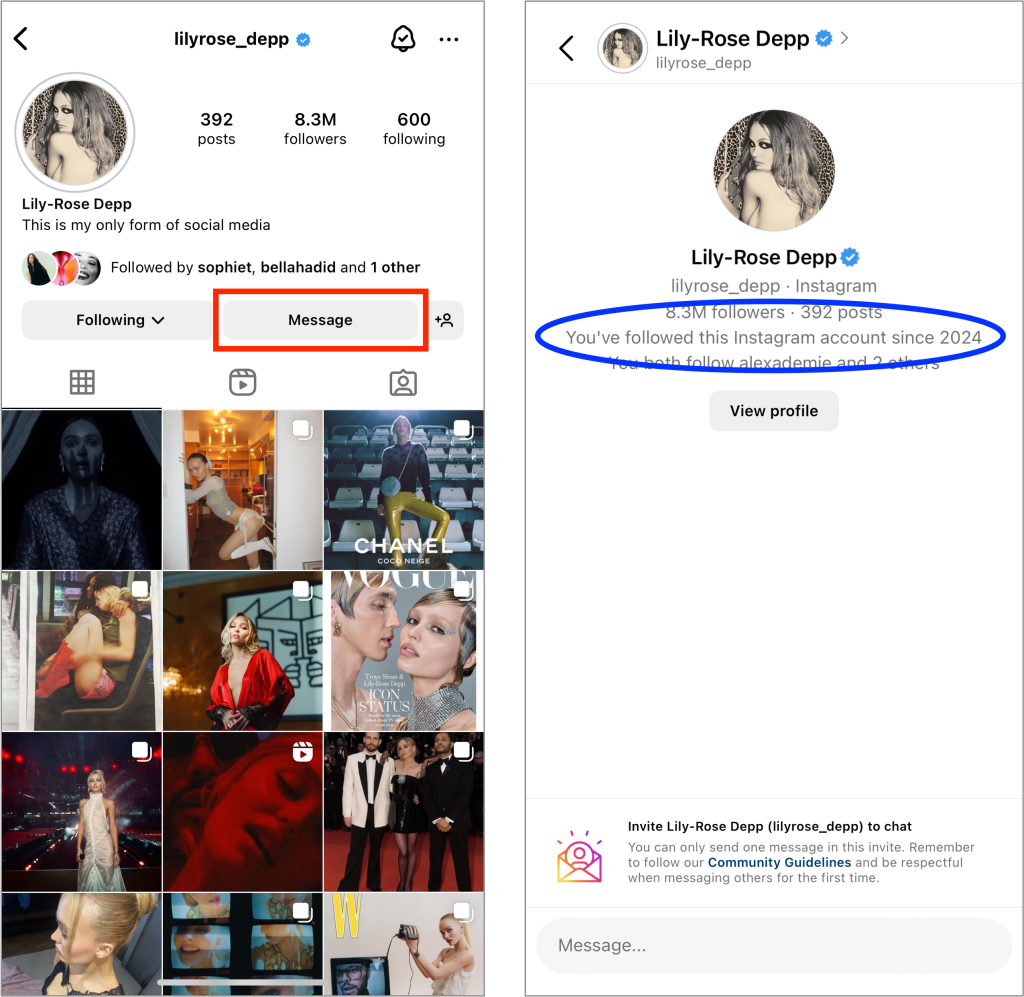
Enfin, vous pouvez également voir l'année où vous avez suivi une personne grâce aux messages directs que vous avez échangés avec elle.
1. Depuis leur profil, cliquez sur « Message » pour accéder à votre conversation avec cette personne.
2. Faites défiler l'écran jusqu'en haut de votre chat.
3. Vous y verrez les informations relatives à son profil, accompagnées de la mention : « Vous suivez ce compte depuis [mois ou année] ».
2. Comment savoir si quelqu'un vous a suivi sur Instagram
Vous vous demandez comment savoir quand quelqu’un vous a suivi sur Instagram? À l’heure actuelle, il n’existe aucun autre moyen fiable de connaître la date exacte à laquelle quelqu’un vous a suivi, si ce n’est en téléchargeant les données d’activité. Cela reste le moyen le plus efficace pour savoir avec certitude quand quelqu’un vous suit. Reportez-vous aux méthodes décrites ci-dessus pour cela.
Cependant, il existe quelques astuces qui vous permettent de savoir si quelqu'un vous a suivi sans utiliser les fonctions avancées de Instagram.
Par exemple, vous pouvez consulter la liste de vos abonnés sur votre profil. Cette liste est automatiquement classée par ordre chronologique. Recherchez le nom d'utilisateur de la personne que vous cherchez dans cette liste. La position de cette personne dans la liste peut vous donner une idée de la date à laquelle elle s'est abonnée à votre compte.
Une autre astuce consiste à faire défiler le haut de vos messages instantanés pour voir quand vous avez commencé à parler. La date du premier message peut être utile pour déterminer quand ils ont commencé à vous suivre. Cela signifie qu'il vous a certainement suivi avant la date de votre premier message.
Et nous savons que ces méthodes sont loin d'être parfaites. Mais les temps désespérés exigent parfois de trouver des miettes comme celles-ci. Elles peuvent au moins nous éclairer sur le moment où quelqu'un a suivi votre page.
3. Comment savoir si quelqu'un a suivi quelqu'un sur Instagram
Il existe de nombreuses méthodes pour vérifier si vous suivez quelqu'un et vice versa. Mais c'est là que le bât blesse : comment savoir si quelqu'un a suivi quelqu'un d'autre que vous sur Instagram ?
Malheureusement, il n'existe actuellement aucun moyen de savoir quand une autre personne que vous-même a suivi un autre utilisateur, et inversement. Ces informations n'ayant aucun rapport avec votre compte, elles sont considérées comme privées et ne sont pas accessibles au public.
Si vous tenez absolument à obtenir ces informations, utilisez des applications tierces qui prétendent fournir des données sur l’activité des abonnés des autres utilisateurs. Il en existe de nombreuses sur Internet. Veillez à choisir une application fiable et non un service dont le seul but est de voler vos identifiants de connexion. Notez que la plupart des applications tierces ne peuvent fournir d’informations sur le moment où quelqu’un a suivi une autre personne et sur l’identité de cette personne que s’il s’agit de comptes publics. Cela ne s’applique donc pas aux comptes privés.
Comment voir les followers de quelqu'un sur Instagram
Ce n’est pas seulement les personnes que quelqu’un suit qui suscitent la curiosité des gens. Parfois, ils sont tout aussi curieux de savoir qui sont les abonnés de cette personne. Vous souhaitez savoir quels comptes suivent vos célébrités préférées, vos marques préférées, voire simplement vos amis et votre famille ? Voici comment consulter la liste des abonnés d’une personne sur Instagram:
1. Ouvrez l'application Instagram .
2. Recherchez le profil de la personne dont vous voulez voir les followers dans la barre de recherche.
3. Sur leur profil, cliquez sur le nombre d'abonnés indiqué en haut de la page. Vous accéderez ainsi à la liste de leurs abonnés.
La liste des abonnés d'un utilisateur classera les utilisateurs par ordre de pertinence, tout comme la liste des personnes qu'il suit. Les abonnés communs et les personnes avec lesquelles vous interagissez beaucoup, le cas échéant, apparaîtront en haut de la liste. Les personnes que vous ne suivez pas et avec lesquelles vous n'avez aucun abonné commun se retrouveront en bas de la liste.
Comment puis-je voir les abonnés d'un compte privé ?
Vous souhaitez connaître l'activité des abonnés d'une personne qui a verrouillé son compte pour le rendre inaccessible aux inconnus ? Vous vous demandez peut-être : « Comment puis-je voir les abonnés d'un compte privé ? »
Vous serez peut-être consterné d'apprendre qu'il n'y a aucun moyen de voir les personnes qui suivent quelqu'un s'il est en mode privé. La logique est la même que celle qui veut que vous ne puissiez pas voir les comptes privés et leur contenu. Ces utilisateurs ont choisi de protéger leur vie privée sur la plateforme. Ce choix leur permet également de protéger leur liste de followers.
La seule façon de consulter la liste des abonnés d'un compte privé est de suivre cette page. Pour cela, vous devez envoyer une demande d'abonnement et attendre que l'utilisateur la valide. Une fois qu'il l'aura fait, suivez les étapes décrites dans la section précédente pour voir ses abonnés. N'oubliez pas de respecter la décision d'une personne si elle choisit de ne pas accepter votre demande d'abonnement.
Comment voir les demandes de suivi sur Instagram pour les approuver ou les refuser ?
Mais que se passerait-il si les rôles étaient inversés et que c’était vous qui aviez un compte privé ? Comment approuver les demandes et autoriser des personnes à accéder à votre vie privée en ligne ? Voici comment consulter les demandes d’abonnement sur Instagram et décider lesquelles approuver ou refuser :
1. Ouvrez l'application Instagram .
2. Cliquez sur l'icône en forme de cœur située dans le coin supérieur droit de votre écran d'accueil, à côté de l'icône de la boîte de réception. Vous accéderez ainsi à l'onglet « Notifications ».
3. En haut de la page des notifications, cliquez sur « Demandes d'abonnement ».
4. Sur la page suivante, vous verrez tous les utilisateurs qui vous ont envoyé des demandes. Cliquez sur « Confirmer » pour ceux que vous souhaitez accepter et sur « Supprimer » pour ceux que vous souhaitez refuser.
5. Pour valider ou supprimer des demandes en masse, cliquez sur « Gérer » en haut à droite de la page. Sélectionnez ensuite toutes les demandes des utilisateurs que vous souhaitez valider ou supprimer afin de les traiter en une seule fois.
Veillez à examiner attentivement le compte de chaque utilisateur avant d'approuver sa demande de follower ! Ne confirmez que les demandes de personnes en qui vous avez confiance et qui souhaitent consulter votre page privée Instagram .
Ne vous focalisez pas sur les abonnés des autres : attirez les vôtres aussi !
C'est amusant de parcourir les listes des autres et de découvrir depuis combien de temps vous suivez certaines pages. Mais ne vous laissez pas trop absorber par ça simplement parce que vous savez comment voir qui une personne suit sur Instagram. N'oubliez pas de vous concentrer sur la création de contenu de qualité et captivant pour attirer davantage d'abonnés.
Path Social peut vous aider dans ce domaine. Nous reprenons le contenu que vous avez soigneusement élaboré et le diffusons auprès de votre public cible. Ainsi, vous avez la certitude que vos publications atteignent les bonnes personnes. Cette efficacité renforce la visibilité et l'engagement sur votre page, ce qui se traduit par une augmentation du nombre d'abonnés authentiques intéressés par votre contenu. Tirez parti dès aujourd'hui de nos algorithmes basés sur l'IA et élargissez votre audience sur Instagram!





Vous souhaitez développer naturellement votre Instagram ?
Découvrez une plateforme conçue pour aider les créateurs à toucher un public authentique et engagé, sans prendre de raccourcis.
Explorez la plateforme




