


Comment désactiver le mode Vanish sur Instagram: Un tutoriel facile

Instagram | 4 septembre 2025
Les messages privés— plus connus sous le nom de « DM » — constituent l’une des fonctionnalités les plus utiles Instagram. Lorsque vous ne parcourez pas le fil d’actualité à la recherche de contenus visuels esthétiques, vous pouvez envoyer des messages à vos amis et partager des publications avec eux. Mais vous est-il déjà arrivé de souhaiter que certains messages privés soient un peu plus confidentiels, par exemple lorsque vous abordez un sujet sensible ? Heureusement, c’est possible grâce au mode « Vanishing ». Il vous suffit ensuite de savoir comment désactiver ce mode sur Instagram revenir aux messages classiques.
C’est bien plus agréable d’avoir des conversations intimes et spontanées en toute sécurité grâce au mode « Disparition » Instagram. Mais comment faire pour quitter cette fonctionnalité après avoir révélé des secrets ou partagé des photos privées ? Poursuivez votre lecture pour découvrir la marche à suivre, étape par étape.
Qu'est-ce que le mode "Vanish" sur Instagram DM ?
Avant d'apprendre à désactiver le mode « Vanish » sur Instagram, il est important de savoir en quoi consiste exactement ce mode.
Le mode "disparition" est une fonctionnalité de Instagram DM qui vous permet d'envoyer des messages qui disparaissent à la personne à qui vous envoyez un message. Cela signifie que tout ce que vous dites ou envoyez dans les chats en mode disparition ne laissera pas d'enregistrement permanent dans le chat. Tous les messages et historiques de discussion en mode disparition seront automatiquement supprimés lorsque vous quitterez la discussion secrète.
Le mode « Vanish » (ou « disparition ») sur Instagram idéal pour renforcer la confidentialité de vos messages. Considérez-le comme l’équivalent du mode incognito, mais appliqué aux messages Instagram . Il est utile dans toutes les situations où vous ne pouvez pas vous permettre que vos propos ou les photos que vous envoyez soient divulgués. Cela inclut notamment la révélation de secrets, le partage d’informations financières ou encore l’envoi de photos coquines à la personne qui vous plaît.
Même si le mode « Disparition » est idéal pour préserver la confidentialité de toutes vos conversations, il présente toutefois certaines limites. Les personnes avec lesquelles vous discutez en mode « Disparition » peuvent toujours faire des captures d'écran de vos conversations privées et des photos que vous leur envoyez. Veillez donc à n'utiliser le mode « Disparition » qu'avec des personnes en qui vous avez confiance pour partager des informations confidentielles.

Comment activer le mode « Vanishing », étape par étape
À quoi bon apprendre à désactiver le mode « messages éphémères » sur Instagram vous ne l'activez pas d'abord ? Avant d'entrer dans les détails de la désactivation de ce mode, voyons comment l'activer. Voici comment activer cette fonctionnalité dans la messagerie, étape par étape :
1. Ouvrez l'application Instagram .
2. Cliquez sur l'icône de la boîte de réception dans le coin supérieur droit de l'écran pour afficher vos messages directs.
3. Faites défiler vos messages jusqu'à ce que vous trouviez le message privé que vous souhaitez mettre en mode « éphémère ». Cliquez ensuite dessus.
4. Faites glisser lentement votre doigt vers le haut au milieu de l'écran de discussion. Un message devrait s'afficher, indiquant : « Faites glisser vers le haut pour activer le mode « Vanish ». »
5. Continuez à faire glisser votre doigt vers le haut jusqu’à ce que le message devienne « Relâchez pour activer le mode invisible ». Ensuite, relâchez votre doigt.
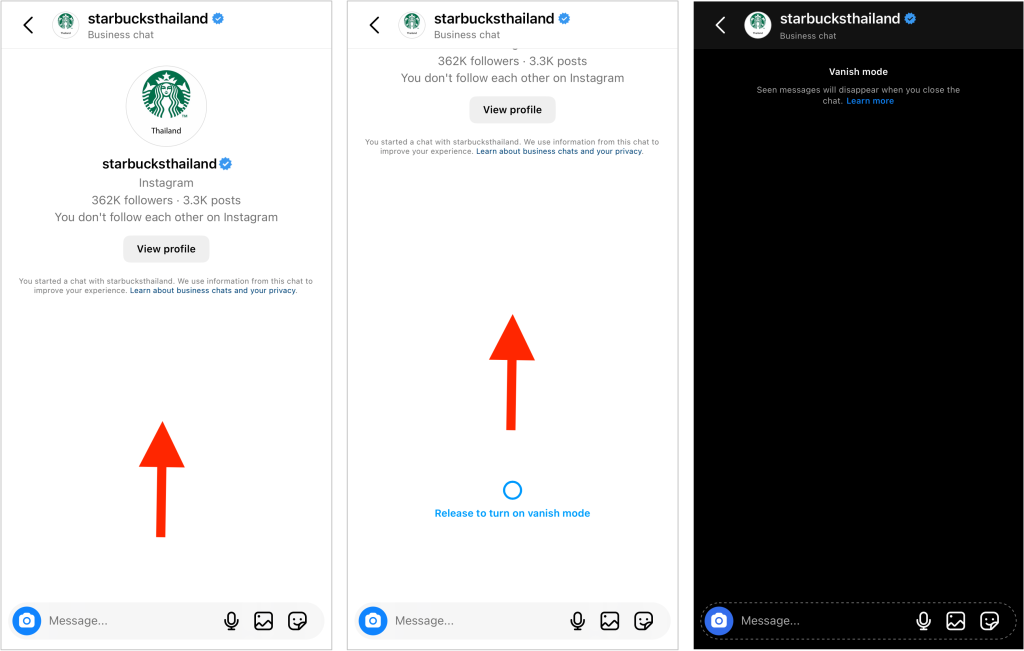
À partir de là, l'écran de votre conversation devrait devenir noir. Tout en haut, vous devriez voir une mention indiquant que vous êtes passé en mode « messages éphémères » avec cette personne. Désormais, aucun message ni aucune photo que vous enverrez ne laissera de trace permanente dans votre conversation privée.
Notez que vous ne pouvez activer le mode de disparition sur Instagram que pour les chats qui ne sont pas sur invitation. Cela signifie que vous ne pouvez généralement pas activer le mode de disparition pour les marques et les influenceurs auxquels vous envoyez un message pour la première fois. Vous ne pouvez le faire que lorsqu'ils acceptent votre chat dans leur boîte de réception.
Comment désactiver le mode invisible sur Instagram lorsque vous avez terminé
Vous avez terminé votre conversation privée et souhaitez revenir à des échanges informels ? Désactiver le mode « messages éphémères » est tout aussi simple que de l'activer. Voici comment désactiver le mode Instagram éphémères » sur Instagram , étape par étape :
1. Ouvrez l'application Instagram et accédez à votre boîte de réception.
2. Sélectionnez le chat que vous aviez précédemment mis en mode disparition.
3. Faites à nouveau glisser votre doigt vers le haut sur l'interface de discussion, comme vous l'avez fait pour activer le mode « Disparition ». Ne relâchez votre doigt que lorsque le message vous invitant à quitter le mode « Disparition » s'affiche.
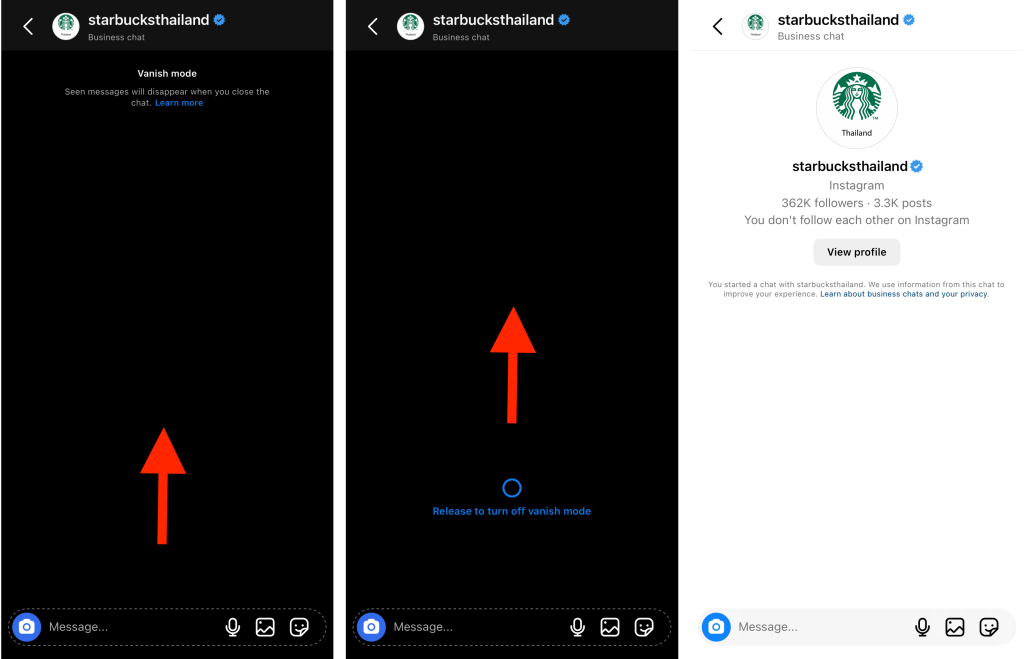
À ce stade, l'écran devrait passer du noir au blanc. Cela signifie que vous avez désactivé avec succès le mode « messages éphémères » et que vous êtes désormais de retour en mode de discussion normal. Tout ce que vous direz ou enverrez désormais restera dans vos messages privés avec cette personne. Et tous les historiques de discussion datant de la période où vous étiez en mode « messages éphémères » auront disparu à jamais.
4 autres bonnes pratiques pour se protéger dans les messages directs d'IG
Conserver vos conversations privées dans le mode « Messages éphémères » Instagramest un excellent moyen de préserver votre vie privée et d’éviter que vos échanges ne soient divulgués. Mais ce n’est pas le seul moyen de vous protéger lorsque vous utilisez les messages privés pour communiquer avec vos amis, vos fans et des inconnus. Voici quelques autres bonnes pratiques à garder à l’esprit lorsque vous échangez des messages sur Instagram.
1. Activer les demandes de messages pour filtrer les messages indésirables
Dans vos paramètres de messagerie, activez la fonctionnalité qui vous permet de recevoir des demandes de message de la part de personnes que vous ne connaissez pas. Ainsi, les messages privés envoyés par des inconnus n'arriveront pas directement dans votre boîte de réception. Ils seront plutôt placés dans le dossier « Demandes de message », où vous pourrez choisir de les approuver ou de les supprimer.
Le fait d'avoir un dossier dédié aux demandes de messages vous permet de mieux organiser votre boîte de réception. Vous ne verrez que les messages privés qui vous concernent. Cela peut vous aider à filtrer les spams, les faux messages privés provenant de comptes suspects et les avances inappropriées sur la plateforme.
2. S'abstenir de partager ses informations personnelles avec des inconnus
Dans la mesure du possible, ne communiquez pas vos informations personnelles à des inconnus par message privé. Pour des raisons de sécurité, ne divulguez pas d’informations sensibles telles que votre nom officiel et votre adresse personnelle. Vous ne voulez pas donner à un inconnu louche l’occasion de devenir un harceleur, n’est-ce pas ? En évitant de divulguer vos informations personnelles, vous assurez votre sécurité dans la vie réelle et vous profitez d’une expérience en ligne positive sur Instagram.

3. Signalez tout message offensant ou inapproprié que vous recevez
Le harcèlement et les brimades sont des réalités difficiles auxquelles vous devez faire face lorsque vous êtes actif sur les réseaux sociaux. Selon le Pew Research Center, 41 % des Américains ont déjà été victimes de harcèlement en ligne sous forme de messages inappropriés, d’insultes, de menaces, etc. Même si vous faites tout votre possible pour l’éviter, il y a toujours un risque que vous en fassiez l’expérience personnellement.
La bonne nouvelle, c'est que si vous recevez des messages privés menaçants ou injurieux, vous pouvez toujours les signaler à Instagram. Le harcèlement, les discours de haine, les brimades et les menaces physiques enfreignent très clairement les règles de la communauté Instagram.
Si vous recevez des messages contenant l'un de ces éléments, signalez immédiatement l'expéditeur. Cliquer sur le bouton « Signaler » est un moyen simple de vous protéger contre les harceleurs. Vous pouvez même les bloquer par la suite.

4. Sécurisez votre compte avec l'authentification à deux facteurs
Enfin, activez l'authentification à deux facteurs pour sécuriser votre compte et protéger votre vie privée, ainsi que celle de vos messages privés. Ainsi, personne ne pourra pirater votre compte et lire vos conversations privées, même s'il dispose de votre mot de passe. Vous pouvez activer l'authentification en l'associant à une application d'authentification, à votre numéro de téléphone portable ou à WhatsApp.
Le mode « Vanish » est génial, mais il est aussi important d'être visible sur Instagram
D'un simple geste, vous pouvez passer en mode « messages éphémères » et préserver la confidentialité de vos conversations avec vos amis. Et maintenant que vous savez comment désactiver le mode « messages éphémères » sur Instagram, revenir au mode de discussion classique sera un jeu d'enfant.
Le mode « Disparition » est idéal pour vos moments les plus intimes et pour partager des photos par message privé. Mais sur le Instagram , passer inaperçu est la dernière chose que vous souhaitez. Il est important d'être très facile à trouver pour développer votre page.
Path Social vous aider dans ce domaine. Nous utilisons l'intelligence artificielle pour diffuser votre contenu auprès de votre public cible grâce à des stratégies promotionnelles qui ont fait leurs preuves. Cela permet non seulement de stimuler l'engagement sur votre page, mais aussi d'augmenter le nombre de vos abonnés. Développez votre communauté dès aujourd'hui avec de nouveaux abonnés 100 % authentiques grâce à nous!





Vous souhaitez développer naturellement votre Instagram ?
Découvrez une plateforme conçue pour aider les créateurs à toucher un public authentique et engagé, sans prendre de raccourcis.
Explorez la plateforme




