


Instagram Fonctionnalités Emoji pour ajouter plus de vie à votre vie IG

Au fil des ans, le monde numérique nous a offert une multitude d’outils pour nous exprimer en ligne. Nous pouvons publier de superbes photos sur Instagram, tweeter nos pensées les plus intimes et créer des Reels pour mettre en avant notre créativité. Mais l’un des outils de communication numérique les plus pratiques et les plus tendance de notre époque est sans aucun doute l’emoji. Aujourd’hui, nous allons nous intéresser aux fonctionnalités Instagram et voir comment vous pouvez les utiliser pour vous exprimer de manière ludique.
Il existe de nombreuses occasions sur Instagram des emojis pour vous exprimer. Vous pouvez ajouter vos emojis préférés dans votre bio et vos légendes. De plus, si vous êtes pressé, vous pouvez réagir rapidement aux Stories et aux messages des autres utilisateurs à l’aide d’emojis. Découvrons ensemble comment faire tout cela sur l’application, d’accord ?
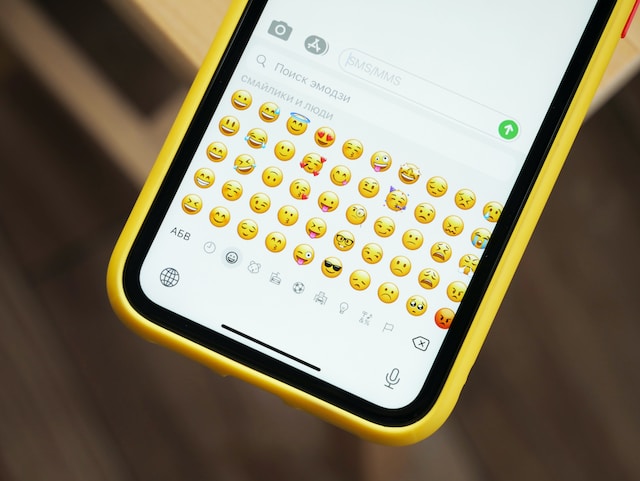
Utiliser des emojis mignons et colorés, c'est génial pour s'exprimer en ligne
Les emojis sont de petites icônes mignonnes représentant des expressions faciales que l'on peut insérer dans un texte. Il existe également des emojis représentant des animaux, des aliments, des lieux, des drapeaux et d'autres symboles. Ces icônes sont idéales pour s'exprimer de manière ludique, simple et visuellement attrayante.
Ces emojis apportent une touche supplémentaire de personnalité et permettent de mieux s'exprimer dans les conversations et les publications quotidiennes. Ils vous permettent de montrer votre côté décontracté et insouciant en ligne, tout en créant une ambiance et une atmosphère bien particulières. Et le plus beau, c'est qu'ils dépassent les barrières linguistiques. C'est en quelque sorte un langage universel que tout le monde peut comprendre !
Les emojis sont incroyablement utiles, surtout pour ceux qui ont du mal à exprimer leurs sentiments uniquement avec des mots. Les gens se sont tellement habitués aux emojis ces dernières années que certains s'en servent pour transmettre leurs émotions. PsyPost rapporte même que les gens parviennent mieux à décrypter les émotions des autres à travers les emojis qu'à travers les expressions faciales.
Mais comment ces emojis jouent-ils un rôle dans votre expérience sur Instagram ? Poursuivez votre lecture pour découvrir toutes les façons dont vous pouvez les utiliser sur l'application.

Emojis pour Instagram Bio : Présentez-vous d'une manière qui attire l'attention
La première façon d'utiliser les emojis sur Instagram est par le biais de votre biographie. Votre bio sur Instagram est la courte section de texte qui se trouve en haut de votre profil et qui vous décrit.
C'est l'un des premiers éléments que les gens voient lorsqu'ils visitent votre page, outre votre photo de profil et votre pseudo. Vous devez donc la rendre vivante et intéressante pour faire bonne impression. Quoi de mieux pour cela que d'utiliser des emojis dans Instagram ?
Utiliser des emojis sympas peut donner à votre marque un petit côté original et de la personnalité. De plus, comme ils sont très colorés, ils peuvent attirer l'attention des gens et les inciter à lire votre bio. Ils vous permettent également de vous exprimer tout en rédigeant une bio courte, concise et créative. C'est très important, car Instagram chaque bio à 150 caractères seulement.
Voici quelques exemples de bios Instagram rendues plus excitantes par quelques emojis :
- "Votre sympathique chef végétarien de NYC 🌿💚🌱"
- "J'adore me produire sur scène ! 💃🎶🎭"
- "Photographe indépendant prêt à capturer vos meilleurs moments 📸"
- "Instructeur de yoga dévoué prêt à vous aider à trouver le zen et la force 🧘♂️🙏".
- "Maman chien à plein temps de Shadow et Cloud 🐶🐾"
- "Fière d'être une joueuse ! 🕹️👾"
Emoji Captions for Instagram: Améliorez votre narration avec ces jolies icônes
Une autre façon d'attirer l'attention des utilisateurs sur Instagram à rédiger des légendes captivantes pour vos publications. Il est important de raconter une histoire à travers vos photos et vos vidéos grâce à vos légendes. Ainsi, votre public aura une meilleure compréhension et un meilleur contexte des contenus que vous publiez.
Ajouter des emojis à la légende Instagram vos Instagram est un excellent moyen de renforcer le côté ludique, dynamique et tendance de celles-ci. Ces icônes accrocheuses susciteront l’intérêt des internautes et les inciteront à lire la suite de votre légende. Vous pouvez également ajouter des emojis à des légendes d’un seul mot pour leur donner un peu de peps tout en les gardant courtes et percutantes.
Vous êtes prêt à personnaliser vos légendes et à leur donner du piquant ? Voici quelques légendes en emoji pour les posts Instagram :
- "Passer du temps avec l'amour de ma vie ce week-end 💑💖🌈"
- « Qu'il pleuve ou qu'il fasse beau, le spectacle doit continuer ! ☔🌞 »
- "Un café et un joli coucher de soleil ? Comptez sur moi ! 🌅☕"
- "Enfin sorti du bureau pour ce voyage à Bali avec les filles ! 🌴🌍✈️"
- "Juste un autre lundi maniaque 💼✨"
Engagez votre audience avec un Emoji Slider sur Instagram Stories
En plus de pouvoir saisir directement des emojis dans les légendes, Instagram des fonctionnalités intégrées qui vous permettent également d'utiliser des emojis directement dans l'application. L'une des façons les plus sympas de le faire consiste à configurer un curseur d'emojis dans l'une de vos Stories.
Le curseur emoji est un sticker interactif que vous pouvez ajouter à vos Instagram . Vous posez une question et configurez une échelle avec les emojis de votre choix. Ensuite, les personnes qui regardent votre Story feront glisser cet emoji de gauche à droite, en fonction de leur réponse à votre question.
Par exemple, imaginons que vous soyez une influenceuse mode et que vous souhaitiez savoir ce que vos abonnés pensent de votre tenue. Vous pouvez publier une photo de votre tenue du jour dans votre Story et y ajouter un curseur avec un emoji « yeux en forme de cœur ». Ajoutez un texte demandant : « Que pensez-vous de ma tenue ? » et attendez que les gens répondent à l'aide du curseur.
Instagram vous Instagram ensuite la position moyenne à laquelle vos abonnés ont placé l'émoji sur l'échelle. Cela peut vous aider à évaluer les styles de mode que votre public aime voir. C'est en quelque sorte un moyen pour les marques d'obtenir rapidement des retours via les Stories. Après tout, il est plus facile et plus amusant d'interagir avec le curseur que de taper une réponse par message privé.
Montrer de l'amour : Comment réagir avec des Emojis sur Instagram Stories
Une autre façon d'utiliser les emojis Instagram consiste à s'en servir pour réagir aux Stories publiées par d'autres utilisateurs. Fini le temps où il fallait envoyer un message à quelqu'un pour répondre à ses Instagram . Désormais, il suffit de cliquer sur quelques boutons pour réagir avec un emoji.
Parfois, vous voulez simplement faire savoir à quelqu'un que vous aimez ses Stories sans avoir à entamer une conversation. Instagram vous facilite la tâche en vous permettant d'utiliser des emojis pour réagir en quelques secondes. C'est un moyen pratique et amusant d'exprimer ce que vous ressentez à propos des publications de quelqu'un.
Voici comment réagir avec des emojis sur Instagram Stories :
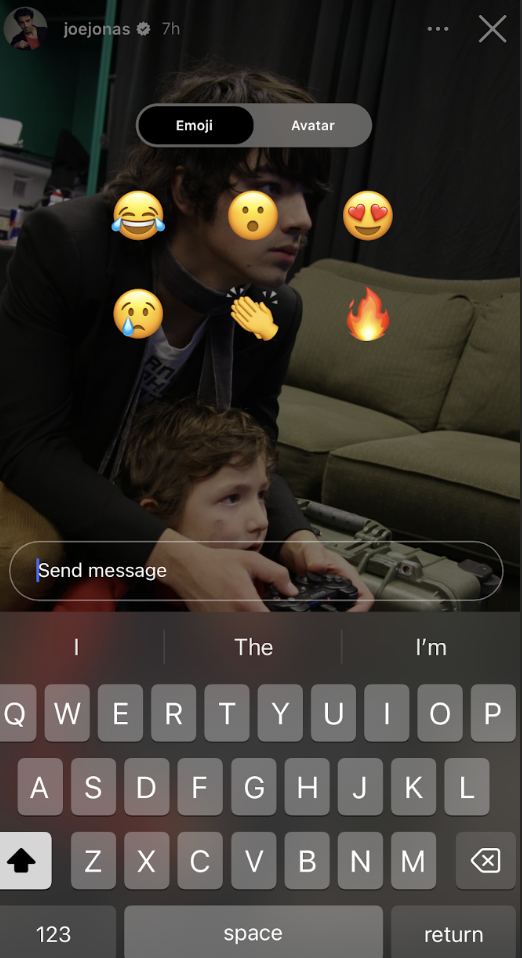
1. Ouvrez l'histoire de quelqu'un sur Instagram .
2. Faites glisser votre doigt vers le haut sur leur publication dans les Stories. Six emojis apparaîtront à l'écran : celui qui rit, celui qui est surpris, celui avec des cœurs dans les yeux, celui qui pleure, celui qui applaudit et celui représentant des flammes.
3. Cliquez sur l'emoji que vous souhaitez utiliser pour réagir à l'histoire. L'écran devrait se remplir de l'emoji de votre choix. L'auteur de l'histoire verra votre réaction en emoji dans sa boîte de réception.
Instagram Réactions Emoji pour les messages directs : La façon la plus rapide de répondre aux messages directs
Vous voulez répondre aux messages directs de quelqu'un le plus rapidement possible ? Au lieu de taper un message à la hâte et d'envoyer un texte avec des fautes de frappe, réagissez avec un emoji en deux clics.
Utiliser un emoji pour réagir à un message est déjà une réponse. Vous pouvez l'utiliser pour exprimer votre reconnaissance à l'égard d'un DM que vous avez reçu. C'est aussi un moyen détourné de mettre fin à une conversation qui dure depuis trop longtemps. Vous pouvez choisir parmi une pléthore d'emojis pour réagir à un DM. L'éventail va de l'emoji "pouce levé" à l'emoji "cœur rouge" classique.
Voici comment utiliser les réactions avec Instagram dans les messages privés, étape par étape :
1. Ouvrez le message direct auquel vous souhaitez réagir dans votre boîte de réception Instagram . Vous pouvez également réagir aux Reels et à d'autres messages que vos amis vous ont envoyés par DM.
2. Si vous souhaitez réagir avec un cœur rouge classique, il vous suffit d'appuyer deux fois sur le message. Si vous souhaitez choisir un autre emoji pour réagir, appuyez longuement sur le message.
3. Les réactions emoji les plus courantes, telles que le visage surpris et l'emoji pleurant, devraient apparaître. Cliquez sur l'un de ces emojis.
4. Si l'emoji que vous souhaitez utiliser ne figure pas parmi les icônes par défaut, cliquez sur le signe « + ». Une liste contenant des centaines d'emojis devrait s'afficher.
5. Faites défiler le plateau et sélectionnez l'emoji que vous souhaitez utiliser en cliquant dessus. La personne qui vous a envoyé un message sera ainsi informée que vous avez réagi avec un emoji.

Manque à l'appel : Pourquoi ne puis-je pas réagir aux messages Instagram avec des Emojis ?
Vous rencontrez des difficultés avec les étapes ci-dessus ? Vous vous demandez peut-être : « Pourquoi je n'arrive pas à répondre aux Instagram avec des emojis ? »
La raison la plus courante pour laquelle Instagram vous permet Instagram de réagir aux messages privés est que votre application n'est pas à jour. Rendez-vous sur l'App Store ou le Google Play Store et vérifiez si vous devez mettre à jour votre application. Redémarrez ensuite l'application et voyez si la fonctionnalité fonctionne.
Il se peut également que vous deviez mettre à jour les options de messagerie dans l'application. Cette opération n'est pas nécessaire pour tout le monde. L'application vous invitera à le faire si elle a besoin d'une action supplémentaire de votre part. Vous pouvez également consulter vos paramètres pour effectuer cette opération.
Comment activer les réactions Emoji sur Instagram si la mise à jour de l'application ne résout pas le problème ?
Si vous avez déjà mis à jour votre application et vos paramètres de messagerie, mais que vous ne parvenez toujours pas à réagir avec des emojis, pas de panique. Cela signifie probablement qu'un bug ou un problème technique au sein de l'application vous en empêche.
Voici comment activer les réactions emoji sur Instagram si vous rencontrez toujours des difficultés :
- Vérifie ta connexion Internet. Parfois, le problème est dû à une mauvaise connexion Wi-Fi. Si ta connexion Internet n'est pas stable, l'application pourrait ne pas te permettre de réagir aux messages ou aux Stories d'autres utilisateurs. Assure-toi d'abord que ta connexion Internet est rapide et stable, puis réessaie.
- Redémarrez l'application ou déconnectez-vous et reconnectez-vous. Ces opérations peuvent rafraîchir les données de l'application et éliminer le problème. Vous pouvez également effacer le cache de Instagram dans les paramètres de votre téléphone pour voir si le problème disparaît.
- Vérifie bien si tu as restreint l'accès à la personne qui t'a envoyé un message. Si quelqu'un est bloqué ou restreint de ton côté, tu ne pourras pas répondre à ses anciens messages privés.
Continuez à utiliser les Emojis de manière stratégique et créative pour attirer de nouveaux adeptes
Les emojis constituent un langage universel que tout le monde comprend. Que vous utilisiez de petits visages jaunes rigolos pour exprimer vos émotions ou des cœurs pour ajouter une touche de mignonnerie, ils sont très pratiques. Ils vous permettent également de rester concis dans vos légendes et votre biographie lorsque vous ne souhaitez pas submerger votre public d'informations.
Sur Instagram, vous pouvez également utiliser des emojis pour réagir aux messages privés et aux Stories des autres utilisateurs. C'est un moyen pratique de répondre de manière créative à vos amis lorsque vous n'avez pas le temps de taper une réponse.
Si vous savez tirer parti des emojis, votre Instagram pourra gagner en popularité. Ces petites icônes mignonnes peuvent donner un côté plus humain à votre marque et vous permettre de mettre en avant votre personnalité décontractée. Lorsque les internautes ressentent cette bonne ambiance qui se dégage de votre biographie et des légendes de vos publications, ils seront peut-être tentés de vous suivre. Essayez donc d’utiliser des emojis dès que vous le pouvez pour agrémenter votre contenu (sans en abuser, bien sûr).
Vous cherchez d'autres moyens de développer votre communauté que d'insérer un emoji Instagram dans chaque légende ? Travaillez avec notre équipe pour construire une base de fans solide.
L'algorithme de ciblage exclusif Path Socialdiffuse votre contenu auprès des personnes les plus susceptibles d'interagir avec celui-ci. Cela signifie que vos publications seront mises en avant directement sous les yeux de votre public cible. Vous obtiendrez ainsi davantage de « J'aime », de commentaires et d'abonnés pour votre page. Développez votre communauté avec nous dès maintenant !





Vous voulez suivre la croissance de votre compte Instagram ?
Analysez vos progrès et obtenez des informations précieuses grâce à notre outil de suivi gratuit !
Vérifiez la croissance de votre compte Instagram dès maintenant




