


Instagram Compte privé 101 : Mettez un cadenas sur votre vie IG

Instagram | 12 septembre 2024
Vous est-il déjà arrivé de tomber sur le profil de quelqu’un, impatient de découvrir son contenu, pour finalement être déçu par ce symbole de cadenas ? C’est toujours frustrant de se rendre compte que la page que vous vouliez explorer est un compte Instagram . Et on ne peut s’empêcher de se demander pourquoi cette personne a choisi de le rendre privé. Se sent-elle gênée par ses publications, déteste-t-elle les gens, ou accorde-t-elle simplement beaucoup d’importance à la confidentialité en ligne ?
Aujourd'hui, nous allons parler de ce qu'est un compte privé sur Instagram et des motivations de ceux qui sont en mode privé. Nous vous apprendrons également à rendre votre propre profil privé si vous souhaitez vous soustraire à la surveillance du public. Prêt à partir ? Entrons dans le monde des pages privées et voyons en quoi elles diffèrent des comptes de médias sociaux publics.

Qu'est-ce qu'un compte privé Instagram ?
Un profil privé sur Instagram une page dont l'accès est restreint au grand public. Seules les personnes qui suivent ce compte peuvent voir tout ce qu'il contient, des publications aux Stories.
Toute personne souhaitant suivre un Instagram privé doit envoyer une demande d'abonnement au propriétaire. Ce dernier a alors le choix d'accepter ou de refuser cette demande. Si votre demande est acceptée, vous pourrez consulter son contenu, voir la liste de ses abonnés, lui envoyer des messages privés, et bien plus encore.
Si votre compte est privé, les utilisateurs ne verront pas votre contenu sur les pages de hashtags, les balises de localisation et la page « Explorer ». Personne ne pourra non plus télécharger ou remixer vos Reels, même si vos abonnés pourront les visionner.
Si une personne qui ne vous suit pas tente de vous envoyer un message privé, celui-ci s'affichera sous forme de demande de message. Vous pourrez alors choisir de répondre ou de supprimer le message, voire de bloquer l'utilisateur si vous le souhaitez.
Mais le fait d'avoir un compte privé ne vous coupe pas complètement du Instagram . Vous pouvez toujours voir les publications publiques et interagir avec elles comme bon vous semble. Et lorsqu'un titulaire de compte privé commente un contenu public, ce commentaire reste visible par tout le monde.
Tout le monde ne peut pas passer à un profil privé sur un coup de tête. Cette option n'est disponible que pour les comptes personnels. Les profils professionnels, en revanche, ne peuvent pas passer en mode privé. Si vous souhaitez rendre votre page professionnelle privée, vous devez d'abord revenir à un compte personnel.
Après tout, les marques et les créateurs sont considérés comme des personnalités publiques, et leur public doit pouvoir les voir en ligne. Compte tenu des nombreux avantages dont bénéficient déjà les comptes professionnels, ce petit contretemps ne devrait pas poser de problème.
Avantages d'un compte IG privé
Rendre votre Instagram présente d'énormes avantages. Que vous souhaitiez rendre votre page privée pour des raisons personnelles ou par souci de sécurité, vous pouvez profiter des avantages suivants :
- Contrôlez qui peut voir ce que vous publiez: tout le monde peut voir ce qui est publié sur un profil public. En revanche, si vous avez un profil privé, seules les personnes que vous approuvez peuvent voir vos publications. C'est la solution idéale si vous publiez du contenu sensible que vous ne souhaitez pas montrer à des inconnus. Si vous publiez des photos de famille, des actualités professionnelles ou des photos indiquant où vous vous trouvez en temps réel, pensez à passer en mode privé.
- Plus de liberté pour vous exprimer: si vous privilégiez la confidentialité, vous n’attirez pas l’attention indésirable d’autres spectateurs. Il règne un sentiment d’exclusivité parmi ceux qui peuvent vous suivre. Vous pouvez n’accepter que les demandes d’abonnement des personnes devant lesquelles vous vous sentez à l’aise pour vous exprimer. Ainsi, votre contenu peut être plus authentique et sans filtre.
- Vous pouvez éviter les comptes de bots et de spam: un compte public vous expose à une multitude de comptes de bots sur l'application. Ils sont extrêmement agaçants, surtout lorsqu'ils laissent des commentaires génériques ou inondent vos messages privés d'offres suspectes. Heureusement, grâce Instagram de compte privé Instagram , vous pouvez les bloquer complètement.
- Une sécurité accrue sur Internet: grâce à un profil privé, vous ne serez plus une cible facile pour les harceleurs et les agresseurs en ligne. Ils n'auront plus aucun moyen de vous envoyer des messages privés malveillants ni de laisser des commentaires désagréables sur vos photos et vidéos.
- Risque réduit d'usurpation d'identité : rien qu'en 2021, la Commission fédérale du commerce (FTC ) a recensé plus de 15 300 cas d'usurpation d'identité sur les réseaux sociaux aux États-Unis. Cela s'explique par la facilité avec laquelle il est possible de voler les photos des utilisateurs et d'en savoir plus sur leur vie grâce à leurs comptes publics sur les réseaux sociaux. Or, personne ne peut voler vos photos ni les informations de votre profil si vous disposez d'un compte privé.
Comment rendre votre compte privé sur Instagram : Un guide facile
Passer à un profil privé est très simple et ne prend qu'une minute ou deux sur l'application. Voici comment rendre votre compte Instagram , étape par étape :
1. Ouvrez l'application Instagram et allez dans votre profil.
2. Cliquez sur les trois lignes horizontales dans le coin supérieur droit de la page.
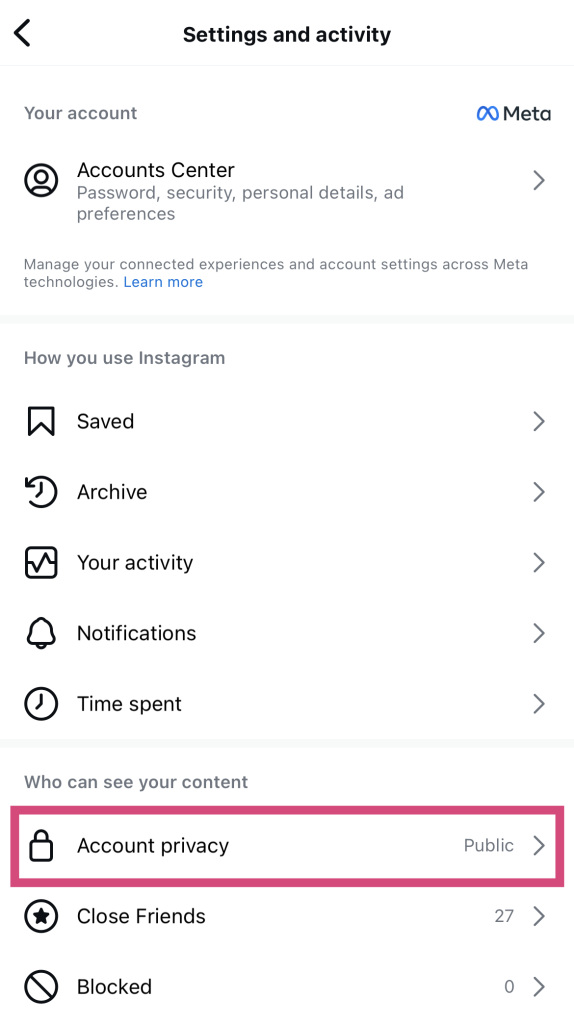
3. Sélectionnez Confidentialité du compte sous "Qui peut voir votre contenu".
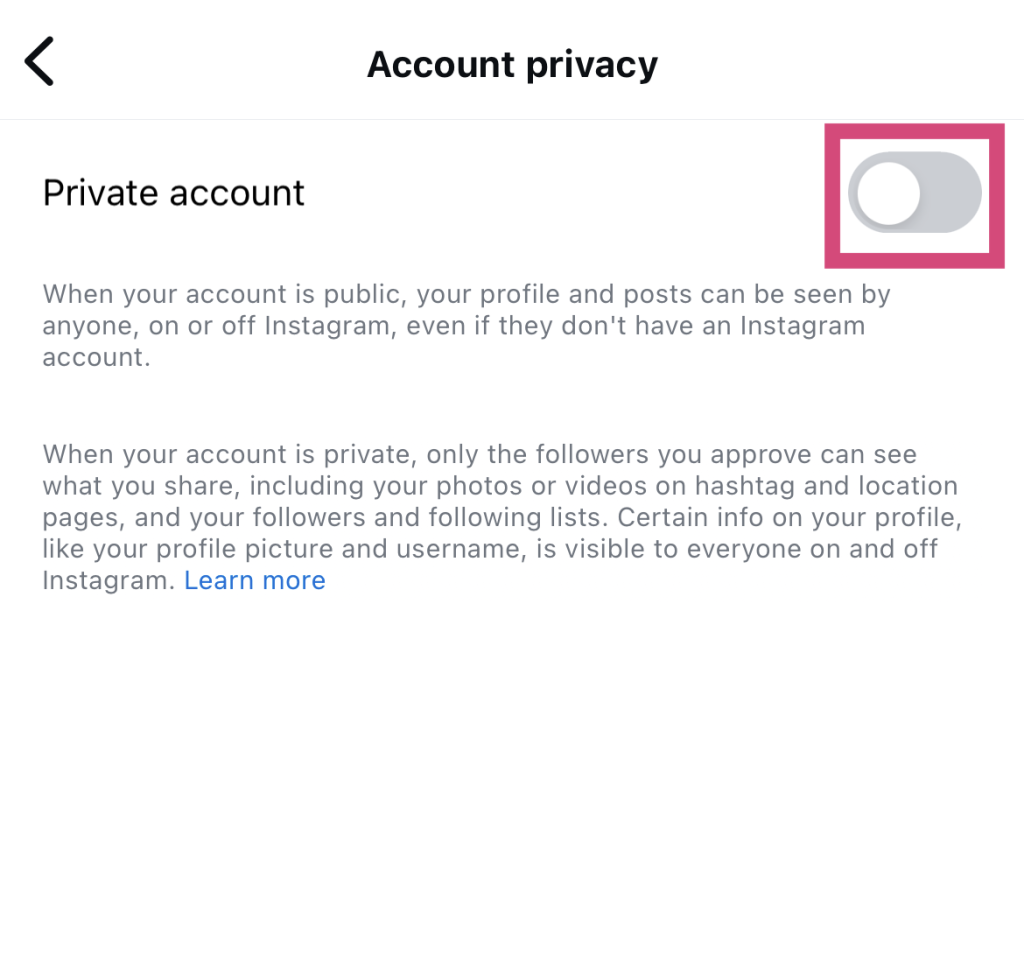
4. Appuyez sur le bouton de basculement situé à côté de l'étiquette Compte privé.
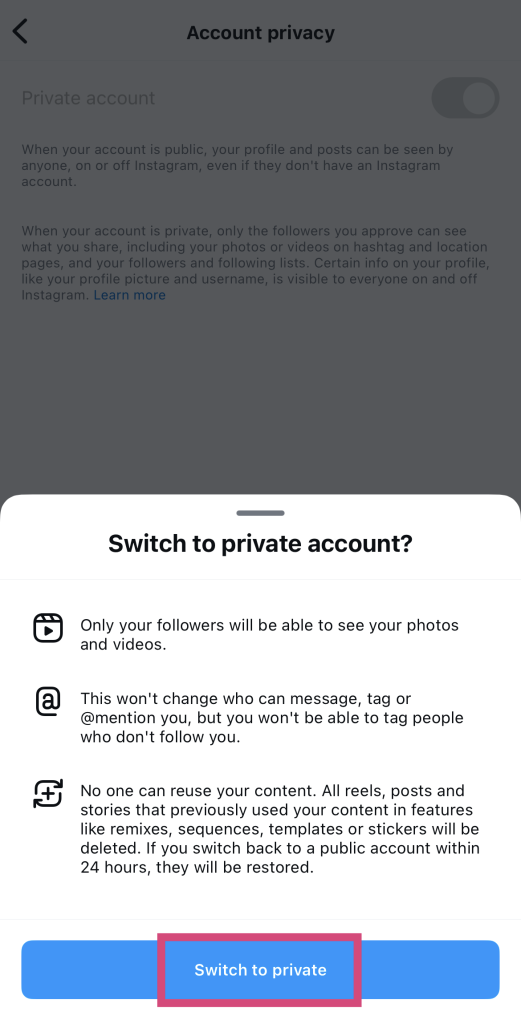
5. Cliquez sur Basculer vers le privé pour confirmer votre décision.
6. Instagram vous inviter à passer en revue vos abonnés afin de vérifier que vous êtes bien d'accord pour qu'ils vous suivent. Si vous souhaitez le faire, cliquez sur « Vérifier les abonnés ». Vous pouvez également choisir de le faire quand vous le souhaitez.
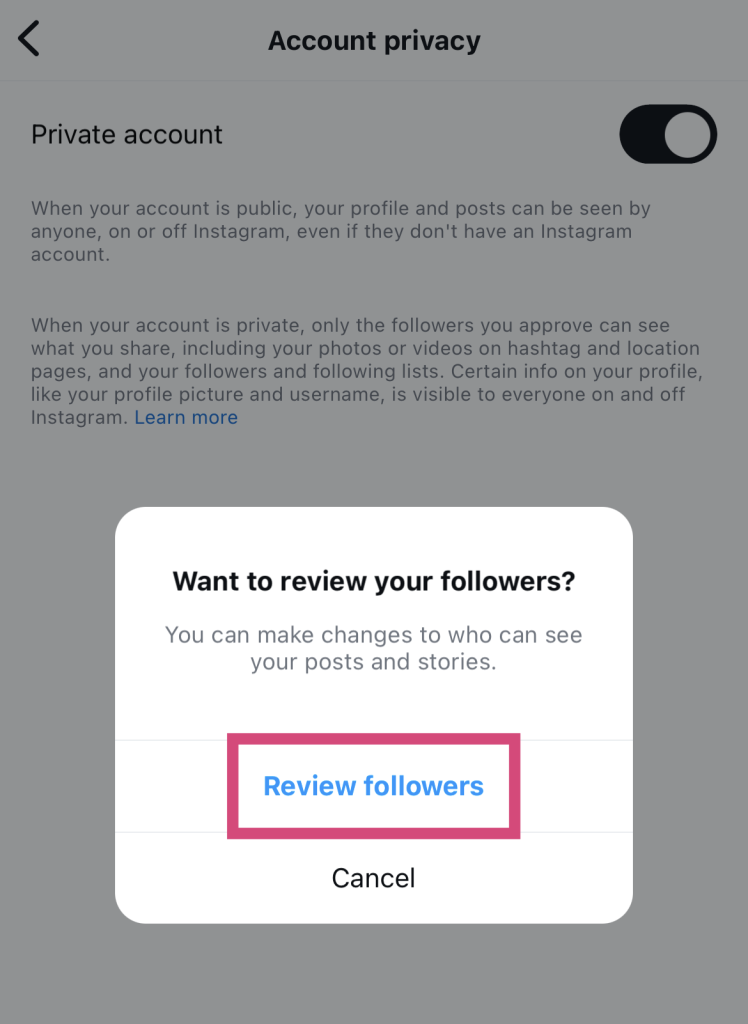
Et voilà ! Vous êtes passé à une page privée.
Comment consulter les comptes privés Instagram
Vous vous demandez comment consulter Instagram privés si vous n'avez pas accès à la page ? La réponse est assez simple : envoyez-leur une demande d'abonnement et espérez qu'ils l'acceptent. Pour cela, il suffit de vous rendre sur le profil de l'utilisateur et de cliquer sur le bouton bleu « Suivre » situé sous sa biographie. Ensuite, patientez et faites preuve de patience pendant qu'ils examinent votre demande et décident s'ils vous autorisent à les suivre.
C'est la méthode la plus respectueuse pour consulter une page privée sur Instagram. C'est exactement ainsi que la plateforme l'a prévu. Vous demandez d'abord l'autorisation, et c'est l'utilisateur dont la page est privée qui a tout le pouvoir d'accepter ou de refuser votre accès à sa page. Tout cela vise à garantir la sécurité et la protection du propriétaire de la page. Et s'il choisit de vous refuser l'accès, vous devrez trouver un autre moyen de jeter un œil à son profil.
Est-il sûr d'utiliser un logiciel tiers de visualisation de comptes privés Instagram ?
Un outil permettant de consulter les comptes Instagram est un outil tiers qui prétend permettre aux utilisateurs de voir le contenu d'un compte privé. Et même s'ils semblent extrêmement utiles et pratiques, leur utilisation n'est pas toujours sans risque.
Ces Instagram privés Instagram sont connus pour être totalement imprécis. La plupart du temps, voire systématiquement, ils ne fonctionnent pas. Instagram nombreuses couches de sécurité difficiles à contourner qui empêchent tout outil tiers d’accéder aux données des comptes privés. Il leur est pratiquement impossible de tenir leurs promesses. Ainsi, tout outil prétendant vous aider à le faire doit automatiquement vous mettre la puce à l’oreille.
De plus, ces outils vous demandent souvent de faire des choses louches, comme cliquer sur des liens de hameçonnage ou de donner votre Instagram . Cela devrait immédiatement vous mettre la puce à l'oreille. Ne faites jamais ce genre de choses, sous peine de voir votre Instagram piraté. Et tant que vous y êtes, restez le plus loin possible de ces outils tiers permettant de consulter des comptes privés !
Existe-t-il un lecteur anonyme de Instagram Story (compte privé) en qui vous pouvez avoir confiance ?
Non, il n'existe pas non plus d'outils fiables permettant de consulter anonymement Instagram (comptes privés). Il existe certes une multitude d'outils gratuits pour consulter les Stories des profils publics. Mais ceux qui promettent les mêmes résultats pour les comptes privés vous mentent probablement effrontément.
Tout comme pour les photos des comptes privés, il est impossible pour des tiers d'accéder aux Stories privées. Alors, ne vous laissez pas avoir !
Comment voir les comptes privés sur Instagram gratuitement et sans les suivre
Alors, si ce n'est pas grâce à des outils tiers, comment peut-on consulter des pages privées à leur insu ? Voici quelques astuces pour consulter Instagram des comptes privés sur Instagram sans les suivre :
- Demandez à un ami commun que vous avez avec cet utilisateur privé si vous pouvez jeter un coup d'œil à sa page via son téléphone.
- Créez une finsta (un deuxième compte Instagram ) et suivez-les avec ce compte au lieu de votre compte principal.
- Consultez leurs autres comptes publics sur les réseaux sociaux, car il se peut qu'ils y republient leur Instagram .

Comment cacher vos followers sur Instagram sans compte privé
L'une des préoccupations majeures des utilisateurs dont le compte est public est que la liste de leurs abonnés soit elle aussi accessible à tous sur Internet. En effet, n'importe qui peut consulter cette liste, ce qui met en danger l'identité de leurs abonnés. Vous demandez-vous souvent comment masquer vos abonnés sur Instagram un compte privé ?
Malheureusement, il n'existe aucun moyen de masquer directement votre liste d'abonnés aux autres utilisateurs. Vous pouvez toutefois bloquer les utilisateurs suspects qui pourraient représenter un danger s'ils avaient accès à vos abonnés. Il peut s'agir notamment de harceleurs ou de persécuteurs dont vous pensez qu'ils seraient capables de nuire à vos amis, à votre famille et à vos fans.
Bloquer une page est très facile. Voici comment procéder :
1. Accédez au profil de l'utilisateur.
2. Cliquez sur les trois points en haut à droite de la page.
3. Sélectionnez Bloc.
Une fois qu'ils seront bloqués, ils ne pourront plus consulter votre page. Cela signifie qu'ils n'auront plus accès à votre liste d'abonnés.
Questions fréquemment posées
Puis-je voir le compte privé de quelqu'un sur Instagram ?
Oui, vous pouvez consulter le profil privé d'une personne sur Instagram simplement Instagram l'ajoutant à vos abonnés. Envoyez-lui une demande d'abonnement et attendez qu'elle l'accepte. Si c'est le cas, vous pourrez alors explorer librement sa page.
Sinon, vous aurez du mal à accéder à une page privée, car les outils tiers de visualisation des profils privés ne fonctionnent que rarement.
Puis-je rendre mon compte Instagram privé ?
Oui, vous pouvez rendre votre page privée à condition de disposer d'un compte personnel. Les comptes professionnels, en revanche, ne peuvent pas passer en mode privé.
Que signifie le fait qu'un compte Instagram soit privé ?
Cela signifie que le profil est verrouillé et que seules les personnes qui suivent cette page peuvent en voir le contenu. Vous devez donc envoyer une demande d'abonnement et attendre que le propriétaire de la page l'approuve. S'il l'approuve, vous pourrez voir les publications, les Stories, la liste des abonnés de cet utilisateur, et bien plus encore.
Quelle est la différence entre un compte personnel et un compte privé sur Instagram?
Un compte personnel est un type de compte destiné aux particuliers qui souhaitent rester en contact avec leurs proches. Quant au compte privé, il s'agit d'un paramètre que vous pouvez activer sur votre compte personnel. Cette fonctionnalité est réservée aux comptes personnels, car elle n'est pas disponible pour les pages professionnelles.
Faites sauter le verrou de votre profil et augmentez votre audience avec Path Social!
Passer en mode privé, c'est génial si tu veux te protéger des harceleurs et des comptes de bots, ou si tu veux réserver ton contenu à ton cercle d'amis. Mais si tu es un créateur en herbe, ce n'est pas la meilleure voie à suivre. Comment les gens vont-ils connaître ton nom si ta page est verrouillée et qu'ils ne peuvent pas la consulter ?
Si vous souhaitez vraiment vous développer sur Internet, n’envisagez même pas de garder un compte Instagram . Faites preuve d’audace et rendez-le public afin que davantage de personnes puissent découvrir et apprécier votre contenu.
Vous avez besoin d'aide pour attirer ce genre d'attention ? Nous sommes là pour vous aider. Path Social des stratégies de croissance organique, telles que les mentions d'influenceurs et les newsletters, pour promouvoir vos publications auprès de votre public cible. Cela attire vers votre page de véritables utilisateurs intéressés, ce qui vous permet d'augmenter votre nombre d'abonnés et vos taux d'engagement.
Des milliers de créateurs en difficulté, comme Margene Beaver, ont pu constater à quel point nous pouvons tripler rapidement leur engagement, et vous aussi, vous pouvez y parvenir. Gagnez dès aujourd’hui davantage Instagram authentiques grâce à l’expertise Path Social!





Vous voulez augmenter le nombre de followers Instagram de manière organique ?
Utilisez notre boîte à outils basée sur l'IA pour attirer de véritables abonnés engagés et booster votre portée.
Augmenter le nombre de followers Instagram




