


Cómo eliminar un comentario en Instagram y otras formas de gestionar tu sección de comentarios

Prácticamente cualquier cosa puede quedar inmortalizada en las redes sociales, pero si sabes cómo borrar un comentario en Instagram, no tendrás que vivir con la vergüenza de haber publicado un comentario con un error ortográfico o un comentario impulsivo y del que te arrepientes durante el resto de tu vida. La opción de borrar los comentarios de otras personas en tus publicaciones también es estupenda si se trata de spam, charlas sin sentido y molestas, comentarios ofensivos, abusivos o inapropiados.
Aquí tienes una guía sobre cómo utilizar la poderosa arma "Suprimir" para eliminar comentarios erróneos o no deseados.

Cómo eliminar un comentario de una entrada de Instagram para gestionar la sección de comentarios
A continuación te explicamos cómo eliminar un comentario de tu entrada en Instagram o varios comentarios al mismo tiempo.
- Debajo de tu publicación, pulsa «Ver todos los comentarios».
- En un iPhone, pulsa los tres puntos de la esquina superior derecha y, a continuación, pulsa «Gestionar comentarios». En un Android, este paso se omite.
- Tanto en iPhone como en Android, solo tienes que seleccionar los comentarios que quieras gestionar.
- Pulsa «Eliminar» en la esquina inferior izquierda y, a continuación, pulsa «Eliminar comentarios» en un iPhone; pulsa el icono de la papelera en la esquina superior derecha para eliminar los comentarios en un dispositivo Android.
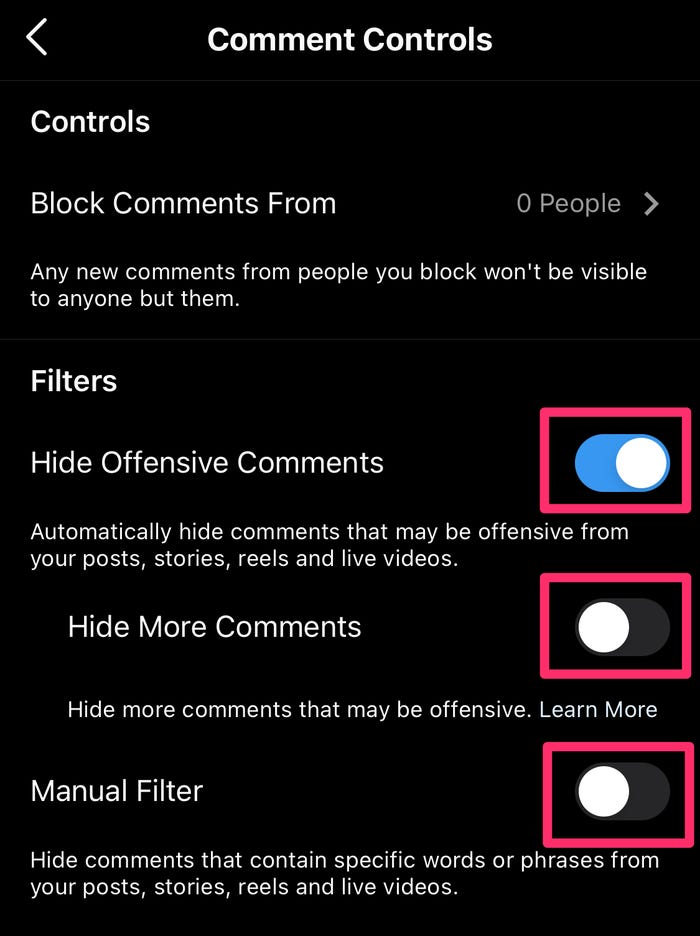
Como alternativa, puedes optar por desactivar los comentarios o gestionar los filtros de comentarios en tu publicación. Puedes ocultar los comentarios ofensivos, según lo que Instagram ofensivo, abusivo o spam. O bien, puedes crear tu propio filtro y especificar las palabras o frases que deseas que se filtren cuando la gente comente tus publicaciones.
Cómo eliminar su comentario en Instagram en un iPhone o Android
Tanto si utilizas un iPhone como un dispositivo Android, a continuación te explicamos cómo puedes borrar tu propio comentario en Instagram.
- Toca la burbuja de mensaje que aparece debajo de la publicación o toca el comentario que quieras eliminar.
- Desliza el dedo hacia la izquierda sobre el comentario para un iPhone o toca el comentario si utilizas un Android.
- Pulsa el icono rojo de la papelera en un iPhone o el icono azul de la papelera en un Android.
Cómo recuperar un comentario eliminado en Instagram: ¿Es posible?
Por desgracia, no hay forma de recuperar un comentario eliminado en Instagram. La acción es definitiva. Por el lado positivo, la persona que escribió el comentario no recibirá ninguna notificación de que se ha eliminado. La única forma de que se entere es si lo busca en tu publicación.
Instagram Guía de crecimiento
Vea cómo las empresas y los creadores están aprovechando los últimos consejos para hacer crecer sus cuentas de Instagram - ¡GRATIS!
Si quieres controlar el tipo de comentarios que aparecen en tus publicaciones sin tener que borrar nada, puedes simplemente ocultar los comentarios que no desees. Los comentarios ocultos solo son visibles para ti y para la persona que los ha escrito. También puedes hacer lo mismo con tus propios comentarios en las publicaciones de otras personas.
Alternativas a la gestión de la sección de comentarios
En lugar de vigilar constantemente tu sección de comentarios para borrar los comentarios en Instagram de los "reincidentes", puedes probar estas otras opciones para gestionar tus publicaciones y mantener alejados para siempre a los elementos desagradables.
- Restringe una o varias cuentas. Cuando restringes a alguien, no recibirás notificaciones cuando comente tus publicaciones y sus comentarios solo serán visibles para él o ella. Tienes la opción de ver el comentario, aprobarlo para que sea visible para los demás, o eliminarlo o ignorarlo. Las cuentas restringidas tampoco podrán ver cuándo estás conectado.
- Limita temporalmente la posibilidad de comentar de una cuenta concreta. Esto funciona igual que restringir una cuenta, salvo que podrás establecer un plazo durante el cual los comentarios de ese seguidor permanecerán ocultos a menos que tú los apruebes. Cuando finalice ese plazo, sus comentarios ocultos seguirán ocultos, pero los nuevos comentarios serán visibles para todo el mundo.
- Bloquea a alguien para que no pueda comentar tus publicaciones. Esto funciona igual que restringir a alguien para que no pueda comentar tus publicaciones, pero la diferencia es que esa persona seguirá pudiendo ver cuándo estás conectado.
- Bloquear una cuenta. Cuando bloqueas a alguien en Instagram, se eliminarán todos sus comentarios y «me gusta» en tus publicaciones. También puedes bloquear las nuevas cuentas que pueda crear para mayor seguridad.
- Denuncia los comentarios que infrinjan las Normas de la comunidad de Instagram. Asegúrate de no borrar el comentario en Instagram cuando lo denuncies.
Por supuesto, siempre tienes la opción de dejar de seguir a alguien en Instagram si crees que es una persona tóxica y no quieres que te relacionen con ella de ninguna manera.

Reflexiones finales: Utiliza la opción de suprimir con prudencia
Tarde o temprano, es posible que recibas comentarios no deseados en tus publicaciones. Afortunadamente, Instagram los usuarios varias opciones para controlar quién puede comentar tus publicaciones y qué comentarios pueden ver tus seguidores. Puedes borrar tu comentario en Instagram de otra persona Instagram si quieres corregirlo o si has cambiado de opinión al respecto. También puedes borrar los comentarios de otras personas en tus publicaciones según tu criterio.
La opción de eliminar comentarios en Instagram especialmente útil para las cuentas empresariales, ya que sus publicaciones son de acceso público. Estas cuentas son propensas a recibir comentarios de spam, acoso y otras formas de abuso en línea. Si gestionas una cuenta empresarial y quieres mantener una comunidad acogedora, moderar la sección de comentarios es una responsabilidad importante.
Si quieres aumentar tu número de seguidores y la interacción, no querrás que los posibles nuevos seguidores se desanimen por los comentarios spam de cuentas falsas o por comentarios inapropiados publicados por personas malintencionadas. Si necesitas ayuda en este ámbito, deberías plantearte colaborar con un socio de crecimiento de confianza, como Path Social. Path Social segmentación avanzada mediante IA y un equipo interno de expertos para conseguir un crecimiento orgánico y duradero, con seguidores reales y genuinamente interesados. ¡Empieza hoy mismo a crecer y a ganar instagram !





¿Listo para aumentar tus seguidores Instagram ?
Empieza hoy mismo a ganar seguidores auténticos y a aumentar la participación.
Aumentar seguidores de Instagram ahora




