


Cómo descargar Instagram Reels: Guarda tus clips IG favoritos

Para muchos usuarios de las redes sociales, desplazarse por Instagram se ha convertido en un hábito diario fascinante. Y, de cada dos vídeos que veas, habrá uno que resulte especialmente cautivador y apasionante. Quizá sea un sketch divertido que te haya hecho reír a carcajadas o una anécdota personal que te parezca inspiradora. Es posible que quieras guardar una copia de estos vídeos breves y destacados para volver a verlos más tarde.
Hoy te enseñamos cómo descargar Instagram Reels directamente a tu teléfono. ¡Sigue leyendo para ver todas tus opciones!
5 razones principales para aprender a descargar carretes de Instagram a la Galería
A los usuarios de Instagram—y, de hecho, de cualquier otra red social de moda—les encantan los vídeoscortos . Estos clips adictivos son rápidos, ingeniosos, entretenidos y dan muchísimas ganas de verlos uno tras otro.
¡Y los resultados hablan por sí solos! Según los datos de Socialinsider, los Reels registran una tasa de interacción superior a la de las fotos y los carruseles, con una media del 1,23 %. Además, tienen una tasa de alcance media superior al 30 %, la más alta de todos los formatos de contenido de Instagram. A los usuarios más ávidos de contenido les encantan estos vídeos breves, ¡y eso se nota!
Dado que los Reels son, sin lugar a dudas, uno de los formatos favoritos de los usuarios, es lógico que la gente quiera descargar estos Instagram . Pero, ¿por qué alguien se tomaría la molestia de guardar una copia digital de un vídeo en su móvil? Estas son algunas de las muchas razones por las que deberías aprender a descargar Reels de Instagram la Galería:
- Puedes volver atrás y ver vídeos divertidos, entretenidos y útiles, incluso si no tienes conexión a Internet.
- Puedes utilizarlos como referencia cuando quieras crear tus propios vídeos inspirándote en una tendencia concreta.
- Facilita el intercambio y envío de vídeos a los amigos que no están en Instagram.
- Permite archivar y conservar una copia del vídeo aunque el propietario lo elimine.
- Puedes utilizar clips específicos del Carrete para reutilizarlos y unirlos a tus propios vídeos.

Cómo descargar Reels de Instagram en iPhone y Android
Hay muchas formas ingeniosas de guardar una copia sin conexión de tus Reels favoritos directamente en tu dispositivo. Algunas son tan sencillas como pulsar un botón en la Instagram . Por otro lado, hay otras formas más sutiles e ingeniosas de descargar Reels si el botón de descarga no está disponible.
¿Estás deseando descargarte increíbles Reels y guardarlos en el carrete de tu cámara? Exploremos nuestros mejores consejos sobre cómo descargar Reels desde Instagram en dispositivos iPhone y Android.
Descargue los carretes directamente desde Instagram
La forma más sencilla de descargar un Reel es simplemente pulsar el botón de descarga de la aplicación. Esta herramienta integrada permite a los usuarios guardar sus propios Reels y, en ocasiones, los de otras personas.
Así es como puede descargar Reels desde Instagram:
1. Abra la aplicación Instagram y busque el Carrete que desea descargar.
2. Haga clic en los tres puntos horizontales del lateral de la pantalla.
3. Pulse Descargar. Esto guardará el vídeo en su dispositivo con una marca de agua que contiene el logotipo Instagram y el nombre de usuario del propietario.
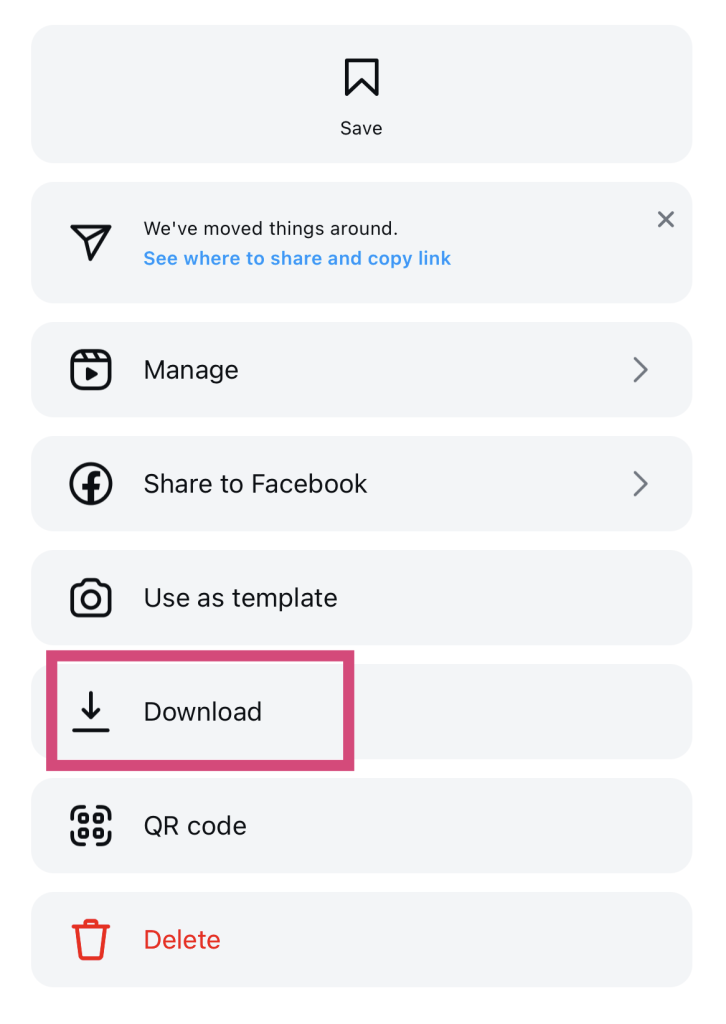
¡Y ya está, ya lo has conseguido! Ahora ya sabes cómo descargar un Reel de Instagram desde la aplicación.
Ten en cuenta que sólo puedes descargar los Reels de otras personas si tienen una cuenta pública. También deben activar la opción "Permitir que otros descarguen tus Reels" antes de publicar su vídeo. No puedes descargar Reels de cuentas privadas.
Graba la pantalla de tu teléfono y luego reproduce el carrete
No todas las esperanzas están perdidas si el botón de descarga no aparece en los Reels de los demás. Puedes hacer algo astuto y utilizar la función de grabación de pantalla de tu dispositivo para capturar el vídeo. A continuación te explicamos cómo hacerlo en unos sencillos pasos:
1. Desliza el dedo hacia abajo para abrir la pantalla de control.
2. Pulsa el botón de grabar pantalla.
3. Abra la aplicación Instagram y reproduzca íntegramente el Carrete que desea guardar.
4. Cuando hayas terminado el Reel, vuelve a pulsar el botón de «Detener grabación » en la pantalla de control.
5. Dirígete al rollo de la cámara y recorta el vídeo para capturar sólo la longitud completa del vídeo.
Aunque esta técnica te permite guardar fácilmente cualquier vídeo que quieras, hay un gran inconveniente. No puedes abrir un Reel en modo de pantalla completa. Por lo tanto, los demás elementos que aparezcan en la pantalla durante la grabación —desde el pie de foto del Reel hasta las notificaciones— aparecerán en la grabación.
Comparte el carrete de tu historia y guárdalo desde ahí
Otro truco poco conocido para descargar un Instagram consiste en compartir el vídeo en tus historias de Instagram. A continuación, descarga esa historia en tu dispositivo. A continuación te explicamos cómo hacerlo, paso a paso:
1. Abra el Carrete que desea descargar.
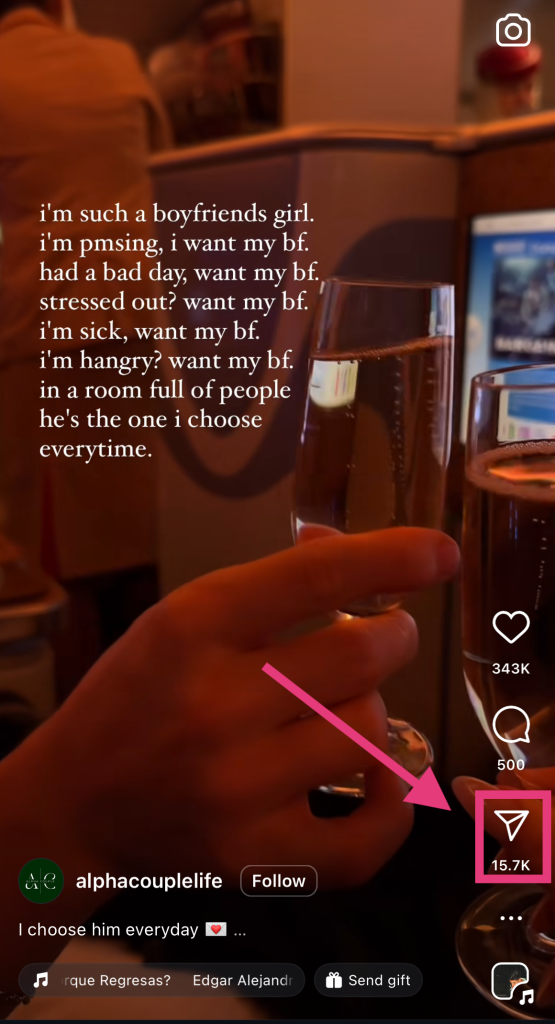
2. Haz clic en el icono del avión de papel en la parte inferior derecha de la pantalla para abrir las opciones de uso compartido.
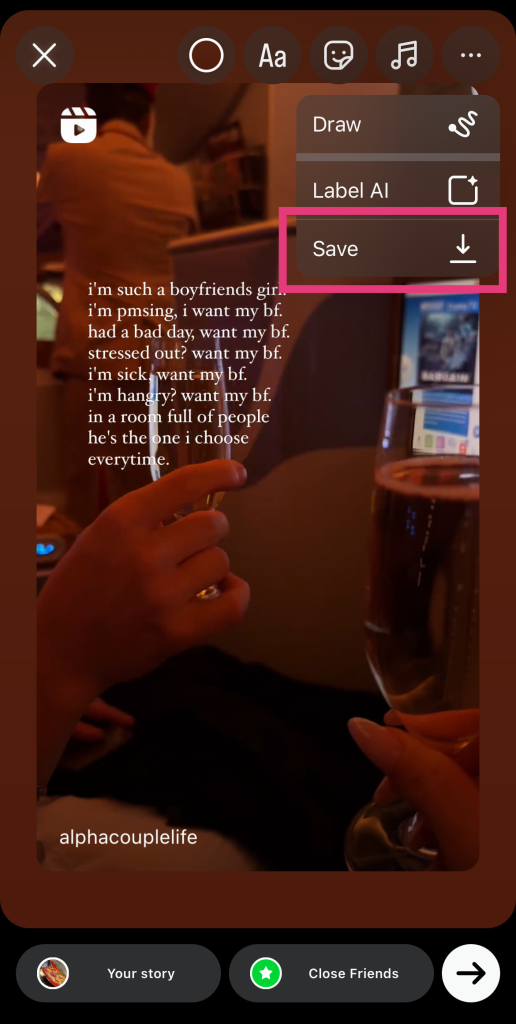
3. 3. Seleccione Añadir a historia. Se abrirá la pantalla del Editor de Historias con el Carrete.
4. Redimensiona el Carrete para hacerlo lo más grande posible.
5. Pulse los tres puntos horizontales de la parte superior de la pantalla.
6. Por último, pulsa «Guardar» para descargarlo en tu dispositivo.
Cómo descargar Instagram Reels sin marca de agua
Los consejos que hemos compartido hasta ahora son estupendos para descargar Reels y verlos de forma ocasional. Pero, ¿y si quieres descargar vídeos para reutilizarlos en tu propio contenido? Todas las técnicas que hemos visto dejan algún tipo de marca, desde el Instagram y el nombre de usuario hasta el pie de foto del Reel. Entonces, ¿qué puedes hacer?
La única forma de descargar un Reel sin elementos innecesarios es utilizando una aplicación de terceros. Por suerte, hay muchas páginas web gratuitas especializadas en la descarga de Reels, como iGram y Publer.
Todas estas herramientas de terceros funcionan prácticamente de la misma manera. A continuación te explicamos, paso a paso, cómo descargar Instagram sin marcas de agua con estas aplicaciones:
1. Abra la aplicación Instagram y busque el Carrete que desea guardar en su dispositivo.
2. Toque el icono del avión de papel en el lateral de la pantalla.
3. Haga clic en Copiar enlace.
4. Abra su navegador web y visite la aplicación de descarga de terceros de su elección.
5. Pega el enlace en la página web y, a continuación, haz clic en el botón «Descargar ».
A partir de ahí, solo tienes que esperar a que la página web recupere los datos del vídeo. Ten paciencia: puede tardar un rato, sobre todo en el caso de los Reels más largos. Cuando el proceso de descarga haya finalizado, el vídeo debería aparecer en la galería de tu móvil.
Cómo descargar Instagram Reels en PC: ¿Es posible?
Si no utilizas el móvil para navegar por Instagram, quizá te estés preguntando cómo descargar Instagram en el ordenador. Por desgracia, en la Instagram no hay ningún botón de descarga disponible para los Reels. Así que, si de verdad quieres guardar el contenido de vídeo directamente en tu ordenador, las aplicaciones de terceros son tu única opción.
Puedes seguir los mismos pasos indicados anteriormente para descargar el Reel que desees. La única diferencia es que no puedes obtener la URL del Reel a través del botón para compartir. En su lugar, copia y pega el enlace del Reel que aparece en el navegador web en la página web de terceros para iniciar el proceso de descarga.

Preguntas frecuentes
¿Puede descargar Reels desde Instagram?
Siempre puedes descargar tus Reels pulsando el botón de descarga que aparece en las opciones de tu publicación. Por otro lado, solo podrás descargar los Reels de otras personas si estas activan la opción «Permitir que otros descarguen este Reel».
¿Por qué no puedo descargar Instagram Reels?
Si no puedes descargar el «Reel» de alguien, significa que esa persona no permitió la descarga al publicar el vídeo. Si estás utilizando una herramienta de descarga de terceros y esta no puede obtener el vídeo, es posible que el propietario tenga activado el modo privado.
¿Cómo descargo un borrador de Reel de Instagram?
Para descargar un Reel que estés editando en ese momento, haz clic en el botón con la flecha hacia abajo situado en la esquina superior derecha de la pantalla del editor. De este modo, el borrador se guardará automáticamente en tu galería.
¿Cómo puedo descargar Reels desde una cuenta privada?
No hay forma de descargar Reels de cuentas privadas. Tu única opción es grabar el vídeo de un usuario privado (si le sigues). Ten en cuenta que las aplicaciones de terceros solo te permiten guardar Reels de cuentas públicas.
Utiliza tus vídeos favoritos para inspirar tu propio contenido de vídeo y que tus fans se lo coman.
Descargar los Reels es una forma estupenda de tenerlos a mano incluso cuando no tienes conexión. Así, no tendrás que rebuscar en la red social para volver a encontrar el Reel. Solo tienes que abrir tu galería para ver el vídeo: ¡pan comido!
Ahora que ya sabes cómo descargar Instagram , puedes utilizar los mejores vídeos para inspirarte a la hora de crear tu propio contenido. ¿Necesitas una herramienta fiable para guardar los Reels? ¡Echa un vistazo al descargador de vídeos Path Social para conseguir vídeos de alta calidad de Instagram!
Cuando crees tus propios Reels cautivadores, Path Social ayudarte a darles difusión. Promocionaremos tu contenido entre tu público objetivo, tal y como hicimos con Hailey’s Clothing, que consiguió más de 1.000 nuevos seguidores. Tú creas contenido fascinante; nosotros nos aseguramos de que la gente lo vea y descubra tu página. Aumenta tu visibilidad, la interacción y el número Instagram con Path Social!





¿Quieres aumentar tu Instagram de forma natural?
Descubre una plataforma diseñada para ayudar a los creadores a llegar a seguidores reales y comprometidos, sin atajos.
Explora la plataforma




