


Luces, cámara, acción: cómo crear un reel en Instagram

Instagram | 6 de diciembre de 2024
No hay nada más satisfactorio (¡y adictivo!) que ver Instagram sin parar. Representan el 50 % del tiempo que la gente pasa en Instagram. ¡Es como si, una vez que empiezas, ya no pudieras parar! Pero, aunque estos vídeos cortos solo tardan unos segundos en verse, producir y editar los Reels lleva horas.
¿Quieres conocer el proceso creativo que hay detrás? Aquí tienes la guía definitiva sobre cómo hacer un Reel en Instagram.
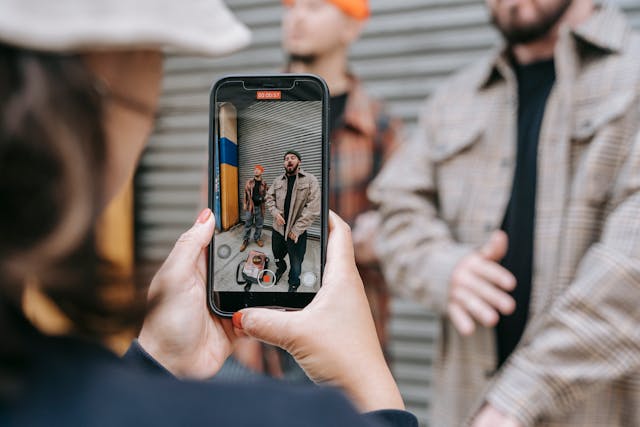
Cómo hacer un carrete en Instagram con fotos y vídeos de tu carrete.
¿Por fin has reunido suficientes fotos y vídeos para crear ese Reel tan genial que tenías en mente? Si es así, aquí te explicamos cómo crear un Reel en Instagram los archivos multimedia de tu galería:
- Abra su aplicación Instagram .
- Cree una nueva entrada pulsando el icono más en la parte inferior de la página y seleccionando Carrete.
- En lugar de pulsar el botón de grabar, desliza el dedo hacia arriba para abrir el carrete.
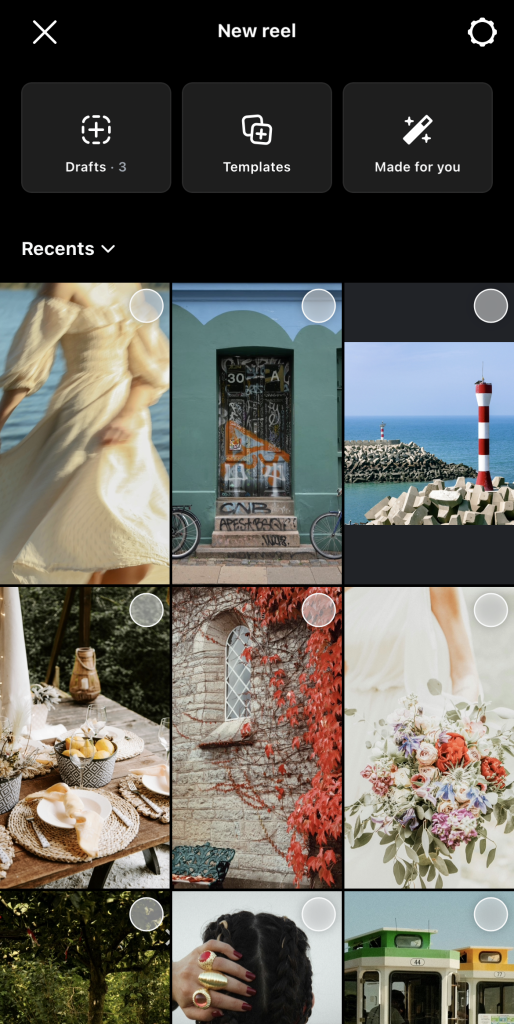
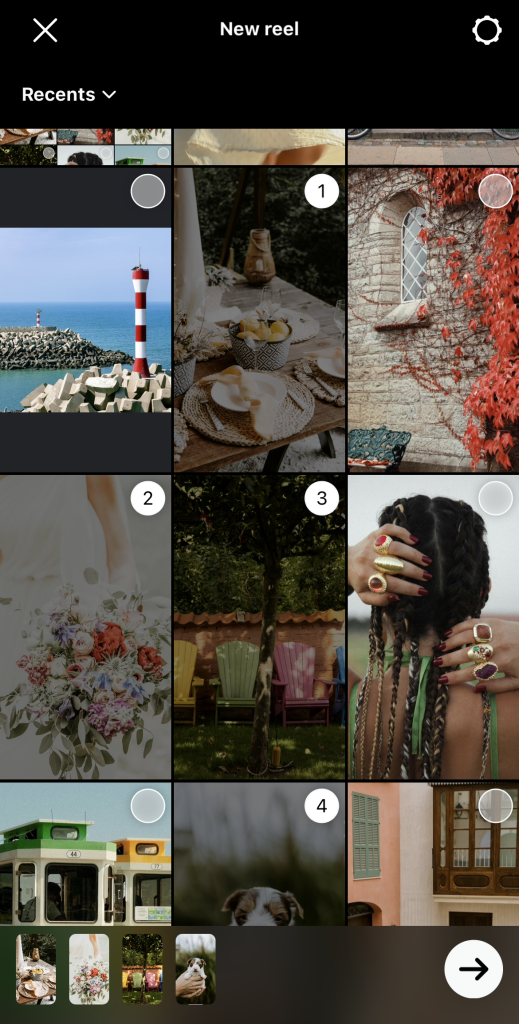
- Marca los círculos correspondientes a los archivos multimedia que quieras añadir. Deberían aparecer en la parte inferior en el orden en que los selecciones. Cuando los hayas seleccionado todos, pulsa la flecha.
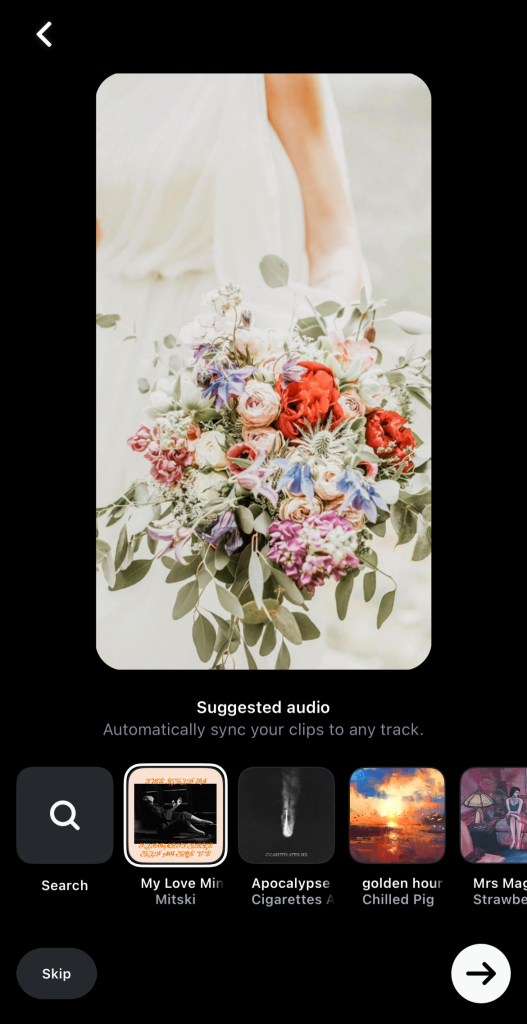
- Instagram te recomendará canciones para tu Carrete. Puedes usar una de ellas u omitirla por ahora si quieres usar el audio original de tus clips.
- Haz clic en Editar vídeo.
- Selecciona cualquier foto o vídeo. A continuación, utiliza los controles de recorte para ajustarlos a la duración deseada. También puedes arrastrar los clips para reorganizarlos como quieras.
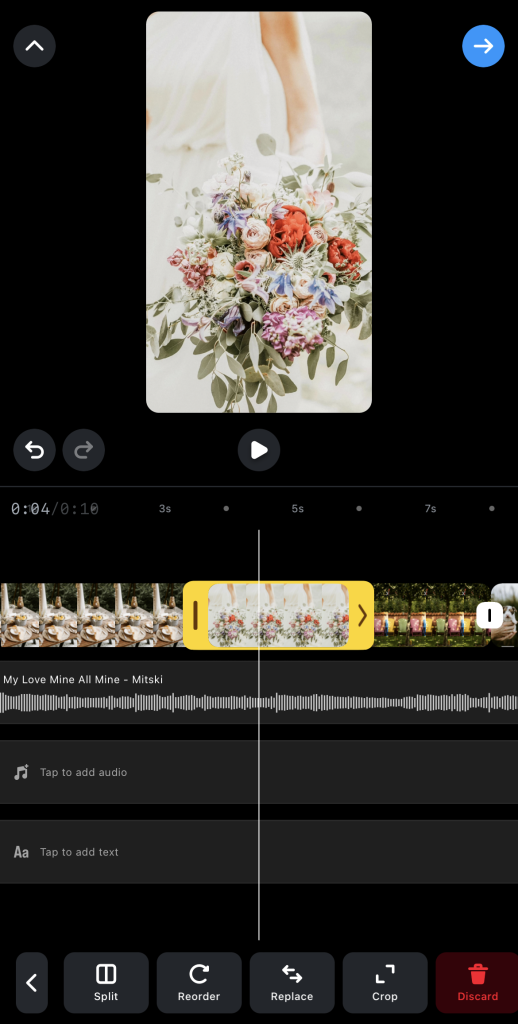
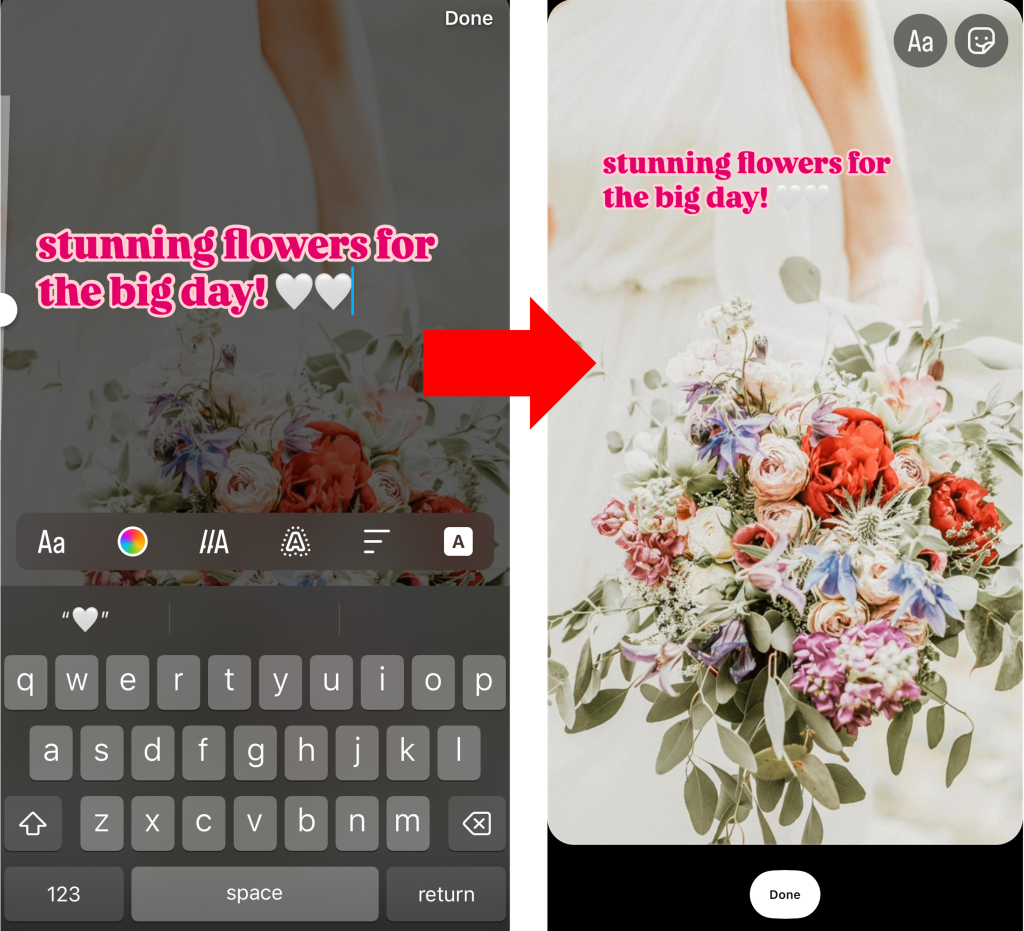
- Haz clic en Tocar para añadir texto para crear superposiciones de texto en tu vídeo.
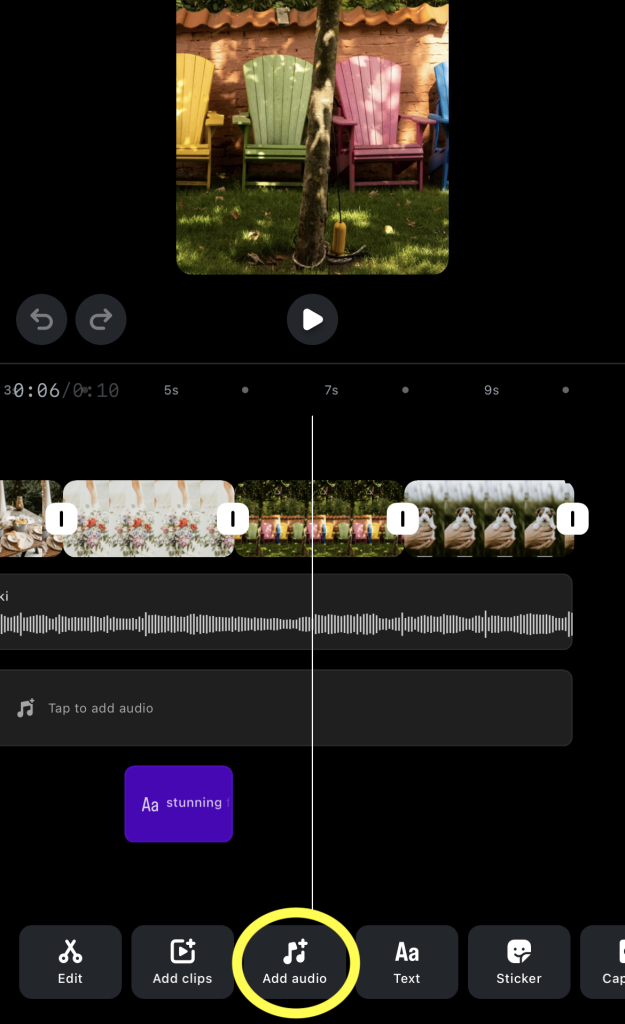
- Pulsa Añadir audio en la parte inferior de la pantalla para abrir la biblioteca de música de Reels.
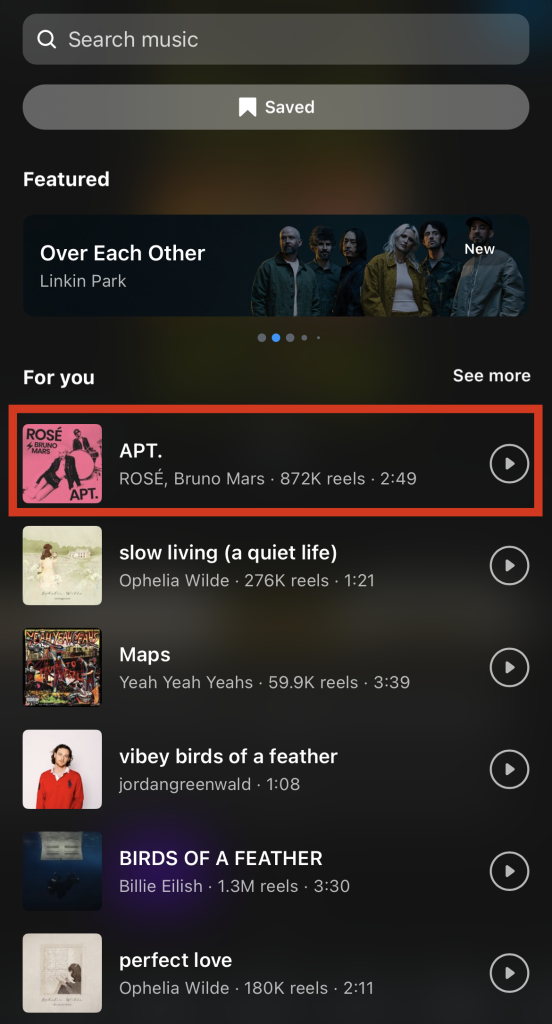
- Utiliza la barra de búsqueda o consulta las recomendaciones de canciones. Selecciona la música o los efectos de sonido que quieras utilizar.
- Arrastra la barra deslizante para seleccionar qué parte del clip de audio quieres añadir al Reel. A continuación, haz clic en «Hecho».
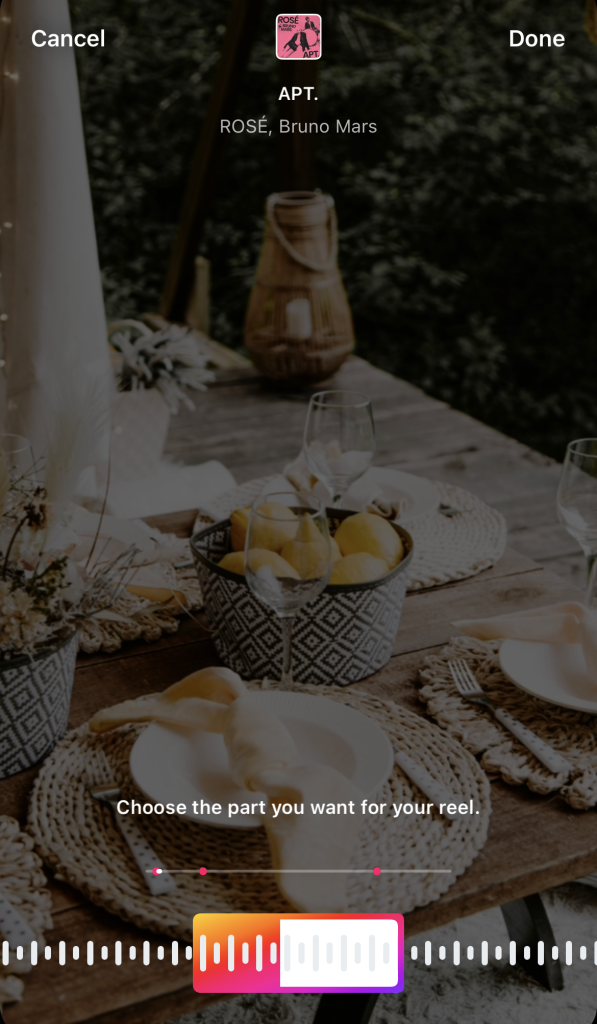
- Previsualiza tu Reel. Cuando estés satisfecho con el resultado, haz clic en la flecha azul situada en la parte superior de la pantalla.
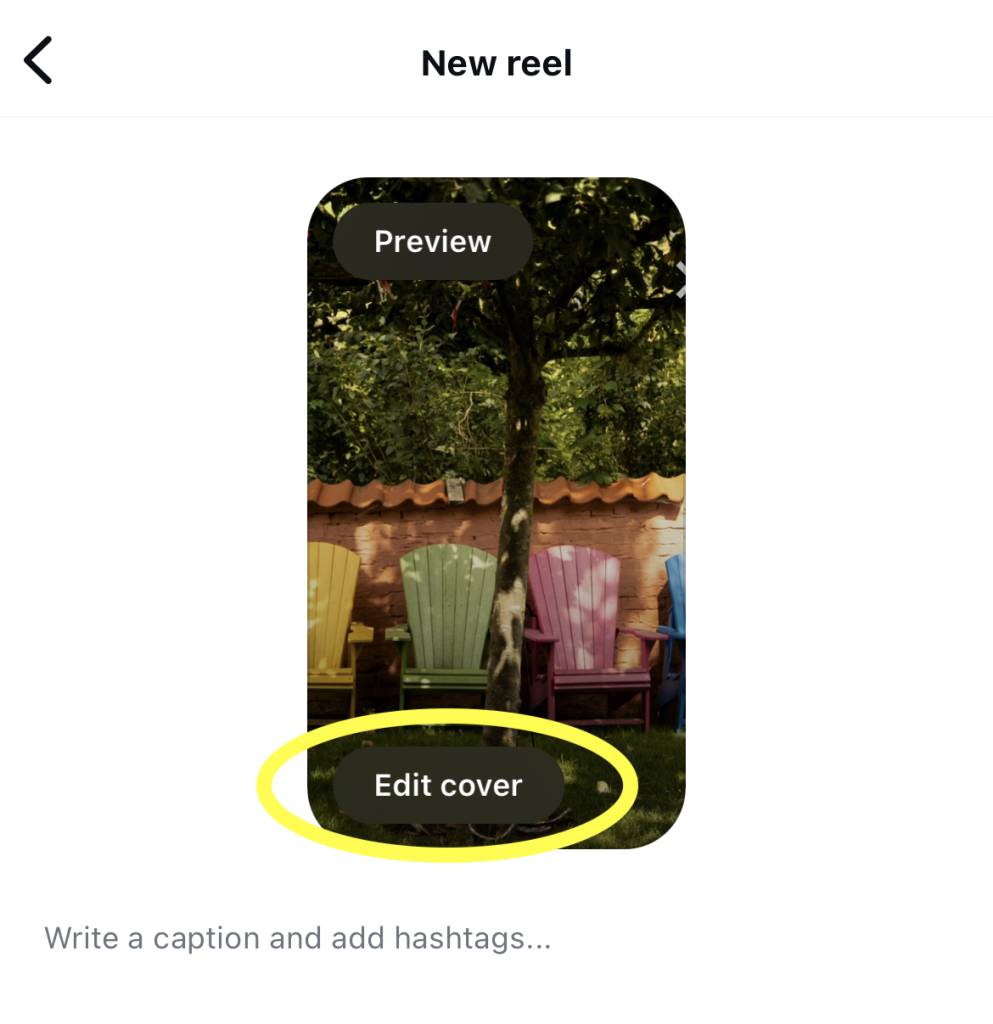
- Pulse Editar cubierta.
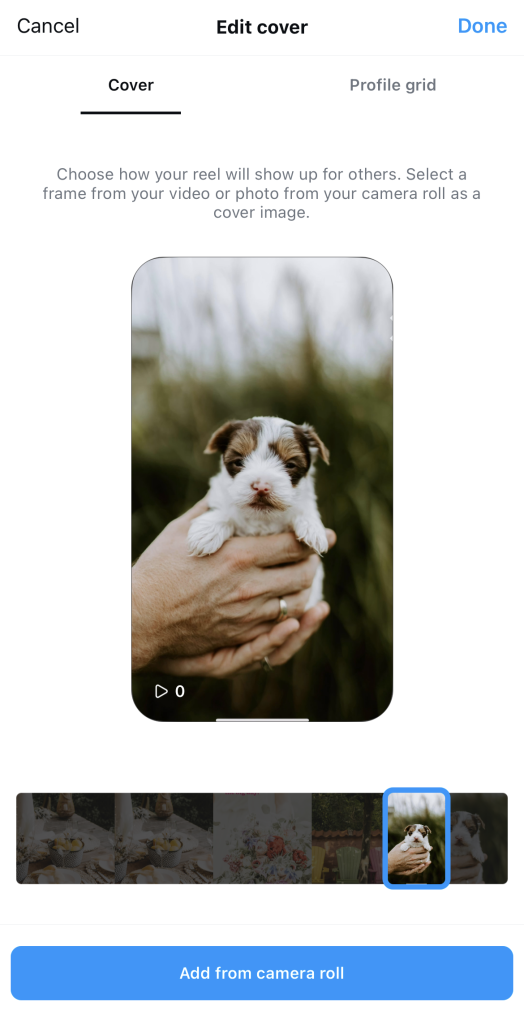
- Arrastra la barra de progreso de Reel para elegir un fotograma para tu foto de portada. A continuación, pulsa «Hecho».
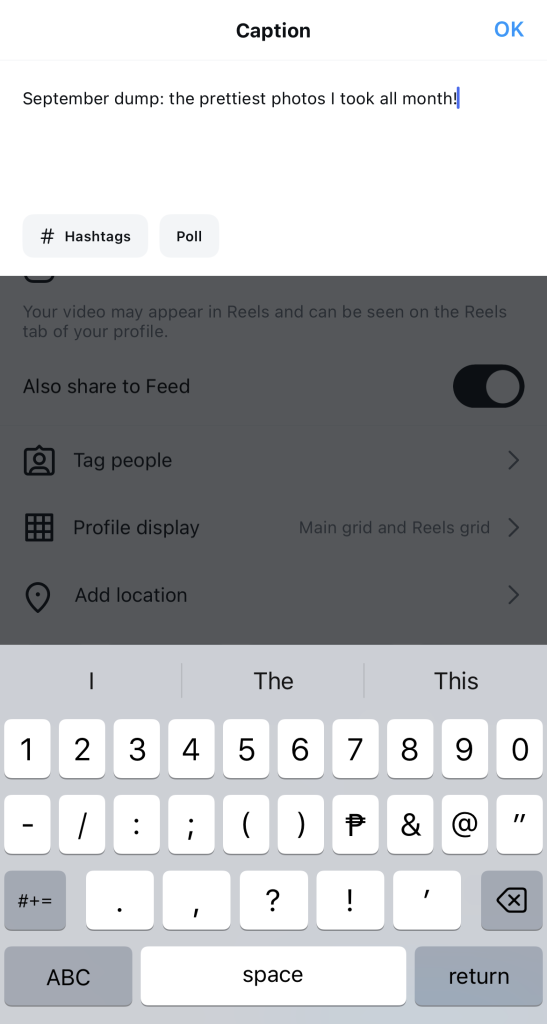
- Escribe un pie de foto creativo y añade los últimos detalles.
- Por último, haz clic en Compartir.
Cómo hacer un carrete con fotos en directo en Instagram
Crear un «Reel» con fotos y vídeos es bastante sencillo. Algunos clips son estáticos, mientras que otros están en movimiento. Pero la versatilidad es aún mayor cuando trabajas con «Live Photos». Con ellas, puedes elegir si quieres que sean imágenes estáticas, clips de vídeo o incluso «Boomerangs».
¿Cómo se hace un carrete Instagram con fotos en directo? Es muy sencillo. Puedes añadir fotos en directo a tu Carrete siguiendo estos sencillos pasos:
- Abra la aplicación Instagram y cree un nuevo Carrete.
- Desliza el dedo hacia arriba para abrir la galería de tu teléfono.
- Pulsa en el menú desplegable "Recientes".
- Seleccione Todos los álbumes.
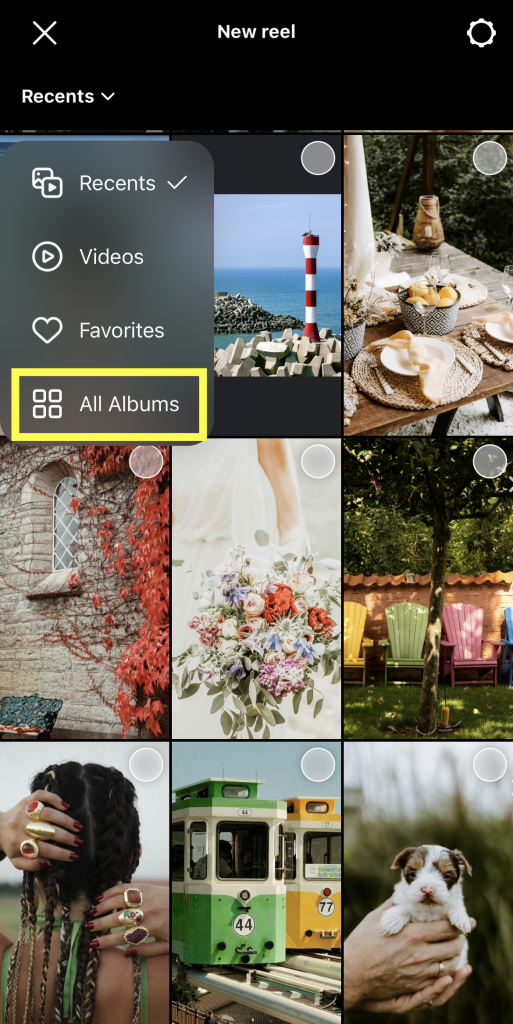
- Desplázate por los tipos de medios y elige Live Photos.
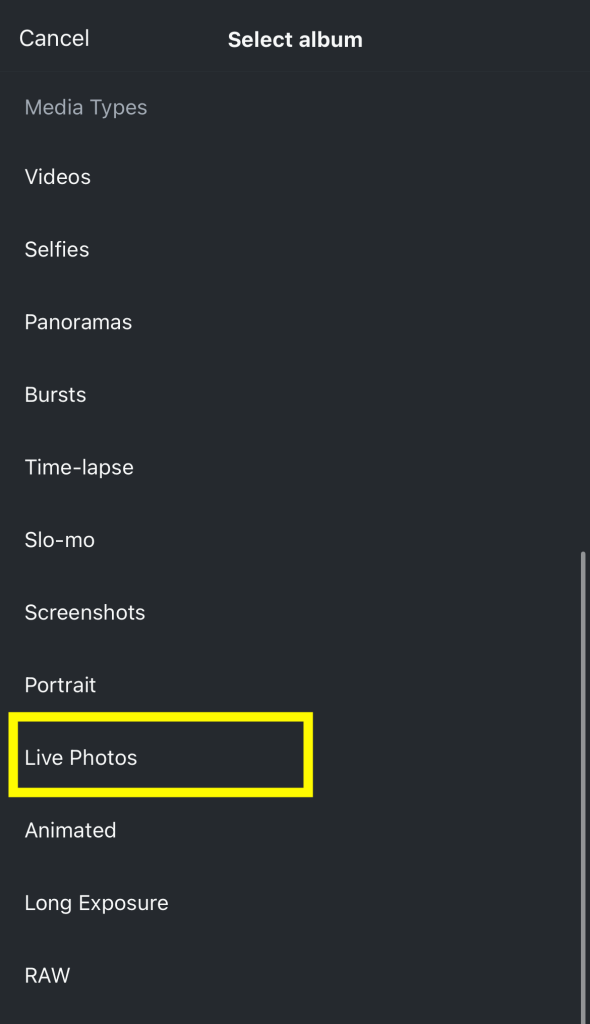
- Elige una foto en directo para añadirla a tu Carrete.
- Selecciona el formato en el que quieres subirlo: una foto o un vídeo «en directo». También puedes modificar la velocidad y el audio de fondo. A continuación, pulsa «Siguiente».
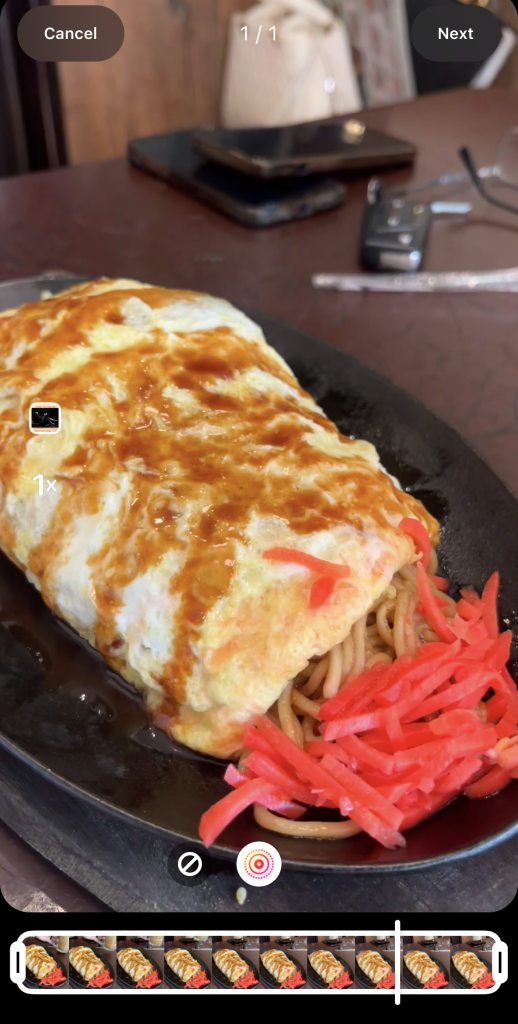
- Pulsa en «Editar vídeo » para añadir música, recortar tus clips, crear superposiciones de texto y mucho más.
- Cuando estés satisfecho con tu Reel, configura su foto de portada y pulsa «Compartir».
Cómo hacer un rollo en bucle en Instagram
¿Alguna vez has visto un Reel que parece reproducirse en bucle? ¿De esos en los que se difumina la línea entre el final del vídeo y el comienzo de la segunda reproducción? ¿Y luego tienes la sensación de estar atrapado viendo el vídeo una y otra vez sin que parezca que vaya a terminar nunca? A estos se les llaman vídeos en bucle, y son unos Reels muy atractivos. Pero quizá te estés preguntando: «¿Cómo puedo crear un Reel que se reproduzca en bucle?»
Los Reels en bucle parecen complicados e intimidantes, pero en realidad son bastante sencillos de hacer. El truco está en planificar cómo el final de tu vídeo se funde a la perfección con el principio. A continuación te explicamos cómo crear Instagram que parezcan reproducirse en bucle eternamente:
- Crea un guión gráfico de cómo será tu Reel. Planifícalo de modo que el principio y el final del vídeo se encuentren en una escena o posición similar.
- Graba los vídeos que necesites para tu Reel.
- Abra Instagram y cree un nuevo Carrete.
- Importa los clips que necesites incluir en tu vídeo.
- Coloca el clip que quieres que se reproduzca en bucle tanto al principio como al final de la línea de tiempo.
- Recorta el primer y el último clip para que la transición sea fluida cuando se reproduzca el vídeo.
- Grabe una voz en off que tenga sentido cuando se reproduzca en bucle para otra transición fluida.
- Añade otros elementos creativos, desde superposiciones de texto hasta efectos de sonido.
- Cuando estés satisfecho con tu Reel, pulsa «Compartir».
Cómo hacer un carrete de diapositivas en Instagram
Los Reels de diapositivas son uno de los tipos de Reels más fáciles y rápidos de crear. En lugar de preocuparte por los vídeos, solo tienes que reunir tus fotos favoritas y juntarlas. Piensa en los Reels de diapositivas como publicaciones de carrusel en movimiento.
Lo único que tienes que hacer es importar tantas fotos como quieras y elegir las transiciones para cada una de ellas. A continuación, añade una música de fondo atractiva que encaje con el ambiente de tu presentación. ¡Y ya está! Ahora ya tienes una presentación para compartir con tus seguidores.
Longitud máxima del carrete Instagram : ¿Qué longitud pueden tener los carretes IG?
Cuando se lanzaron los Reels, solo podían durar un máximo de 15 segundos. Obviamente, eso no es suficiente, teniendo en cuenta lo mucho que a la gente le gusta ver estos vídeos. Por eso, Meta introdujo algunos cambios en la duración máxima de los Reels. Hoy en día, estos vídeos pueden durar hasta 90 segundos.
Un minuto y medio es más que suficiente para que los creadores hagan vídeos entretenidos. Pero si necesitas más tiempo, puedes dividir un vídeo largo en varias partes. ¡Conviértelo en una serie que vayas publicando poco a poco para mantener a tu público en vilo!

Más consejos para hacer virales los carretes
Una cosa es saber cómo crear Reels en Instagram. Pero eso es sólo una parte de la ecuación. También debes prepararlos para que tengan éxito. Aquí tienes algunos consejos para que tus vídeos tengan más posibilidades de conseguir visitas y convertirse en virales:
- Publica cuando tus seguidores estén conectados: el mejor momento para publicar Reels es cuando tus seguidores están activos en la plataforma. De esta forma, la gente ve tu contenido en cuanto se publica, lo que les permite interactuar con él al instante. Cuanta más interacción recibas, más lo destacará el Instagram en el feed.
- Utiliza hashtags diseñados para ayudar a que los Reels crezcan: Instagram los hashtags más populares de Instagram que fomentan la interacción Instagram #likeforlike y #followforfollowback. Pero también hay etiquetas que ayudan a aumentar las visualizaciones de los vídeos, como #trendingreels y #reelsviral.
- Comparte tu Reel en tu Instagram : vuelve a publicar tu Reel en las historias para asegurarte de que tus seguidores no se lo pierdan. Los Reels que generan menos interacción acaban en la parte inferior del feed, y mucha gente no los ve. Por eso, asegúrate de que el Reel también aparezca en tu historia.
- Experimenta con herramientas de edición de terceros: ¿Quieres jugar con efectos de vídeo avanzados o técnicas como el croma y transiciones más fluidas? Utiliza aplicaciones de edición de Reel de terceros. Estas herramientas creativas te ayudarán a crear vídeos perfectos con un toque más profesional.
- Incluye subtítulos y texto superpuesto para facilitar la lectura: Los subtítulos y el texto en el vídeo facilitan la asimilación de los vídeos incluso cuando se ven en silencio. También es estupendo para el público con problemas de audición.
Y así es como se hace un carrete para Instagram.
Los vídeos impactantes, que hacen que los usuarios dejen de desplazarse y que sean entretenidos son el secreto para llamar más la atención en Instagram. Con contenido de vídeo atractivo, puedes mostrar tu creatividad y la personalidad de tu marca, al tiempo que aumentas tu visibilidad en la plataforma. Y merece la pena, porque los Reels se están haciendo incluso más populares que los vídeos de TikTok.
Ahora que ya sabes cómo crear un Reel en Instagram, es hora de dar el siguiente paso. Tienes que hacer todo lo posible para asegurarte de que la gente lo vea. Si te cuesta dar a conocer tu contenido, Path Social ayudarte.
Utilizamos estrategias promocionales orgánicas para atraer a más seguidores potenciales a tu página. Esto te permite conseguir rápidamente más seguidores y más interacción en los Reels en los que tanto te esfuerzas. Hemos ayudado a páginas como «Pushing the Project» a ganar más de 17 000 seguidores, y tú también puedes experimentar ese mismo crecimiento espectacular. ¡Ponte en contacto con Path Social consigue más Instagram hoy mismo!
Preguntas frecuentes
¿Cómo hago carretes en Instagram con fotos y música?
Cuando crees un nuevo Instagram , importa las fotos que quieras en lugar de vídeos. Cuando llegues a la pantalla del editor de Reels, pulsa «Añadir audio» para abrir la biblioteca de música. Desde allí, elige la canción que quieras que suene de fondo mientras se reproducen tus fotos.
¿Cómo puedo compartir mi Instagram Reel con mis seguidores?
Cuando publiques un Reel, aparecerá en el feed principal de tus seguidores. Si quieres asegurarte aún más de que lo vean, también puedes compartir el Reel en tu Story.
¿Cómo convierto mi historia Instagram en un Reel?
Las historias caducan al cabo de 24 horas, así que lo mejor es publicar ese contenido en forma de Reel. Para ello, solo tienes que guardar la historia en el carrete. A continuación, crea un nuevo Reel e importa el vídeo que has guardado. Edita el Reel como quieras y ¡ya puedes publicarlo!





¿Quieres una potente promoción Instagram ?
Amplíe su alcance con estrategias específicas que atraigan la participación y seguidores reales.
Comienza ya tu promoción Instagram