


Cómo ver a amigos cercanos en Instagram: Guía paso a paso

InstagramLa función "Amigos íntimos" te permite crear un grupo selecto de amigos para que vean contenidos exclusivos que el público no puede ver. Es como dar asientos VIP a las personas favoritas de tu círculo social para que vean tus historias y publicaciones privadas.
Pero, ¿y si quiere reevaluar quién está en la lista? ¿Cómo lo haces? Aquí tienes una guía rápida sobre cómo ver Amigos íntimos en Instagram para gestionar tu lista más fácilmente.

Un rápido repaso: ¿Qué son los amigos íntimos en Instagram?
Instagram los usuarios crear listas de «Amigos cercanos» para que puedan compartir contenido exclusivo con un grupo selecto de personas. Esto ofrece a los creadores la oportunidad de publicar contenido personal sin que lo vea todo el mundo. En su lugar, solo lo verán sus mejores amigos y su círculo más íntimo. Es perfecto para contenido espontáneo, sin filtros y divertido que pone de manifiesto la autenticidad de la marca y que no está pulido ni seleccionado.
La forma más habitual de utilizar esta función es publicar «Historias para amigos cercanos», también conocidas a veces como«CFS». Cuando alguien publica una historia destinada exclusivamente a sus amigos Instagram , aparecerá un círculo verde alrededor de su foto Instagram . Y al abrirla, verás un símbolo verde con una estrella en la parte superior de la historia.
Muchas personas utilizan su lista privada de «Amigos cercanos» para compartir contenido en Instagram . Sin embargo, en 2023, Instagram una actualización que permite a los usuarios utilizar esta función también para las publicaciones del feed y los Reels.
La mayoría de los creadores se limitan a Instagram habitual Instagram . Seleccionan fotos con un estilo estético, elaboran un calendario de contenidos y programan publicaciones para el feed público. Pero también pueden incluir las publicaciones de «Amigos cercanos» en su estrategia de contenido. Pueden añadir a su lista de «Amigos cercanos» únicamente a sus seguidores más fieles y activos. Allí, pueden recompensar a esos seguidores con contenido exclusivo, solo para ellos.

Cómo ver amigos cercanos en Instagram: Paso a Paso
¿Tienes una lista de personas que has etiquetado como Amigos íntimos y quieres revisarla y volver a evaluarla? A continuación te explicamos cómo consultar tus Amigos íntimos en unos sencillos pasos desde tu configuración personal:
1. Abra la aplicación Instagram .
2. Ve a tu perfil.
3. Toca las tres líneas horizontales de la parte superior de la pantalla para ir a la configuración.
4. Seleccione Amigos cercanos para ver la lista completa.
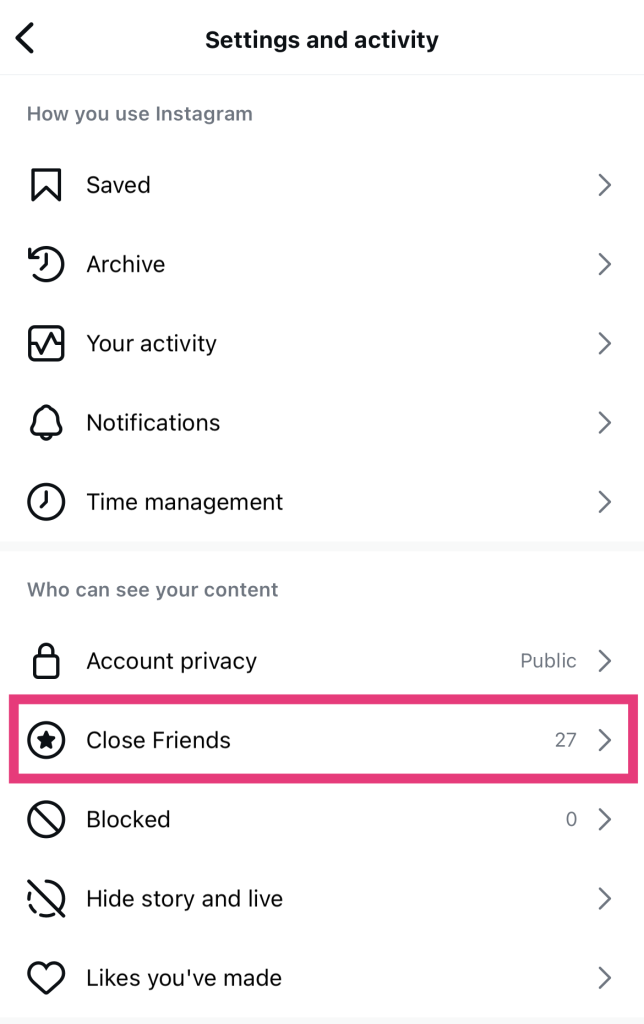
Si ahora mismo tienes una Instagram activa, también puedes ver a tus «Amigos cercanos» desde allí. A continuación te explicamos cómo:
1. Abre tu Historia actual.
2. Pulsa los tres puntos de la parte inferior de la pantalla, marcados como Más.
3. Elija la configuración de la historia.
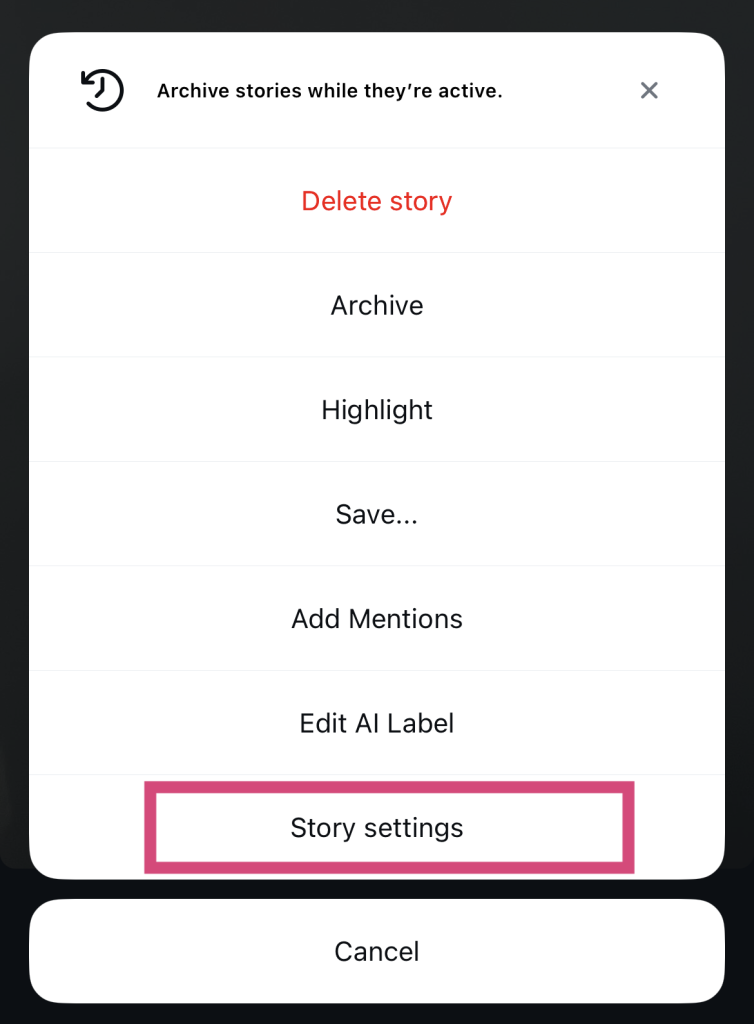
4. Seleccione Amigos cercanos para ver la lista completa.
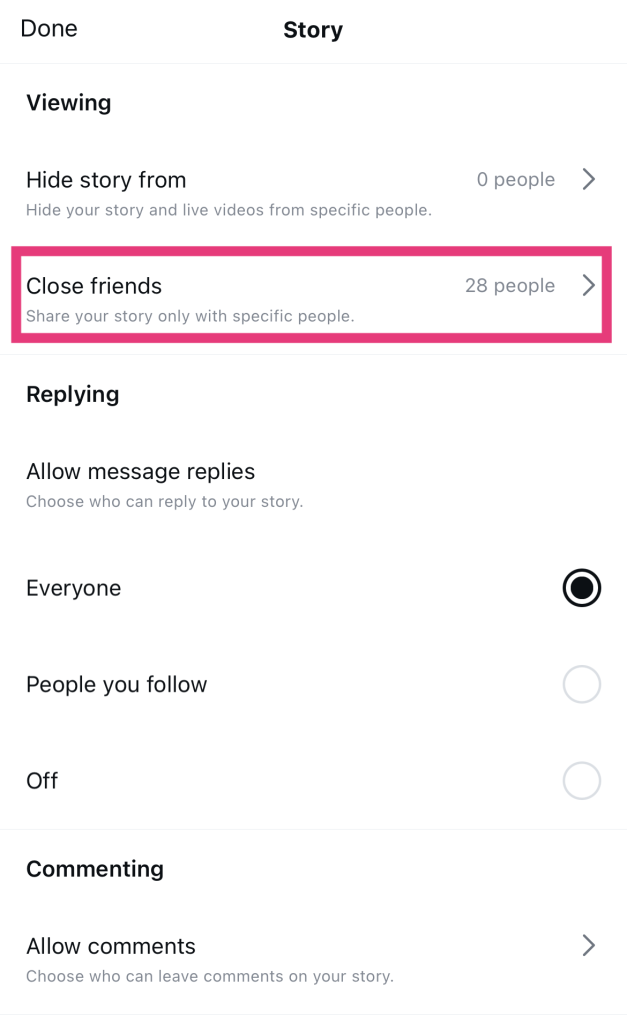
Cómo saber si estás en la lista de amigos íntimos de alguien
¡Pues eso es muy sencillo! Si te preguntas cómo saber si estás en la lista de «Amigos cercanos» de alguien, lo único que tienes que hacer es fijarte en el círculo verde que rodea las «Historias» de esa persona. ¡Es la señal más fácil de detectar para saber que estás en su lista!
Aquí tienes otro consejo para saber en la lista de «Amigos cercanos» de quién apareces en Instagram. Busca el símbolo de la estrella en las publicaciones del feed. En la parte superior de una publicación destinada exclusivamente a «Amigos cercanos» aparece un pequeño rectángulo verde con una estrella blanca.
Instagram no envía notificaciones cuando alguien te añade a sus Amigos íntimos. Pero si buscas estos símbolos verdes, te resultará muy fácil averiguarlo.
¿Puedes salir de la lista de amigos íntimos de alguien?
Por desgracia, no, no puedes salir de la lista de «Amigos cercanos» de otra persona. El propietario de la lista es la única persona que puede decidir quién entra y quién sale de ella.
Pero lo entendemos. A veces, puede resultar un poco incómodo ver contenido de «Amigos cercanos» de alguien con quien no te sientes precisamente cercano. Si de verdad no quieres ver su contenido, siléncialos para que sus «Stories» no aparezcan en tu página de inicio. No te preocupes; Instagram les avisa si lo haces, ¡así que no habrá ningún momento incómodo!

Cómo ver los amigos cercanos de alguien en Instagram Hack: ¿Hay una manera?
Una cosa es ver el contenido de «Amigos cercanos» de alguien en el que tú apareces. Pero es mucho más interesante saber cómo ver los «Amigos cercanos» de otras personas en Instagram. Entonces, ¿es posible?
Lamentablemente, no. Instagram no ofrece actualmente la posibilidad de ver la lista de amigos íntimos de otras personas. Esas listas siguen siendo privadas y sólo para los ojos de su propietario.
Por supuesto, siempre puedes ponerte en modo detective y buscar pistas sobre quién está en la lista de quién. Este es nuestro truco favorito para «ver los amigos cercanos de alguien en Instagramfíjate en quién interactúa con el contenido de sus amigos cercanos.
Si puedes ver las publicaciones o los Reels de la sección «Amigos cercanos» de alguien, echa un vistazo a los «Me gusta» y los comentarios. Solo las personas que figuran en la lista de «Amigos cercanos» del autor pueden acceder a ese contenido. Así que, si pueden interactuar con esas publicaciones, ¡seguro que están en la lista!

¡Acércate a más seguidores haciendo crecer tu página!
Ahora que ya sabes cómo ver a tus «Amigos cercanos» en Instagram, utilízalo como estrategia para fomentar la interacción. Ofrece contenido exclusivo a tus seguidores más fieles para estrechar los lazos con ellos.
¿Quieres aumentar tu número de seguidores y añadir a más personas a «Amigos cercanos» para ofrecerles contenido exclusivo? Path Social ayudarte! Promocionaremos tu página para que llegue a tu público objetivo. Cuanto mayor sea tu visibilidad en Internet, ¡más seguidores conseguirás!
Hemos ayudado a creadores como Margene Beaver a aumentar enormemente el número de cuentas a las que llegan, ¡y podemos hacer lo mismo por ti! Haz crecer tu comunidad y comparte contenido exclusivo con más seguidores gracias a Path Social.
Preguntas frecuentes
¿Por qué estoy en la lista de amigos íntimos de alguien en Instagram?
Normalmente, alguien te añadirá a su lista de «Amigos cercanos» si te considera una persona importante dentro de su círculo social. Es posible que te vea como su mejor amigo o como alguien de plena confianza. Eso hace que se sienta cómodo compartiendo contigo contenido sincero, auténtico y sin filtros en Internet.
¿Cómo sé si alguien ha publicado una Historia de amigos íntimos?
Sabrás que alguien ha publicado una historia de «Amigos cercanos» si ves un círculo verde alrededor de su foto de perfil. Cuando abras Instagram, las historias de «Amigos cercanos» suelen aparecer al principio de la barra de historias.
¿Muestra Instagram Notas de Amigos Cercanos?
Los usuarios pueden publicar Instagram exclusivas para «Amigos cercanos». Por extraño que parezca, no hay ninguna indicación que permita saber si una nota se ha publicado exclusivamente para «Amigos cercanos» o para todo el mundo. Es un poco confuso, pero esperemos que Instagram una actualización que identifique estas notas como «para Amigos cercanos».





¿Quieres aumentar tu Instagram de forma natural?
Descubre una plataforma diseñada para ayudar a los creadores a llegar a seguidores reales y comprometidos, sin atajos.
Explora la plataforma




