


Cómo desactivar la cuenta de empresa en Instagram fácilmente

Las empresas y los creadores aprovechan el ecosistema de marketing de Instagrampara dar a conocer sus productos y servicios. Instagram, por su parte, ofrece herramientas completas para ayudar a las cuentas empresariales a comercializar sus productos. Es más, estos creadores conectan con su público de forma más eficaz para promocionar su marca y ganar popularidad. Sin embargo, con el tiempo, es posible que algunas cuentas empresariales quieran volver a ser cuentas personales por motivos justificados. Por ello, deben conocer bien esta función para saber cómo desactivar la «cuenta empresarial» en Instagram.
Hay varias razones por las que estos usuarios deciden dar este paso. Puede ser para disfrutar de mayor privacidad o para utilizar Instagram sin las herramientas y funciones adicionales. Sea cual sea el caso, hay una serie de pasos prácticos que debes seguir para desactivar un perfil empresarial en Instagram. Sigue leyendo para descubrir por qué y cómo puedes desactivar con éxito tu perfil empresarial de Instagram .

¿Qué es un perfil empresarial Instagram ?
Antes de ver cómo desactivar una cuenta empresarial de Instagram, veamos primero en qué consiste este tipo de cuenta. Una cuenta empresarial de Instagram está pensada para empresas, tanto grandes como pequeñas, y para marcas que desean mostrar sus productos y servicios en Instagram. Grandes marcas como Apple, Nike, Adidas y muchas otras cuentan con perfiles empresariales. Estas tienen acceso a funciones que las cuentas personales no tienen, como las publicaciones promocionadas, la posibilidad de monetización y los botones de contacto.
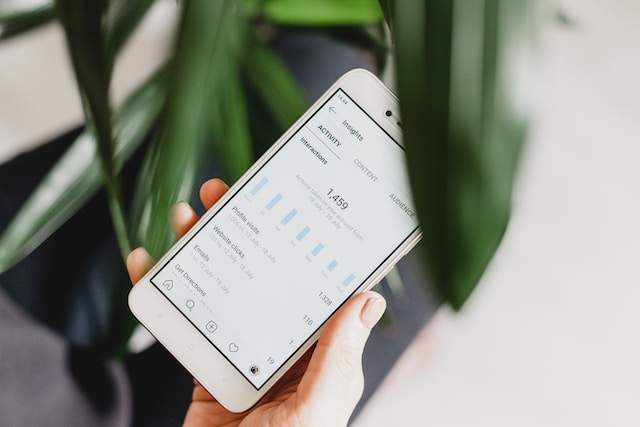
Una de las características más destacadas de una cuenta empresarial de Instagram es la herramienta de análisis Instagram . Esta herramienta proporciona a las empresas datos detallados sobre sus seguidores, como la edad, el sexo, la ubicación y las horas de mayor actividad. Esta información resulta de un valor incalculable a la hora de diseñar estrategias de marketing para llegar a su público objetivo.
Las cuentas empresariales ofrecen la ventaja de poder publicar anuncios para el comercio electrónico y potenciar las publicaciones para lograr un mayor alcance. Además, cuentan con un botón de contacto que ayuda a simplificar las interacciones entre los clientes y la empresa. Este botón puede enlazar con una dirección de correo electrónico, un número de teléfono o una página web, lo que facilita a los clientes ponerse en contacto.
Una cuenta empresarial de Instagram ofrece las herramientas necesarias para la expansión y la interacción con el público. Sin embargo, si en algún momento quisieras volver a una cuenta personal, sigue leyendo para saber cómo hacerlo.
¿Por qué aprender a desactivar la "cuenta de empresa" en Instagram?
Por supuesto, cambiar tu cuenta de Instagram a un perfil empresarial te permite acceder a funciones y herramientas avanzadas de la plataforma. Sin embargo, pueden surgir ciertas circunstancias por las que quieras volver a una cuenta personal. Veamos algunas razones por las que deberías aprender a desactivar tu cuenta empresarial en Instagram.
- Cambio de preferencias: Es posible que, al principio, prefieras tener una cuenta empresarial. Sin embargo, con el tiempo, quizá quieras cambiar y optar por una presencia más informal y personal en Instagram.
- Preocupaciones sobre la privacidad: La privacidad es importante para muchos usuarios. Las cuentas empresariales en Instagram suelen exigir que compartas información de contacto y datos de ubicación, lo que a veces puede resultar incómodo. Sin embargo, volver a una cuenta personal te permite mantener un mayor control sobre tu información personal.
- Reducir las estadísticas y las notificaciones: Aunque las estadísticas de Instagram ofrecen datos valiosos, pueden resultar abrumadoras para quienes no las utilizan para mejorar su estrategia en redes sociales. Por lo tanto, para disfrutar de una experiencia más relajada en Instagram , resulta esencial cambiar a una cuenta personal.
- Prueba y error: A veces , la curiosidad nos lleva por caminos inesperados. A veces, creas una cuenta empresarial por curiosidad, pero luego no sabes muy bien cómo utilizarla de forma eficaz. En esos casos, desactivar tu cuenta empresarial de Instagram puede ser la decisión más acertada.
- Cambio en la estrategia empresarial: Es posible que decidas tomar un rumbo diferente en tu estrategia en redes sociales. Teniendo en cuenta ese cambio, resulta lógico recuperar el control de tu cuenta.
Saber cómo cambiar de una cuenta empresarial a una personal ofrece flexibilidad. Permite a los usuarios adaptar su experiencia en Instagram a sus necesidades y preferencias cambiantes. Por lo tanto, la opción de cambiar de cuenta permite a los usuarios gestionar su identidad en línea como mejor les parezca.

Cómo cambiar a una cuenta personal en Instagram
Tras analizar detenidamente el «porqué», es hora de aprender a desactivar una cuenta empresarial en Instagram. Aprender a cambiar a una cuenta personal en Instagram es muy sencillo. En solo unos minutos, podrás disfrutar de la sencillez y la privacidad de una cuenta personal. A continuación te explicamos cómo hacerlo:
- Abre la aplicación móvil Instagram y visita tu perfil. Toca el icono de opciones en la esquina superior derecha.
- Aparecerá un menú en la parte inferior de la pantalla. Selecciona "Configuración", que debería ser la primera opción de la lista.
- En la sección «Configuración», desplázate hacia abajo hasta que veas la sección «Para profesionales».
- Seleccione "Tipo de cuenta y herramientas".
- Entre las opciones disponibles, selecciona «Cambiar a cuenta personal».
- Aparecerá un mensaje de confirmación en el que se explica qué ocurre al realizar este cambio. Cuando estés listo, acepta el cambio.
¡Ya está! Tu perfil empresarial ahora es un perfil personal. Conservarás todos tus seguidores, publicaciones y contenido. Sin embargo, algunas funciones específicas para perfiles empresariales, como las estadísticas de « Instagram », ya no estarán disponibles. Si alguna vez cambias de opinión, recuerda que puedes volver al perfil empresarial cuando quieras.
Instagram Cuenta Privada: Mejora tu presencia
Ahora has vuelto a utilizar una cuenta personal de Instagram. Puedes disfrutar de las funciones básicas de Instagram, como publicar fotos y vídeos. Pero eso no es todo. Supongamos que te preocupa mucho la privacidad y que pasar de un perfil empresarial a uno personal no te basta. En ese caso, Instagram ofrece la opción de cuenta privada. Pero, ¿qué significa tener una cuenta privada en Instagram ?
Una cuenta privada significa que solo los usuarios aprobados pueden seguirte y ver tu contenido. Supongamos que alguien que no te sigue intenta ver tu cuenta privada de Instagram y tus publicaciones. En ese caso, verá un mensaje que indica que tu cuenta es privada.
Hay varias razones por las que podrías optar por una cuenta privada en Instagram, entre ellas:
- Mayor privacidad: Una cuenta privada te da un mayor control sobre quién puede ver tus contenidos. Esto es especialmente importante si quieres mantener tu vida personal separada de tu presencia online.
- Público seleccionado: Una cuenta privada te permite elegir quién puede seguirte. Es ideal para quienes desean que su lista de seguidores se limite exclusivamente a amigos, familiares o una comunidad concreta.
Si quieres configurar tu cuenta de Instagram como privada, sigue estos sencillos pasos:
- Abra la aplicación Instagram en su dispositivo móvil.
- Toca el icono de perfil en la esquina inferior derecha para acceder a tu perfil.
- Toca las tres líneas horizontales de tu página de perfil en la esquina superior derecha para abrir el menú. Selecciona "Configuración y privacidad".
- Desplázate hacia abajo hasta la sección «Quién puede ver tu contenido» del menú «Ajustes». A continuación, pulsa en «Privacidad de la cuenta».
- Pulse el botón "Cuenta privada". Instagram emitirá un aviso. Confírmalo pulsando "Cambiar a privada". ¡Listo! Ya tienes una cuenta IG privada.
Pasos prácticos a tener en cuenta después de desactivar su cuenta de IG Business
Ya has vuelto con éxito a tu cuenta personal. Sin embargo, hay algunas cosas que debes tener en cuenta ahora que empiezas una nueva etapa en Instagram:
- Revise su configuración de privacidad: Comprueba tu configuración de privacidad y asegúrate de que se ajusta a tus preferencias. Puedes hacer que tu cuenta sea privada para mayor privacidad.
- Actualiza tu biografía: Es posible que tu biografía en Instagram aún contenga información relacionada con la empresa. Tómate un momento para actualizarla y reflejar tus nuevos intereses o aficiones.
- Interactúa con tus seguidores: Tu público objetivo ha disfrutado viendo tus contenidos relacionados con la empresa. Ahora es el momento de interactuar con ellos y darles a conocer tu cambio actual.
- Descubre las nuevas funciones: Aunque tengas una cuenta personal, puedes seguir utilizando las funciones de Instagram, como las «Stories» y los «Reels». Aprovecha esta oportunidad para explorar diferentes aspectos de la plataforma.

Haga crecer su cuenta personal o empresarial con Path Social
Desactivar una cuenta empresarial en Instagram es bastante sencillo. Te permite recuperar el control, la privacidad y disfrutar de una experiencia más sencilla. Además, considerar la opción de la cuenta privada puede mejorar tu experiencia en Instagram y hacer que tu presencia en línea sea más íntima.
Tanto si tienes una cuenta personal como una cuenta de empresa, aumentar tu número de seguidores en Instagram puede resultar complicado. Sin embargo, puedes potenciar el crecimiento orgánico de tu Instagram con servicios innovadores como Path Social.
Path Social Es un servicio de vanguardia que te pone en contacto con seguidores reales de Instagram que están genuinamente interesados en tu contenido. Utiliza técnicas avanzadas de segmentación para conectarte con usuarios que comparten tus intereses y pasiones. A diferencia de los bots de redes sociales o los métodos de spam que utilizan otras plataformas, Path Social se centra en un crecimiento orgánico y auténtico. Puedes aprovechar las funciones premium de Path Social para hacer crecer rápidamente tu cuenta.
Ya has aprendido a desactivar la cuenta empresarial en Instagram; ahora, céntrate en crear y programar contenido increíble para tu público. Además, con servicios como Path Social a tu disposición, tu contenido llegará al público adecuado. ¿Listo para potenciar tu presencia en redes sociales en Instagram? Regístrate y empieza a aumentar tus seguidores en Instagram con Path Social hoy mismo.





¿Quieres aumentar tu Instagram de forma natural?
Descubre una plataforma diseñada para ayudar a los creadores a llegar a seguidores reales y comprometidos, sin atajos.
Explora la plataforma




