Cómo utilizar una herramienta de exportación de seguidores de IG: Conoce a tu público

Es fácil obsesionarse con si el número de seguidores en Instagram aumentando. No hay nada más satisfactorio que ver cómo esa cifra sube cada vez más. Pero no siempre se trata tanto del número como de la calidad de tus seguidores. Entonces, ¿quién te sigue realmente? ¿Son fans de verdad o cuentas falsas y de spam? Eso es algo que puedes comprobar con una herramienta de exportación de seguidores de Instagram.
Exportar tu lista de seguidores te brinda la oportunidad de revisar los nombres de todas las personas que siguen tu página. Te ayuda a conocer mejor a tus seguidores. Al mismo tiempo, los datos que obtienes de ella te permiten ajustar y perfeccionar tu estrategia en redes sociales.
¿No sabes exactamente cómo funciona una herramienta de exportación de seguidores? Conozcamos a fondo esta herramienta esencial de las redes sociales.

¿Por qué necesita ver la lista de seguidores de un usuario?
Hay muchas razones por las que, como creador, resulta útil consultar tu lista de seguidores. Al visualizar en una hoja de cálculo quiénes son tus seguidores, podrás conocerlos mejor y hacerte una idea de la calidad de tu comunidad de seguidores. Estas son solo algunas de las cosas que puedes deducir con solo analizar una lista de seguidores exportada:
- Datos demográficos de la audiencia: Echar un vistazo a los perfiles de tus seguidores te ayuda a conocer los datos demográficos de tu comunidad, como su edad, género y ubicación. Esto te permite saber a qué tipo de personas estás atrayendo en Internet.
- Cuentas falsas o fantasma: Según Buffer, alrededor del 9,5 % de Instagram son cuentas falsas. Si te tomas la molestia de analizar el perfil de cada seguidor, podrás detectar cuáles son los seguidores falsos. Para identificarlos, fíjate en nombres de usuario extraños o incoherentes, fotos de perfil en blanco y un número reducido de seguidores y de personas a las que siguen.
- Seguidores activos y comprometidos: Echar un vistazo a todos tus seguidores te permite conocer mejor a aquellos seguidores valiosos que interactúan con tu contenido.
- Usuarios que han dejado de seguirte: Si exportas regularmente tu lista de seguidores, puedes comparar la lista nueva con la antigua para detectar quiénes han dejado de seguirte. Esto te ayuda a identificar quién ha dejado de seguirte (quizás por falta de interés) y cuándo (para ver qué pudo haberlo provocado).
Gracias a esta valiosa información, podrás tomar decisiones mejores y más fundamentadas sobre tu estrategia en redes sociales de cara al futuro. Podrás adaptar tu contenido de forma específica a tus seguidores, lo que te permitirá generar una interacción significativa con tu contenido.
Cómo exportar seguidores de Instagram con la herramienta de descarga de datos de IG
La forma más sencilla de exportar tus seguidores es utilizando la función integrada Instagramque te permite descargar tus datos personales. A continuación te explicamos cómo hacerlo, paso a paso:
1. Abre la aplicación Instagram y ve a tu perfil.
2. Toque el menú de hamburguesa (el que tiene tres líneas horizontales) en la esquina superior derecha de su perfil. Accederás a la configuración de tu cuenta.
3. Seleccione el Centro de Metacuentas en la parte superior de la configuración.
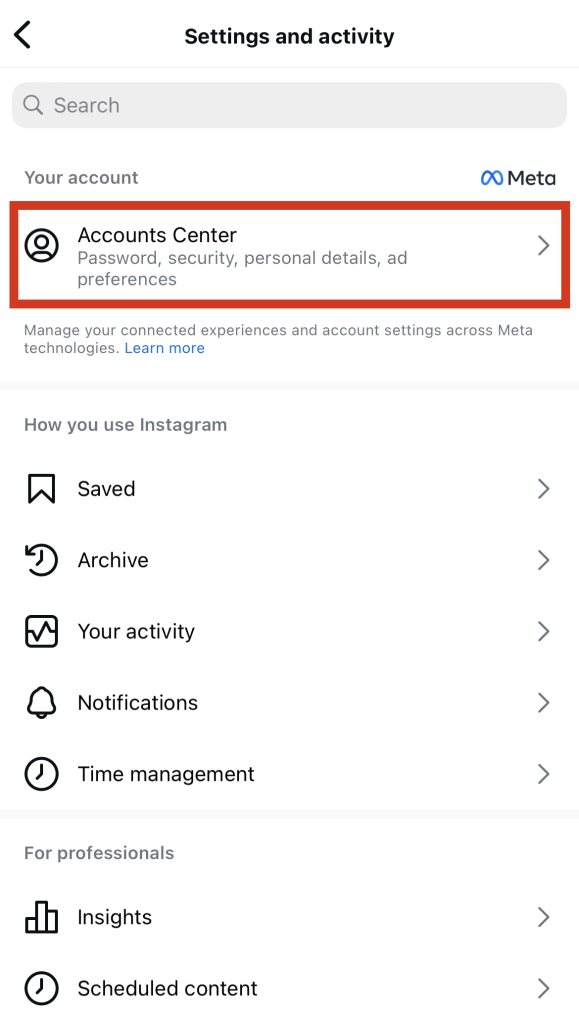
4. En "Configuración de la cuenta", toca Tus datos y permisos.
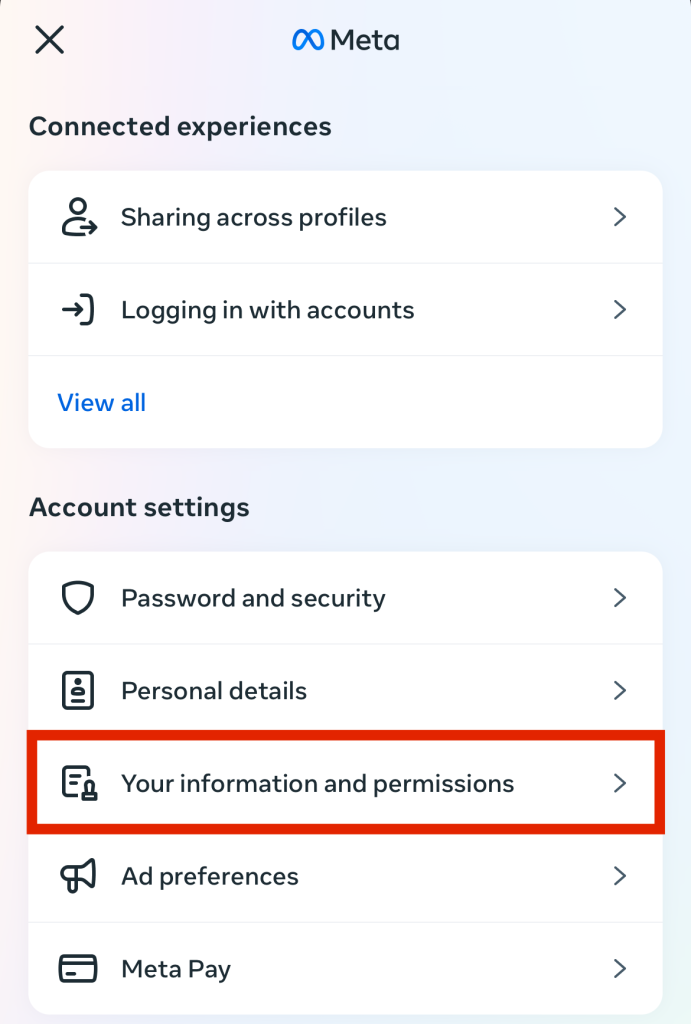
5. Seleccione Descargar su información.
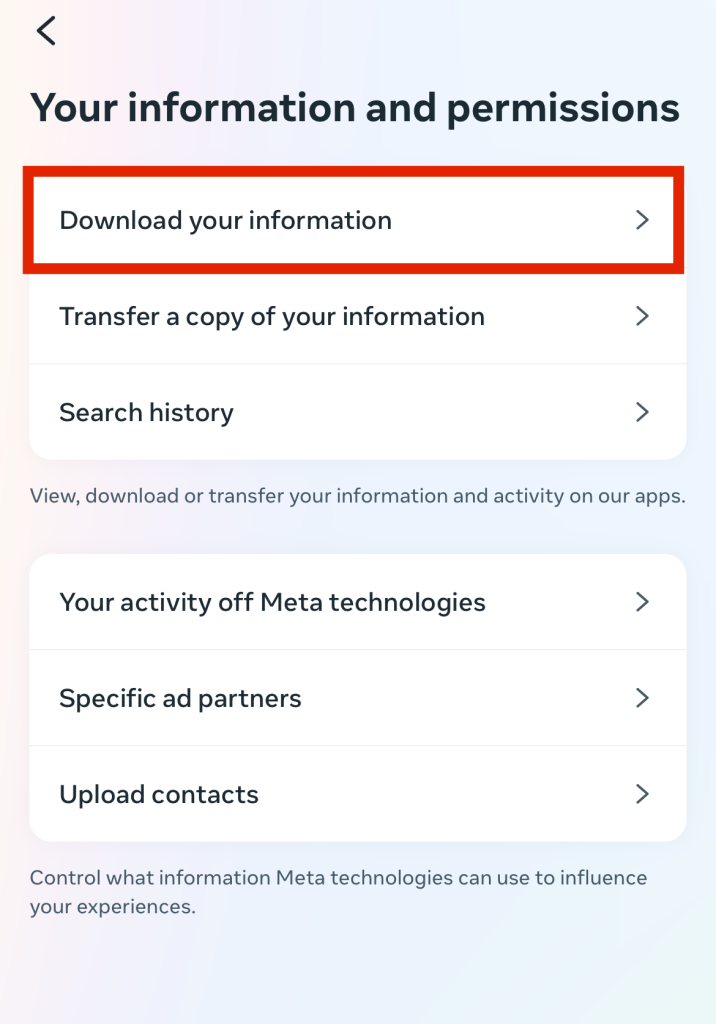
6. En la página siguiente, verás todas tus descargas de datos actuales y programadas. Pulsa en «Descargar» o «Transferir información» para realizar una nueva solicitud.
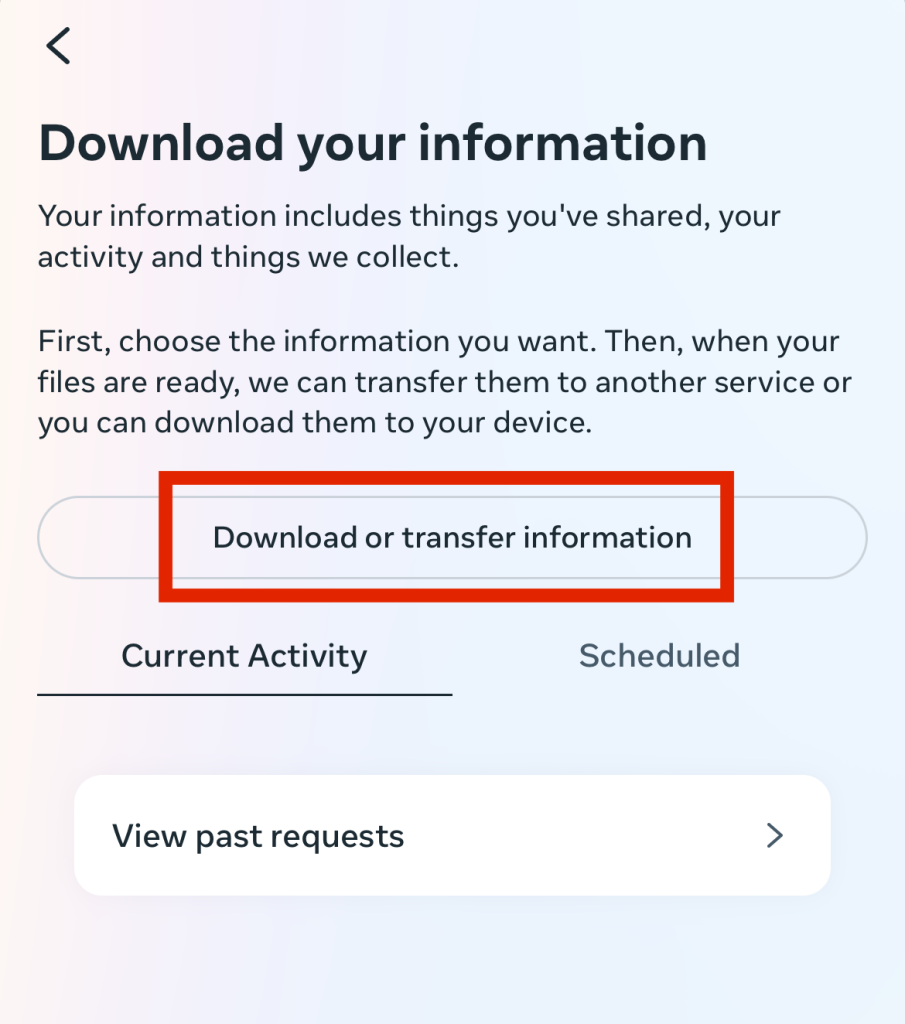
7. Si tienes varias cuentas, elige la cuenta cuya lista de seguidores quieras exportar. A continuación, pulsa «Siguiente».
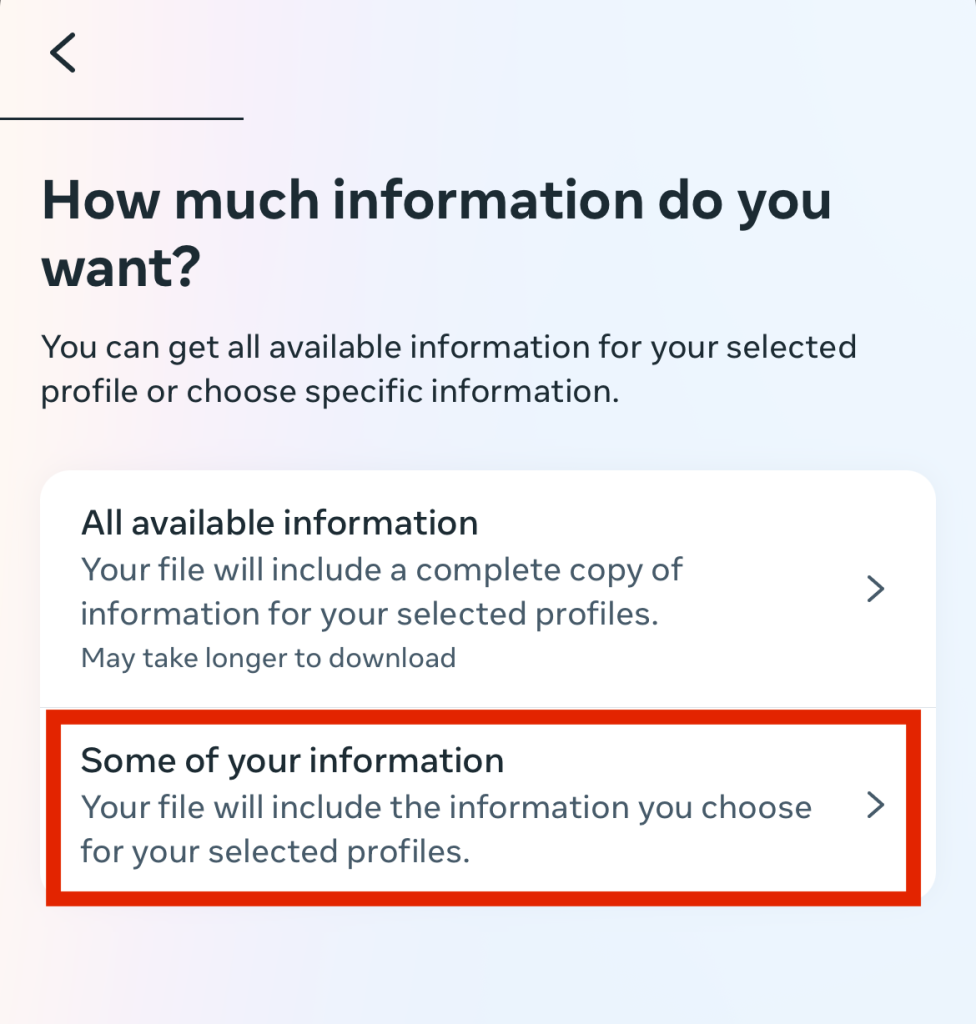
8. Seleccione Parte de su información.
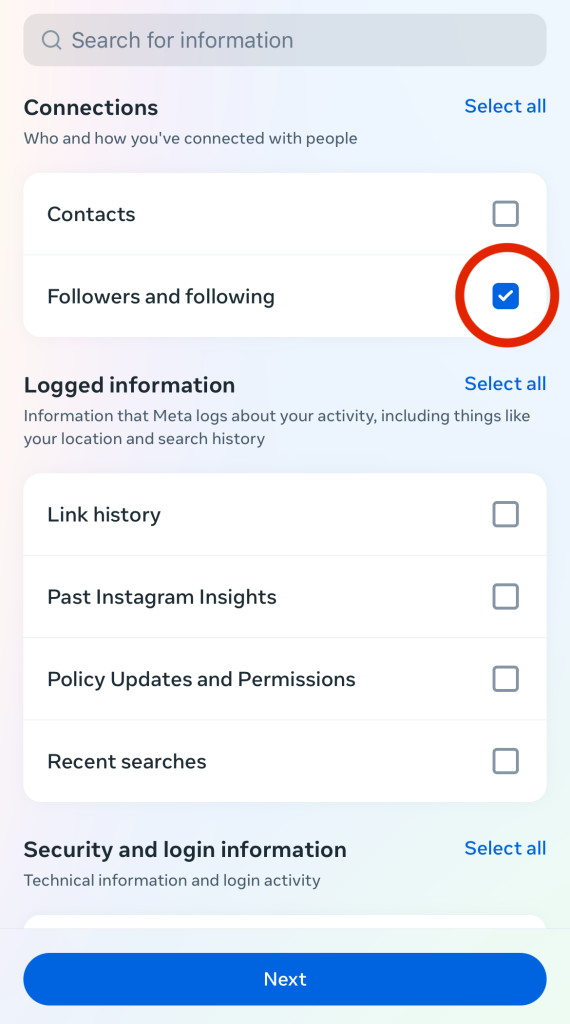
9. En «Conexiones», selecciona «Seguidores y personas a las que sigues». A continuación , pulsa «Siguiente».
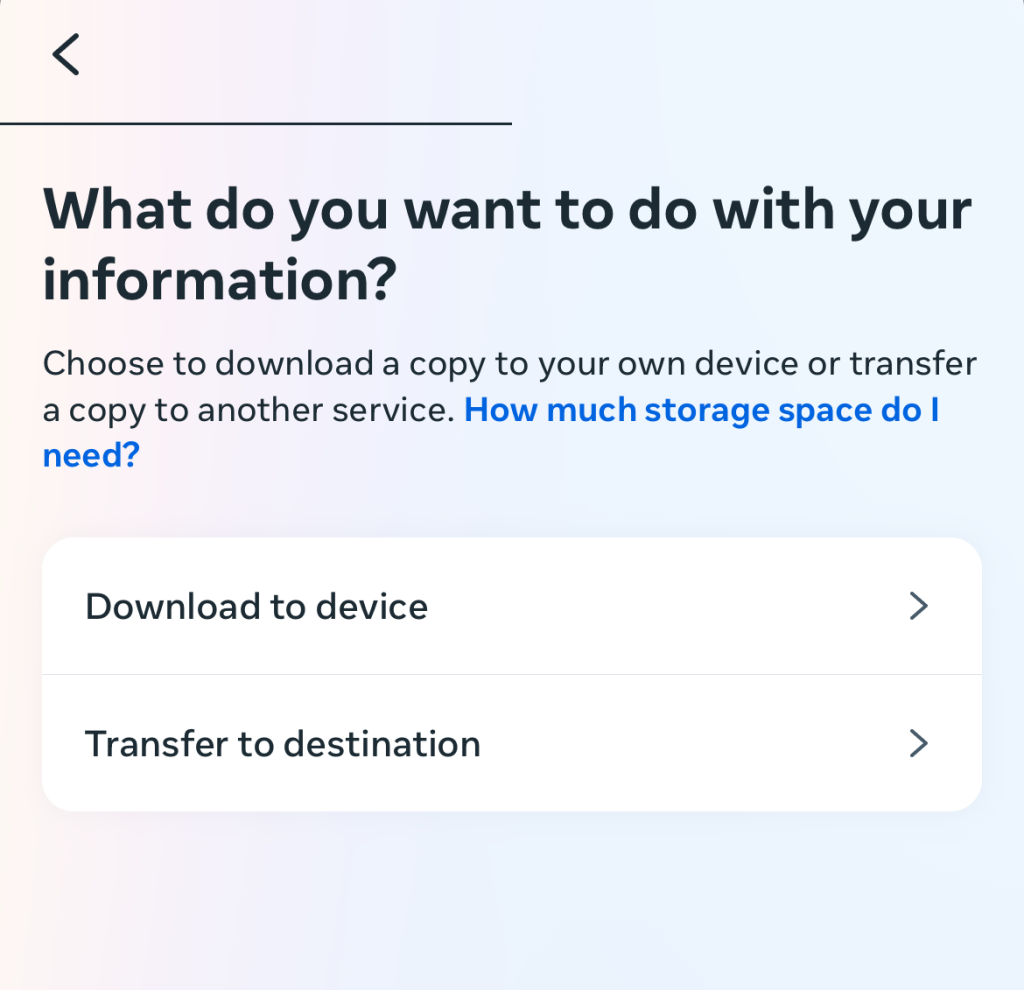
10. Elige si quieres descargar el archivo en tu dispositivo o transferirlo a otro destino, como Dropbox.
11. Pulse Crear archivos.
12. Espera a que Instagram te Instagram que el proceso de exportación ha finalizado. A partir de ahí, podrás descargar un archivo Excel o CSV con una lista de todos tus seguidores.
Cómo utilizar una herramienta de exportación de seguidores de IG para obtener datos más detallados sobre los seguidores
Exportar tu lista de seguidores directamente desde Instagram es ideal si quieres ver a tus propios seguidores. Pero, ¿y si quieres ver la lista de seguidores de otra marca o de otro creador? Instagram permite a los usuarios descargar sus propios datos personales. Entonces, ¿cómo puedes ver los seguidores de otra persona?
Ahí es donde entran en juego las herramientas de exportación de seguidores de IG de terceros. Estas aplicaciones y extensiones de exportación te permiten extraer los datos de seguidores de cualquier persona en la plataforma. Es estupendo si quieres comparar los seguidores de alguien con los tuyos o dirigirte a los seguidores de un competidor para determinados proyectos.
Hay muchas opciones de herramientas de exportación de terceros entre las que elegir. Algunas se presentan en forma de páginas web, como la herramienta de LinkedRadar, o de extensiones populares para el navegador, como IGFollow e IGExport.
Algunas de estas herramientas tan útiles ofrecen mucho más que los nombres de los seguidores de una persona. También muestran información adicional, como las URL de sus perfiles, el número de seguidores, el estado de verificación y mucho más. Es perfecto para hacerse una idea clara de cómo se presenta cada perfil en Instagram.
Así es como funciona normalmente el uso de una herramienta de exportación de seguidores IG de terceros:
1. Abre el programa, la página web o la extensión del navegador que hayas elegido.
2. Indique el nombre de usuario de la persona cuya lista de seguidores desea exportar.
3. Pulsa el botón «Exportar» o su equivalente, dependiendo de la herramienta que estés utilizando.
4. Espere a que la herramienta analice los datos y genere el archivo CSV o la hoja de cálculo que contiene la lista de seguidores.
5. Descarga el archivo y consulta toda la lista de seguidores de ese usuario.
¿Es segura la herramienta de exportación de seguidores de IG?
Vamos a ser sinceros contigo. Utilizar una herramienta para exportar seguidores de Instagram no es precisamente lo más seguro del mundo. Siempre existe el problema de exportar datos de las cuentas de otras personas y de utilizar herramientas de terceros que no están afiliadas a Instagram. Hay quien considera que esto supone una infracción de las condiciones de uso Instagram, sobre todo teniendo en cuenta que la plataforma está tomando medidas drásticas contra la violación de la privacidad y la extracción de datos.
Eso significa que utilizar herramientas de exportación de terceros puede acarrearte problemas con la plataforma. Quizás te lo perdonen con una advertencia o un «shadowban» temporal. Pero si abusas de estas herramientas de terceros no autorizadas y las utilizas con demasiada frecuencia, podrías acabar con la cuenta suspendida. Por lo tanto, sé lo más prudente posible al utilizar estas herramientas.
Analizar a tus seguidores actuales es divertido, pero atraer a otros nuevos es más importante
Es increíblemente fascinante revisar tu lista de seguidores y ver a todas las personas que han mostrado su apoyo a tu página. Es una forma estupenda de obtener nueva información sobre tu público y evaluar la calidad de tu comunidad de seguidores en general. A continuación, a partir de los datos que recopiles, podrás ajustar tus estrategias Instagram para adaptarlas a tus seguidores.
Pero no te quedes estancado analizando a tus seguidores actuales con una herramienta para exportar seguidores de Instagram. Es igual de importante centrar tus esfuerzos en atraer nuevos seguidores a tu página. Para eso, Path Social tu mejor aliado.
Nuestro equipo utiliza algoritmos basados en inteligencia artificial para promocionar de forma orgánica tu contenido entre tu público objetivo. Potenciamos tu visibilidad en Instagram, dándote a conocer a nuevos seguidores potenciales. ¡Eso se traduce en más seguidores, más «me gusta» y más éxito en Internet!
Hemos ayudado a miles de marcas a hacerse famosas rápidamente. Fíjate, por ejemplo, en «Beauty of Baking», una página que consiguió 19 000 nuevos seguidores con nuestra ayuda. ¡Mejora tu Instagram y consigue más seguidores con Path Social!
Preguntas frecuentes
¿Qué hace la herramienta de exportación de seguidores IG?
Los servicios de exportación de seguidores extraen la lista completa de seguidores de cualquier cuenta. Aunque Instagram cuenta con una función integrada Instagram permite descargar esta lista, también puedes utilizar herramientas de terceros. Si optas por estas últimas, es posible que veas información adicional en la lista, además de los nombres de usuario de los seguidores. Esto incluye enlaces a su perfil, foto de perfil, fecha en la que te siguieron y mucho más.
¿Hay alguna forma de exportar una lista de seguidores de Instagram ?
Para obtener esta lista, puedes utilizar la función de descarga de datos de Instagramo una herramienta de exportación de terceros. Ambas opciones te proporcionarán una lista completa de los seguidores de un perfil de Instagram compilada en una hoja de cálculo.
¿Las herramientas de exportación de IG avisan a la persona cuyos seguidores exportas?
No, no lo hacen. Estas herramientas no están vinculadas directamente al perfil cuyos seguidores estás consultando. Simplemente funcionan en segundo plano, por lo que no tienen forma de enviar notificaciones a esos usuarios. Así que, si estás echando un vistazo a la lista de seguidores de alguien, no te preocupes: ¡no hay ningún riesgo de que te descubran!





¿Quieres aumentar tu Instagram de forma natural?
Descubre una plataforma diseñada para ayudar a los creadores a llegar a seguidores reales y comprometidos, sin atajos.
Explora la plataforma