



Los creadores de contenido y los influencers siempre buscan nuevas formas de mejorar sus perfiles en línea y sacar el máximo partido a su influencia. Dada la enorme base de usuarios Instagramy su importancia como plataforma para el intercambio de contenido visual, la plataforma ha lanzado una aplicación genial llamada Instagram Studio.
Este blog te guiará en el uso eficaz de Creator Studio Instagram para gestionar tu perfil en Instagram Lite y aprovechar al máximo sus funciones.
Pero antes, veamos cuáles son las características específicas de Instagram Studio.
Se trata de una plataforma que ofrece a los creadores de contenido y a los influencers una serie de herramientas e información útiles para mejorar sus perfiles de Instagram . Además, facilita la gestión de varias cuentas, la programación de contenidos, el análisis de indicadores clave de rendimiento (KPI) y la monetización. Esta plataforma es fácil de usar y simplifica el flujo de trabajo de los influencers, ya que elimina la necesidad de recurrir a software o servicios adicionales.
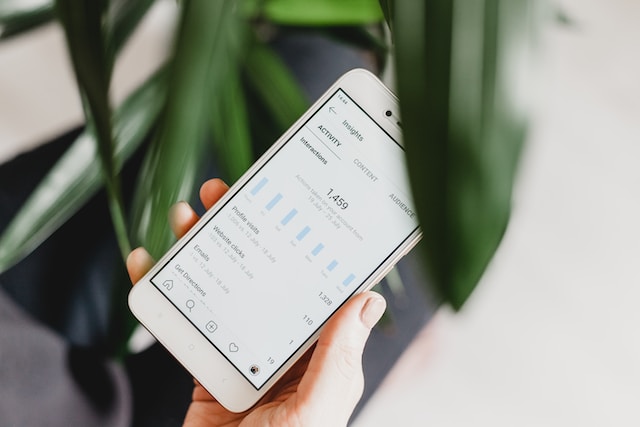
¿Qué es Instagram Creator Studio y cuáles son sus ventajas?
Para entender mejor cómo utilizar esta herramienta tan extendida, empecemos por descubrir qué es Instagram Studio. Cuando se lanzó por primera vez, Facebook Creator simplificó el proceso de producción para los creadores de contenido, los administradores de redes sociales y las empresas gracias a una herramienta integral.
Creator Studio es ahora un centro multifuncional en el que los usuarios pueden consultar sus mensajes, publicar nuevas entradas y programar publicaciones futuras. Instagram incorporado a la plataforma debido a su potencial como herramienta de marketing para creadores de contenido, influencers y pequeñas empresas.
Instagram Creator Studio alberga herramientas que mejoran la administración y el análisis de cuentas. Veamos con más detalle algunas de sus funciones más interesantes.
Administración sencilla de contenidos
Con Creator Studio Instagram, puedes gestionar todas tus Instagram desde un único y práctico lugar. Los vídeos de IGTV, las imágenes y las historias se pueden ver y gestionar fácilmente a través de una interfaz de escritorio optimizada.
Esto significa que puedes dejar a un lado tu dispositivo móvil y disfrutar de una experiencia de navegación más tradicional, como la que ofrecen los ordenadores de sobremesa o portátiles. Creator Studio te ayuda a ahorrar tiempo y esfuerzo a la hora de gestionar tu material, tanto si quieres crear un estilo visual uniforme como si deseas revisar tus archivos.
Planificación de contenidos oportuna y eficaz
La posibilidad de programar el contenido con antelación es una de las características más destacadas de Creator Studio. Instagram los profesionales del marketing programar publicaciones con antelación, lo que garantiza una presencia constante y dinámica en la plataforma. Se trata de una opción muy útil para los expertos en sectores con gran demanda que necesitan más tiempo o recursos para publicar al instante.
Si planificas, podrás mantener un calendario de publicación constante, aumentar la participación de tu público y difundir aún más tus mensajes.
Perspectivas valiosas y trabajo analítico
Para que el marketing tenga éxito, es necesario conocer a fondo el público objetivo y los gustos de cada persona. Instagram Studio te ofrece información detallada sobre tu Instagram y tu contenido Instagram . Analiza métricas como el alcance, la interacción y la conversión para conocer mejor a tu público y saber qué tipo de contenido le resulta más interesante. Esta información te permite ajustar tu estrategia de contenido, crear publicaciones más interesantes y fomentar el diálogo con Instagram y seguidores más cercanos Instagram .
Asociaciones de marcas y monetización
Creator Studio para Instagram permite a los usuarios con más de 10.000 seguidores ganar dinero con anuncios y organizar la colocación de productos.
Esta herramienta te permite explorar posibles acuerdos con marcas, organizar colaboraciones y gestionar de forma eficaz el contenido patrocinado. Además, permite a Instagram obtener ingresos a través de colaboraciones inteligentes con marcas.
Fácil gestión multicuenta
Instagram Creator Studio mejora no sólo el proceso de marketing individual, sino también la eficacia de los equipos de marketing. InstagramEl cliente de escritorio de Creator Studio permite a numerosos miembros del equipo ver y administrar las cuentas desde una ubicación central.
Creator Studio facilita la coordinación de todas las tareas relacionadas con Instagram , desde la concepción de ideas hasta la programación y el seguimiento de los resultados.
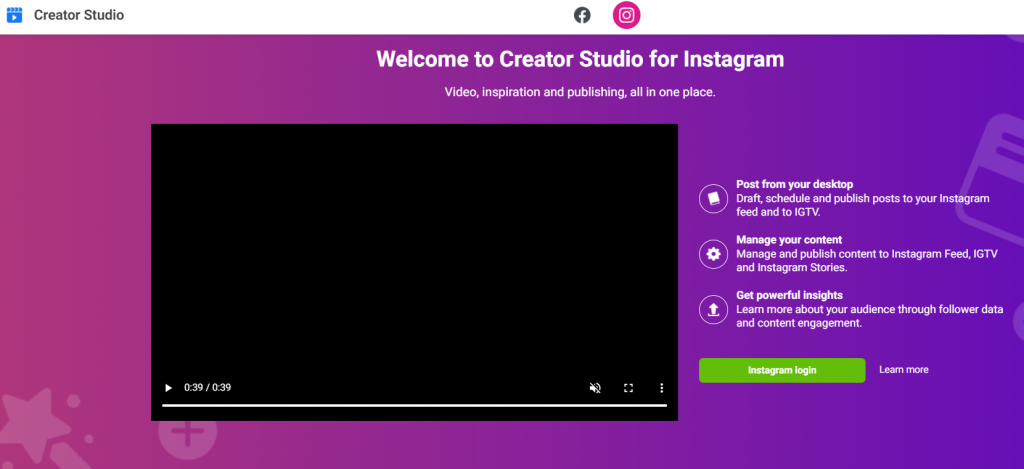
Cómo conectar Creator Studio a Instagram
Si no sabes cómo conectar Creator Studio a Instagram, vamos a repasar algunos pasos fáciles y sencillos. Pero ten en cuenta que debes tener una Instagram correctamente configurada antes de utilizar Instagram Studio.
Paso 1: Cambie a la cuenta Business o Creator Studio Instagram
Debes cambiar a una cuenta de empresa o creador de Instagram a través de su configuración. Las cuentas de empresa y de creador en Instagram permiten a los usuarios ver las métricas de sus publicaciones y perfiles y añadir un enlace en el que se puede hacer clic a su biografía.
Paso 2: Vincula tu página de empresa de Facebook
Una vez que te hayas pasado a una cuenta empresarial, vincula tu Instagram una página de Facebook empresarial o personal. Si no quieres que la gente pueda ver tu página empresarial de Facebook, puedes marcarla como «no publicada».
Paso 3: Inicie sesión en Instagram Creator Studio
Una vez que hayas completado los pasos anteriores, podrás iniciar sesión en Creator Studio. En la página principal encontrarás un cuadro de inicio de sesión para acceder a Creator Studio.
Sólo tienes que introducir tu nombre de usuario y contraseña de Instagram para acceder a tu cuenta. También puedes acceder con tus datos de Facebook si has conectado tu cuenta de Instagram a tu página.
Al iniciar Instagram Studio, aparece el panel de control principal, que muestra todo tu contenido en un único y práctico lugar. Puedes ver todo tu material en un solo sitio, ordenado por formatos como imágenes, vídeos, Stories, carrusel o IGTV.
En la parte izquierda de Creator Studio hay un menú de navegación. Puedes ver tus Instagram vinculados a Creator Studio y acceder a las pestañas «Biblioteca de contenidos», «Estadísticas», «Calendario» y «Monetización».
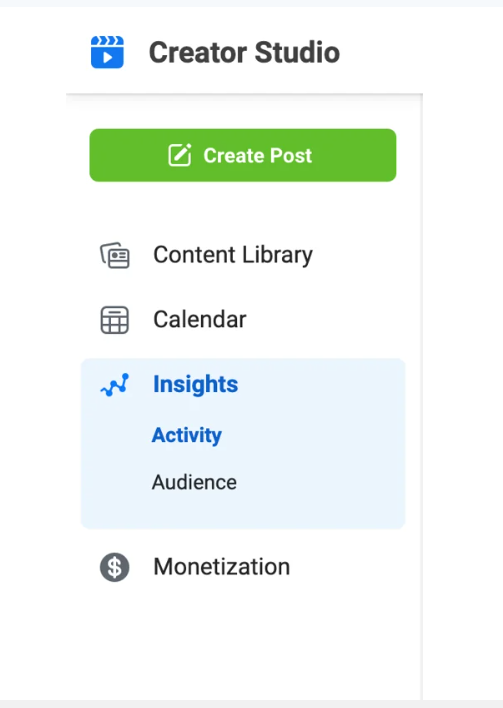
Hay tres botones situados al final del menú. El primer botón de la izquierda contrae el menú en una fila de iconos. Si pulsas el botón Calendario, Creator Studio accederá a tu calendario de Facebook.
Además, puedes acceder al Centro de formación a través del icono con forma de libro situado en el extremo derecho. Desde allí, puedes ayudar a los usuarios a aprender a sacar el máximo partido a Creator Studio.
Cómo utilizar Creator Studio para Instagram
Creator Studio agiliza el proceso de autoedición tanto para empresas como para artistas. Puedes publicar vídeos y fotos en el feed original de Instagramy en IGTV. A continuación se explica cómo utilizar Creator Studio para Instagram:
- Haz clic en el botón de publicación y dirígete al cuadro desplegable para elegir si quieres compartirlo en el feed principal de Instagramo en IG Video.
- Aquí puedes subir las fotos y los vídeos que quieras compartir en Instagram. A continuación, puedes escribir pies de foto y compartir tu publicación en Facebook. Además, puedes desactivar los comentarios de una publicación concreta accediendo a la sección «Configuración avanzada».
- En el caso de los vídeos de IGTV, puedes elegir una miniatura personalizada en la sección «Configuración avanzada» e incluir subtítulos.
- Una vez que hayas escrito tu entrada, haz clic en el botón «Publicar», situado en la esquina derecha de la pantalla. De este modo, tu entrada se publicará al instante en la web. Al hacer clic en él, aparecerá un menú desplegable que te ofrecerá la opción de publicar la entrada inmediatamente o guardarla como borrador.
Utilizar Creator Studio para publicar en Instagram elimina la necesidad de navegar sin parar en un dispositivo móvil o de forzar los dedos escribiendo en una pantalla diminuta. Los creadores de contenidos y las marcas pueden beneficiarse enormemente del uso de esta herramienta para planificar y crear material al menos una semana antes de su publicación.
Creator Studio Instagram Programación
Los creadores de contenido suelen programar la publicación de sus contenidos con una semana o un mes de antelación. Con Creator Studio, Instagram y planificar el contenido resulta muy sencillo. No necesitarás ningún otro programa.
Al utilizar Creator Studio para programar Instagram , puedes seguir los mismos pasos tanto para el Instagram como para IGTV. Lo único que varía es el procedimiento de publicación. Así es como funciona:
- Selecciona el botón «Publicar» y, a continuación, la flecha hacia abajo. En el cuadro que aparece a continuación, puedes publicar la entrada inmediatamente o guardarla para más tarde.
- En el siguiente cuadro, puedes seleccionar la hora y el día exactos en los que quieres que se publique la entrada.
- Una vez que hayas revisado la información, selecciona la opción azul «Programar». A continuación, Creator Studio pondrá la publicación en cola para su publicación.
Tu biblioteca de contenidos mostrará la publicación programada con una etiqueta verde que dice «Programada» para indicar el estado de la publicación. Al pasar el cursor por encima del estado de la publicación, aparecerá un símbolo de puntos suspensivos que te permitirá realizar más modificaciones o publicar el mensaje antes de lo previsto. Al hacer clic en él, aparecerá un menú con opciones como «Eliminar», «Publicar inmediatamente», «Ver» y «Editar».
Obtención de información de Instagram Creator Studio
Muchas redes sociales populares cuentan con widgets de análisis integrados. En ocasiones, los usuarios han comprobado que las cifras cuadran. Creator Studio permite a las empresas y a los creadores de contenido evaluar de forma sencilla y precisa los datos y observar las interacciones en Instagram.
Puedes obtener un desglose semanal y demográfico de tus interacciones utilizando las funciones Insights de Instagram Creator Studio. Puedes desglosar Creator Studio Insights en dos grupos: Actividad y Audiencia.
Gracias a las estadísticas de actividad, puedes obtener un desglose visual y numérico del rendimiento de cada página y cada contenido. Muestra cuántas personas han interactuado con cada publicación y cuál ha sido su alcance.
Por el contrario, los datos sobre la audiencia te proporcionan información sobre las características demográficas y los patrones de actividad de tus seguidores. Además, Creator Studio puede determinar las horas de mayor interacción de tu audiencia. Esta información puede ayudarte a elegir el mejor momento del día para publicar.
Gracias a las herramientas de análisis, las marcas y los influencers pueden determinar cuándo y qué tipo de contenido funciona mejor en Instagram la frecuencia con la que deben publicar.
- Selecciona «Insights» en la lista de opciones de la barra lateral de la izquierda. Puedes elegir qué métricas quieres ver en un menú desplegable, como el total de impresiones, clics, comparticiones o comentarios.
- Selecciona «Actividad» para obtener estadísticas sobre Instagram compartidas Instagram . En Instagram, puedes hacer un seguimiento de tu alcance, interacción e impresiones.
- Selecciona «Público» para ver una representación gráfica de los datos demográficos de tu público, incluyendo la edad y el sexo, y selecciona «Público». Además, puedes obtener más información sobre sus datos demográficos, incluidos los países y las ciudades de donde proceden.
Cómo utilizar la función de monetización en Instagram Creator Studio
Haber conseguido más de 10 000 seguidores fieles en Instagram nuevas oportunidades de publicidad y colocación de productos. Con IG Creator Studio, puedes acceder a un sistema completo para supervisar el rendimiento de tu contenido de pago y tus colaboraciones con marcas.
Seleccione la opción "Monetización" del menú principal para empezar. Al hacer clic en esta opción, se iniciará el Administrador de Brand Collabs y se abrirán las opciones de personalización. Esto es lo que puedes esperar:
- Gestión de colaboraciones de marca: Aquí puedes acceder a un análisis detallado de tu material de marca. Se trata de un método muy práctico para supervisar el estado de tus diferentes colaboraciones de marca y evaluar su rendimiento. Gestionar tus colaboraciones es muy sencillo, ya que tienes toda la información importante al alcance de la mano. Puedes acceder fácilmente a los detalles de las campañas, al estado de los pagos y a los análisis de interacción para mantener el control.
- Solicitud de colaboraciones con marcas: Creator Studio ofrece una interfaz optimizada para conectar con marcas y explorar oportunidades de colaboración. La sección Monetización presenta varias empresas que buscan asociarse con influencers y productores de contenidos con fines promocionales. Podrías emplear esta lista para encontrar posibles colaboraciones si tienes una especialización y un público objetivo determinados.
- Encontrar oportunidades de ingresos: Como Instagram , puedes acceder a otras formas de ingresos además de las colaboraciones comerciales. Con Creator Studio, puedes probar diversas estrategias de monetización para tu contenido y descubrir cuáles son las mejores. Utiliza la opción de menú «Monetización» para obtener más información sobre las numerosas estrategias de monetización y colaboraciones que tienes a tu disposición.
- Descubre acuerdos de monetización: Descubre nuevas oportunidades para ganar dinero y conectar con personas con intereses afines utilizando la sección «Monetización» de Creator Studio. Esta función simplifica el proceso de identificar, gestionar y supervisar tus acuerdos con marcas, lo que te permite monetizar tu contenido de forma eficaz.
5 problemas comunes con Instagram Creator Studio y soluciones
Aunque Instagram Studio facilita mucho la gestión de tu contenido, a veces es inevitable que surjan problemas. Sin embargo, existen soluciones sencillas para la mayoría de ellos.
A continuación se enumeran cinco de los problemas más habituales que surgen con Creator Studio, junto con sus soluciones:
1. Problemas de inicio de sesión o acceso
Instagram tengas dificultades para iniciar sesión en Creator Studio e Instagram . Asegúrate de haber introducido el nombre de usuario y la contraseña correctos antes de volver a intentar iniciar sesión. Si el problema persiste, puedes probar a borrar la caché y las cookies de tu navegador para ver si así se soluciona. Si sigue sin funcionar, intenta iniciar sesión desde otro navegador o dispositivo.
2. Problemas de sincronización de contenidos
En ocasiones, puede que te encuentres con problemas Instagram Creator Studio e Instagram tu contenido y a las publicaciones programadas. Para solucionarlo, cierra la sesión en Creator Studio y vuelve a iniciarla, o bien actualiza la página. Además, asegúrate de tener una buena conexión a Internet, ya que esto puede evitar problemas de sincronización del contenido.
3. Errores de programación de IG Creator Studio
Otro problema que complica las cosas es cuando intentas programar una publicación en IG Creator Studio y te encuentras con un error o un fallo técnico. Se recomienda comprobar la fecha, la hora y la zona horaria de tu publicación antes de publicarla. Si el problema persiste, plantéate cambiar la fecha de publicación o borrar la publicación y volver a crearla. Si has agotado todas las demás opciones, ponte en contacto con el equipo de asistencia Instagrampara que te ayuden.
4. Métricas y perspectivas
A veces, los datos y los análisis que ofrece Creator Studio no cuadran. Para solucionar el problema, asegúrate de haber seleccionado la hora correcta en Creator Studio y de que tu Instagram esté correctamente vinculada a la aplicación.
5. Instagram Creator Studio no funciona en dispositivos móviles
Aunque Creator Studio funciona bien en ordenadores de sobremesa, la aplicación móvil puede tener funciones limitadas. Puede haber diferencias en la experiencia del usuario o imposibilidad de acceder a determinadas funciones al utilizar Instagram un navegador web móvil en comparación con la aplicación. Como consecuencia, muchos usuarios se quejan de queInstagram Studio no funciona». Teniendo esto en cuenta, lo mejor es acceder a las funciones de Creator Studio utilizando un ordenador de sobremesa o portátil.
Si tienes algún otro problema con Creator Studio, consulta el Centro Instagram o ponte en contacto directamente con su equipo de asistencia. Allí te ayudarán y te darán instrucciones detalladas para solucionar tu problema.
Instagram Creator Studio - Última palabra
Los influencers, los creadores de contenido y los profesionales del marketing se beneficiarán enormemente del nuevo Creator Studio Instagram. Su diseño es intuitivo y la gestión del contenido es sencilla, lo que facilita enormemente la creación y organización del material.
Las excepcionales funciones de programación eliminan el estrés que supone publicar en Instagram . Gracias a las estadísticas y los datos analíticos de IG Creator Studio, los usuarios pueden adaptar mejor su contenido a su público objetivo. Por no hablar de las interesantes posibilidades de monetización y colaboración con marcas, que ayudan a los usuarios a convertir sus aficiones en negocios rentables.
¿Estás listo para llevar tu Instagram al siguiente nivel? No busques más: Path Social. Con sus herramientas seleccionadas por expertos y sus estrategias personalizadas, podrás sacar todo el partido a tu cuenta y aumentar tu número de seguidores como nunca antes.No esperes más para potenciar tu Instagram : deja que Path Social te a conseguirlo.





¿Quieres seguir el crecimiento de tu cuenta de Instagram ?
Analice su progreso y obtenga información valiosa con nuestra herramienta de seguimiento gratuita.
Comprueba ahora el crecimiento de tu cuenta de Instagram




