


Qué es un DM: Explicación de la jerga de IG para los mensajes

«¡Déjame mandarle un DM!» «¡No te hagas el desconocido, envíame un DM!» Escuchamos expresiones como estas muy a menudo cuando la gente habla de ponerse en contacto con alguien por mensaje. Se trata de jerga relacionada con las redes sociales que se puede oír en una conversación informal. Pero, ¿qué es realmente un DM? ¿Y qué hace que los DM de Instagram sean tan especiales en comparación con otras formas de comunicación digital? ¡Sigue leyendo esta guía para descubrir todo esto y mucho más!

¿Qué es un DM en las plataformas de medios sociales?
Si no estás muy familiarizado con la jerga digital, quizá te preguntes: «¿Qué es un DM en las redes sociales?». En pocas palabras, «DM» es la abreviatura de «mensaje directo», es decir, un mensaje privado que puedes enviar directamente a una persona concreta a través de Internet.
A diferencia de otras formas de comunicación en las redes sociales, como los comentarios, los mensajes directos son privados. Por eso, puedes ser tan abierto y sincero como quieras en tus mensajes sin preocuparte de que el público los vea.
El término coloquial «DM» se utiliza hoy en día con tanta frecuencia que incluso aparece en el diccionario Merriam-Webster. ¿Qué es un «DM» según este prestigioso diccionario, te preguntarás? Se utiliza tanto como sustantivo como verbo. Como sustantivo, significa simplemente un mensaje online enviado a alguien. Como verbo, significa el acto de enviar un mensaje a alguien por vía digital, como en: «Le voy a enviar un DM más tarde».
La posibilidad de enviar mensajes privados a alguien en las redes sociales es una forma estupenda de enviar mensajes personalizados a amigos y seguidores. Te permite interactuar con otros usuarios de las redes sociales y establecer contactos en línea. A las marcas les puede resultar especialmente útil para sus actividades de atención al cliente, ya que muchas dudas sobre los productos se pueden resolver a través de los mensajes privados.
¿Cómo es un DM en Instagram ? 5 características clave de los mensajes directos de IG
Quizá te preguntes: «¿Qué es un mensaje directo en Instagram y en qué se diferencia de los mensajes directos de otras redes sociales?». Pues bien, un mensaje directo de Instagram es, básicamente, un mensaje directo normal y corriente en Internet. Puedes enviar uno a cualquier persona con la que quieras chatear de forma directa y privada. También puedes enviar fotos, emojis, mensajes de voz, GIF y mucho más a través de un mensaje directo de Instagram .
Sin embargo, además de estas funciones típicas de los mensajes privados, los mensajes directos de Instagram también cuentan con un montón de características interesantes. Aquí tienes algunas de ellas que seguro que disfrutarás a la hora de contactar y comunicarte con tus amigos.

1. Chats de grupo para mensajes entre amigos
Enviar mensajes a los amigos por separado sobre los mismos temas puede ser agotador. Por eso Instagram permite a los usuarios hacer chats de grupo de hasta 250 personas. Es perfecto para grupos de amigos y familias que quieren hablar de planes y enviarse contenidos interesantes.
Lo mejor es que incluso puedes cambiar el nombre de tu chat de grupo. Ponle a tus mensajes directos de grupo el nombre que quieras, como ese nombre tan original con el que se conoce a tu grupo de amigos. También puedes añadir emojis a los nombres de los chats de grupo. Es una forma estupenda de organizar tus mensajes directos de grupo para que sepas de un vistazo cuál es el propósito de cada chat.

2. Videollamadas para una comunicación más rápida
¿Quieres ponerte en contacto con alguien y hablar con él lo antes posible? Prueba la función de videollamadas de los mensajes directos de « Instagram ». Es muy parecida a FaceTime, pero está en Instagram.
Pasar de los mensajes de texto a las videollamadas cara a cara es una forma estupenda de subir el nivel de los chats con amigos y familiares. Es mucho más fácil hablar que estar todo el día enviando y recibiendo mensajes de texto. Pero recuerda que sólo debes llamar y aceptar llamadas de personas en las que confíes.
Puedes iniciar videollamadas con cualquier persona con la que ya hayas intercambiado mensajes directos. Sin embargo, esta función está limitada a las cuentas no verificadas. No puedes realizar videollamadas con perfiles verificados.
3. Compartir directamente contenidos interesantes de Instagram con amigos
Una de las funciones más útiles de los mensajes de « Instagram » es que te permite compartir publicaciones de « Instagram » con tus amigos a través de los mensajes directos. Desde fotos bonitas del feed hasta «Reels» divertidos y con los que te sientes identificado, basta con unos pocos clics para enviar publicaciones a tus amigos. A continuación, este contenido compartido aparecerá en tus mensajes directos con ellos.
Compartir contenidos interesantes con amigos y familiares es una forma estupenda de suscitar conversación en las redes sociales. También es fantástico para compartir productos de una marca que te gusta o recomendaciones de música de moda.
4. Modo Vanish para comunicación privada
¿Quieres que tus mensajes sean privados? Activa el modo «Vanish» para que tú y tus amigos podáis enviar mensajes que desaparecen. Todo lo que envíes en el modo «Vanish» no se guardará en tu historial de chat. Es el lugar perfecto para contar secretos, enviar fotos atrevidas y compartir información confidencial.
Tus mensajes privados solo se borran cuando vuelves al modo de chat normal. Así que asegúrate de saber cómo desactivar el modo «desaparecer» antes de soltar el chisme a través de mensajes que se borran solos.

5. Solicitudes de mensajes para mantener a raya los DM no deseados
Instagram Los mensajes directos (DM) también cuentan con unas funciones de seguridad increíbles que contribuyen a que la plataforma sea un entorno seguro y positivo. Por ejemplo, cuando alguien que no conoces te envía un mensaje, este va directamente a tu carpeta de solicitudes de mensajes. Desde allí, puedes aprobar o eliminar los mensajes.
Esto te permite distinguir entre los mensajes que son relevantes para ti y los que te envía gente al azar. Crea algo así como un filtro para que los DM que veas en tu bandeja de entrada sean sólo los "seguros". Los DM no solicitados -que a veces pueden ser dañinos u ofensivos- van a parar a las solicitudes de mensajes.
Es perfecto para mantener a raya los mensajes de texto no deseados, los mensajes fraudulentos y el spam. De esta forma, podrás centrarte únicamente en los mensajes directos que te resulten importantes.
Precaución: Desconfíe de los falsos mensajes de texto y spam de Instagram
Instagram Los mensajes directos pueden ser muy chulos y estar repletos de funciones útiles, pero también suponen una fuente de peligros en las redes sociales. Cuando utilices los mensajes para establecer contactos e interactuar con cuentas interesantes, ten cuidado con los mensajes directos falsos Instagram o con los mensajes de spam.
No aceptes solicitudes de mensajes de desconocidos que afirmen ser alguien que conoces sin confirmar primero que realmente son quienes dicen ser. Si permites que personas fraudulentas accedan a tus mensajes directos, podrías verte envuelto en un ciclo de estafas y ataques de phishing. En caso de duda, denuncia siempre a los usuarios sospechosos que te envíen mensajes no solicitados en Instagram.
Cómo borrar DMs de Instagram
¿Le has enviado un mensaje directo a alguien y te has arrepentido al instante? No te preocupes: otra función genial de los mensajes directos de « Instagram » es que puedes retirar mensajes concretos e incluso borrar conversaciones completas. A continuación te explicamos cómo borrar los mensajes directos de « Instagram », ya sea un mensaje suelta o todo el historial de una conversación.
Empecemos por cómo anular el envío de un mensaje. A continuación te explicamos cómo hacerlo, paso a paso:
1. Abre la aplicación Instagram y dirígete a tu bandeja de entrada.
2. Busque el chat con el mensaje que desea anular.
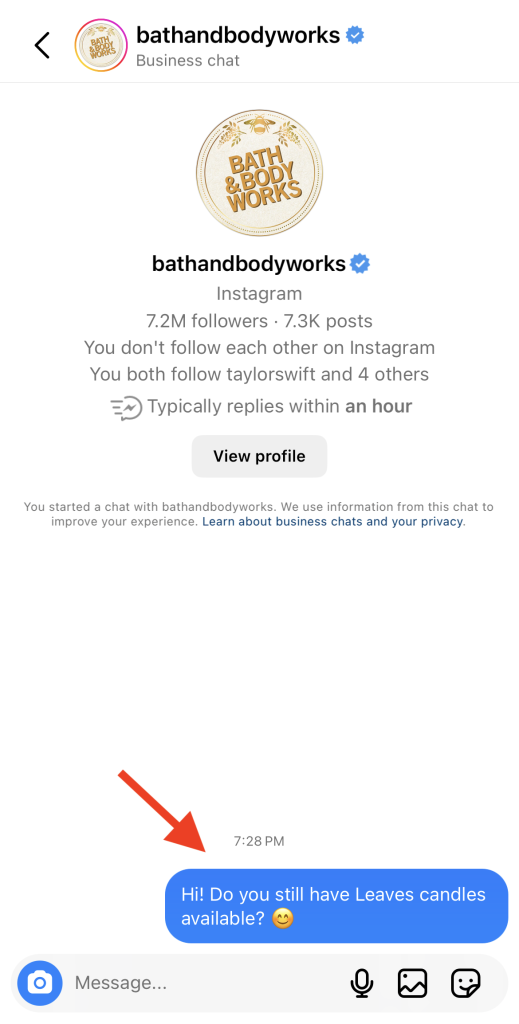
3. Desplázate por el chat hasta que encuentres el DM concreto que deseas anular.
4. Mantenga pulsado el mensaje.
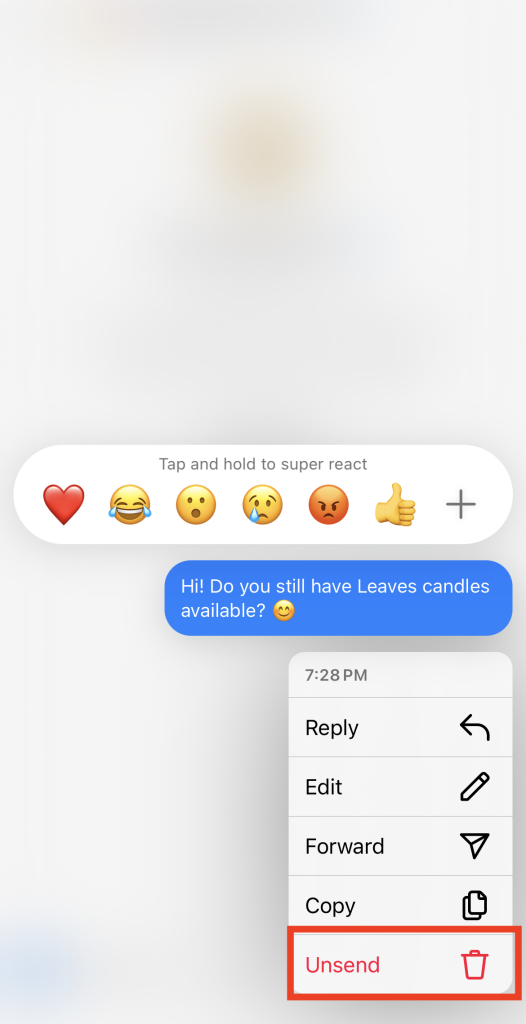
5. Haga clic en Anular envío.
6. Si es la primera vez que cancelas el envío de un mensaje directo, aparecerá un mensaje de confirmación con información sobre cómo borrar mensajes. Haz clic en «Aceptar» en ese mensaje.
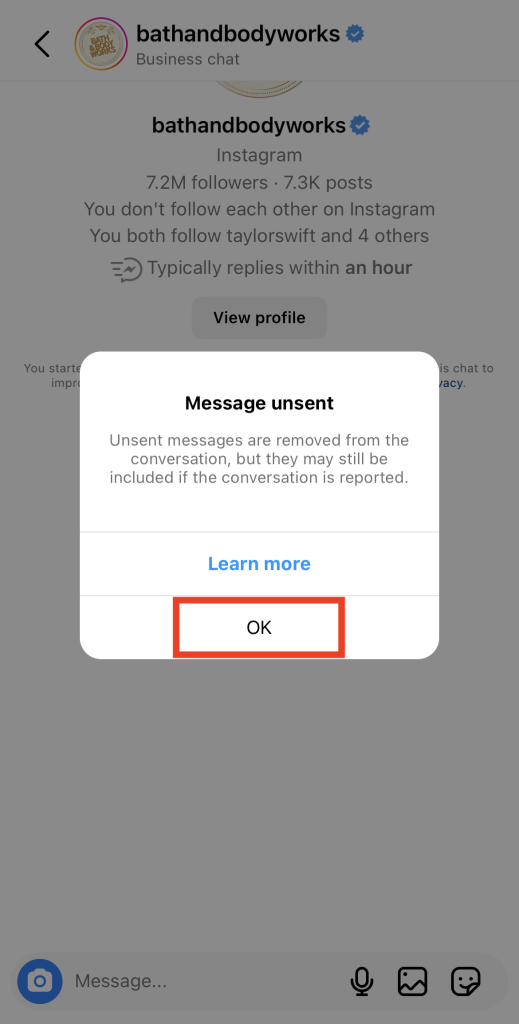
Ahora, el mensaje que querías borrar debería desaparecer del chat. Tampoco será visible para la persona con la que estás chateando.
Pero, ¿y si quieres borrar un chat entero de forma permanente? A continuación te explicamos cómo hacerlo:
1. Accede a tu bandeja de entrada en la aplicación Instagram .
2. Desplácese hasta encontrar el nombre de la persona cuyo DM desea eliminar.
3. Desliza el dedo hacia la izquierda en ese DM.
4. 4. Haga clic en Eliminar.
5. Confirme su decisión de eliminar el DM pulsando Eliminar en la pregunta emergente.
Cuando hagas esto, ya no verás el mensaje privado en tu lista de chats. Sin embargo, la otra persona seguirá viendo tus mensajes privados en su bandeja de entrada.
Cómo recuperar DMs de Instagram después de haberlos borrado
Así que ahora ya sabes cómo borrar mensajes en Instagram. Como es lógico, lo siguiente que quizá te preguntes es cómo recuperar los mensajes directos de Instagram después de haberlos borrado.
Por desgracia, una vez que has borrado los mensajes directos, no hay forma de recuperarlos. Existe la idea errónea en Internet de que se pueden ver los mensajes borrados al descargar los datos de « Instagram » en la configuración personal. Sin embargo, Instagram la propia plataforma indica que las descargas de datos personales no incluyen los mensajes directos no enviados ni los eliminados.
Si necesitas acceder a mensajes directos antiguos debido a una emergencia, ponte en contacto con el servicio de asistencia de Instagram para que te ayuden.
¿Puedes hacer una captura de pantalla de Instagram DMs?
Si quieres guardar mensajes importantes de un chat, quizá te preguntes: «¿Se pueden hacer capturas de pantalla de los mensajes privados de Instagram ?»
Sí, por supuesto que puedes hacer capturas de pantalla de los mensajes directos sin preocuparte de que la otra persona se entere. Instagram no envía notificaciones de captura de pantalla para los mensajes del chat, así que nunca se enterarán. Así que no dudes en guardar las conversaciones mediante capturas de pantalla sin preocuparte por las consecuencias.
¡Sal de los DMs para promocionar tu marca y crecer en Instagram!
Instagram Con el paso de los años, los mensajes directos (DM) se han convertido en una función prácticamente imprescindible en las redes sociales. La gente los utiliza para crear chats grupales, compartir publicaciones interesantes, llamar a alguien para ver cómo está y mucho más. Al fin y al cabo, ¿qué es un mensaje directo sino una función que permite a los usuarios de las redes sociales interactuar con otras personas en línea?
Pero si quieres que tu página crezca, debes salir de los límites de la bandeja de entrada de mensajes de Instagram . El verdadero crecimiento se produce en el feed, cuando la gente ve tu contenido. Eso es precisamente lo que Path Social te ayuda a conseguir. Utilizamos la inteligencia artificial para identificar a tu público objetivo y asegurarnos de que vea tu página. Esta visibilidad adicional amplía tu audiencia, lo que aumenta tu número de seguidores a largo plazo. Así que, si quieres conseguir más seguidores en Instagram, ¡colabora hoy mismo con Path Social !





¿Buscas la mejor forma de conseguir seguidores Instagram ?
Deje que nuestras estrategias de crecimiento orgánico dirigidas por IA trabajen para usted.
Consigue seguidores de Instagram ahora




