Comment sauvegarder une vidéo sur Instagram: Guide étape par étape

De temps en temps, vous tombez sur une vidéo incroyablement utile sur Instagram que vous voulez absolument avoir sur votre téléphone. Il peut s’agir d’une recette de votre plat préféré, d’idées de destinations de voyage pour l’été ou d’une vidéo sympa de la célébrité qui vous fait craquer. Et après l’avoir regardée, une seule question vous vient à l’esprit : comment enregistrer une vidéo depuis Instagram? Dans ce petit guide, nous allons vous présenter toutes les méthodes permettant d’enregistrer une publication vidéo pour la revoir plus tard.

Sauvegarder le contenu vidéo pour le revoir plus tard en l'ajoutant à vos favoris
Vous souhaitez accéder facilement à vos vidéos préférées sur Instagram pour les revoir plus tard ? Le moyen le plus rapide d'y parvenir est d'enregistrer ces vidéos, c'est-à-dire de les mettre en signet.
Vous pouvez enregistrer toutes sortes de vidéos, des Reels d’ Instagram aux publications du fil d’actualité. Vous pouvez ensuite parcourir vos publications mises en favoris sans avoir à remonter dans l’application pour les retrouver. Ce qui est génial, c’est que vous pouvez classer toutes vos vidéos enregistrées dans des collections « Instagram ». Cela permet une expérience plus organisée et extrêmement fluide lorsque vous parcourez vos vidéos enregistrées.
Enregistrer une publication vidéo, c'est un jeu d'enfant ; il suffit de quelques clics. Voici comment procéder, en prenant un Reel comme exemple :
1. Ouvrez la bobine que vous souhaitez enregistrer.
2. Appuyez sur le menu à trois points dans le coin inférieur droit de la vidéo.
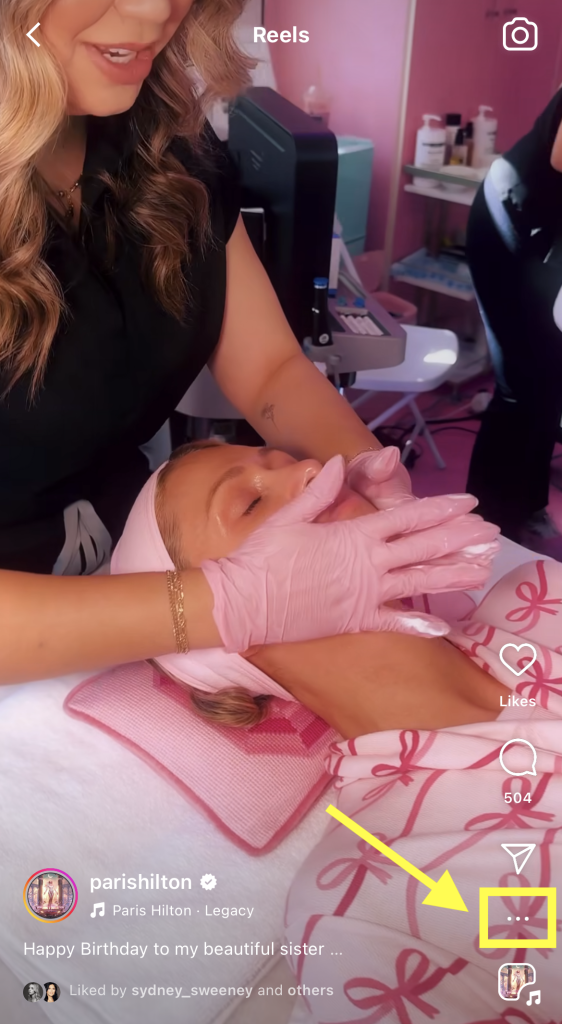
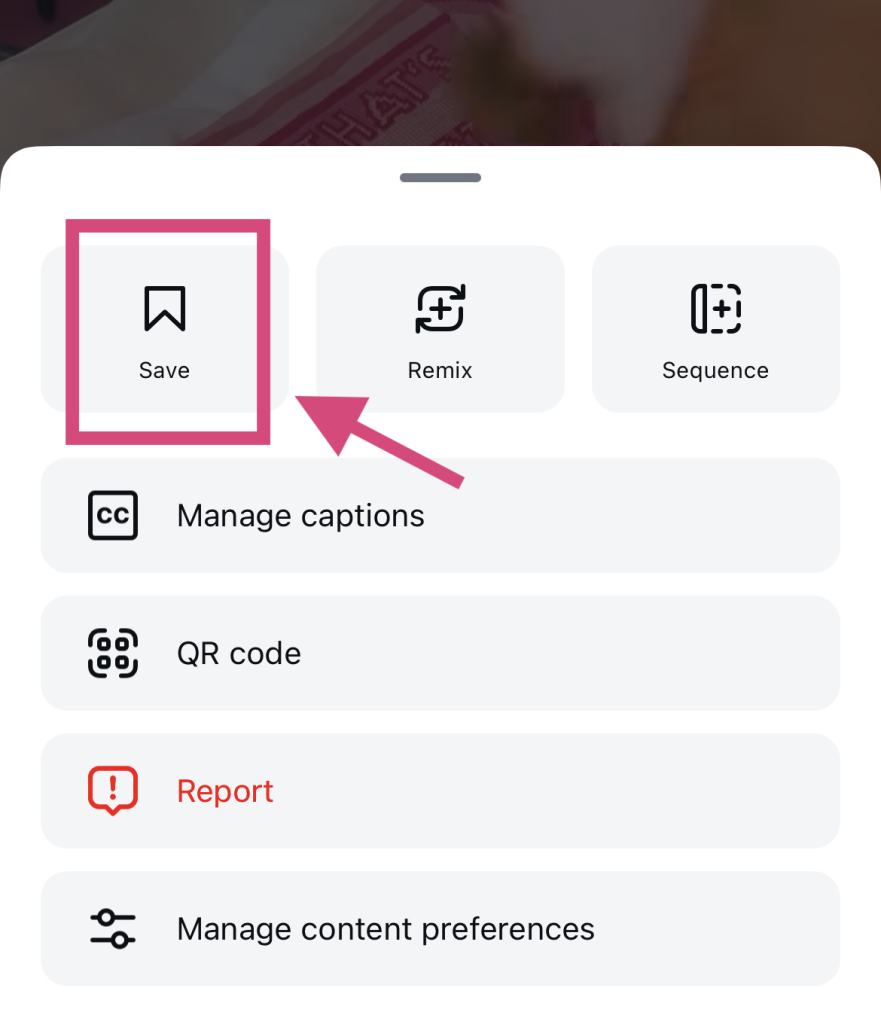
3. Cliquez sur le bouton Enregistrer avec l'icône du signet.
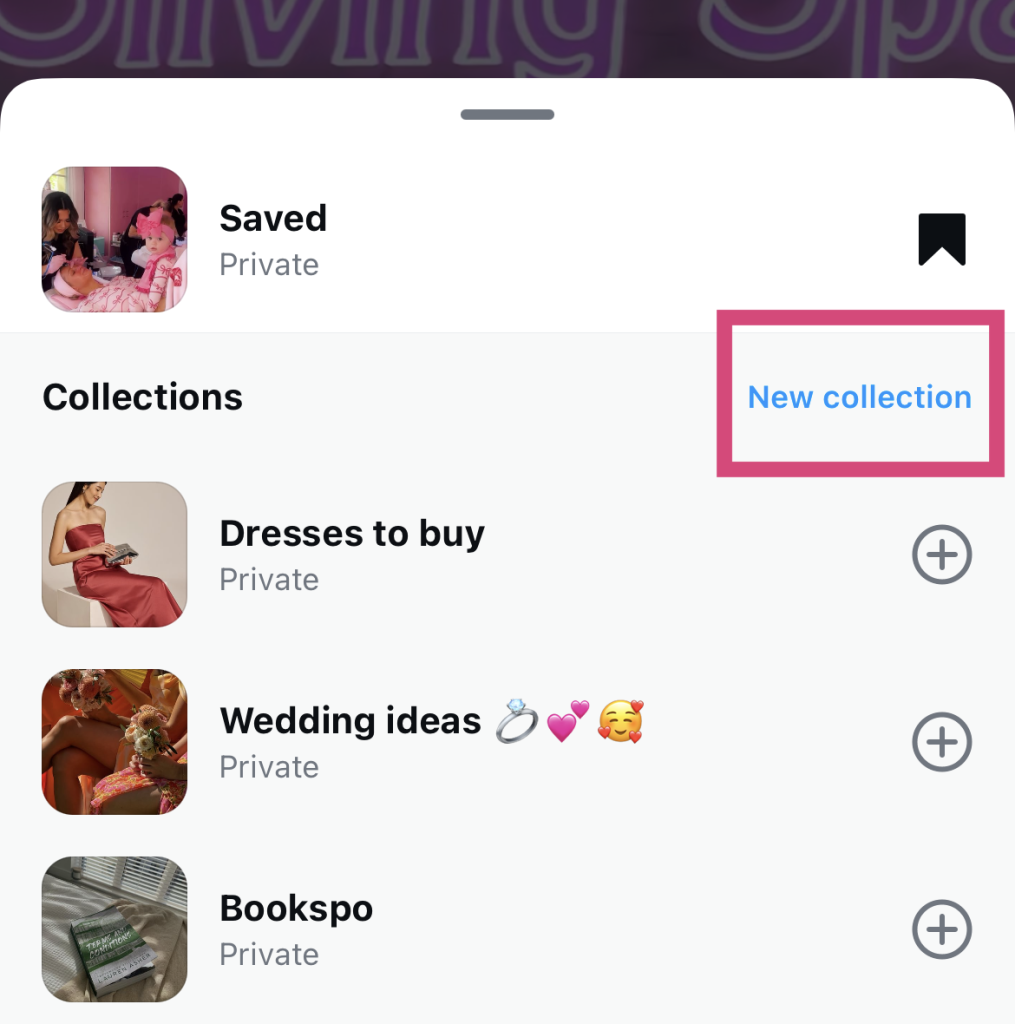
4. Choisissez la collection dans laquelle vous souhaitez l'ajouter. Pour créer une nouvelle catégorie, cliquez sur « Nouvelle collection ».
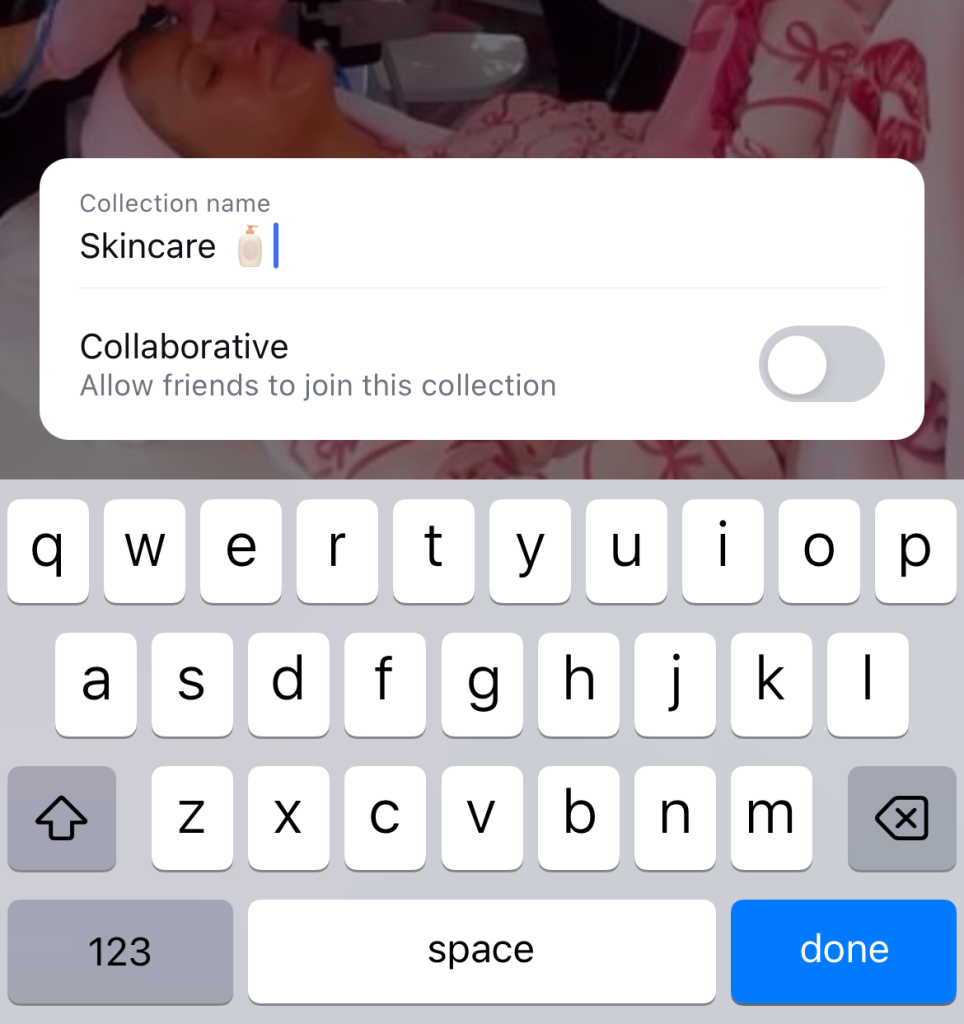
5. Saisissez un nom pour votre collection. Cliquez ensuite sur « Enregistrer ».
Vous pouvez désormais retrouver cette vidéo dans votre dossier « Enregistrés », accessible depuis les paramètres de votre profil.
Ajouter des vidéos à votre dossier « Enregistrés » présente de nombreux avantages. C’est un excellent moyen de rassembler des publications dont vous souhaitez vous inspirer pour créer votre propre contenu. Vous pouvez également utiliser cette fonctionnalité pour regrouper des contenus utiles et informatifs que vous souhaitez consulter ultérieurement, comme des tutoriels.
Comment enregistrer une vidéo sur Instagram dans mon Camera Roll ?
Parfois, une vidéo est tellement bonne qu'il ne suffit pas de la sauvegarder. Elle est tellement utile et percutante que vous avez besoin d'une copie dans votre rouleau d'appareil photo pour la regarder hors ligne.
Malheureusement, Instagram ne permet pas actuellement de télécharger les vidéos d'autres utilisateurs. Ainsi, si vous souhaitez vraiment enregistrer une vidéo sur votre appareil, vous devrez utiliser un outil tiers de téléchargement de vidéos Reels.
Il existe des tonnes d'applications populaires de téléchargement de vidéos. L'une de nos préférées s'appelle Publer. Voici comment enregistrer une vidéo directement sur votre appareil avec ce site web :
1. Ouvrez la bobine ou le message vidéo que vous souhaitez télécharger sur Instagram.
2. Dans le menu contextuel qui s'affiche, appuyez sur le bouton de partage (c'est-à-dire l'icône représentant un avion en papier).
3. Sélectionnez Copier le lien. Une coche devrait apparaître pour confirmer rapidement que vous avez bien copié le lien.
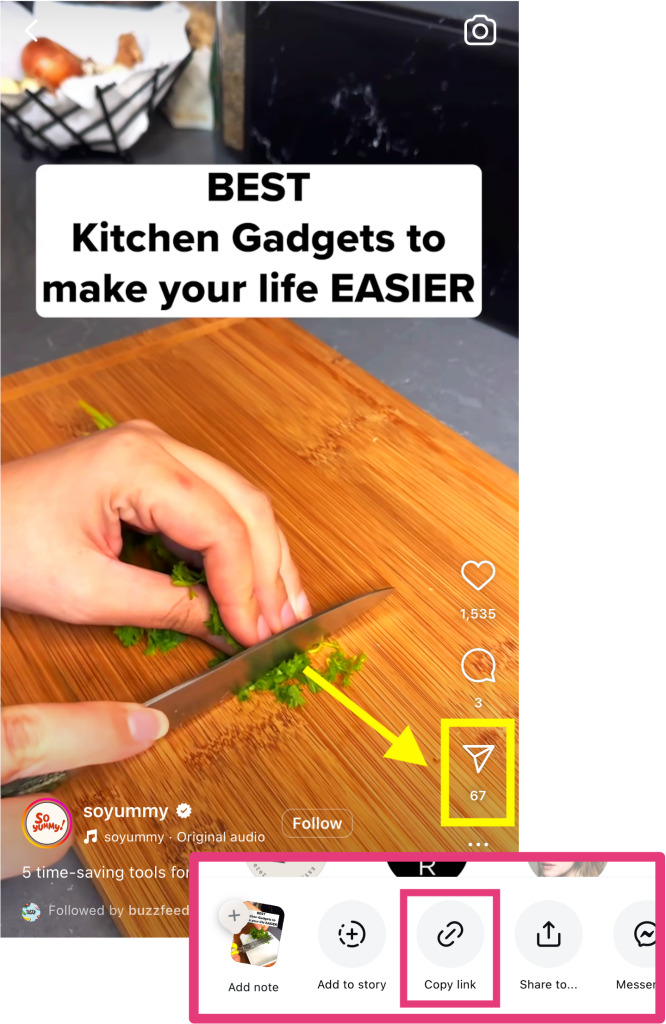
4. Rendez-vous sur le site web de Publer et collez l'URL de votre vidéo dans le champ approprié.
5. Cliquez sur le bouton Télécharger pour traiter la vidéo et l'enregistrer sur votre appareil.
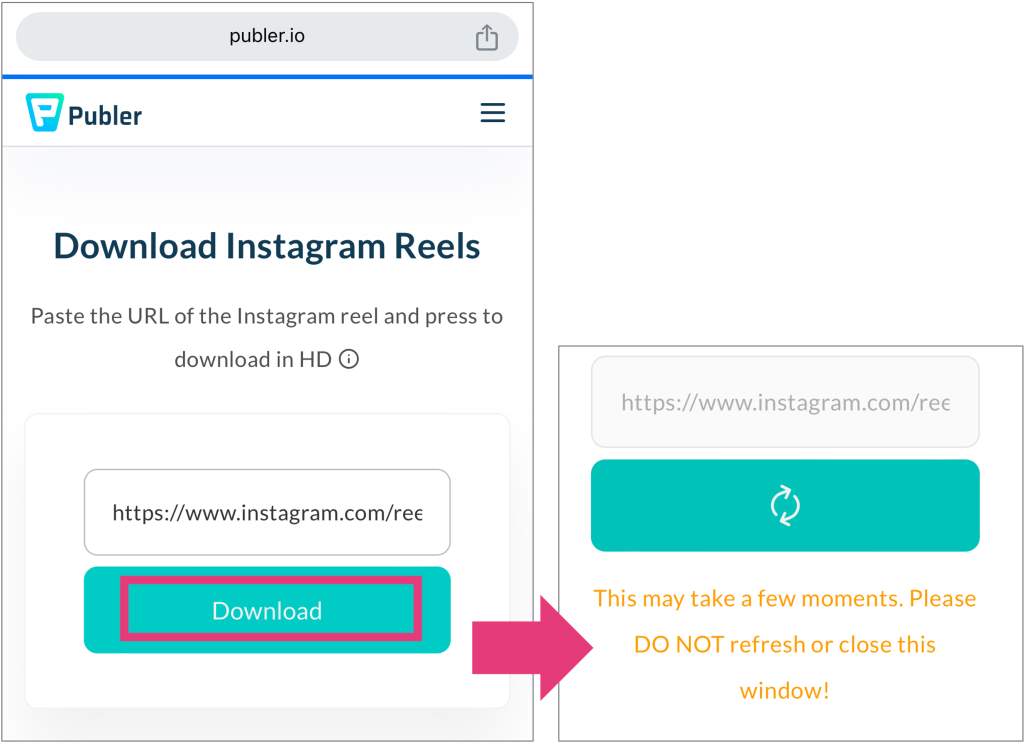
Notez que vous ne pouvez télécharger que des vidéos provenant de profils publics Instagram . Il n'y a actuellement aucun moyen de télécharger des bobines à partir de comptes privés.
Mais si vous êtes vraiment désespéré , vous pouvez envisager d'enregistrer leurs vidéos en mode « capture d'écran ». Sachez simplement que le résultat ne sera pas parfait. Vous capturerez de nombreux éléments superflus, comme les boutons « J'aime » et « Commenter », ainsi que la légende de la vidéo.
Vidéos IG Story : Comment sauvegarder les vidéos de Instagram sur mon téléphone ?
Les Reels et les vidéos du fil d'actualité ne sont pas les seuls contenus vidéo susceptibles d'attirer votre attention sur la plateforme. Les Stories d'Instagram s sont elles aussi très divertissantes. On est d'ailleurs d'autant plus tenté de les enregistrer pour les revoir, car elles disparaissent au bout de 24 heures.
Malheureusement, il n'est pas non plus possible de télécharger la Story d'une autre personne. Cependant, vous pouvez toujours recourir à l'enregistrement d'écran pour enregistrer les Stories à l'aide de votre téléphone. Et ne vous inquiétez pas :Instagram n'envoie aucune notification à l'auteur de la Story si vous le faites !
Vous pouvez également télécharger vos propres Stories. Si vous ne les avez pas encore publiées, c'est très simple. Il suffit d'appuyer sur le menu à trois points en haut de l'éditeur de Story, puis de cliquer sur « Enregistrer ».
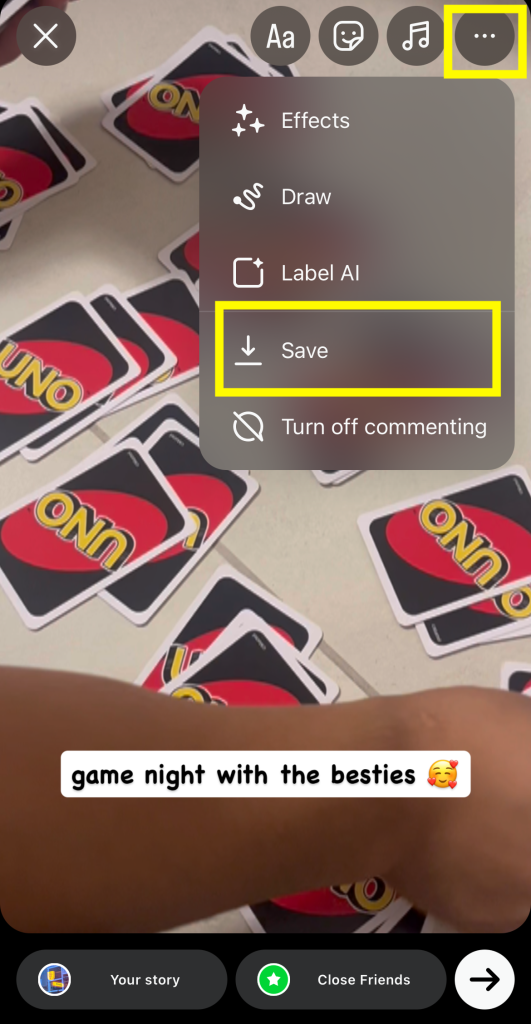
Vous souhaitez enregistrer vos vidéos « Story » dans votre pellicule après les avoir publiées ? Voici comment faire :
1. Ouvrez le site Instagram Story.
2. Appuyez sur le menu à trois points intitulé Plus.
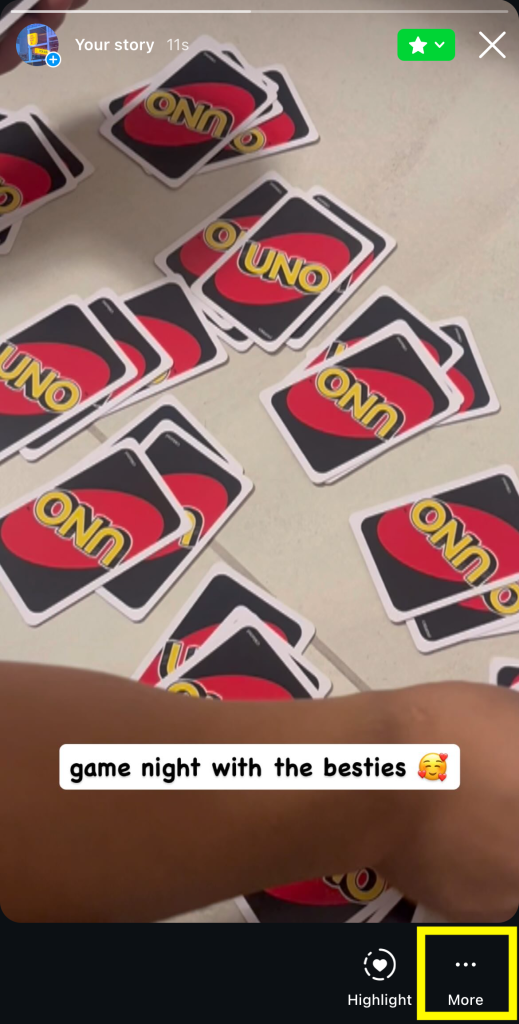
3. Sélectionnez Enregistrer.
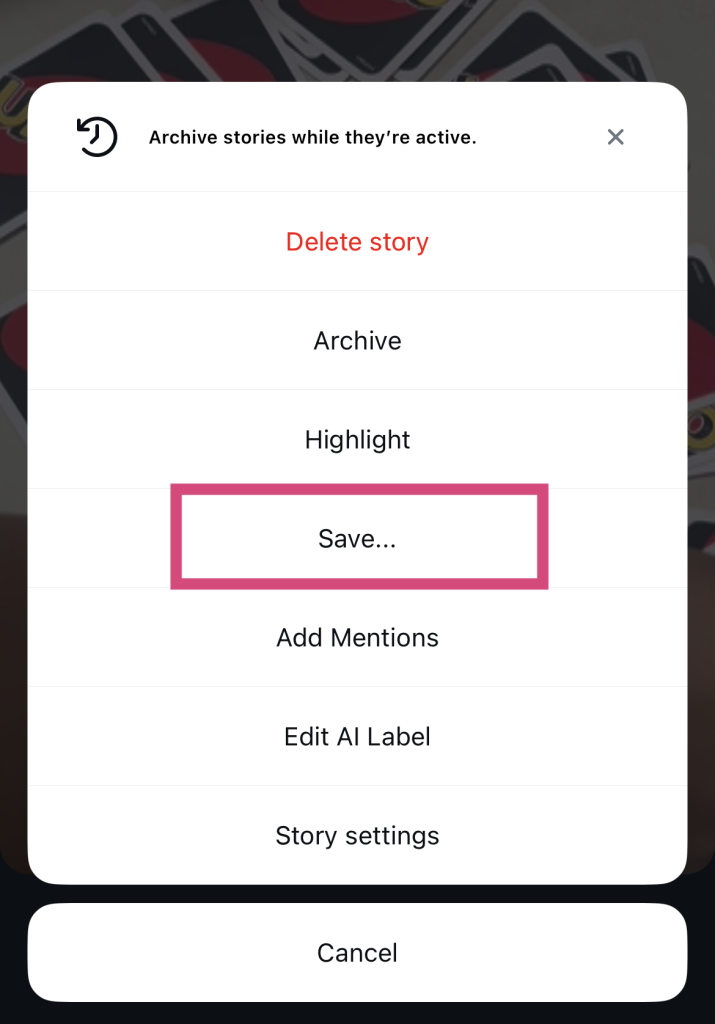
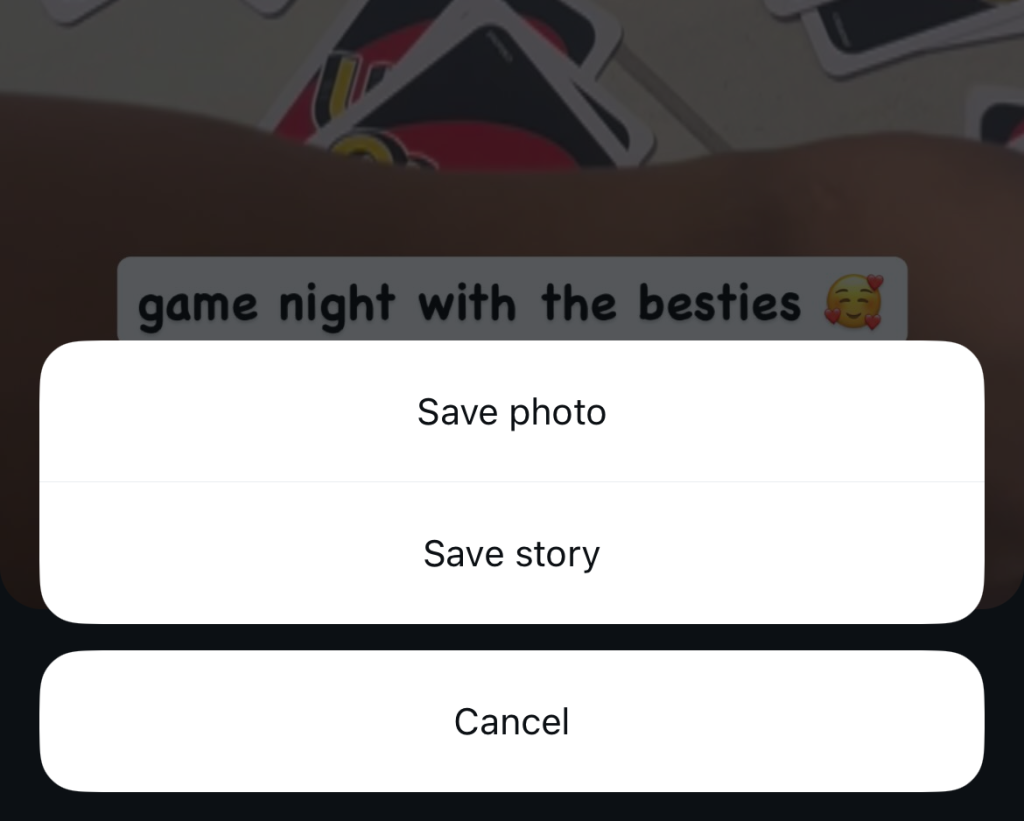
4. Choisissez entre Sauvegarder la photo/vidéo (télécharge uniquement ce message) et Sauvegarder l'histoire (rassemble toutes les histoires en une seule vidéo).
Comment puis-je enregistrer une vidéo sur Instagram DM ?
Selon Statista, environ 694 000 Reels sont envoyés chaque minute sur Instagram par message privé. Lorsque vous recevez des vidéos par message privé, c'est probablement quelqu'un qui partage avec vous un contenu qu'il sait que vous apprécierez. Il n'est donc pas étonnant que vous souhaitiez les garder à portée de main. Pour enregistrer ces Reels, suivez les étapes ci-dessus afin de les télécharger sur votre téléphone ou dans votre dossier « Enregistrés ».
Mais qu'en est-il des vidéos personnelles qui ne sont pas publiées sur la plateforme, mais qui vous sont envoyées directement ? La bonne nouvelle, c'est qu'il est encore plus facile de télécharger ces vidéos. Il suffit de les ouvrir dans votre conversation avec quelqu'un. Ensuite, cliquez sur la flèche vers le bas pour les enregistrer directement sur votre appareil.
Comment sauvegarder une vidéo en direct sur Instagram?
Vous venez de terminer une session Instagram Live en parlant à vos fans et vous voulez voir comment vous vous en êtes sorti ? Vous pouvez facilement télécharger vos dernières vidéos en direct sur votre téléphone pour les revoir et mieux les analyser.
Vous vous demandez : « Comment enregistrer une vidéo de mon Live sur Instagram ? » C'est très simple. Dès la fin de votre Live, appuyez sur le bouton « Télécharger la vidéo » pour enregistrer l'intégralité de la diffusion sur votre appareil. Et voilà !
Notez que vous ne pouvez télécharger ces vidéos qu'après la fin officielle de votre Live. Et soyez patient : le processus peut prendre plus de temps que le téléchargement de vidéos normales, car les vidéos Live sont assez longues !
Enregistrez des vidéos inspirantes et créez un meilleur contenu pour vous développer sur IG !
Enregistrer des contenus captivants pour pouvoir les consulter plus tard est idéal pour revoir des tutoriels, des astuces et d’autres vidéos utiles. Mais cela peut aussi changer la donne pour améliorer la qualité de votre contenu. En enregistrant des vidéos, vous pouvez vous en inspirer pour vos futures publications et peaufiner votre contenu afin de le rendre encore plus captivant. Et un contenu captivant attire toujours davantage d’abonnés !
Vous souhaitez développer votre audience encore plus rapidement ? L'équipe de Path Social est là pour vous aider ! Nous utilisons des algorithmes basés sur l'IA pour diffuser votre contenu directement auprès des personnes les plus susceptibles de l'apprécier et d'interagir avec celui-ci. Vous gagnerez ainsi davantage d'abonnés et bénéficierez de taux d'engagement plus élevés, ce qui vous ouvrira la voie vers le succès sur Instagram.
Plus besoin de vous demander : « Comment puis-je enregistrer une vidéo depuis Instagram pour améliorer mon contenu ? » dans le seul but d'élargir votre communauté. Avec notre aide, vous n'avez qu'à vous détendre et nous laisser faire le travail. Nous avons aidé des pages comme « Pushing the Project » à gagner rapidement plus de 17 000 nouveaux abonnés, et nous ferons de même pour vous. Développez dès aujourd'hui votre présence sur Instagram grâce à Path Social!
Questions fréquemment posées
Comment puis-je télécharger une vidéo à partir de Instagram?
Il n'est pas possible de télécharger directement une vidéo depuis Instagram. Vous devez donc utiliser une application tierce de téléchargement de vidéos Instagram pour en obtenir une copie. Indiquez l'URL de la vidéo que vous souhaitez enregistrer, puis téléchargez-la ! Parmi les sites de téléchargement de vidéos les plus populaires, on peut citer Publer, Snapinsta et Inflact.
Pourquoi ne puis-je pas télécharger les vidéos d'autres personnes sur Instagram?
Instagram n'autorise pas les utilisateurs à télécharger les vidéos d'autres utilisateurs afin de protéger leur vie privée et d'empêcher la diffusion potentielle de leur contenu. Si vous souhaitez vraiment télécharger la vidéo de quelqu'un, utilisez un outil de téléchargement tiers.
Est-ce que Instagram avertit les autres lorsque vous téléchargez ou enregistrez leur vidéo ?
Non, Instagram n'envoie pas de notifications lorsque vous enregistrez, faites une capture d'écran ou enregistrez l'écran du contenu d'une autre personne. La plateforme n'a aucun moyen de savoir si vous avez utilisé un outil de téléchargement tiers pour enregistrer les publications vidéo d'autrui. Elle n'enverra donc pas non plus de notifications si vous procédez ainsi.





Vous cherchez la meilleure façon d'obtenir de vrais followers Instagram ?
Bénéficiez d'une croissance authentique grâce à notre approche ciblée, conçue pour vous apporter des abonnés qui interagissent réellement avec votre contenu.
Obtenir de vrais followers Instagram