De vez en cuando, te topas en Instagram con un vídeo increíblemente útil Instagram simplemente tienes que tener en tu móvil. Quizá sea una receta de tu plato favorito, destinos de viaje para el verano o un vídeo bonito de tu famoso favorito. Y solo hay un pensamiento en tu cabeza después de verlo: ¿cómo puedo guardar un vídeo de Instagram? En esta guía rápida, te mostraremos todas las formas en las que puedes guardar una publicación de vídeo para volver a verla más tarde.

Guardar contenido de vídeo para volver a verlo más tarde marcándolo como favorito
¿Quieres acceder fácilmente a tus vídeos favoritos en Instagram para volver a verlos más tarde? La forma más rápida de hacerlo es guardando -o "marcando"- esos vídeos.
Puedes guardar todo tipo de vídeos, desde Reels de Instagram hasta publicaciones del feed. Después, puedes revisar las publicaciones que has marcado como favoritas sin tener que desplazarte hacia atrás en la aplicación para volver a encontrarlas. Lo mejor es que puedes clasificar todos tus vídeos guardados en colecciones de Instagram . Esto hace que la experiencia de revisar los vídeos guardados sea más organizada y muy fluida.
Guardar una publicación de vídeo es muy fácil; solo hay que dar unos cuantos toques. A continuación te explicamos cómo hacerlo, utilizando un Reel como ejemplo:
1. Abra el Carrete que desea guardar.
2. Pulse el menú de tres puntos situado en la esquina inferior derecha del vídeo.
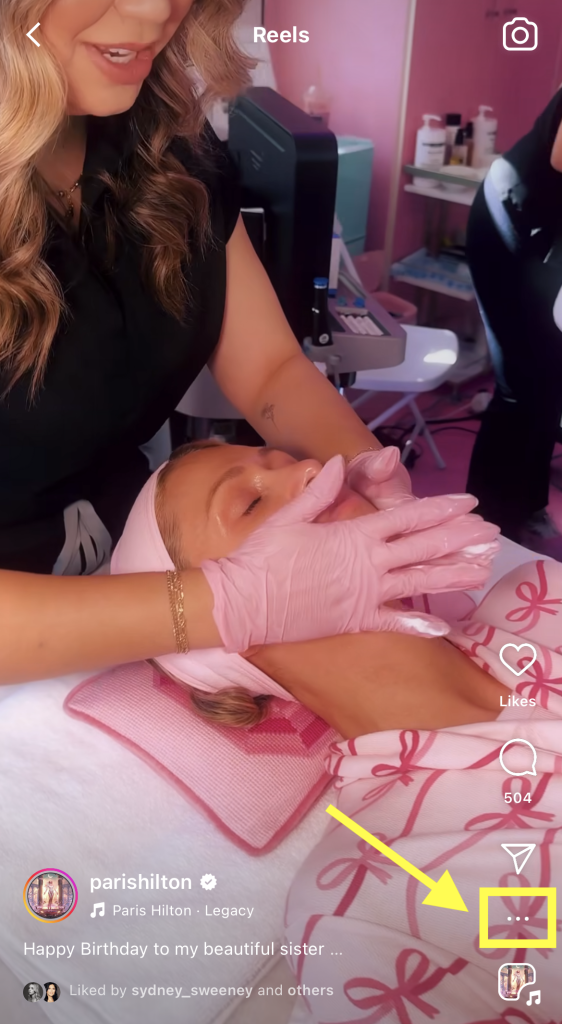
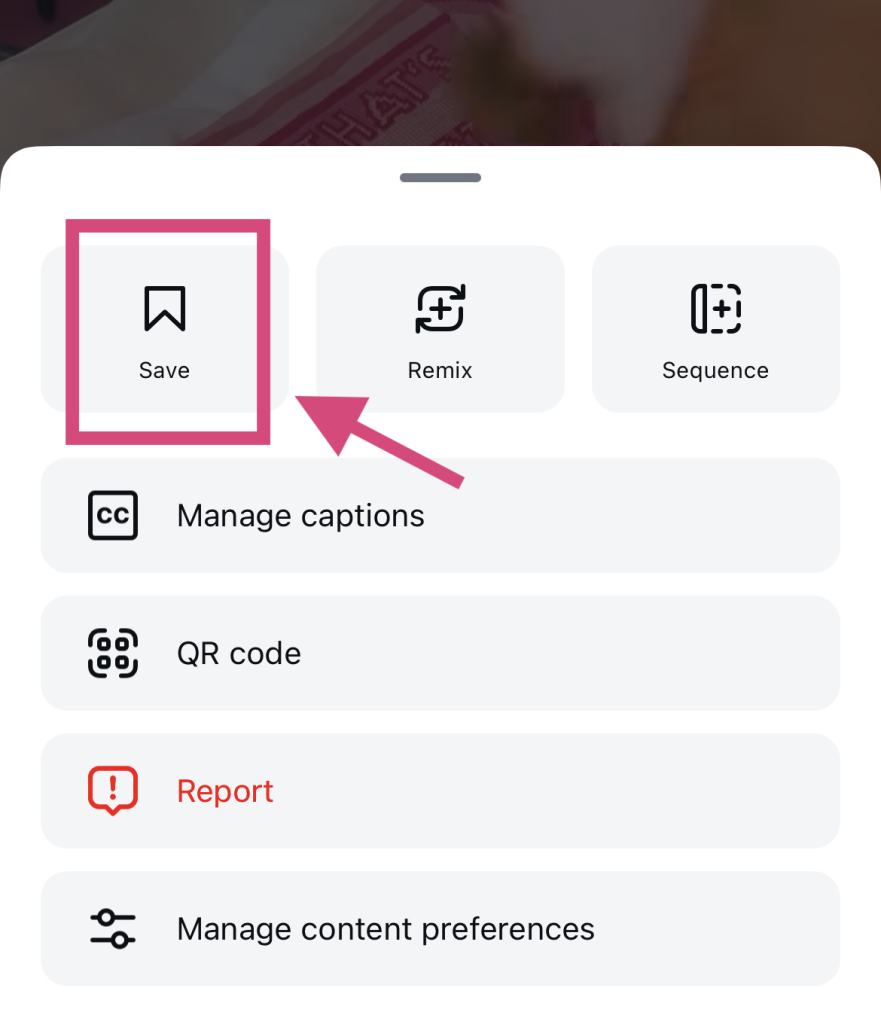
3. Haga clic en el botón Guardar con el icono del marcador.
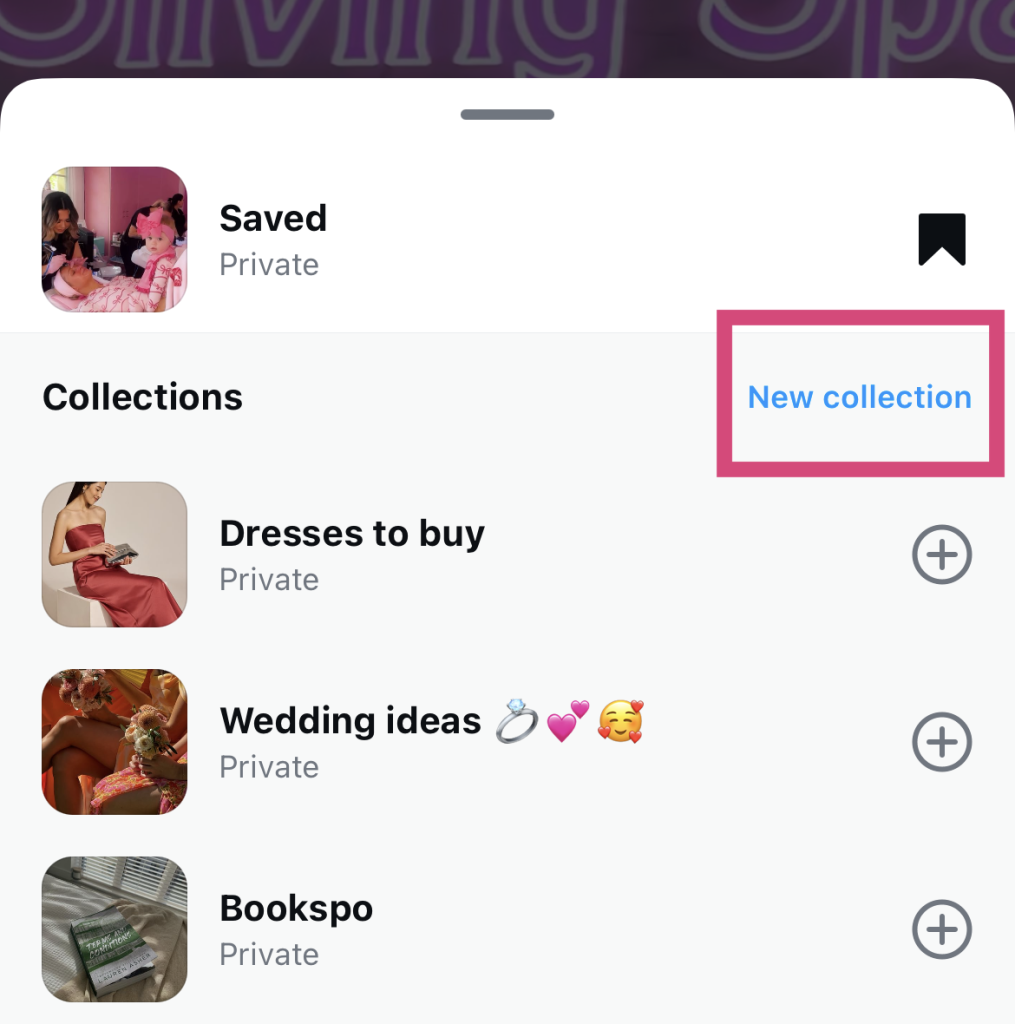
4. Elige en qué colección quieres incluirlo. Para crear una nueva categoría, haz clic en «Nueva colección».
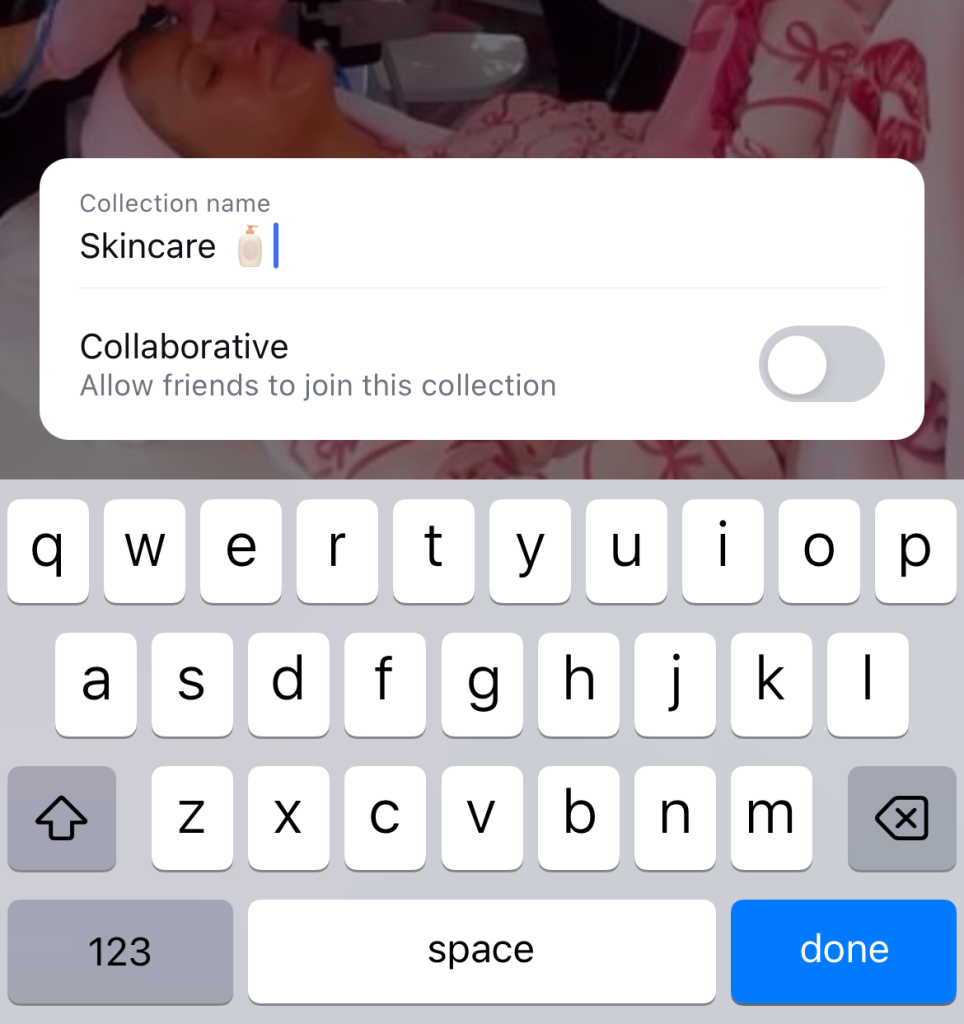
5. Escribe un nombre para tu colección. A continuación, pulsa «Guardar».
Ahora puedes encontrar ese vídeo en la carpeta «Guardados», a la que puedes acceder desde la configuración de tu perfil.
Guardar vídeos en tu carpeta «Guardados» tiene un montón de ventajas. Es una forma estupenda de recopilar publicaciones en las que quieres inspirarte para crear tu propio contenido. También puedes utilizar esta función para recopilar contenido útil e informativo que quieras volver a consultar más adelante, como tutoriales.
¿Cómo guardo un vídeo de Instagram en mi Camera Roll?
A veces, un vídeo es tan bueno que no basta con guardarlo. Es tan útil e impactante que necesitas una copia en tu carrete para verlo sin conexión.
Por desgracia, Instagram no permite Instagram descargar los vídeos de otros usuarios. Así que, si de verdad quieres guardar un vídeo en tu dispositivo, necesitarás una aplicación de terceros para descargar vídeos de Reels.
Hay montones de aplicaciones populares para descargar vídeos. Una de nuestras favoritas se llama Publer. Aquí te explicamos cómo guardar un vídeo directamente en tu dispositivo con ese sitio web:
1. Abra el Reel o la entrada de vídeo que desea descargar en Instagram.
2. En el menú emergente que aparece, pulsa el botón para compartir (también conocido como el icono del avión de papel).
3. Seleccione Copiar enlace. Deberías ver una marca de verificación como confirmación rápida de que has copiado correctamente el enlace.
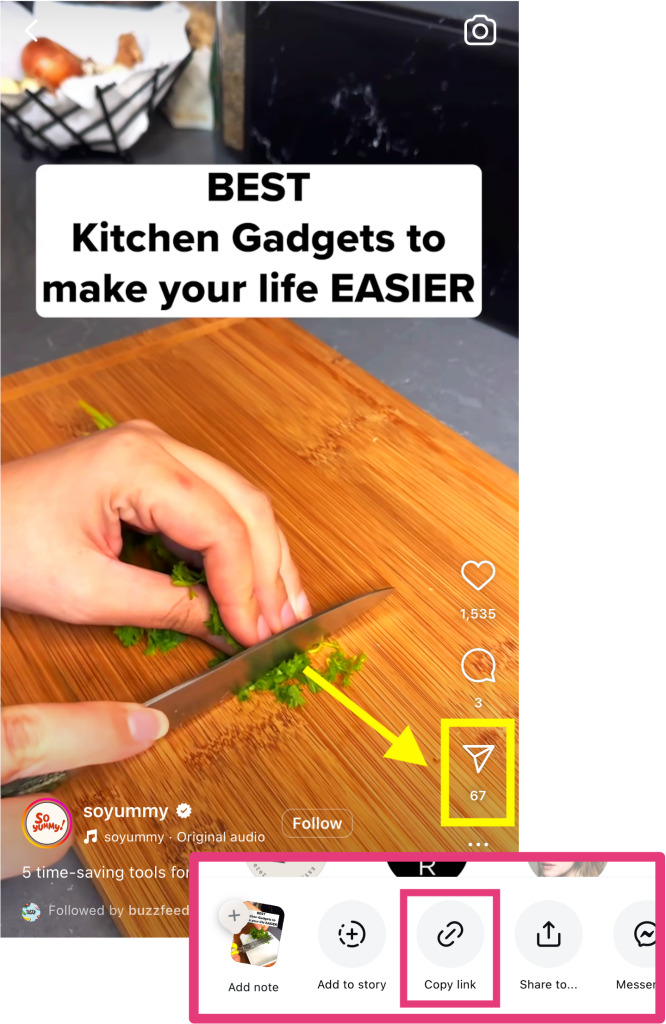
4. Dirígete al sitio web de Publer y pega la URL de tu vídeo en el campo correspondiente.
5. Pulsa el botón Descargar para procesar el vídeo y guardarlo en tu dispositivo.
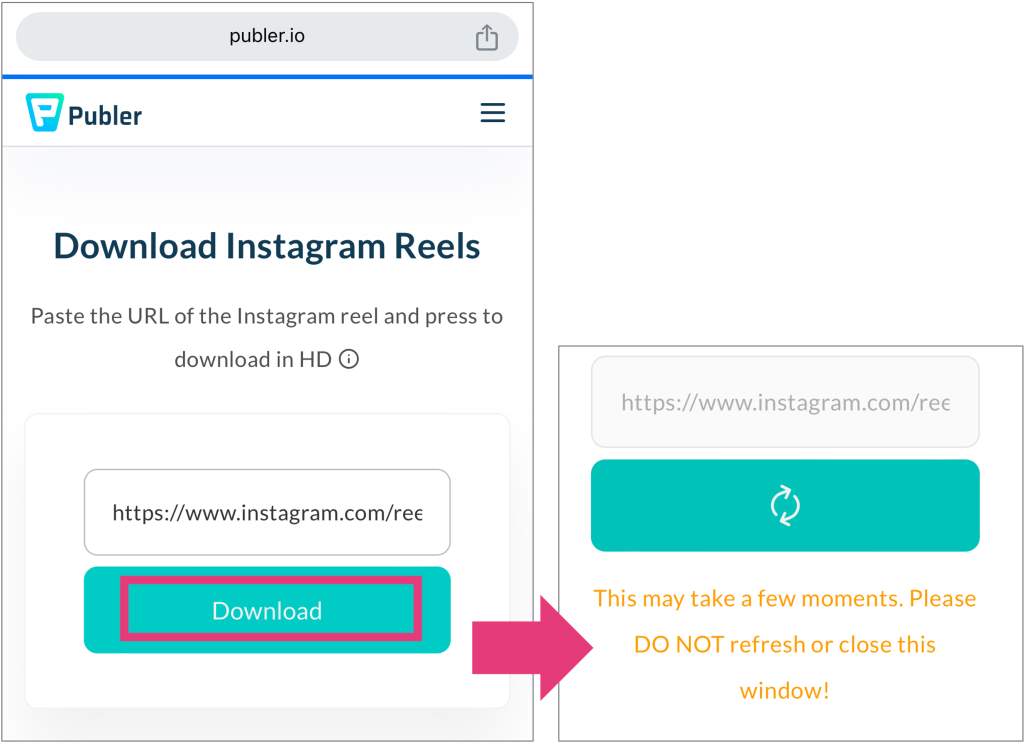
Ten en cuenta que sólo puedes descargar vídeos de perfiles públicos de Instagram . Actualmente no hay forma de descargar Reels de cuentas privadas.
Pero si estás realmente desesperado , plantéate grabar la pantalla mientras ven sus vídeos. Eso sí, ten en cuenta que el resultado no será perfecto. Capturarás muchos elementos innecesarios, como los botones de «Me gusta» y «Comentar», y la descripción del vídeo.
Vídeos de IG Story: ¿Cómo puedo guardar desde Instagram a mi teléfono?
Los Reels y los vídeos del feed no son los únicos contenidos de vídeo que pueden llamar tu atención en la plataforma. Instagram de los usuarios también son bastante entretenidas. Además, da más ganas de guardar estos vídeos para volver a verlos, ya que caducan al cabo de 24 horas.
Por desgracia, tampoco hay forma de descargar la historia de otra persona. Sin embargo, siempre puedes recurrir a grabar la pantalla para guardar las historias con tu móvil. ¡Y no te preocupes,Instagram avisa al autor de la historia si lo haces!
También puedes descargar tus propias historias. Si aún no las has publicado, es muy fácil. Solo tienes que pulsar el menú de los tres puntos situado en la parte superior del editor de historias y seleccionar «Guardar».
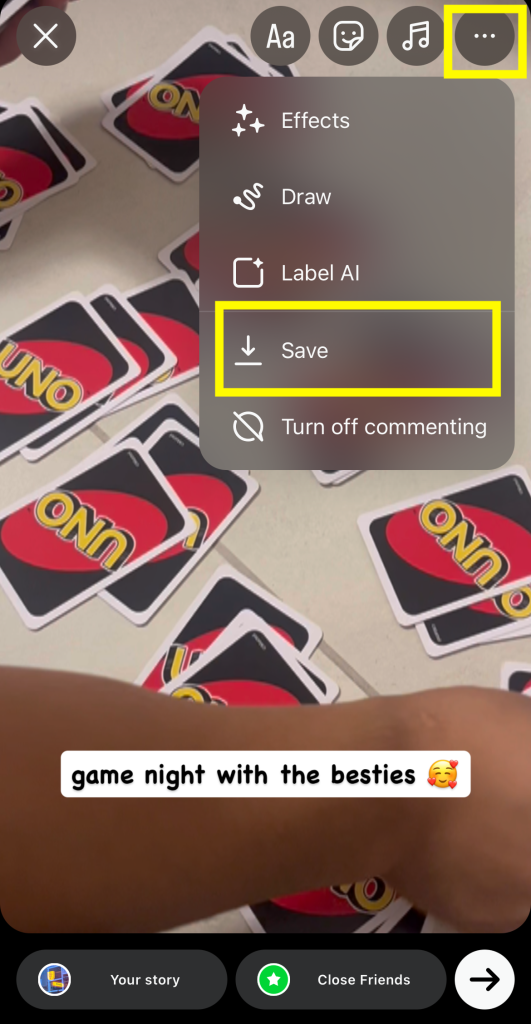
¿Quieres guardar los vídeos de tus «Stories» en el carrete después de publicarlos? A continuación te explicamos cómo hacerlo:
1. Abra su historia actual en Instagram .
2. Pulse el menú de tres puntos llamado Más.
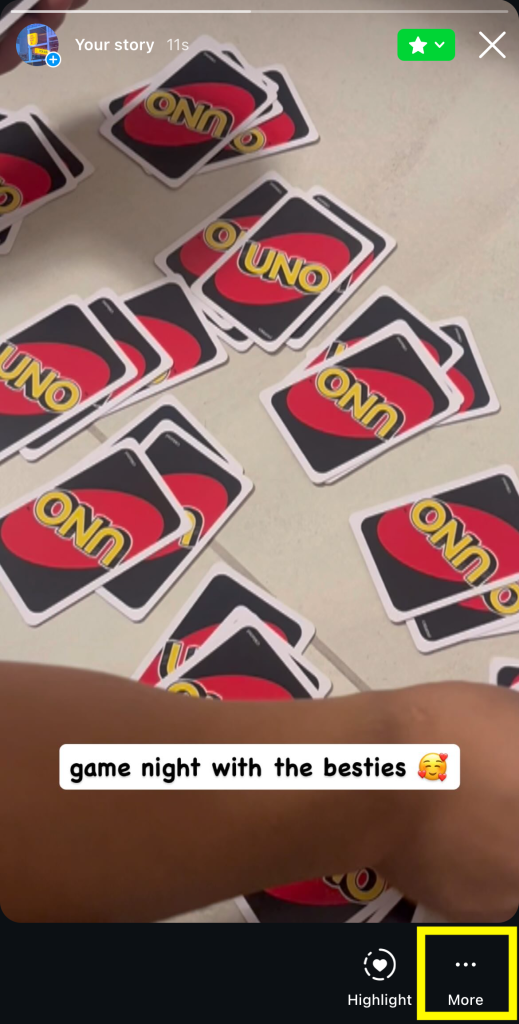
3. Seleccione Guardar.
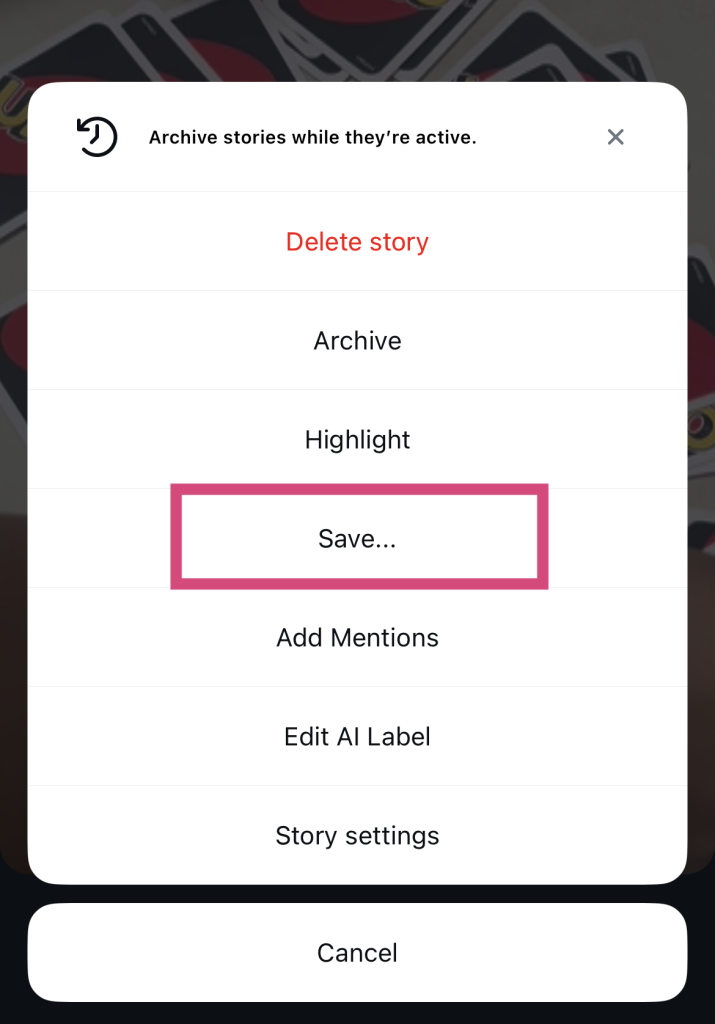
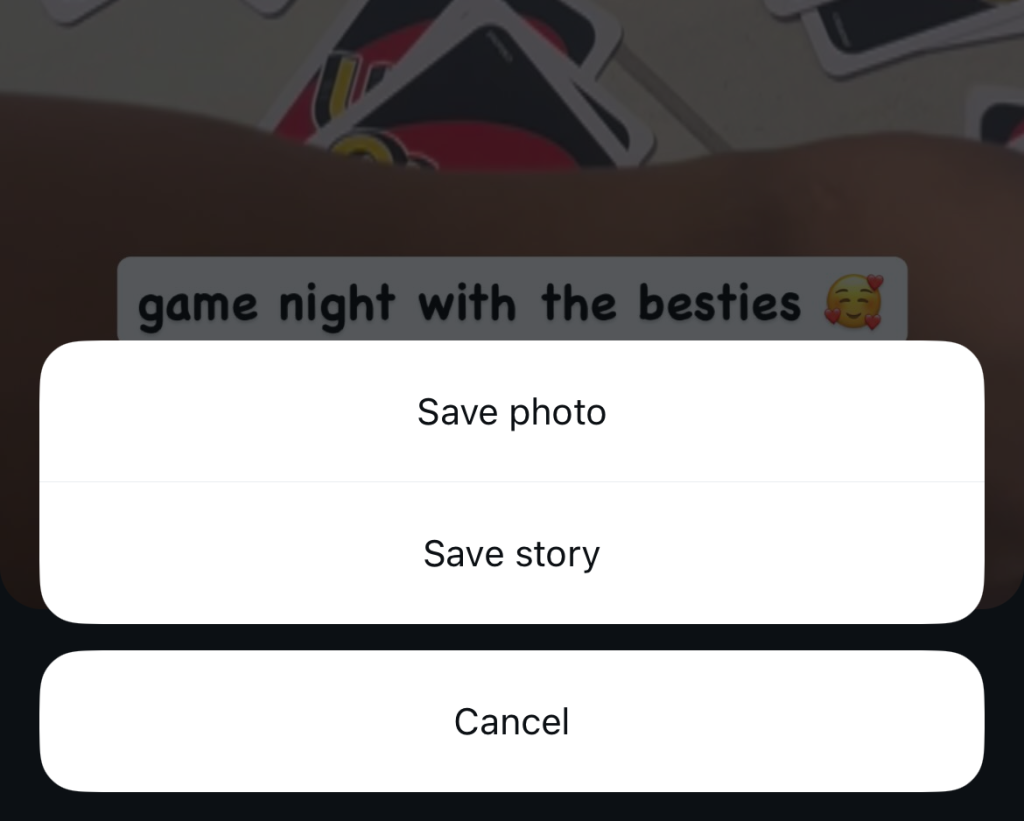
4. Elige entre Guardar foto/vídeo (descarga sólo esa publicación) y Guardar historia (recopila todas las Historias en un único vídeo).
¿Cómo puedo guardar un vídeo de Instagram DM?
Según Statista, cada minuto se envían unos 694 000 Reels en Instagram mensajes directos. Cuando recibes vídeos por mensaje directo, probablemente sea de alguien que comparte contenido que sabe que te va a gustar. Por eso, no es de extrañar que quieras tenerlos a mano. Para guardar esos Reels, sigue los pasos anteriores y descárgalos en tu móvil o en la carpeta «Guardados».
Pero, ¿qué pasa con los vídeos personales que no se publican en la plataforma, sino que te envían directamente? La buena noticia es que descargar esos vídeos es aún más fácil. Solo tienes que abrirlos en el chat con la persona correspondiente. A continuación, pulsa el botón de la flecha hacia abajo para guardarlo directamente en tu dispositivo.
¿Cómo puedo guardar un vídeo en directo de Instagram?
¿Acabas de terminar una sesión de Instagram Live hablando con tus fans y quieres ver cómo te ha ido? Puedes descargar fácilmente tus últimos vídeos en directo a tu teléfono para volver a verlos y revisarlos mejor.
¿Te preguntas: «¿Cómo puedo guardar un vídeo de mi Instagram ?» Es muy fácil. Justo después de terminar tu directo, pulsa el botón «Descargar vídeo» para guardar toda la retransmisión en tu dispositivo. ¡Y ya está!
Tenga en cuenta que sólo podrá descargar estos vídeos una vez que su Live haya finalizado oficialmente. Y ten paciencia: el proceso puede llevar más tiempo que la descarga de vídeos normales, ya que los vídeos Live son bastante largos.
¡Guarda vídeos inspiradores y crea mejores contenidos para crecer en IG!
Guardar contenido interesante para consultarlo más adelante es genial para volver a ver tutoriales, consejos y otros vídeos útiles. Pero también supone un gran cambio a la hora de mejorar tu contenido. Al guardar vídeos, puedes utilizarlos como fuente de inspiración para futuras publicaciones y perfeccionar tu contenido para que resulte aún más atractivo. ¡Y un contenido atractivo siempre atrae a más seguidores!
¿Quieres aumentar tu número de seguidores aún más rápido? ¡El equipo de Path Social ayudarte! Utilizamos algoritmos basados en inteligencia artificial para hacer llegar tu contenido directamente a aquellas personas que más probablemente lo disfruten e interactúen con él. Como resultado, conseguirás más seguidores y mayores índices de interacción, allanando el camino hacia el éxito en Instagram.
Ya no tendrás que preguntarte: «¿Cómo puedo guardar un vídeo de Instagram mejorar mi contenido?», solo para aumentar tu número de seguidores. Con nuestra ayuda, solo tienes que sentarte, relajarte y dejarnos hacer el trabajo. Hemos ayudado a páginas como «Pushing the Project» a ganar más de 17 000 nuevos seguidores rápidamente, y lo haremos por ti también. ¡Aumenta tu Instagram con Path Social hoy mismo!
Preguntas frecuentes
¿Cómo puedo descargar un vídeo de Instagram?
No se puede descargar un vídeo directamente desde Instagram. Por lo tanto, tienes que utilizar una aplicación de terceros para descargar Instagram y así conseguir una copia. Introduce la URL del vídeo que quieras guardar y, a continuación, ¡descárgalo! Entre los sitios web más populares para descargar vídeos se encuentran Publer, Snapinsta e Inflact.
¿Por qué no puedo descargar vídeos de otras personas en Instagram?
Instagram permite descargar los vídeos de otros usuarios para proteger su privacidad y evitar la posible difusión de su contenido. Si de verdad quieres descargar el contenido de vídeo de alguien, utiliza una herramienta de descarga de terceros.
¿Notifica Instagram a los demás cuando descargas o grabas su vídeo?
No, Instagram envía notificaciones cuando guardas, haces una captura de pantalla o grabas la pantalla del contenido de otra persona. La plataforma no tiene forma de saber si has utilizado una herramienta de descarga de terceros para guardar las publicaciones en vídeo de otra persona. Por lo tanto, tampoco te enviará notificaciones si haces eso.





¿Buscas la mejor forma de conseguir seguidores reales Instagram ?
Experimenta un crecimiento auténtico gracias a nuestro enfoque específico, diseñado para atraer seguidores que realmente interactúen con tu contenido.
Consigue seguidores reales Instagram