


Comment créer une page Instagram : Un guide facile pour les débutants en IG

Même si elle existe depuis des années, Instagram reste l’une des applications de réseaux sociaux les plus en vogue. Selon Statista, la plateforme compte 1,2 milliard d’utilisateurs actifs par mois. Cela représente environ 28 % de l’ensemble des internautes dans le monde ! Ainsi, si vous souhaitez entrer en contact avec d’autres personnes en ligne, Instagram est vraiment l’endroit idéal. Et la première étape pour vous lancer sur l’application consiste à apprendre à créer une page Instagram .
Heureusement, la création de votre compte Instagram est très simple. Vous pouvez le faire directement depuis l'application sur votre appareil mobile. De plus, si vous êtes chef d'entreprise ou que vous souhaitez devenir influenceur, vous pouvez même transformer votre nouveau compte en page professionnelle.
Dans ce guide, nous allons vous expliquer en détail comment créer votre première page Instagram . Nous vous donnerons même quelques-uns de nos meilleurs conseils pour réussir sur cette plateforme, même si vous êtes débutant ! Restez avec nous pour découvrir les bases d’ Instagram et vous lancer sur le réseau social visuel le plus populaire au monde.

Comment créer une page « Instagram », étape par étape
Créer une page sur Instagram est très simple, et vous pouvez le faire directement depuis votre application mobile. Notez toutefois que vous devez avoir au moins 13 ans pour créer un compte sur la plateforme.
Vous avez le choix entre deux options pour créer votre compte Instagram . Vous pouvez soit partir de zéro, soit l'associer directement à votre compte Facebook existant. Mais ne vous inquiétez pas : la procédure est simple, quelle que soit l'option choisie. Voici comment créer une page Instagram , étape par étape :
1. Téléchargez l'application mobile Instagram sur l'Apple App Store ou le Google Play Store.
2. Ouvrez l'application sur votre appareil mobile. Vous devriez alors accéder à la page de connexion de la plateforme.
3. Si votre compte Facebook s'affiche, vous pouvez cliquer dessus pour créer un compte Instagram reprenant vos informations Facebook. Si vous souhaitez créer une page à partir de zéro, cliquez sur « Créer un nouveau compte ».
4. Saisissez l'adresse e-mail ou le numéro de portable que vous souhaitez associer à votre page. Si jamais vous ne parvenez plus à accéder à votre compte Instagram , vous pourrez y récupérer l'accès grâce à ces coordonnées.
5. Saisissez le code de confirmation unique envoyé à votre adresse électronique ou à votre numéro de téléphone.
6. Choisissez votre mot de passe. Assurez-vous qu’il soit suffisamment complexe pour que personne ne puisse le deviner facilement ! Ensuite, appuyez sur « Suivant ».
7. Saisissez votre date de naissance, puis cliquez sur « Suivant ».
8. Choisissez votre identifiant « Instagram » (c'est-à-dire votre nom d'utilisateur), puis appuyez sur « Suivant ».
9. Lisez attentivement les conditions d'utilisation de Instagram. Si vous les acceptez, appuyez sur « J'accepte » pour finaliser la création de votre compte.
10. Ajoutez une photo de profil. Si vous souhaitez ajouter une photo plus tard, appuyez simplement sur « Passer ».
Et voilà, c'est terminé ! Notez que si vous créez un compte synchronisé avec Facebook, vous pourrez vous connecter à Instagram avec les mêmes identifiants.
Comment créer un compte professionnel Instagram
Lorsque vous créez un compte pour la première fois sur Instagram, celui-ci est par défaut un compte personnel. Mais si vous gérez une marque, vous pouvez facilement passer à un compte professionnel.
Les comptes professionnels donnent accès à des outils Instagram spécialement conçus pour la création de marques. Il s'agit notamment de fonctionnalités telles que Instagram Insights et la possibilité de diffuser de la publicité payante sur la plateforme.
Il existe deux types de comptes professionnels : les profils d'entreprise et les comptes de créateurs. Les outils disponibles pour chacun d'entre eux sont adaptés aux besoins spécifiques de ces types de comptes. Les comptes d'entreprise peuvent utiliser des outils tels qu'Instagram Shopping pour stimuler leurs ventes et afficher les informations relatives à leur établissement dans leur biographie. De leur côté, les influenceurs en mode « créateur » ont accès à des fonctionnalités liées aux partenariats avec des marques et au contenu sponsorisé.
Vous souhaitez passer à un compte professionnel ou à un compte de créateur ? Voici comment créer un compte professionnel Instagram à partir de votre page :
1. Ouvrez l'application Instagram et accédez à votre profil.
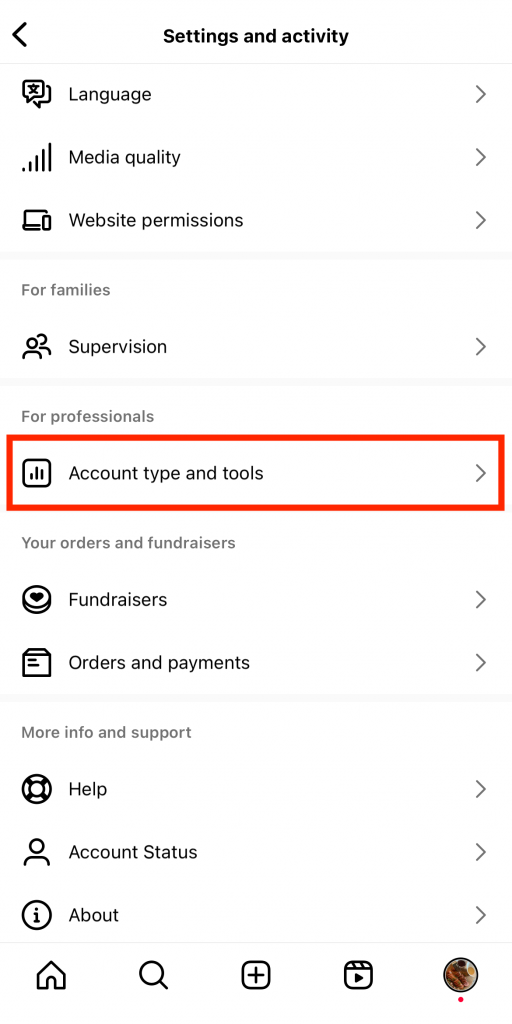
2. Cliquez sur le menu des paramètres en haut à droite de la page.
3. Continuez à faire défiler les paramètres jusqu’à ce que vous voyiez la section « Pour les professionnels ». Appuyez ensuite sur « Type de compte » puis sur « Outils ».
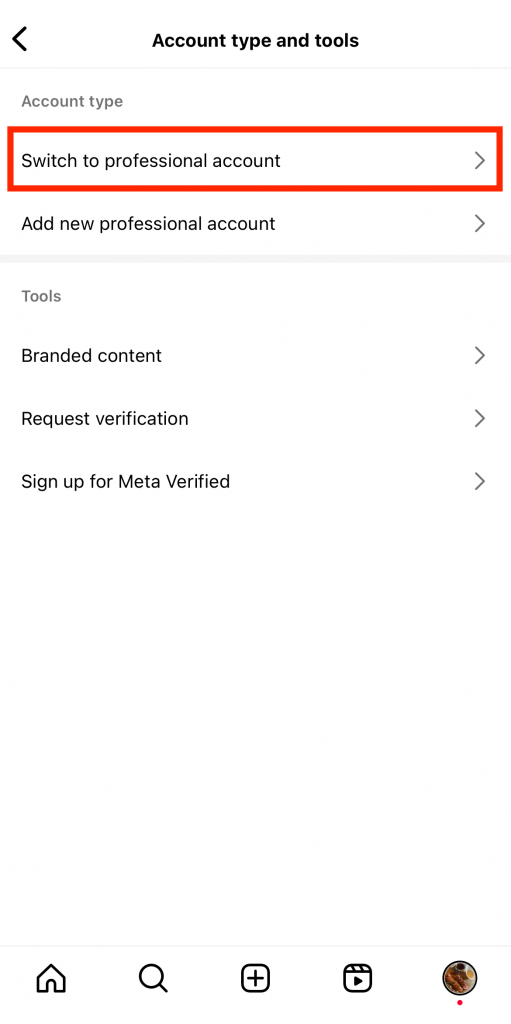
4. Sous "Type de compte", cliquez sur Passer au compte professionnel.
5. Lisez les rappels et l'introduction sur les comptes professionnels en cliquant sur Continuer dans les pages suivantes.
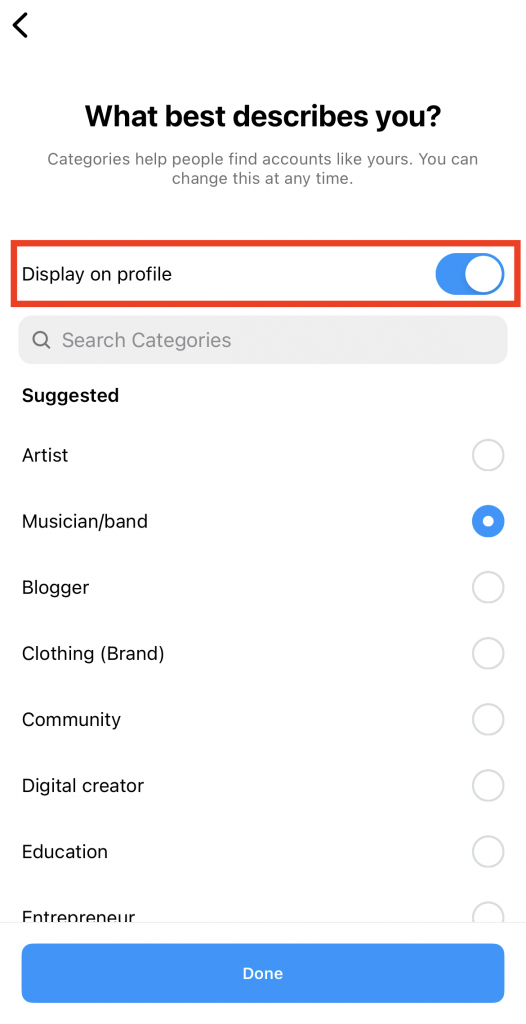
6. Choisissez une catégorie qui vous décrit le mieux en tant que professionnel. Les catégories comprennent "écrivain", "blog personnel", "restaurant", etc. Veillez à activer l'option "Afficher sur le profil" pour afficher publiquement votre catégorie.
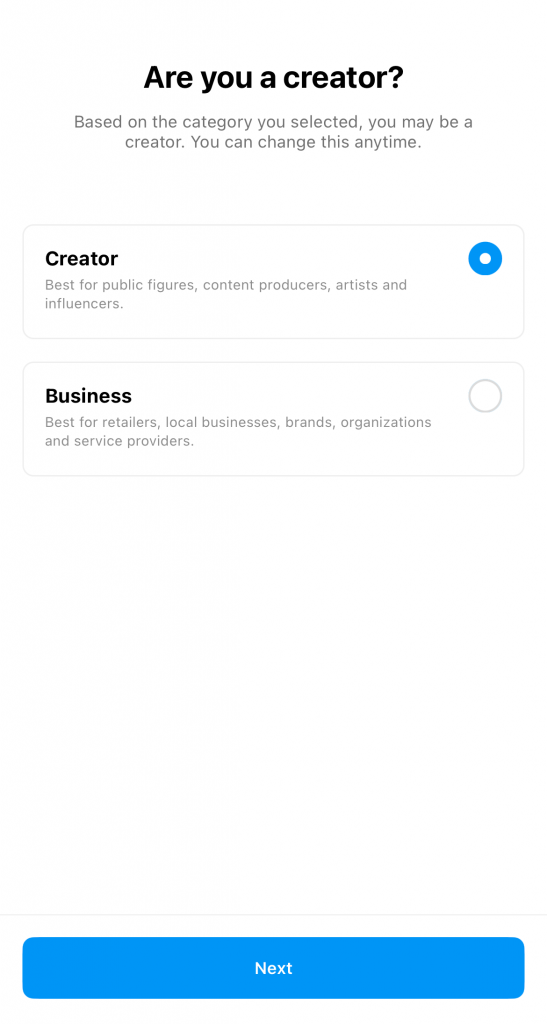
7. Sur la page suivante, choisissez entre un compte « Créateur » et un compte « Entreprise ». Cliquez ensuite sur « Suivant ».
8. Pour finir, associez votre page professionnelle « Instagram » à votre compte Facebook si vous le souhaitez. Sinon, appuyez sur « Ignorer ». Vous avez désormais accès à votre tableau de bord professionnel.
Comment créer une page thématique Instagram
Créer une page Instagram avec une esthétique précise et cohérente est un excellent moyen d'attirer votre public cible. Adoptez un style visuel caractéristique pour votre fil d'actualité, qu'il s'agisse d'un style minimaliste aux teintes neutres ou de couleurs vives et audacieuses. C'est un excellent moyen de vous démarquer et d'attirer l'attention des internautes.
Vous ne savez pas comment créer une page thématique Instagram ? Voici une liste de choses à faire pour vous aider à créer la page de vos rêves :
- Trouvez votre créneau. Il doit s'agir d'un sujet qui vous passionne et sur lequel vous pouvez créer du contenu de manière régulière. Parmi les créneaux les plus populaires, on trouve la photographie, les voyages, la mode, la technologie, le fitness et bien d'autres encore.
- Choisissez une palette de couleurs. Ce seront vos couleurs emblématiques à long terme, alors faites le bon choix !
- Définissez clairement le ton de votre marque, c'est-à-dire la personnalité que vous souhaitez voir refléter dans votre fil d'actualité.
- Élaborez une stratégie de contenu qui comprend des piliers de contenu et une planification a posteriori. Cela vous aidera à maintenir une présence cohérente sur Instagram et à organiser votre contenu esthétique.
- Produisez régulièrement du contenu qui s'inscrit dans votre esthétique.

Quel devrait être mon premier message sur Instagram ?
Maintenant que vous savez comment créer votre page Instagram , vous vous demandez sans doute : « Quel devrait être mon premier article sur Instagram ? »
Vous pouvez publier ce que vous voulez comme premier élément de contenu sur Instagram. Il peut s'agir d'une vidéo d'introduction ou même d'un simple selfie accompagné d'une légende racontant votre histoire personnelle. Veillez simplement à ce que votre contenu soit attrayant et pertinent pour votre public cible.
Vous êtes à court d'idées pour votre premier article ? En voici quelques-unes dont vous pourrez vous inspirer :
- Teasers pour le lancement officiel de votre marque sur Instagram .
- Une vidéo vous présentant aux internautes et expliquant ce qu'ils peuvent attendre de votre page.
- Un mot de bienvenue pour accueillir les nouveaux adeptes.
- Un regard en coulisses sur vous et votre équipe en train de développer la marque.
- La vision unique ou la déclaration de mission de votre marque.

Comment réussir sur Instagram en tant que nouvelle page : Nos 5 meilleurs conseils
Maintenant que vous avez créé votre page - avec votre premier post - il est temps de penser à un peu plus long terme. Comment réussir avec une toute nouvelle page sur une plateforme aussi compétitive et débordante de contenu ?
En fin de compte, tout repose sur les efforts que vous êtes prêt à fournir pour produire du contenu créatif exceptionnel. Cela implique de laisser libre cours à votre créativité autant que possible, tout en tirant pleinement parti des fonctionnalités uniques d’ Instagram. Vous ne savez pas comment vous y prendre ? Voici cinq de nos conseils pour réussir sur Instagram, même si vous débutez.
1. Expérimentez différents types de messages Instagram
Plus vous variez les types de publications sur Instagram , plus vous avez de chances de toucher un public large. Les photos époustouflantes et les publications en carrousel sont idéales pour capter l’attention de vos abonnés. Mais si vous souhaitez élargir encore davantage votre audience, créez également des Reels sur Instagram . Cela permettra de faire connaître votre nouvelle page à un public plus large, susceptible de préférer les vidéos aux photos.
2. Élaborer la bio de votre profil pour faire une bonne première impression
Optimisez la bio de votre profil pour que les gens aient une idée de qui vous êtes dès qu'ils visitent votre page.
Si vous avez une page personnelle, parlez un peu de vous. Vous pouvez par exemple indiquer la ville où vous habitez et votre métier actuel. Vous pouvez aussi simplement rédiger une biographie simple et amusante, ou ajouter votre citation préférée pour inspirer les autres.
Si vous disposez d'un compte professionnel, veillez à indiquer votre catégorie dans votre biographie. Ajoutez vos coordonnées et toute autre information importante afin que vos partenaires potentiels puissent vous contacter facilement.
3. Rédiger des légendes intéressantes et adaptées à votre public cible
Sur Instagram, créer des photos et des vidéos captivantes et de grande qualité est un jeu d'enfant. Mais vous ne devez pas pour autant négliger vos légendes. Celles-ci doivent être captivantes et intéressantes pour capter l'attention de votre public cible et le fidéliser.
Veillez à ce que vos légendes racontent une histoire captivante qui apporte du contexte à votre image ou à votre vidéo. Elles peuvent également être si pleines d'esprit que les internautes en riront aux larmes et décideront de vous suivre. Pensez à inclure des conseils, des leçons de vie, des tutoriels et d'autres types de légendes qui prolongent le temps passé sur votre publication.
4. Utiliser les hashtags et les balises de localisation pour améliorer la visibilité
Vous souhaitez toucher rapidement davantage de personnes ? Utilisez des hashtags et des balises de localisation pour rendre votre publication visible auprès d'un public plus large. Ces balises sont extrêmement efficaces pour mettre votre contenu en avant sur la page « Explorer ». Elles constituent également un excellent moyen d'atteindre les personnes intéressées par votre domaine d'activité ou votre communauté locale. Cela permet de faire connaître votre nouvelle page à davantage de personnes, ce qui, en retour, augmente vos chances de gagner plus d'abonnés.

5. Diffuser des annonces pour atteindre votre marché cible avec précision
Si vous disposez d'un compte professionnel, pensez à diffuser des publicités sur Instagram pour toucher votre public cible. Investir dans du contenu payant vous permet d'atteindre rapidement les bonnes personnes. Cela vous offre la possibilité de promouvoir tous les produits ou services proposés par votre marque. De plus, c'est un excellent moyen d'obtenir un premier afflux d'abonnés et de clients potentiels après avoir créé votre compte Instagram .
Vous démarrez à Instagram en partant de zéro ? Prenez de l'avance avec Path Social
Créer une page sur Instagram est relativement simple. Il vous suffit de suivre la procédure de création de compte, de choisir un nom d'utilisateur et une photo de profil, puis de commencer à publier du contenu. Si vous accordez de l'importance à la mise en valeur de votre fil d'actualité, concentrez-vous sur un thème esthétique ou un créneau spécifique pour créer la page de vos rêves. Ensuite, suivez les bonnes pratiques créatives et professionnelles qui vous aideront à connaître rapidement le succès sur la plateforme.
Cependant, le plus difficile lorsqu'on démarre Instagram à partir de zéro est d'obtenir des adeptes. Vous devez vous efforcer de faire connaître votre marque avant d'attirer un public.
Maintenant que vous savez comment créer une page Instagram , pensez à faire appel à un service de développement d’audience tel que Path Social. Notre algorithme exclusif peut vous aider à booster rapidement votre nombre d’abonnés. Notre équipe utilise l’intelligence artificielle pour aider votre contenu à atteindre votre public cible et lui faire découvrir votre nouvelle page. Ce gain de visibilité se traduit non seulement par un engagement accru sur vos publications, mais aussi par l’acquisition de nombreux nouveaux abonnés. Mieux encore, ces abonnés sont 100 % réels et véritablement intéressés par votre contenu. Gagnez dès aujourd’hui davantage d’abonnés authentiques sur Instagram grâce à nous !





Prêt à booster vos followers Instagram ?
Commencez à gagner des adeptes authentiques et à augmenter l'engagement dès aujourd'hui !
Augmenter le nombre de followers Instagram




