


Cómo crear una página Instagram : Guía fácil para novatos en IG

Aunque lleva años en el mercado, Instagram sigue siendo una de las redes sociales más populares en las que estar presente. Según Statista, la plataforma cuenta con 1.2 mil millones de usuarios activos al mes. ¡Eso supone alrededor del 28 % de la población mundial que utiliza Internet! Así que, si quieres conectar con gente en línea, Instagram es sin duda el lugar ideal. Y el primer paso para empezar a utilizar la aplicación es aprender a crear una página de Instagram .
Por suerte, crear tu cuenta de Instagram es muy fácil. Puedes hacerlo directamente desde la aplicación de tu dispositivo móvil. Además, si eres propietario de un negocio o aspiras a convertirte en influencer, incluso puedes convertir tu nueva cuenta en una página profesional.
En esta guía, te mostraremos exactamente cómo configurar tu primera página de Instagram . ¡Incluso te daremos algunos de nuestros mejores consejos para triunfar en la plataforma, aunque seas un principiante! Quédate con nosotros para aprender estos conceptos básicos de Instagram y dar tus primeros pasos en la red social visual favorita del mundo.

Cómo crear una página de « Instagram », paso a paso
Crear una página en Instagram es muy sencillo, y puedes hacerlo directamente desde la aplicación móvil. Ten en cuenta que debes tener al menos 13 años para crear una cuenta en la plataforma.
Hay dos formas de crear tu cuenta de Instagram . Puedes empezar desde cero o vincularla directamente a tu cuenta de Facebook ya existente. Pero no te preocupes: el proceso es sencillo en cualquier caso. A continuación te explicamos, paso a paso, cómo crear una página de Instagram :
1. Descargue la aplicación móvil Instagram en Apple App Store o Google Play Store.
2. Abre la aplicación en tu dispositivo móvil. Esto debería llevarte a la página de inicio de sesión de la plataforma.
3. Si aparece tu cuenta de Facebook, puedes hacer clic en ella para crear una cuenta en Instagram que refleje tus datos de Facebook. Si quieres crear una página desde cero, haz clic en «Crear nueva cuenta».
4. Introduce la dirección de correo electrónico o el número de móvil que quieras vincular a tu página. Si alguna vez no pudieras acceder a tu cuenta de Instagram , podrás recuperar el acceso utilizando esta información de contacto.
5. Introduzca el código de confirmación que se le ha enviado a su correo electrónico o a su número de teléfono.
6. Elige tu contraseña. ¡Asegúrate de que sea lo suficientemente segura como para que nadie pueda adivinarla fácilmente! A continuación, pulsa «Siguiente».
7. Introduce tu fecha de nacimiento y, a continuación, haz clic en «Siguiente».
8. Elige tu nombre de usuario de Instagram (también conocido como « ») y, a continuación, pulsa «Siguiente».
9. Lee las condiciones de uso de Instagram. Si estás de acuerdo con ellas, pulsa «Acepto» para finalizar la creación de tu cuenta.
10. Sube una foto de perfil. Si quieres añadir una foto más adelante, solo tienes que pulsar «Omitir».
¡Y ya está, ya has terminado! Ten en cuenta que, si creas una cuenta sincronizada con Facebook, podrás iniciar sesión en Instagram con los mismos datos de acceso.
Cómo crear una cuenta profesional en Instagram
Cuando creas una cuenta por primera vez en Instagram, por defecto será una página personal. Sin embargo, si gestionas una marca, puedes cambiar fácilmente a una cuenta profesional.
Las cuentas profesionales tienen acceso a herramientas especiales de Instagram diseñadas especialmente para crear marcas. Entre ellas se incluyen funciones como Instagram Insights y la posibilidad de realizar publicidad de pago en la plataforma.
Hay dos tipos de cuentas profesionales: los perfiles empresariales y las cuentas de creadores. Las herramientas disponibles para cada una de ellas están adaptadas a las necesidades de estos tipos de cuentas. Las cuentas empresariales pueden utilizar herramientas como « Instagram » y «Shopping» para impulsar las ventas e incluir la información de su establecimiento en su biografía. Por su parte, los influencers en modo «creador» tienen acceso a funciones relacionadas con las colaboraciones con marcas y el contenido patrocinado.
¿Quieres cambiar a una cuenta de empresa o de creador? A continuación te explicamos cómo crear una cuenta profesional en Instagram a partir de tu página:
1. Abre la aplicación Instagram y dirígete a tu perfil.
2. Haga clic en el menú de configuración situado en la parte superior derecha de la página.
3. Sigue desplazándote por los ajustes hasta que veas la sección «Para profesionales». A continuación, pulsa en «Tipo de cuenta» y «Herramientas».
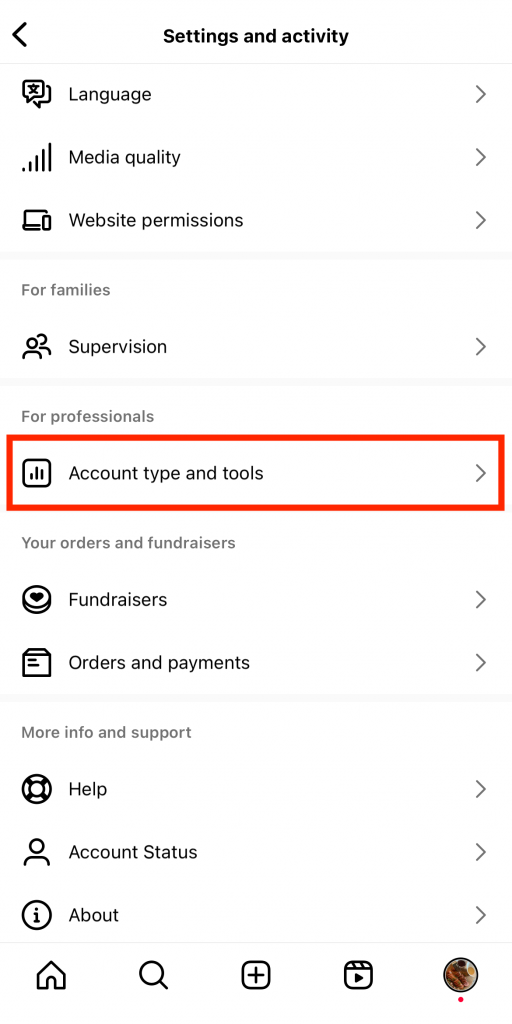
4. En "Tipo de cuenta", haga clic en Cambiar a cuenta profesional.
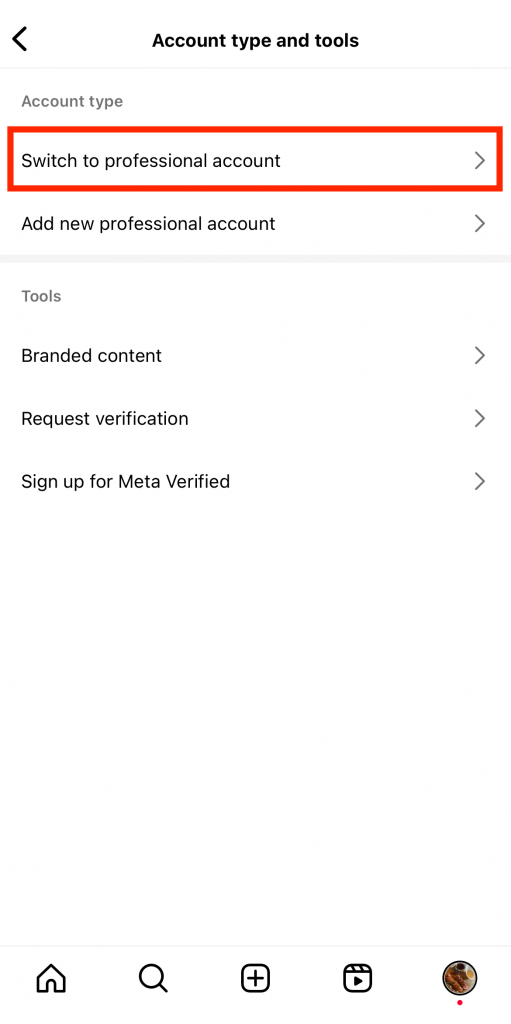
5. Lea los recordatorios y la introducción sobre las cuentas profesionales haciendo clic en Continuar en las páginas siguientes.
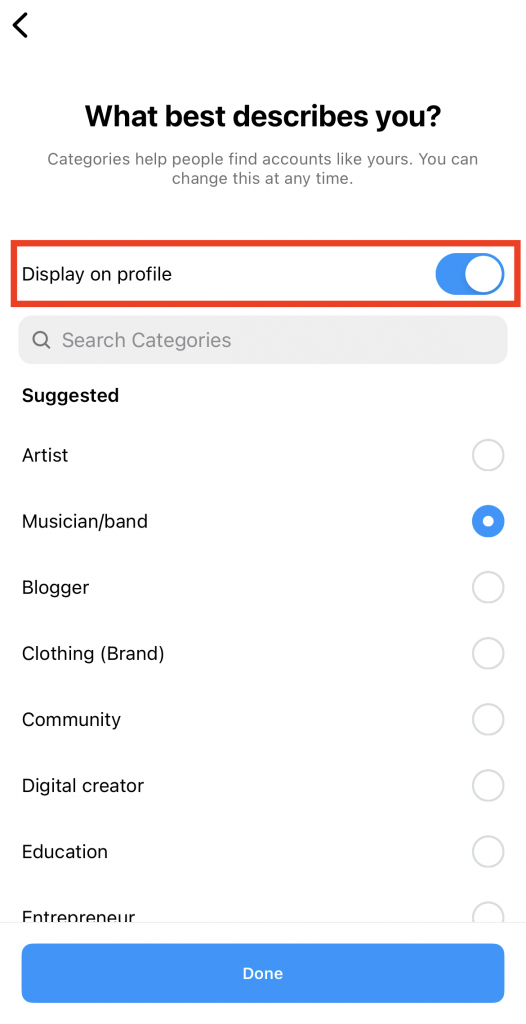
6. Elige la categoría que mejor te describa como profesional. Las categorías incluyen "escritor", "blog personal", "restaurante" y más. Asegúrate de activar la opción "Mostrar en el perfil" para mostrar tu categoría públicamente.
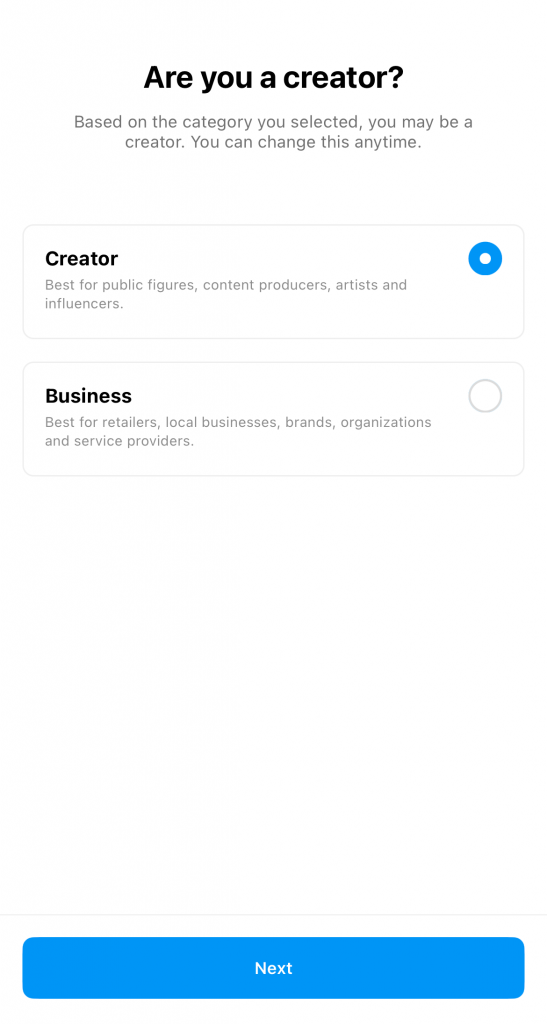
7. En la página siguiente, elige entre una cuenta de creador y una cuenta empresarial . A continuación, haz clic en «Siguiente».
8. Por último, vincula tu página empresarial de « Instagram » con tu cuenta de Facebook si lo deseas. Si no, pulsa en «Omitir». Ahora ya tienes acceso a tu panel de control profesional.
Cómo crear una página temática Instagram
Crear una página de Instagram con una estética específica y coherente es una forma estupenda de atraer a tu público objetivo. Mantén un diseño concreto en tu feed con tu estilo característico, ya sea minimalista con tonos neutros o con colores llamativos y vivos. Es una forma estupenda de destacar y captar la atención de la gente.
¿No sabe cómo crear una página temática Instagram ? Aquí tienes una lista de cosas que debes hacer y que pueden ayudarte a crear la página de tus sueños:
- Encuentra tu nicho. Debe ser un tema que te apasione y sobre el que puedas crear contenido de forma constante. Entre los nichos más populares se encuentran la fotografía, los viajes, la moda, la tecnología, el fitness y muchos más.
- Elige una paleta de colores. Estos serán tus colores característicos a largo plazo, ¡así que elígelos con cuidado!
- Define la voz de tu marca, es decir, la personalidad que quieres que refleje tu feed.
- Desarrolle una estrategia de contenidos que incluya pilares de contenido y programación posterior. Esto te ayudará a mantener una presencia coherente en Instagram y a organizar tu contenido estético.
- Produzca regularmente contenidos que se ajusten a su estética.

¿Cuál debería ser mi primer mensaje en Instagram ?
Ahora que ya sabes cómo crear tu página de Instagram , seguramente te estarás preguntando: «¿Cuál debería ser mi primera publicación en Instagram ?»
Puedes publicar lo que quieras como primer contenido en Instagram. Puede ser un vídeo introductorio o incluso un simple selfie con un pie de foto en el que cuentes tu historia personal. Solo tienes que asegurarte de que sea atractivo y relevante para tu público objetivo.
¿Te has quedado sin ideas para tu primer post? Aquí tienes algunas en las que inspirarte:
- Teasers para el lanzamiento oficial de su marca en Instagram .
- Un vídeo para presentarte a la gente y explicarles lo que pueden esperar de tu página.
- Una bienvenida para saludar a los nuevos seguidores.
- Una mirada entre bastidores a usted y su equipo desarrollando la marca.
- La visión o misión única de su marca.

Cómo tener éxito en Instagram como página nueva: Nuestros 5 mejores consejos
Ahora que ya has creado tu página, con tu primer post, es hora de pensar un poco más a largo plazo. Cómo puedes tener éxito con una página nueva en una plataforma tan competitiva y repleta de contenidos?
En definitiva, lo que realmente importa es el esfuerzo que estés dispuesto a dedicar a crear contenido creativo e impresionante. Eso significa dar rienda suelta a tu creatividad tanto como sea posible, al tiempo que aprovechas al máximo las funciones únicas de Instagram. ¿No sabes muy bien cómo hacerlo? Aquí tienes cinco de nuestros consejos para triunfar en Instagram, incluso si eres nuevo en la plataforma.
1. Experimente con diferentes tipos de mensajes Instagram
Cuantos más tipos de publicaciones de Instagram pruebes, a más gente podrás llegar potencialmente. Las fotos impresionantes y las publicaciones en formato carrusel son perfectas para llegar a tus seguidores. Pero si quieres ampliar ese alcance, crea también algunos Reels de Instagram . Así darás a conocer tu nueva página a un público más amplio que quizá prefiera los vídeos a las fotos.
2. Elabore la biografía de su perfil para causar una buena primera impresión
Optimiza la biografía de tu perfil para que la gente se haga una idea de quién eres nada más visitar tu página.
Si tienes una página personal, cuéntales algo sobre ti. Plantéate compartir en qué ciudad vives y a qué te dedicas actualmente. También puedes escribir una biografía sencilla y divertida o añadir tu cita favorita para inspirar a los demás.
Si tienes una cuenta profesional, asegúrate de indicar tu categoría en tu biografía. Añade tus datos de contacto y otra información importante para que a los posibles socios les resulte más fácil ponerse en contacto contigo.
3. Escriba subtítulos interesantes y relevantes para su público objetivo
Crear fotos y vídeos atractivos y de alta calidad es pan comido en Instagram. Pero tampoco debes descuidar tus pies de foto. Deben ser atractivos e interesantes para captar la atención de tu público objetivo y conseguir que se conviertan en seguidores.
Asegúrate de que tus pies de foto cuenten una historia cautivadora que aporte contexto a tu imagen o vídeo. También pueden ser tan ingeniosos que la gente se parta de risa y te siga. Plantéate añadir consejos, lecciones de vida, tutoriales y otros pies de foto que aumenten el tiempo de permanencia en tu publicación.
4. Utiliza hashtags y etiquetas de ubicación para aumentar la visibilidad
¿Quieres llegar a más gente rápidamente? Utiliza hashtags y etiquetas de ubicación para que tu publicación sea visible para un público más amplio. Estas etiquetas son muy eficaces para que tu contenido aparezca en la página «Explorar». Además, son fantásticas para llegar a personas interesadas en tu nicho o en tu comunidad local. De este modo, tu nueva página se da a conocer a más gente, lo que, a su vez, aumenta tus posibilidades de conseguir más seguidores.

5. Publique anuncios para llegar con precisión a su mercado objetivo
Si tienes una cuenta profesional, plantéate publicar anuncios en Instagram para llegar a tu público objetivo. Invertir en contenido de pago te permite llegar rápidamente a las personas adecuadas. Te brinda la oportunidad de promocionar cualquier producto o servicio que ofrezca tu marca. Además, es una forma excelente de conseguir ese impulso inicial de seguidores y clientes potenciales tras crear tu cuenta en Instagram .
¿Empezando de cero en Instagram ? Tome ventaja con Path Social
Crear una página en Instagram es relativamente fácil. Solo tienes que seguir el proceso de creación de la cuenta, elegir un nombre de usuario y una foto de perfil, y empezar a publicar. Si te preocupas por la selección de contenidos de tu feed, céntrate en un tema estético o un nicho concreto para crear la página de tus sueños. A continuación, sigue las mejores prácticas creativas y profesionales que te ayudarán a alcanzar rápidamente el éxito en la plataforma.
Sin embargo, lo más difícil de empezar Instagram desde cero es conseguir seguidores. Hay que pasar por el proceso de dar a conocer la marca antes de atraer al público.
Ahora que ya sabes cómo crear una página de Instagram , plantéate trabajar con un servicio de crecimiento como Path Social. Nuestro algoritmo propio puede darte un impulso inicial en tu número de seguidores. El equipo utiliza inteligencia artificial para ayudar a que tu contenido llegue a tu público objetivo y dar a conocer tu nueva página entre ellos. Este aumento de la visibilidad no solo se traduce en una mayor interacción en tus publicaciones, sino también en un gran número de nuevos seguidores. Lo mejor de todo es que estos seguidores son 100 % reales y están genuinamente interesados en tu contenido. ¡Consigue hoy mismo más seguidores auténticos en Instagram con nuestra ayuda!





¿Listo para aumentar tus seguidores Instagram ?
Empieza hoy mismo a ganar seguidores auténticos y a aumentar la participación.
Aumentar seguidores de Instagram ahora




