


Comment télécharger les messages de Instagram Story pour les garder en mémoire ?

Instagram Les Stories sont géniales pour découvrir des moments de vie spontanés et décontractés partagés par vos amis et votre famille. Cependant, le problème, c’est que ces publications verticales (photos et vidéos) disparaissent définitivement au bout de 24 heures. Alors, comment revoir les Stories que vous avez aimées ? Voici une astuce qui vous permettra de les regarder autant de fois que vous le souhaitez : téléchargez les Stories d’ Instagram directement sur votre appareil.
Dans ce guide complet, nous allons vous expliquer comment enregistrer les Stories d’ Instagram , qu’elles soient les vôtres ou celles d’un autre utilisateur. Accrochez-vous bien, car nous allons vous dévoiler toutes nos astuces pour conserver une copie de vos Stories préférées. C’est parti !

Raisons pour lesquelles vous pourriez vouloir écrire une histoire sur Instagram Download
Social Pilot indique que pas moins de 70 % des utilisateurs regardent quotidiennement des Stories. Il existe donc de nombreuses raisons pour lesquelles quelqu’un pourrait vouloir télécharger des Stories vidéo depuis Instagram sur son appareil personnel. Parmi celles-ci, on peut citer :
- Conserver des copies des photos et des vidéos pour en garder un souvenir une fois qu'elles auront disparu, en particulier pour les « Stories » liées à des moments chargés d'émotion et à des étapes importantes
- Rassembler les contenus intéressants sur lesquels vous tombez dans l'application pour vous en inspirer lors de la rédaction de vos propres articles.
- Analyser le Story content des principaux concurrents de votre marque
- Regarder des vidéos même lorsque vous n'êtes pas connecté à l'internet
Vous reconnaissez-vous dans l'une des motivations ci-dessus ? Si oui, poursuivez votre lecture pour découvrir exactement comment télécharger une story Instagram.

Sauvegarder le message de quelqu'un : Comment télécharger une vidéo d'histoire depuis Instagram sur votre appareil
Vous voulez garder une copie des Stories de quelqu'un d'autre sur votre rouleau d'appareil photo pour les regarder encore et encore plus tard ? Voici deux de nos astuces pour télécharger une vidéo Story sur Instagram.
1. Utiliser un téléchargeur d'histoires Instagram tiers de confiance
Le moyen le plus simple de sauvegarder le contenu d'une Story est d'utiliser un téléchargeur de Story tiers Instagram . Ces outils pratiques vous permettent de télécharger les Stories de quelqu'un d'autre directement sur votre appareil. Vous avez ainsi la possibilité d'accéder à ses posts même après leur expiration au bout de 24 heures.
Ce qui est génial avec ces outils de téléchargement de Stories, c'est qu'ils sont totalement anonymes. En général, ils ne vous demandent pas votre nom d'utilisateur ni votre mot de passe Instagram . Il leur suffit du pseudo de l'utilisateur dont vous souhaitez récupérer les Stories, ou éventuellement d'un lien vers une Story. Ensuite, ils vous fournissent les liens de téléchargement, sans poser de questions.
Assurez-vous simplement de choisir un téléchargeur IG Story tiers digne de confiance pour cette tâche. Nous recommandons vivement l'outil de téléchargement de SaveFrom.Net. L'utilisation de cet outil est très simple. Voici comment procéder :
1. Sur le site web, saisissez le nom d'utilisateur de la personne dont vous souhaitez télécharger les « Stories ». Vous pouvez également coller le lien vers son profil.
2. Cliquez sur Télécharger.
3. Parcourez les vidéos et les photos de la liste qui s'affiche. Cliquez sur Télécharger la photo ou Télécharger la vidéo sous celles que vous souhaitez enregistrer. Le téléchargement démarre alors sur votre appareil.
2. Enregistrement sur écran du contenu de l'histoire de quelqu'un
Vous hésitez à utiliser un téléchargeur tiers pour sauvegarder les Stories de quelqu'un ? Vous pouvez toujours faire quelque chose de plus simple et enregistrer à l'écran le contenu de leurs Stories. Cela vous permet de conserver une copie du contenu sans quitter l'application Instagram .
Et vous n'avez pas à craindre qu'ils découvrent que vous avez enregistré leur histoire. Instagram n'avertit pas les utilisateurs lorsque d'autres personnes le font.
Notez toutefois que cette méthode est loin d'être parfaite. Il peut être difficile de capturer exactement les vidéos ou les photos que vous souhaitez inclure dans votre enregistrement d'écran. Vous devrez ensuite découper votre enregistrement final. De plus, votre enregistrement inclura leur nom d'utilisateur, le champ de message privé en bas de l'écran, ainsi que les boutons « J'aime » et « Partager ». Mais si cela ne vous dérange pas, cette méthode est parfaite.

Comment télécharger Instagram Stories à partir de votre propre compte ?
S'il faut faire preuve d'ingéniosité et recourir à des outils tiers pour télécharger les Stories d'autres utilisateurs, c'est beaucoup plus simple pour les vôtres. « Instagram » propose plusieurs fonctionnalités intégrées à l'application qui permettent aux utilisateurs de conserver une copie du contenu de leurs Stories.
Vous aimez l'histoire de votre chef-d'œuvre et vous voulez la sauvegarder sur votre téléphone ? Voici comment télécharger Instagram Stories depuis votre propre page directement sur votre appareil.
Sauvegarde manuelle : Comment télécharger Instagram Story avec audio
Instagram permet aux utilisateurs d'enregistrer manuellement le contenu de leurs propres Stories. L'avantage de télécharger vos Stories directement depuis Instagram , c'est qu'elles conservent toute leur qualité, tant au niveau visuel qu'audio. Voici donc comment télécharger des Stories d'Instagram tout en conservant la qualité audio grâce à la fonctionnalité intégrée à l'application :
1. Ouvrez l'application Instagram et ouvrez votre Story actuelle.
2. Cliquez sur les trois points en bas de l'écran intitulés Plus.
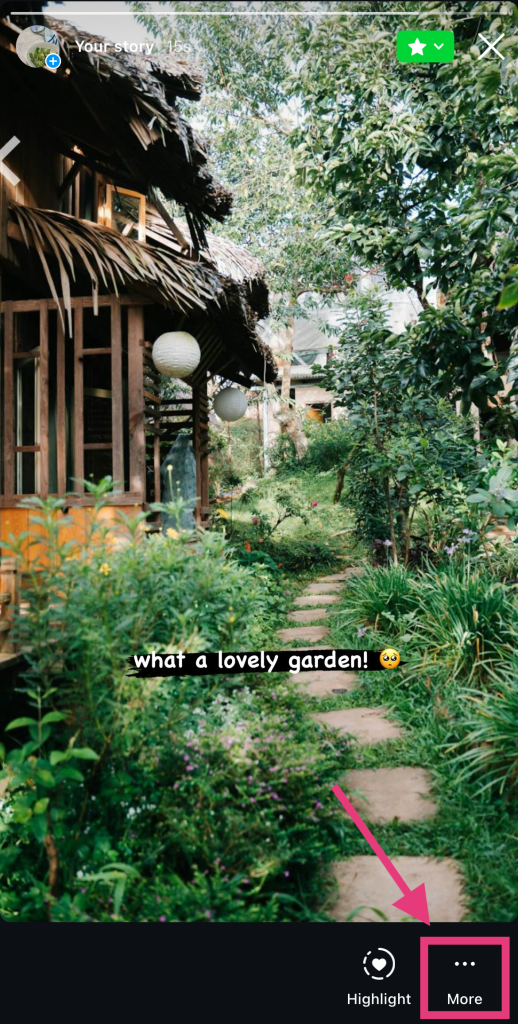
3. Appuyez sur Enregistrer.
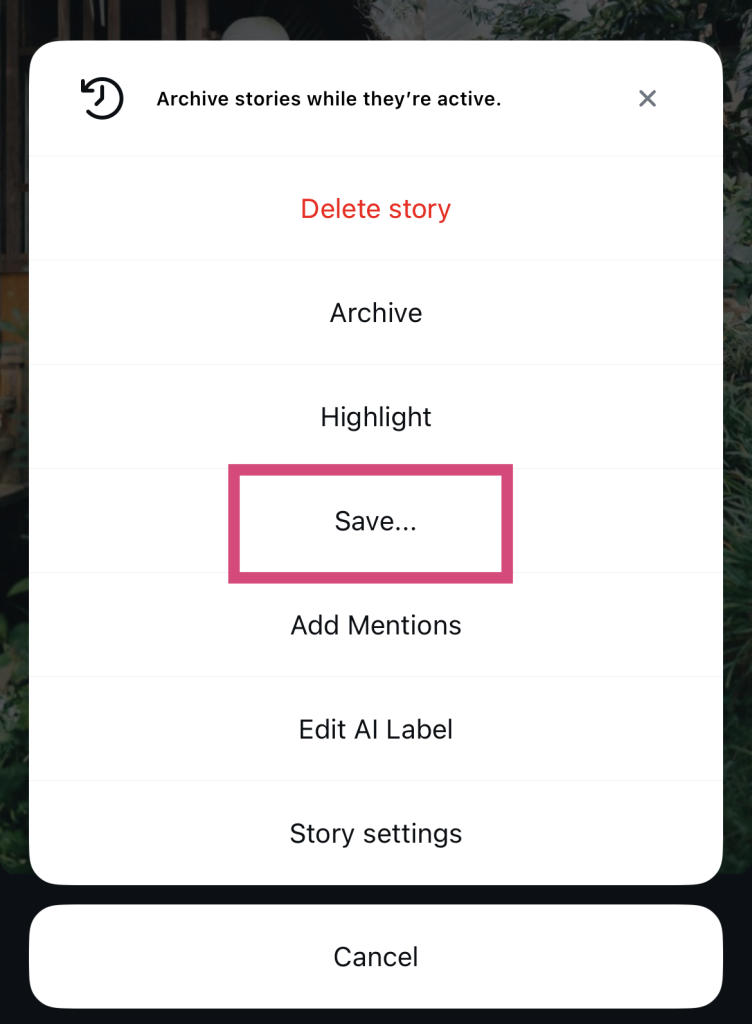
4. Sélectionnez « Enregistrer la photo/vidéo » si vous souhaitez enregistrer uniquement cette publication en particulier. Si vous souhaitez enregistrer l'intégralité de votre Story, appuyez sur « Enregistrer la Story » pour télécharger une compilation vidéo de toutes vos publications actuelles de la Story. Ces fichiers téléchargés apparaîtront dans votre pellicule.
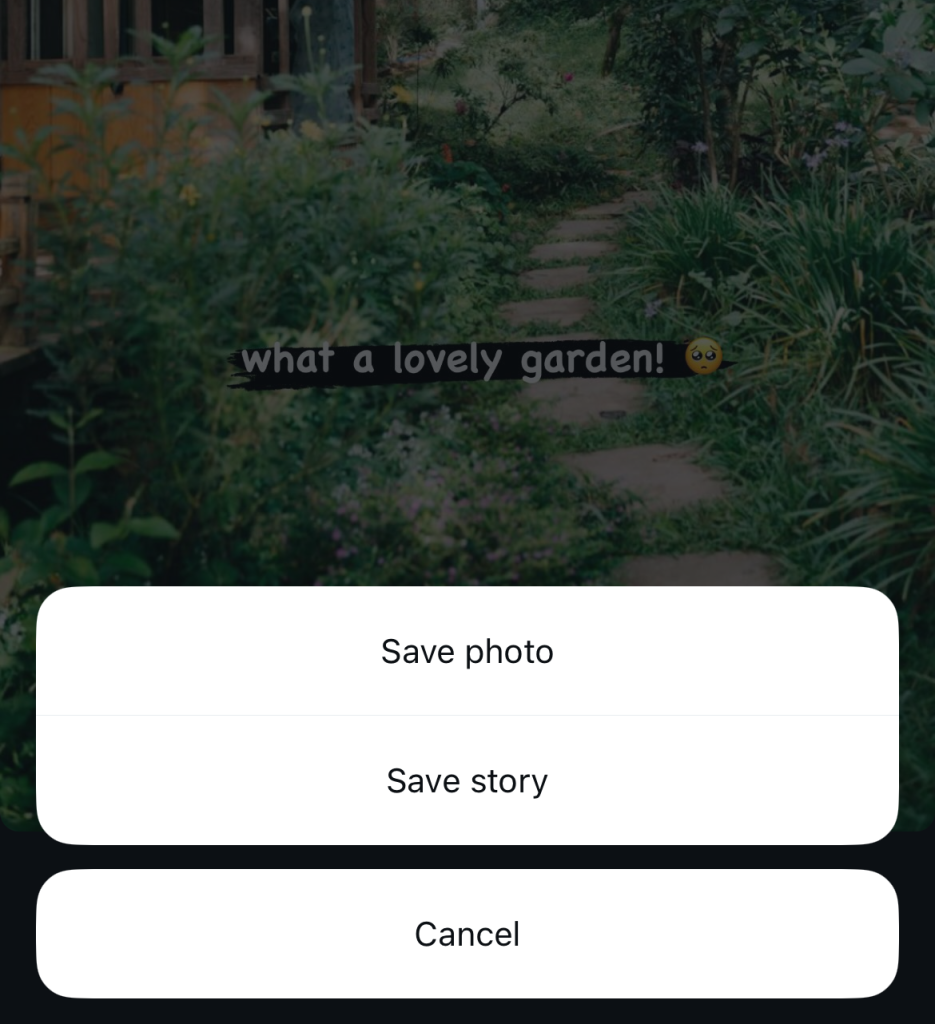
Au fait, cette méthode ne se limite pas aux Stories actives de leur profil. Vous pouvez également l'utiliser pour les Stories de vos archives Instagram et pour toutes les Stories mises en avant sur votre page.
Activer la fonction "Enregistrer l'histoire dans le rouleau de l'appareil photo" sur IG
Une autre façon simple d'enregistrer tout le contenu de vos Stories dans votre pellicule consiste à activer le téléchargement automatique des Stories. Cela permet à Instagram de télécharger automatiquement toutes les Stories que vous publiez directement sur votre téléphone. Voici comment activer ce paramètre, étape par étape :
1. Dans l'application « Instagram », accédez à votre profil.
2. Cliquez sur les trois lignes horizontales (alias le menu hamburger) en haut de l'écran.
3. Faites défiler jusqu'à la section "Votre application et vos médias" et appuyez sur Archivage et téléchargement.
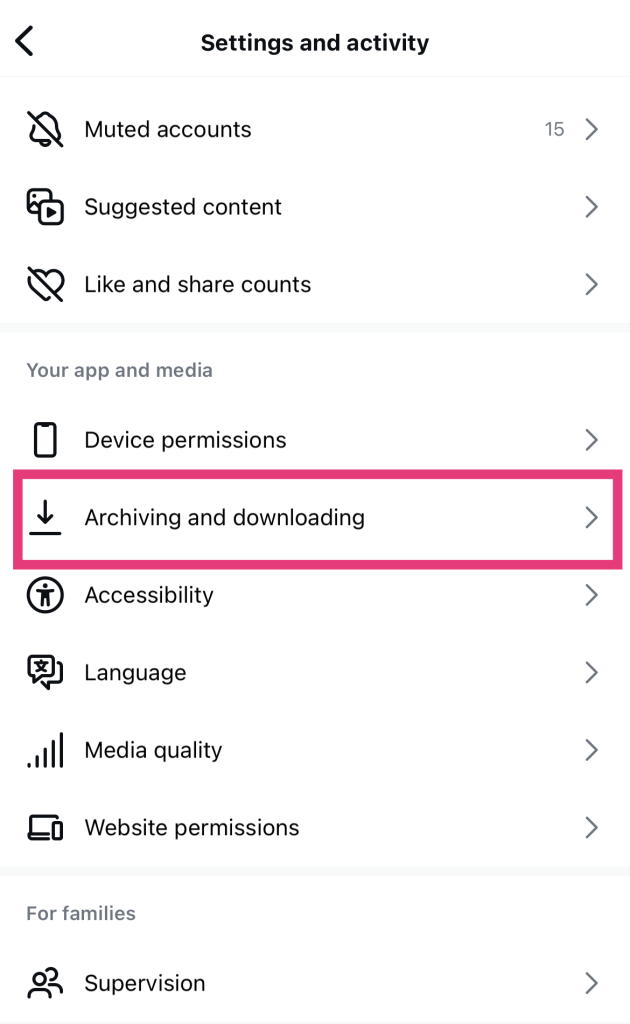
4. Activez la case à cocher Enregistrer l'histoire dans le rouleau d'appareils photo.
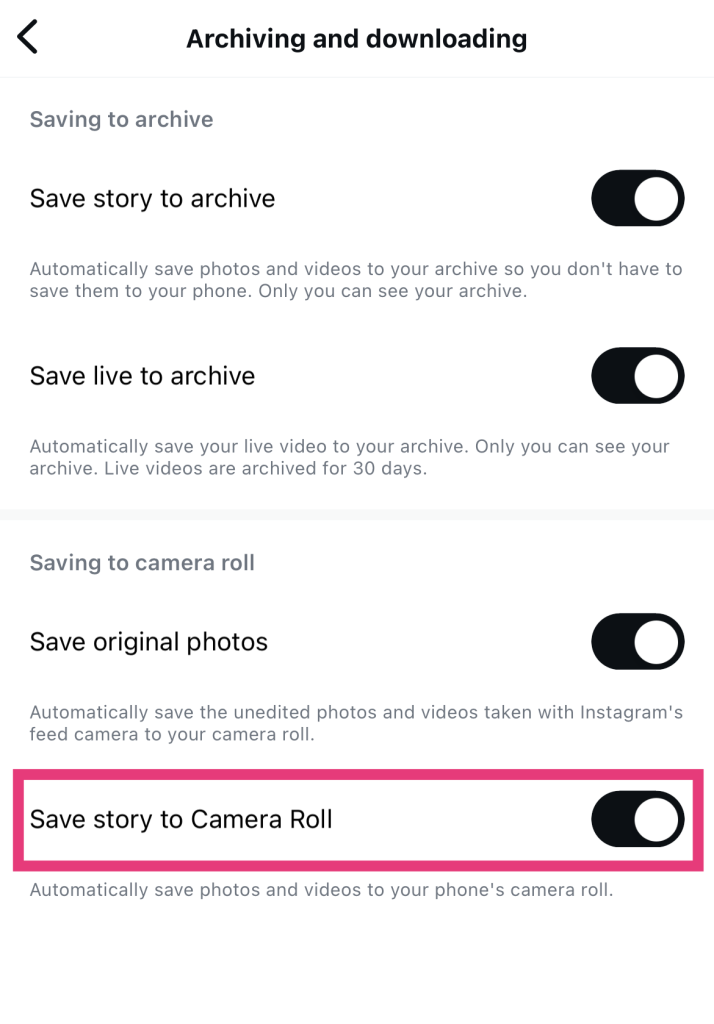
Et voilà, c'est tout — un jeu d'enfant ! Désormais, chaque fois que vous publiez une Story, elle est également enregistrée directement dans la galerie de votre appareil.
Comment télécharger des histoires privées sur Instagram : Est-ce possible ?
Vous vous demandez comment télécharger les Stories privées d'Instagram d'une personne dont le profil est verrouillé ? Eh bien, désolé de vous décevoir, mais ce n'est pas possible.
Instagram prend très au sérieux la confidentialité des utilisateurs. Lorsqu'un compte est en mode privé, il est impossible de récupérer des données sur le contenu actuel de ses Stories. Ainsi, même les meilleurs outils de téléchargement de Stories ne peuvent pas extraire ces publications ni vous permettre de les télécharger.
C'est vrai, c'est vraiment frustrant, mais c'est ainsi que les comptes privés sur Instagram ont été conçus. Il est important de respecter la décision des autres de garder leur compte privé afin que des inconnus ne puissent pas accéder à leur contenu.
Si tout le reste échoue, il suffit de demander à l'auteur du message initial une copie de ses récits.
Bien sûr, c'est un peu embarrassant. Mais demander à l'auteur de l'histoire une copie de son contenu est une évidence si vous en avez désespérément besoin.
Certains utilisateurs pourraient même apprécier cette franchise. Cela leur montre que vous n’agissez pas en cachette, en utilisant des outils de téléchargement pour enregistrer leur contenu sans leur autorisation. Alors, ne soyez pas timide. Envoyez-leur un message privé et demandez-leur s’ils sont d’accord pour partager avec vous une copie de leurs stories.
Veillez simplement à expliquer clairement et en toute honnêteté pourquoi vous avez besoin de ce contenu. Commencez par vous présenter poliment. Précisez ensuite si vous l'utilisez pour un projet, comme source d'inspiration pour vos propres publications, ou simplement parce que vous le trouvez divertissant. Croisons les doigts pour qu'ils soient assez généreux pour partager leur publication avec vous !

Questions fréquemment posées
Puis-je sauvegarder l'intégralité de mon histoire Instagram ?
Oui, vous pouvez enregistrer l'intégralité de votre Story en une seule fois, sans avoir à télécharger chaque photo et chaque vidéo séparément. Pour ce faire, sélectionnez l'option « Enregistrer la Story » lorsque l'application vous demande comment vous souhaitez enregistrer votre contenu. Instagram regroupe tout le contenu de votre Story actuellement active en une seule vidéo, qui apparaît ensuite dans votre pellicule.
L'économiseur d'histoire Instagram est-il sûr ?
Oui, les outils permettant de télécharger des Stories sont généralement assez sûrs. La plupart d’entre eux ne demandent que le nom d’utilisateur de la personne dont vous souhaitez télécharger les Stories. Comme ils ne vous demandent pas vos identifiants de connexion à Instagram , ils présentent peu de risques en matière de piratage ou de suspension de compte sur Instagram .
Veillez à faire des recherches approfondies sur le téléchargeur Story que vous choisissez. Il doit être réputé et avoir des tonnes d'avis d'autres personnes pour prouver qu'il est sûr et légitime.
Les gens sauront-ils que je télécharge leur histoire à l'aide d'une application tierce ?
Non. Lorsque vous téléchargez la Story de quelqu’un, cette personne n’a aucun moyen de le savoir. C’est l’application tierce que vous utilisez qui se charge de récupérer les données depuis sa page. Cela signifie qu’il est impossible de remonter jusqu’à vous. Alors, rassurez-vous : personne ne va vous prendre pour un harceleur d’ Instagram !
Concentrez-vous sur vos propres Stories IG et développez votre page avec Path Social!
Il existe de nombreuses façons d'enregistrer des Stories sur votre appareil. Vous pouvez télécharger vos propres Stories directement depuis Instagram. Par ailleurs, des outils pratiques de téléchargement de Stories proposés par des tiers seront vos meilleurs alliés pour enregistrer le contenu d'autres utilisateurs.
Le téléchargement du contenu de Instagram Story à partir des pages d'autres personnes peut créer une certaine dépendance. Mais ne vous laissez pas prendre au piège. Il est plus important de vous concentrer sur votre propre contenu et de vous assurer qu'il atteint le bon public. Path Social peut être votre arme secrète pour cela.
Au fil des ans, Path Social a développé des outils de ciblage exclusifs pour promouvoir votre page auprès de votre public cible spécifique. Nous veillons à ce que le fil d’actualité et le contenu de vos Stories atteignent à chaque fois les bonnes personnes. Vous gagnerez ainsi des fans engagés qui correspondent à votre marché cible. Renforcez votre présence sur Instagram et gagnez davantage d’abonnés dès aujourd’hui grâce à Path Social!





Vous cherchez la meilleure façon d'obtenir des followers Instagram ?
Essayez notre service Instagram basé sur l'IA pour obtenir des résultats concrets et durables.
Essayez notre service de followers Instagram




