


Cómo descargar las entradas de Instagram para guardarlas en la memoria

Instagram son geniales para ver cómo les va a tus amigos y familiares en su día a día, de forma espontánea y sin artificios. Sin embargo, el problema es que estas publicaciones verticales de fotos y vídeos desaparecen para siempre al cabo de 24 horas. Entonces, ¿cómo puedes volver a ver las historias que te han gustado? Aquí tienes un consejo que te permitirá verlas una y otra vez: descarga Instagram directamente en tu dispositivo.
En esta guía completa, te enseñaremos cómo guardar Instagram , tanto si son tuyas como si son de otros usuarios. Prepárate, porque estamos a punto de mostrarte todos nuestros trucos para conseguir una copia del contenido de tus historias favoritas. ¡Empecemos!

Razones por las que podría querer hacer una descarga de historias de Instagram
Social Pilot señala que nada menos que el 70 % de los usuarios ve contenido de las historias a diario. Por lo tanto, hay muchas razones por las que alguien podría intentar descargar las historias en vídeo de Instagram su dispositivo personal. Entre ellas se incluyen:
- Guardar copias de las fotos y los vídeos para conservarlos como recuerdo una vez que hayan caducado, sobre todo en el caso de las «Stories» relacionadas con momentos emotivos y hitos importantes.
- Recopilar contenidos interesantes que encuentres en la aplicación para utilizarlos como inspiración a la hora de crear tus propias historias.
- Analizar el contenido de las historias de los principales competidores de su marca
- Ver vídeos aunque no estés conectado a Internet
¿Te identificas con alguna de las razones anteriores? Si es así, sigue leyendo para descubrir exactamente cómo puedes descargar una historia de Instagram.

Guardar el post de alguien: Cómo descargar una historia de vídeo de Instagram a su dispositivo
¿Quieres guardar una copia de las Historias de otra persona en tu rollo de la cámara para verlas una y otra vez más tarde? Aquí tienes dos de nuestros trucos para descargar un vídeo de Stories desde Instagram.
1. Utilice un descargador de cuentos de terceros de confianza Instagram
La forma más sencilla de guardar el contenido de las Historias de otra persona es utilizar un descargador de Historias de terceros de Instagram . Estas prácticas herramientas te permiten descargar las Historias de otra persona directamente a tu dispositivo. Así podrás acceder a sus publicaciones incluso después de que caduquen al cumplirse las 24 horas.
Lo mejor de estas herramientas para descargar historias es que son totalmente anónimas. Normalmente no te piden tu Instagram ni tu contraseña Instagram . Lo único que necesitan es el nombre de usuario de la persona cuyas historias quieres descargar o, tal vez, el enlace a la historia. A continuación, te proporcionan los enlaces de descarga sin hacerte ninguna pregunta.
Sólo asegúrate de elegir un programa de descarga de IG Story de confianza. Uno que recomendamos es la herramienta de descarga de SaveFrom.Net. Usar esta herramienta es muy sencillo. Te explicamos cómo:
1. En la página web, introduce el nombre de usuario de la persona cuyas «Stories» quieras descargar. También puedes pegar el enlace a su perfil.
2. Haga clic en Descargar.
3. Repasa las Historias de vídeo y fotos de la lista que aparece. Pulsa Descargar foto o Descargar vídeo debajo de las que quieras guardar. Se iniciará la descarga en tu dispositivo.
2. Grabar en pantalla el contenido de la historia de alguien
¿Te da reparo utilizar un descargador de terceros para guardar las Historias de alguien? Siempre puedes hacer algo más sencillo y grabar en pantalla el contenido de sus Historias. Así podrás conservar una copia de su contenido sin salir de la aplicación Instagram .
Y no tienes que preocuparte de que se enteren de que has grabado su Historia. Instagram no avisa a los usuarios cuando otras personas lo hacen.
Ten en cuenta, sin embargo, que este método dista mucho de ser perfecto. Puede resultar complicado capturar exactamente los vídeos o las fotos que deseas incluir en tu grabación de pantalla. Después, tendrás que recortar la grabación final. Además, la grabación incluirá su nombre de usuario, el campo de mensajes directos de la parte inferior y los botones de «Me gusta» y «Compartir». Pero si no te molesta que aparezcan estos elementos, este método es perfecto.

Cómo descargar Instagram Stories desde su propia cuenta
Aunque hay que ingeniárselas y utilizar herramientas de terceros para descargar las historias de otras personas, con las propias es mucho más fácil. Instagram un par de funciones integradas en la aplicación que permiten a los usuarios guardar una copia del contenido de sus historias.
¿Te encanta la Historia de tu obra maestra y quieres guardarla en tu teléfono? Aquí tienes cómo descargar Instagram Stories desde tu propia página directamente a tu dispositivo.
Guárdalos manualmente: Cómo descargar Instagram Story With Audio
Instagram los usuarios guardar manualmente el contenido de sus propias historias. Lo mejor de descargar tus historias directamente desde Instagram que conservan toda su calidad, tanto visual como de audio. A continuación te explicamos cómo descargar Instagram sin perder calidad de audio utilizando la función integrada en la aplicación:
1. Abre la aplicación Instagram y abre tu Historia actual.
2. Haga clic en los tres puntos de la parte inferior de la pantalla con la etiqueta Más.
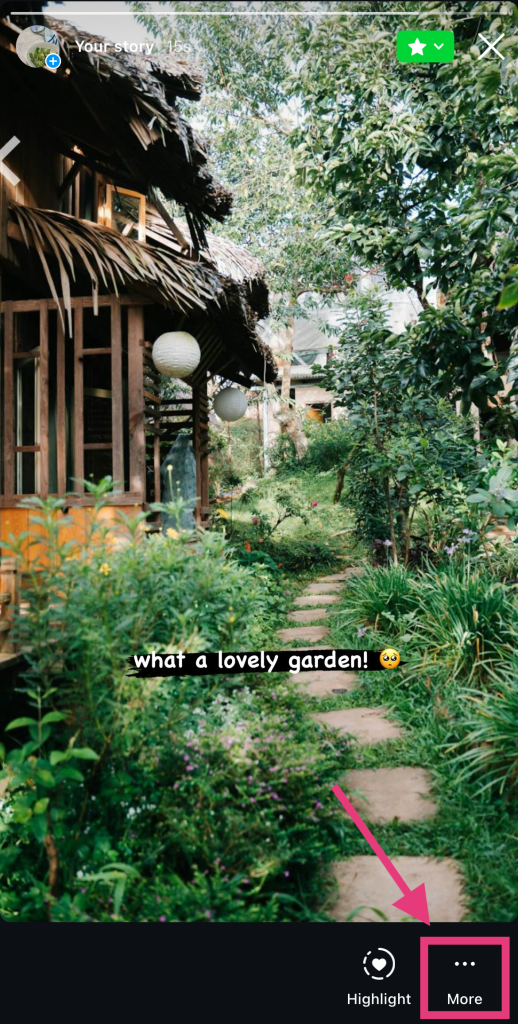
3. Pulse Guardar.
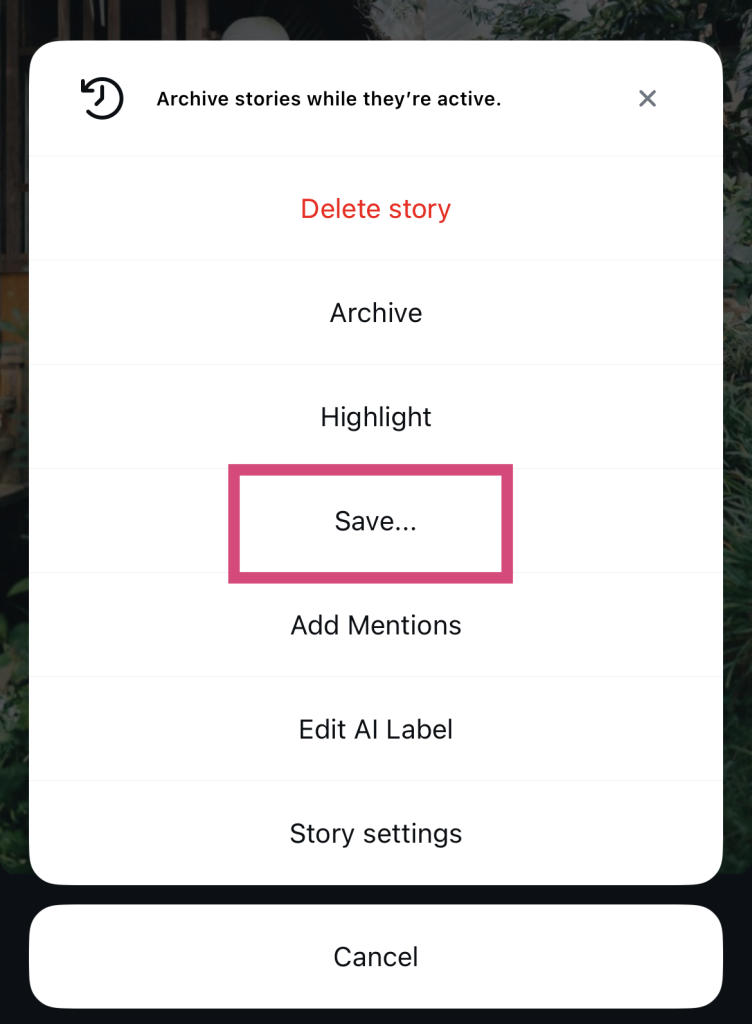
4. Selecciona «Guardar foto/vídeo» si quieres guardar solo esa publicación concreta. Si quieres la historia completa, pulsa «Guardar historia» para descargar un vídeo que recopile todas tus publicaciones actuales de la historia. Estas descargas aparecerán en tu carrete.
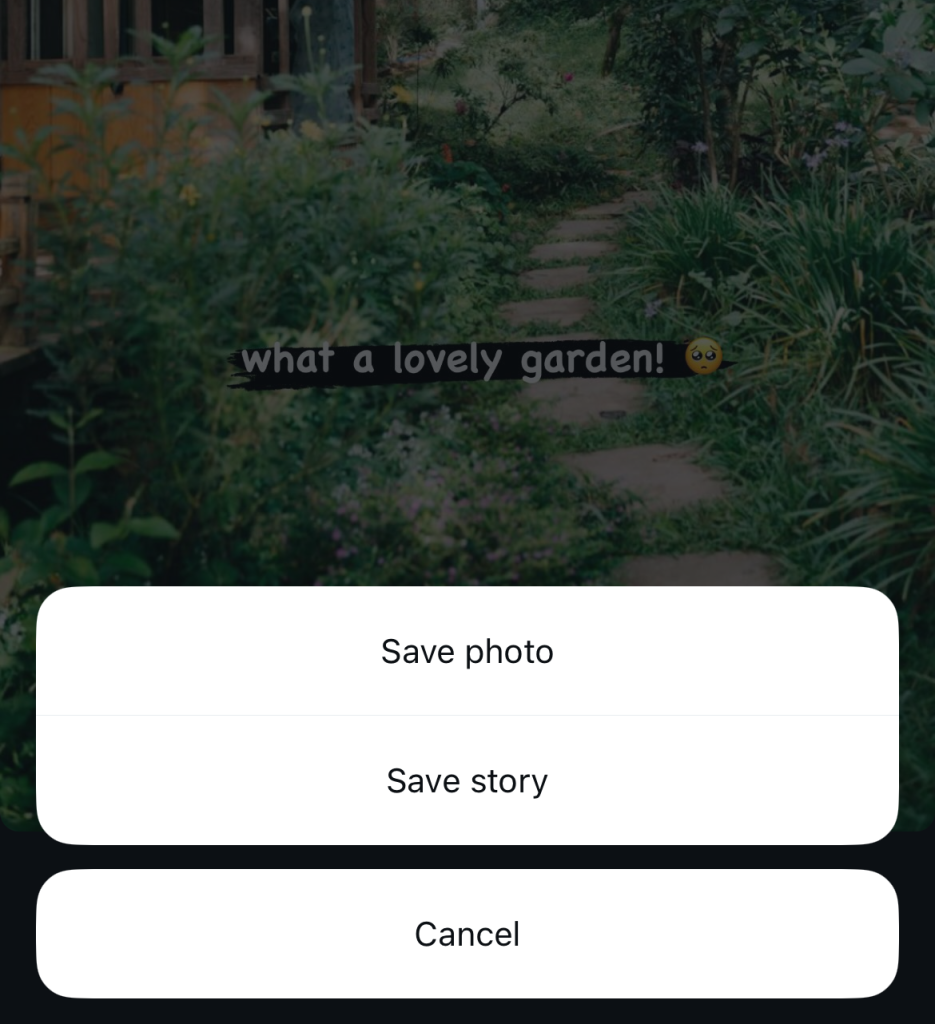
Por cierto, este método no se limita únicamente a las «Stories» activas de su perfil. También puedes aplicarlo a las «Stories» de tu archivo de Instagram y a cualquier «Story destacada» de tu página.
Activar la función "Guardar historia en el carrete" en IG
Otra forma sencilla de guardar todo el contenido de tus «Stories» en el carrete es activar la descarga automática de «Stories». De este modo Instagram automáticamente cada «Story» que publiques directamente en tu móvil. A continuación te explicamos, paso a paso, cómo activar esta opción:
1. En la Instagram , ve a tu perfil.
2. Haga clic en las tres líneas horizontales (también conocidas como menú hamburguesa) de la parte superior de la pantalla.
3. Desplácese hasta la sección "Su aplicación y medios" y pulse Archivar y descargar.
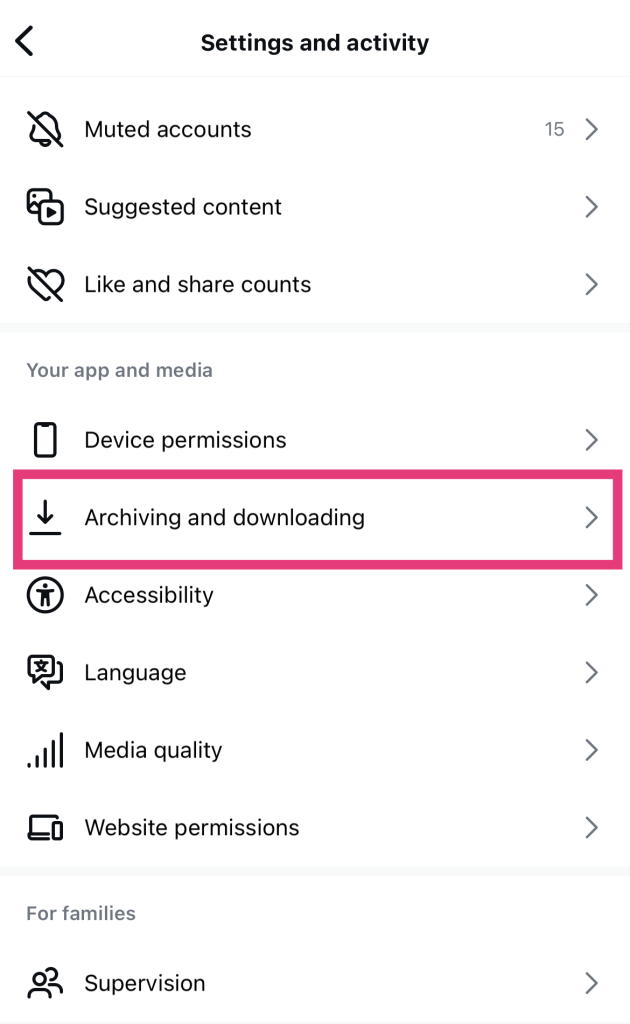
4. Activa la opción Guardar historia en el carrete.
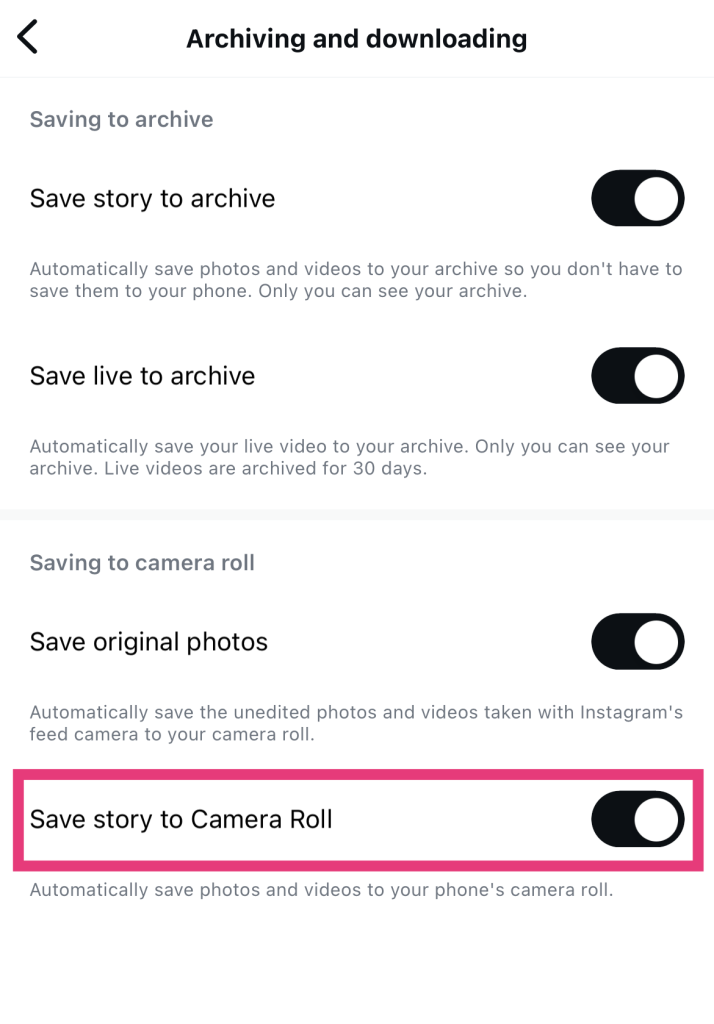
Y eso es todo, ¡pan comido! Ahora, cada vez que publiques una «Story», también se guardará directamente en la galería de tu dispositivo.
Cómo descargar historias privadas de Instagram : ¿Es posible?
¿Te preguntas cómo descargar Instagram privadas Instagram de alguien que tiene el perfil privado? Pues, siento decepcionarte, pero eso no es posible.
Instagram muy en serio la privacidad de los usuarios. Cuando una cuenta está en modo privado, no hay forma de obtener datos sobre el contenido actual de sus historias. Por lo tanto, es imposible que ni siquiera las mejores herramientas para descargar historias puedan recuperar esas publicaciones y permitirte descargarlas.
Claro, es muy frustrante, pero así es como Instagram diseñaron las cuentas privadas de Instagram . Es importante respetar la decisión de otras personas de mantener sus cuentas privadas para que los desconocidos no puedan acceder a su contenido.
Si todo lo demás falla, simplemente pide al autor del hilo una copia de sus historias.
Claro, esto es un poco embarazoso. Pero pedir al autor original de la historia una copia de su contenido es una obviedad si la necesitas desesperadamente.
Es posible que a algunos usuarios incluso les guste esta franqueza. Les deja claro que no estás actuando a sus espaldas utilizando herramientas de descarga para guardar su contenido sin su permiso. Así que no seas tímido: envíales un mensaje directo y pregúntales si estarían dispuestos a compartir contigo una copia de sus historias.
Solo asegúrate de explicar con detalle y sinceridad por qué necesitas ese contenido. Primero, preséntate educadamente. A continuación, explica si lo vas a utilizar para un proyecto, como inspiración para tus propias publicaciones o simplemente porque te parece entretenido. ¡Crucemos los dedos para que sean lo suficientemente generosos como para compartir su publicación contigo!

Preguntas frecuentes
¿Puedo guardar toda mi historia en Instagram ?
Sí, puedes guardar toda tu historia de una sola vez sin tener que descargar cada foto y cada vídeo por separado. Para ello, selecciona la opción «Guardar historia» cuando la aplicación te pregunte cómo quieres guardar tu contenido. Instagram todo el contenido de tu historia actualmente activa en un solo vídeo, que luego aparecerá en tu carrete.
¿Es seguro un Story saver de Instagram ?
Sí, las herramientas para descargar historias suelen ser bastante seguras. Muchas de ellas solo te piden el nombre de usuario de la persona cuyas historias quieres descargar. Como no te piden tus credenciales Instagram , el riesgo de sufrir ataques informáticos o Instagram es bajo.
Asegúrate de investigar a fondo el descargador de Story que elijas. Debe ser de buena reputación y tener un montón de comentarios de otras personas para demostrar que es seguro y legítimo.
¿Se enterará la gente si descargo su Historia utilizando una aplicación de terceros?
No. Cuando descargas la «Story» de alguien, esa persona no tiene forma de saberlo. La aplicación de terceros que utilizas se encarga de recuperar los datos de su página. Eso significa que no hay forma de rastrear nada hasta ti. Así que tranquilo: ¡no pensarán que eres un Instagram !
¡Céntrate en tus propias historias de IG y haz crecer tu página con Path Social!
Hay muchas formas de guardar las historias en tu dispositivo. Puedes descargar tus propias historias directamente desde Instagram. Por otro lado, las prácticas herramientas de descarga de historias de terceros serán tu mejor aliado a la hora de guardar el contenido de otras personas.
Puede resultar bastante adictivo descargar contenidos de Instagram Story de páginas ajenas. Pero no te dejes atrapar por eso. Es más importante centrarse en el contenido de tus propias Historias y asegurarte de que llega al público adecuado. Path Social puede ser tu arma secreta para ello.
A lo largo de los años, Path Social desarrollado herramientas de segmentación propias para promocionar tu página entre tu público objetivo específico. Nos aseguramos de que el contenido del feed y de las historias de tu marca llegue siempre a las personas adecuadas. Como resultado, conseguirás seguidores comprometidos que formen parte de tu mercado objetivo. ¡Potencia tu Instagram y consigue más seguidores hoy mismo con Path Social!





¿Buscas la mejor forma de conseguir seguidores Instagram ?
Prueba nuestro servicio Instagram basado en inteligencia artificial para obtener resultados reales y duraderos.
Pruebe nuestro servicio de seguidores de Instagram




