


Instagram Le fil d'actualité ne se charge pas ? Voici comment y remédier

Instagram | 1er juillet 2024
Vous venez de passer une longue journée, et tout ce dont vous avez envie, c’est de vous détendre et de faire défiler Instagram sans y penser. Vous vous installez confortablement dans votre lit, vous sortez votre téléphone et vous ouvrez votre application de réseau social préférée. Mais là, rien. Aucune publication à aimer, à commenter ou à partager avec vos amis, même en appuyant plusieurs fois sur « Actualiser ». Pourquoi ? À cause d’un problème technique agaçant : le Instagram ne se charge pas correctement.
Il existe de nombreuses raisons techniques pouvant expliquer Instagram affiche Instagram les nouvelles publications dans le fil d'actualité. Dans ce guide, nous allons passer en revue chacune d'entre elles et vous proposer des conseils et astuces pour résoudre ces problèmes techniques courants. Nous vous présenterons également quelques techniques de dépannage qui, nous l'espérons, permettront à votre fil d'actualité de fonctionner à nouveau. Poursuivez votre lecture pour découvrir tout cela et bien plus encore !

Pourquoi mon fil d'actualité Instagram n'affiche-t-il pas les nouveaux messages ?
Vous vous demandez peut-être : « Pourquoi mon Instagram n'affiche-t-il pas les nouvelles publications ? » Lorsque vous ouvrez l'application, il se peut que votre écran d'accueil affiche la dernière mise à jour du fil d'actualité avant que le problème ne survienne.
La plupart du temps, les problèmes liés au flux sont dus à un problème technique plus général qui touche l'ensemble de la plateforme.
Voici une astuce pour savoir si le problème concerne uniquement le fil d'actualité ou l'application dans son ensemble. Rendez-vous dans d'autres sections Instagram vérifiez si elles ne se chargent pas non plus. Si vous constatez des dysfonctionnements, par exemple si les pages « Explorer » ne fonctionnent pas ou si les Reels ne se chargent pas, il se peut que le problème ne se limite pas au fil d'actualité.
Si tel est le cas, il est temps de passer aux choses sérieuses et de déterminer ce qui est à l'origine des problèmes sur l'ensemble de la plateforme.

Pourquoi mon flux Instagram ne se charge-t-il pas ? 4 problèmes courants et comment les résoudre
Il existe de nombreuses explications plausibles pour expliquer pourquoi Instagram du mal à charger votre fil d'actualité. La plupart sont d'ordre technique : certaines dépendent de vous, d'autres nécessitent davantage de patience, le temps Instagram le problème de son côté. Il est toutefois important de connaître toutes ces différentes raisons afin de savoir comment réagir dans chaque situation possible.
Vous vous grattez la tête en vous demandant : « Pourquoi mon Instagram ne se charge-t-il pas ? » Voici quatre des raisons les plus courantes qui expliquent ce phénomène et ce que vous pouvez faire pour y remédier.
1. Instagram Impossible d'actualiser le fil d'actualité en raison d'une mauvaise connexion Internet
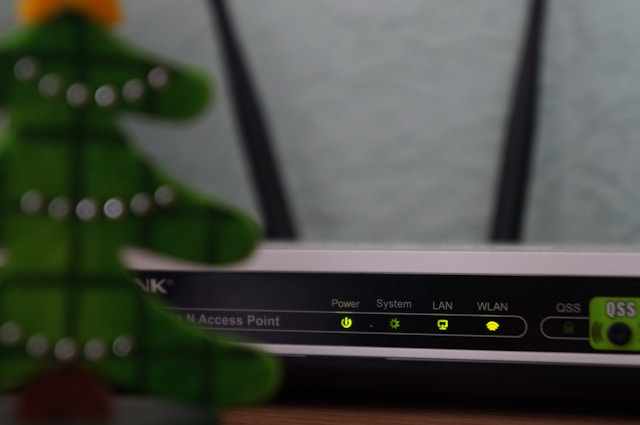
Il est fort probable Instagram actualiser les publications de votre fil d’actualité sur votre appareil en raison d’un problème de connexion Internet. Peut-être rencontrez-vous des difficultés pour vous connecter à un réseau Wi-Fi stable, ou bien votre routeur connaît-il des problèmes techniques. Il est également possible que votre fournisseur d’accès Internet soit confronté à une congestion du réseau, d’où la lenteur de la connexion.
Quelle qu'en soit la cause, une connexion Internet trop lente peut empêcher votre fil d'actualité de charger les nouvelles publications.
Si c'est le cas, effectuez un test de débit en ligne pour vérifier la vitesse de votre connexion Internet. Si le site semble extrêmement lent ou ne se charge pas du tout, le problème vient très probablement de votre connexion. Votre priorité est désormais de vous équiper d'une connexion Internet haut débit afin de pouvoir à nouveau consulter votre fil d'actualité.
Essayez de réinitialiser votre routeur pour voir si cela résout les problèmes de connexion. Vous pouvez également changer de réseau ou utiliser vos données mobiles pour trouver une connexion internet plus stable.
2. Il y a des bogues parce que vous utilisez une version obsolète de l'application Instagram .
Une autre raison pour laquelle votre fil d'actualité ne se charge pas pourrait être que vous utilisez une version obsolète Instagram. Les anciennes versions des applications peuvent parfois présenter des problèmes de performances et des bugs mineurs, qui entraînent des dysfonctionnements. Ces dysfonctionnements pourraient être à l'origine de vos problèmes avec le fil d'actualité.
Instagram publient régulièrement de nouvelles versions de l'application afin de corriger les bugs et autres problèmes techniques. Il est donc important de mettre régulièrement à jour votre application avec les nouvelles versions. Ainsi, vous éviterez de rencontrer des problèmes techniques, comme le fait que votre fil d'actualité ne se charge pas.
Rendez-vous sur l'App Store ou le Google Play Store pour vérifier que vous disposez bien de la dernière version Instagram. Si ce n'est pas le cas, mettez à jour votre application. Nous vous recommandons vivement d'activer les mises à jour automatiques afin de vous assurer de toujours disposer de la dernière Instagram sur votre appareil.
Si Instagram met Instagram à jour sur votre appareil, c'est peut-être parce que vous disposez déjà de la dernière version. Cela signifie qu'un autre problème est à l'origine de l'anomalie sur votre fil d'actualité. Continuez à lire.
3. Il y a une panne dans les serveurs de Instagram
En mars 2024, Instagram une panne majeure qui a donné lieu à environ 50 000 signalements concernant ce problème, selon CNN. Ne pouvant plus faire défiler de contenu, tout le monde était à bout de nerfs.
Si vous ne comprenez pas pourquoi votre fil d'actualité ne se charge pas, c'est peut-être la même chose qui se passe. Eh oui, une panne des serveurs Instagramest une autre explication possible à un fil d'actualité qui ne fonctionne pas correctement.
Il existe de nombreuses raisons pouvant expliquer une panne des serveurs Instagram, allant d'un trafic exceptionnellement élevé à (Dieu nous en préserve) une attaque DDoS. Mais lorsque les serveurs sont hors service , il faut s'attendre à ce que l'application tout entière soit également indisponible.
Consultez des forums comme Reddit et Twitter pour voir si d'autres utilisateurs se plaignent que leur flux ne se charge pas. DownDetector est également un excellent outil pour suivre les problèmes de plateforme. Vous pouvez également consulter les canaux officiels de Instagrampour voir si des annonces ont été faites à ce sujet.
Malheureusement, si c'est la raison pour laquelle le fil d'actualité ne se charge pas, vous n'avez d'autre choix que d'attendre. Instagram très probablement déjà en train de tenter de résoudre le problème. Patientez et actualisez régulièrement votre fil d'actualité pour vous rendre compte dès qu'il fonctionnera à nouveau.
4. L'heure système de votre appareil n'est pas alignée sur celle de Instagram.
Instagram de ces horodatages pour que le fil d'actualité puisse se charger. Cependant, si les paramètres de date et d'heure de votre appareil ne correspondent pas à Instagram, cela pourrait empêcher le fil d'actualité de se charger correctement.
Accédez aux paramètres de votre appareil et réglez la date et l'heure en fonction de votre fuseau horaire. S'il existe une option « automatique », sélectionnez-la. Ensuite, ouvrez l'application et vérifiez à nouveau le fil d'actualité. Avec un peu de chance, cela devrait résoudre le problème.
Autres conseils de dépannage lorsque Instagram ne peut pas charger les articles
Vous n'arrivez toujours pas à charger correctement votre flux Instagram après avoir suivi les techniques décrites ci-dessus ? Ne vous inquiétez pas. Il y a encore d'autres choses que vous pouvez faire pour dépanner votre application.
Commencez par redémarrer votre appareil, qu'il s'agisse d'un téléphone ou d'une tablette. Cela réinitialise votre session sur Instagram peut résoudre des problèmes mineurs, comme un fil d'actualité qui ne s'affiche pas correctement.
Vous pouvez également essayer de désinstaller Instagram le réinstaller depuis l'App Store ou le Google Play Store. Connectez-vous à votre compte ; avec un peu de chance, le fil d'actualité s'affichera correctement cette fois-ci.
Si aucune de ces astuces ne vous aide à résoudre votre problème, il est temps de le signaler à Instagram. Ainsi, l'équipe d'assistance pourra examiner le problème et tenter de le résoudre de son côté. Voici comment procéder en quelques étapes simples :
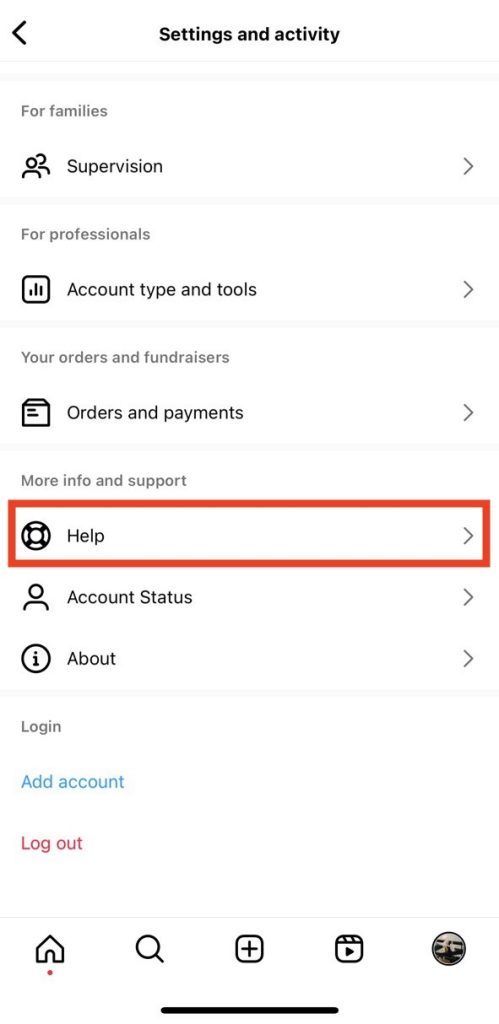
1. Sur votre Instagram , cliquez sur le menu « hamburger » (trois lignes horizontales) situé en haut à droite de l'écran. Cela ouvre le menu des paramètres.
2. Faites défiler la page jusqu'en bas. Dans la section « Plus d'informations et assistance », sélectionnez « Aide ».
3. Cliquez sur Signaler un problème.
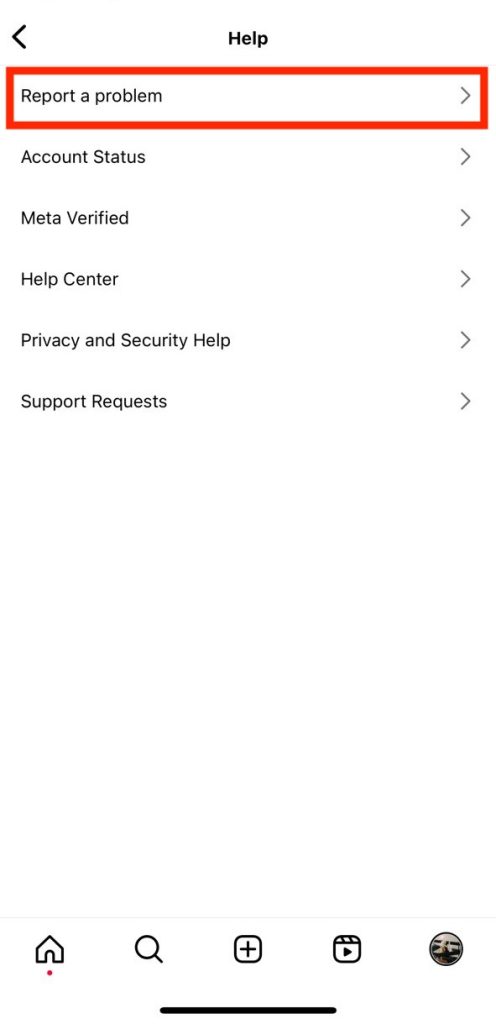
4. L'écran suivant pourrait vous inviter à revenir à l'endroit où vous avez constaté le problème et à secouer votre appareil. Au lieu de cela, appuyez sur « Signaler un problème » sans secouer votre appareil.
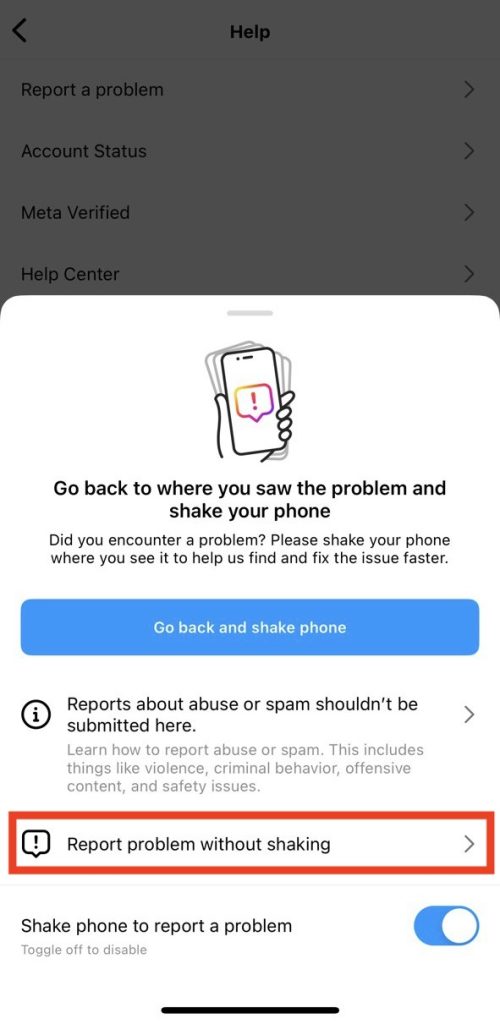
5. Indiquez si vous souhaitez ou non générer un rapport de diagnostic pour votre application. Passez ensuite à la page suivante.
6. Tapez une explication du problème que vous rencontrez avec votre alimentation.
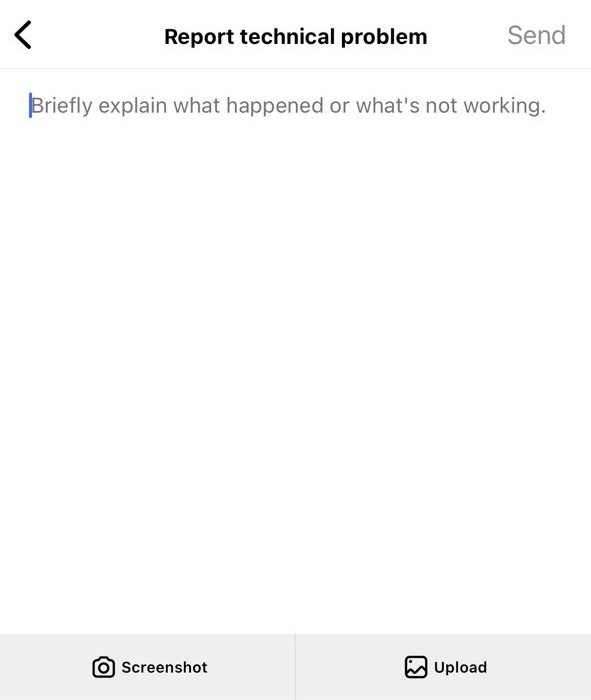
7. Téléchargez toutes les captures d'écran nécessaires pour prouver le problème.
8. Pour finir, cliquez sur « Envoyer ».
Notez que la réponse de Instagram à votre rapport peut prendre de quelques heures à quelques jours.
Pourquoi Instagram affiche-t-il d'anciens messages même sans problème technique ?
Vous ne rencontrez aucun problème technique ? Dans ce cas, le fil d'actualité qui affiche d'anciennes publications s'explique probablement par le fait qu'il n'y a pas de nouvelles publications à afficher. Peut-être avez-vous déjà vu toutes les publications récentes des personnes que vous suivez. Lorsque cela se produit, l'algorithme Instagram vous propose alors d'anciens contenus à la place.
L'une des raisons possibles est que vous suivez beaucoup de comptes inactifs sur Instagram. Si les comptes que vous suivez ne publient pas souvent, vous continuerez probablement à voir d'anciennes publications dans votre fil d'actualité. Suivez davantage de comptes actifs qui correspondent à vos centres d'intérêt pour découvrir du contenu plus récent et plus intéressant !
Mais pourquoi Instagram d'anciennes publications alors qu'il y a du nouveau contenu disponible ? En effet, il se peut que vous voyiez d'anciennes publications à la place des nouvelles, car Instagram ce sont celles qui vous intéressent le plus. L'application mettra toujours en avant le contenu publié par les comptes avec lesquels vous interagissez le plus.
Ne paniquez pas si votre flux Instagram ne se charge pas
Il est important de résoudre les problèmes liés au fil d'actualité dès que vous les constatez. Après tout, personne ne veut passer à côté de nouveaux contenus dès leur publication sur le fil d'actualité. Ajoutez donc cette page à vos favoris pour garder à l'esprit nos conseils permettant de résoudre les problèmes techniques qui Instagram les publications du fil d'actualité.
Maintenant que vous ne paniquez plus à l'idée que votre Instagram ne se charge pas, il est temps de vous concentrer sur l'utilisation concrète de la plateforme. Cela implique notamment de tout mettre en œuvre pour que votre page se développe au fil du temps. C'est là que Path Social vous aider.
Nous utilisons l'IA pour mettre en avant votre contenu auprès des personnes les plus susceptibles de l'apprécier et d'interagir avec lui. Vous bénéficierez ainsi d'un coup de pouce non seulement au niveau du nombre d'abonnés, mais aussi en termes d'engagement. En un rien de temps, vous aurez des dizaines de nouveaux abonnés qui attendront avec impatience chaque nouvelle publication que vous publierez. Créez dès aujourd'hui une communauté florissante d'abonnés avec Path Social!





Vous souhaitez développer naturellement votre Instagram ?
Découvrez une plateforme conçue pour aider les créateurs à toucher un public authentique et engagé, sans prendre de raccourcis.
Explorez la plateforme




