


Instagram Téléchargeur de photos : Pourquoi en avez-vous besoin ?

Instagram | 31 mai 2024
Vous souhaitez peut-être conserver des photos de mode pour un dossier marketing ou un tableau d'humeur. Peut-être recueillez-vous des inspirations de maquillage pour votre mariage. Ou encore, vous aimez la photographie de nature et souhaitez étudier les éléments artistiques utilisés par un photographe professionnel que vous admirez. Un téléchargeur de photos Instagram vous sera certainement utile dans ces cas-là !
Pouvez-vous télécharger des photos directement à partir de Instagram?
La réponse est à la fois oui et non.
Vous pouvez télécharger vos photos depuis Instagram les enregistrer sur votre appareil. Cependant, Instagram les utilisateurs à télécharger les photos d'autres personnes. Vous pouvez enregistrer des photos dans une collection au sein de Instagram ou sur le site. Si vous souhaitez vraiment télécharger une photo sur votre appareil, vous devrez utiliser un outil tiers de téléchargement Instagram . Nous y reviendrons plus en détail ultérieurement.
Enregistrement de photos dans une collection
Vous pouvez créer plusieurs collections dans votre profil. Lorsque vous ajoutez la photo d'une autre personne à une collection, celle-ci ne sera pas informée de votre action. De plus, votre collection n'est visible que par vous.
Il existe plusieurs façons d'enregistrer une photo dans une collection. Suivez ces étapes si vous utilisez l'application Instagram :
- Recherchez la photo que vous souhaitez enregistrer dans une collection.
- Appuyez dessus, puis sur l'icône de favori située dans le coin inférieur droit, sous l'image. Vous pouvez également appuyer sur les trois points situés dans le coin supérieur droit, au-dessus de l'image, puis sur l'icône « Enregistrer ».
- Lorsque vous enregistrez une image, une barre intitulée « Enregistrer dans une collection » s'affiche au bas de l'image. Appuyez dessus pour enregistrer l'image dans une nouvelle collection ou pour sélectionner une collection.
- Si vous créez un nouvel article et que vous souhaitez l'enregistrer après avoir modifié l'image, vous ne pourrez suivre les étapes ci-dessus qu'après avoir partagé votre photo.
Si vous utilisez Instagram votre ordinateur, voici comment enregistrer des photos dans vos collections :
- Recherchez la photo que vous souhaitez enregistrer.
- Cliquez dessus, puis survolez le symbole du signet dans le coin inférieur droit de la section des commentaires.
- Les albums de votre collection s'affichent. Sélectionnez la collection dans laquelle vous souhaitez enregistrer l'image.
In-App Instagram Photo Downloader pour enregistrer vos photos sur votre appareil
Il est souvent difficile de résister à l'envie d'améliorer ses images à l'aide des outils amusants et des filtres magnifiques deInstagram avant de les partager sur son profil. Il se peut qu'une photo soit si belle que vous souhaitiez en enregistrer une copie sur votre appareil. Voici comment le faire en utilisant le téléchargeur de photos intégré à l'application Instagram :
- Si vous créez une publication classique, vous devrez la partager sur votre profil avant de pouvoir l'enregistrer.
- Si vous créez une story, prenez une photo avec l'appareil photo ou importez-en une depuis votre galerie. Retouchez la photo comme vous le souhaitez. Lorsque vous êtes satisfait(e), appuyez sur les trois points situés dans le coin supérieur droit, puis sur « Enregistrer » pour la télécharger sur votre appareil. Vous pouvez ensuite terminer le partage de votre story.
- Si vous souhaitez télécharger une image existante, vous devrez vous connecter à votre profil depuis un ordinateur. Accédez à votre profil et repérez la photo. Cliquez dessus, puis faites un clic droit sur la photo. Enfin, sélectionnez « Enregistrer sous » et choisissez le dossier de destination sur votre ordinateur.

Instagram Photo Downloader Free Tools
Il existe une application pour presque tout ce à quoi vous pouvez penser. Vous envisagez de télécharger les photos de quelqu'un d'autre sur Instagram ? Vous pouvez faire des captures d'écran si cela ne vous dérange pas d'obtenir des images de mauvaise qualité. Vous pouvez également utiliser un outil de téléchargement de photos Instagram pour enregistrer des copies d'images de haute qualité sur votre appareil.
Instagram Téléchargement de photos pour iPhone
Si vous utilisez un iPhone, voici les meilleures applications pour télécharger Instagram que vous pouvez essayer !
- Instant Saver. Il vous suffit de copier le lien Instagram . Appuyez sur les trois points situés au-dessus de la photo, dans le coin supérieur droit, puis sur « Lien ». Ouvrez Instasave sur votre iPhone et collez le lien. Vous pouvez immédiatement republier la photo sur votre Instagram la télécharger sur votre téléphone. L'application est gratuite.
- Repost-Pro. En plus de vous permettre de republier facilement Instagram en mentionnant correctement la source, cette application gratuite vous permet d'enregistrer des photos en haute résolution sur votre iPhone. Il vous suffit de copier le lien de l'image sur Instagram: celle-ci s'ajoutera automatiquement à l'application Repost lorsque vous l'ouvrirez.
Instagram Extension Chrome Photo Downloader
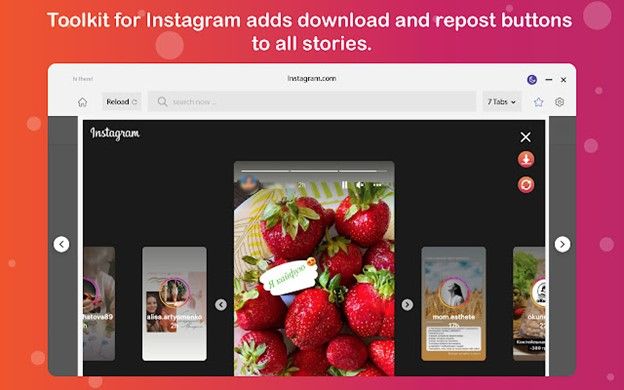
Une extension Chrome de téléchargement de photos Instagram ajoute une fonction de téléchargement à Instagram afin que vous puissiez facilement enregistrer des photos sur votre ordinateur ou votre téléphone, gratuitement et sans limite. La meilleure extension qui fonctionne encore après la dernière mise à jour de Instagramest Save & Repost pour Instagram.
Ajoutez cette extension à votre compte Google : elle ajoutera automatiquement des boutons « Partager » et « Télécharger » à toutes Instagram . Parmi les autres fonctionnalités, on trouve :
- Téléchargez les photos de Instagram en haute qualité.
- Télécharger les vidéos Instagram .
- Économiseur d'histoire de Instagram.
- Deux modes de taille d'écran pour le bureau et le téléphone.
- Republier des photos et des vidéos.
- Aucune limitation de téléchargement.
Instagram Photo Downloader pour PC
Vous pouvez essayer ces options si vous avez besoin d'enregistrer des photos Instagram directement sur votre ordinateur sans perdre en qualité.
- Inflact's Instagram photo downloader for PC.
Il s'agit d'un outil convivial qui fonctionne avec n'importe quel appareil et système d'exploitation. Il suffit de suivre les étapes suivantes :
- Allez sur Instagram et ouvrez l'image que vous souhaitez télécharger.
- Copier le lien de l'article.
- Vers le site web du téléchargeur de photos Inflact Instagram .
- Collez le lien dans le champ situé à côté du bouton bleu Télécharger la photo.
- Cliquez sur le bouton Télécharger la photo.
C'est tout ! Vous aurez une copie haute résolution de la photo Instagram enregistrée sur votre ordinateur.
- Instagram Outil de téléchargement de photos à partir de Path Social.
Utilisez cet outil gratuit pour enregistrer instantanément des photos à partir de n'importe quel compte public Instagram . Il suffit de copier et de coller le lien de l'image ! Vous n'avez même pas besoin de vous connecter à votre compte Instagram . Cet outil est parfait si vous ne souhaitez pas télécharger une application ou une extension tierce. Voici comment l'utiliser :
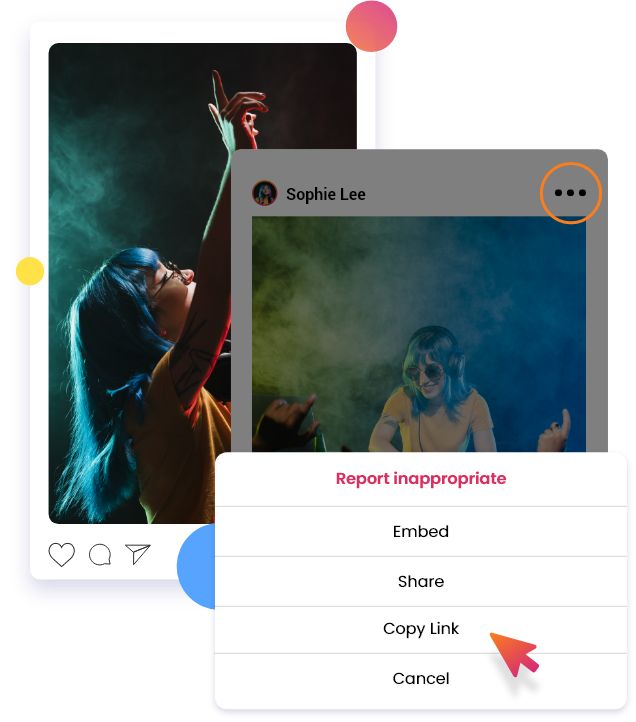
- Si vous êtes connecté à Instagram, repérez la photo que vous souhaitez enregistrer, cliquez sur les trois points situés dans le coin supérieur droit, puis sélectionnez « Copier le lien ».
- Si vous ne souhaitez pas vous connecter à Instagram si vous n'avez pas de compte Instagram, utilisez l'outil « Instagram Viewer » Path Socialpour accéder au profil Instagram public qui a partagé la ou les photos que vous souhaitez télécharger. Repérez la photo, cliquez sur les trois points situés dans le coin supérieur droit, puis sélectionnez « Copier le lien ».
- Collez le lien dans l'outil de téléchargement de photos Instagram et cliquez sur "Rechercher".
Existe-t-il un téléchargeur privé de photos Instagram ?
Malheureusement, il n'existe aucun moyen de consulter ni de télécharger Instagram privées Instagram . Si un compte est privé et que vous ne le suivez pas, votre accès à ce profil sera limité. Cela signifie que vous ne pourrez pas voir ses photos privées.
Si vous souhaitez consulter leurs photos et utiliser un outil de téléchargement Instagram , vous devez d'abord vous abonner à ce compte privé.
N'oubliez pas Instagram met Instagram à jour sa plateforme afin de renforcer la protection de la vie privée de ses utilisateurs. Même lorsque vous enregistrez des photos provenant de comptes publics, n'oubliez pas que vous n'êtes pas autorisé à utiliser ces photos sans l'autorisation expresse du propriétaire et sans mentionner ce dernier.
Si vous avez l’intention de partager Instagram de quelqu’un d’autre, la meilleure solution consiste à utiliser une application de partage qui ajoute automatiquement la mention de la source à la publication. Ainsi, vous n’aurez pas à craindre d’oublier de citer le propriétaire de la publication ou de le faire de manière incorrecte. Il ne suffit pas d’utiliser « CTTO » (crédit au propriétaire) pour indiquer que la publication ne vous appartient pas. Vous pouvez taguer la personne dans votre légende (si elle vous autorise à le faire) ; ou, à tout le moins, mentionner son nom.
Il est également toujours bon de commenter le message original pour demander l'autorisation de le partager ou pour informer le propriétaire que vous allez partager son message.
Développez votre marque Instagram en repostant des photos qui méritent d'être partagées
Si vous gérez une marque sur Instagram, partager du contenu généré par les utilisateurs (CGU), des mèmes amusants ou des informations utiles peut vous aider à vous faire remarquer et à gagner davantage d'abonnés et d'engagement. Un outil de téléchargement Instagram est très pratique lorsque vous avez besoin d'enregistrer des images sur votre appareil sans perte de qualité, en vue d'une utilisation ultérieure.
Il est essentiel d'être très social sur cette plateforme très fréquentée pour assurer la croissance de Instagram . Veillez donc à entretenir de bonnes relations avec les autres utilisateurs en créditant toujours les bonnes personnes lorsque vous partagez leurs publications. L'intégration de contenus repostés dans votre stratégie de contenu globale est un bon moyen d'ajouter du caractère à votre marque. Cela peut rendre votre page plus attrayante pour de nouveaux adeptes potentiels.
La création d'un contenu unique et constamment surprenant prend déjà beaucoup de temps. Pourquoi ne pas libérer plus de temps pour que vous puissiez concentrer tous vos efforts sur la création de contenu ? Laissez à un expert en stratégie de croissance Instagram le soin de s'occuper de l'augmentation du nombre de vos followers et de l'engagement.
Faites équipe avec Path Social profitez de ses capacités avancées de ciblage d'audience, rendues possibles grâce à sa technologie d'IA exclusive. Laissez ses spécialistes des réseaux sociaux en interne promouvoir votre contenu auprès du public adéquat grâce à des stratégies marketing qui ont fait leurs preuves.
Avec Path Social, vous pouvez compter sur une croissance régulière grâce à de vraies personnes qui s'intéressent sincèrement à votre marque. Reconnu par plus de 20 000 Instagram , tous secteurs et niches confondus, Path Social votre meilleur atout pour une croissance durable et fructueuse. Commencez dès aujourd'hui à développer votre audience et à gagner Instagram !





Vous voulez augmenter le nombre de followers Instagram de manière organique ?
Utilisez notre boîte à outils basée sur l'IA pour attirer de véritables abonnés engagés et booster votre portée.
Augmenter le nombre de followers Instagram




