


Instagram Descargador de fotos: Por qué necesitas uno

Instagram | 31 de mayo de 2024
Puede que quieras guardar algunas fotos de moda para un plan de marketing o un mood board. Tal vez estés recopilando inspiraciones de looks de maquillaje para tu boda. O te gusta la fotografía de naturaleza y quieres estudiar los elementos artísticos utilizados por un fotógrafo profesional al que admiras. Un descargador de fotos de Instagram te resultará muy útil para estos fines.
¿Se pueden descargar fotos directamente de Instagram?
La respuesta es sí y no.
Puedes descargar tus fotos de Instagram guardarlas en tu dispositivo. Sin embargo, Instagram permite a los usuarios descargar fotos de otras personas. Puedes guardar fotos en una colección dentro de la Instagram o en la página web. Tendrás que utilizar una herramienta de descarga Instagram de terceros si realmente quieres descargar una foto a tu dispositivo. Hablaremos más sobre esto más adelante.
Guardar fotos en una colección
Puedes tener más de una colección en tu perfil. Cuando guardas la foto de otra persona en una colección, no se le notificará tu acción. Además, tu colección guardada solo es visible para ti.
Hay varias formas de guardar una foto en una colección. Sigue estos pasos si utilizas la aplicación Instagram :
- Busca la foto que quieras guardar en una colección.
- Tócalo y, a continuación, toca el símbolo del marcador situado en la esquina inferior derecha, debajo de la imagen. O bien, toca los tres puntos situados en la esquina superior derecha, encima de la imagen, y toca el icono «Guardar».
- Cuando guardes una imagen, aparecerá una barra en la parte inferior de la imagen que dice «Guardar en la colección». Toca esta barra para guardar la imagen en una nueva colección o para seleccionar una colección.
- Si estás creando una nueva publicación y quieres guardarla después de editar la imagen, solo podrás seguir los pasos anteriores una vez que hayas compartido la foto.
Si utilizas Instagram tu ordenador, a continuación te explicamos cómo guardar fotos en tus colecciones:
- Busca la foto que quieras guardar.
- Haga clic en él y, a continuación, pase el ratón por encima del símbolo del marcador situado en la esquina inferior derecha de la sección de comentarios.
- Aparecerán los álbumes de tus colecciones. Seleccione la colección en la que desea guardar la imagen.
In-App Instagram Descargador de fotos para guardarlas en tu dispositivo
A menudo es difícil resistirse a mejorar las imágenes con las divertidas herramientas y los bonitos filtros deInstagram antes de compartirlas en tu perfil. Una foto puede quedar tan bonita que quieras guardar una copia en tu dispositivo. A continuación te explicamos cómo hacerlo utilizando el descargador de fotos de la aplicación Instagram :
- Si estás creando una publicación normal, tendrás que compartirla en tu perfil antes de poder guardarla.
- Si estás creando una historia, haz una foto con la cámara o sube una de tu galería. Edita la foto como quieras. Cuando estés satisfecho, pulsa los tres puntos de la esquina superior derecha y, a continuación, pulsa «Guardar» para descargarla en tu dispositivo. A continuación, ya puedes terminar de compartir tu historia.
- Si quieres descargar una imagen ya publicada, tendrás que iniciar sesión en tu perfil desde un ordenador. Ve a tu perfil y busca la foto. Haz clic en ella y, a continuación, haz clic con el botón derecho del ratón sobre la foto. Por último, selecciona «Guardar como» y elige la carpeta de destino en tu ordenador.

Instagram Photo Downloader Herramientas gratuitas
Hay una aplicación para casi todo lo que se te ocurra. ¿Estás pensando en descargarte las fotos de otra persona en Instagram ? Puedes hacer capturas de pantalla si no te importa obtener imágenes de baja calidad. O puedes utilizar una herramienta de descarga de fotos de Instagram para guardar copias de imágenes de alta calidad en tu dispositivo.
Instagram Descargador de fotos para iPhone
Si utilizas un iPhone, ¡estas son las mejores aplicaciones para descargar Instagram que puedes probar!
- Instant Saver. Lo único que tienes que hacer es copiar el enlace Instagram . Toca los tres puntos que hay encima de la imagen, en la esquina superior derecha, y luego toca «Enlace». Abre Instasave en tu iPhone y pega el enlace. Puedes volver a publicar la imagen al instante en tu Instagram descargarla en tu móvil. La aplicación es gratuita.
- Repost-Pro. Además de permitirte volver a publicar fácilmente Instagram con la atribución correspondiente, esta aplicación gratuita te permite guardar fotos en alta resolución en tu iPhone. Solo tienes que copiar el enlace de la imagen en Instagram y se añadirá automáticamente a la aplicación Repost cuando la abras.
Instagram Extensión de Chrome para descargar fotos
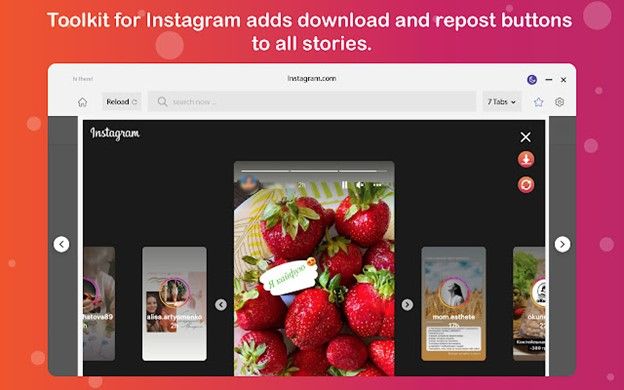
Una extensión de Chrome para descargar fotos de Instagram añade una función de descarga a Instagram para que puedas guardar fotos fácilmente en tu ordenador o teléfono de forma gratuita y sin límites. La mejor que existe y que sigue funcionando tras la última actualización de Instagrames Save & Repost for Instagram.
Añade la extensión a tu cuenta de Google y esta añadirá automáticamente botones para compartir y descargar en todas Instagram . Otras funciones incluyen:
- Descargue fotos de Instagram en alta calidad.
- Descargue los vídeos de Instagram .
- Story saver de Instagram.
- Dos modos de tamaño de pantalla tanto para escritorio como para teléfono.
- Vuelve a publicar fotos y vídeos.
- Sin limitaciones de descarga.
Instagram Descargador de fotos para PC
Puedes probar estas opciones si necesitas guardar fotos de Instagram directamente en tu ordenador sin perder calidad.
- Inflact's Instagram photo downloader for PC.
Esta es una herramienta fácil de usar que funciona para cualquier dispositivo y sistema operativo. Sólo tienes que seguir estos pasos:
- Vaya a Instagram y abra la imagen que desea descargar.
- Copie el enlace del puesto.
- Al sitio web del descargador de fotos Inflact Instagram .
- Pegue el enlace en el campo situado junto al botón azul Descargar foto.
- Haz clic en el botón Descargar foto.
¡Ya está! Tendrás una copia de alta resolución de la foto de Instagram guardada en tu ordenador.
- Instagram Herramienta de descarga de fotos de Path Social.
Utiliza esta herramienta gratuita para guardar instantáneamente fotos de cualquier cuenta pública de Instagram . Sólo tienes que copiar y pegar el enlace de la imagen. Ni siquiera necesitas iniciar sesión en tu cuenta de Instagram . Esta herramienta es perfecta si no quieres descargar una aplicación o extensión de terceros. A continuación te explicamos cómo utilizarla:
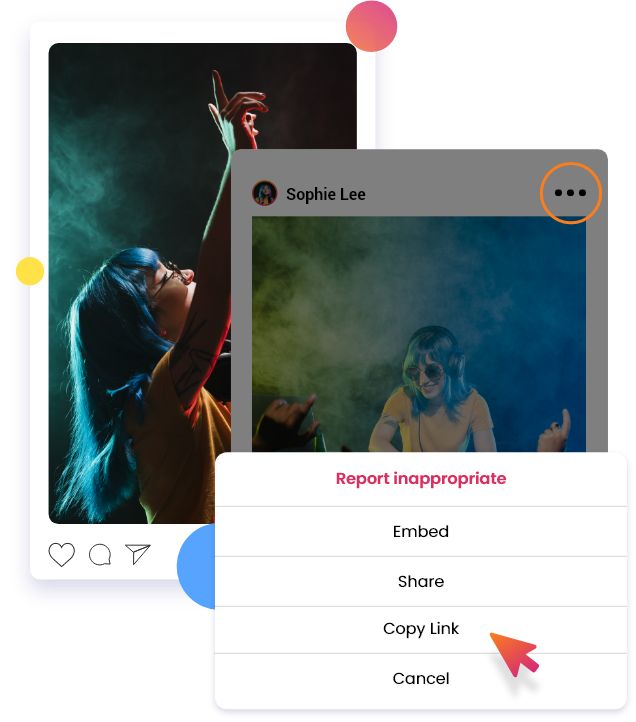
- Si has iniciado sesión en Instagram, busca la foto que quieras guardar y pulsa los tres puntos de la esquina superior derecha; a continuación, selecciona «Copiar enlace».
- Si no quieres iniciar sesión en Instagram no tienes una cuenta de IG, utiliza la herramienta Instagram Viewer» Path Socialpara acceder al perfil público de IG que ha compartido la foto o fotos que quieres descargar. Busca la foto, haz clic en los tres puntos de la esquina superior derecha y selecciona «Copiar enlace».
- Pegue el enlace en la herramienta de descarga de fotos Instagram y haga clic en "Buscar".
¿Existe un descargador de fotos privado en Instagram ?
Por desgracia, no hay forma de ver ni descargar Instagram privadas Instagram . Si una cuenta es privada y no la sigues, tendrás acceso restringido al perfil. Esto significa que no podrás ver sus fotos privadas.
Si quieres ver sus fotos y utilizar un programa para descargar Instagram , primero tienes que empezar a seguir la cuenta privada.
Recuerda que Instagram actualiza Instagram la plataforma para reforzar la protección de la privacidad de sus usuarios. Incluso al guardar fotos de cuentas públicas, ten en cuenta que no está permitido utilizar dichas fotos sin la debida autorización del propietario y sin citar su autoría.
Si tienes intención de compartir Instagram de otra persona, la mejor opción es utilizar una aplicación de reposteo que añada automáticamente la atribución a la publicación. De esta forma, no tendrás que preocuparte por olvidarte de mencionar al autor de la publicación o por hacerlo de forma incorrecta. No basta con utilizar «CTTO» (crédito al autor) para indicar que la publicación no es tuya. Puedes etiquetar a la persona en el pie de foto (si te permite etiquetarla); o, como mínimo, mencionar su nombre.
También es una buena práctica comentar la publicación original para pedir permiso para compartirla o para notificar al propietario que vas a compartir su publicación.
Haga crecer su marca Instagram reenviando fotos que merezcan ser compartidas
Si tienes una marca en Instagram, compartir contenido generado por los usuarios (UGC), memes divertidos o información útil puede ayudarte a destacar y a conseguir más seguidores y participación. Un programa para descargar Instagram es una herramienta muy útil cuando necesitas guardar imágenes en tu dispositivo sin perder calidad para utilizarlas más adelante.
Ser muy social en una plataforma tan concurrida es esencial para el crecimiento de Instagram . Así que asegúrate de mantener buenas relaciones con otros usuarios dando siempre crédito a las personas adecuadas cuando compartas sus publicaciones. Incluir contenido reenviado en tu estrategia general de contenidos es una buena forma de añadir carácter a tu marca. Esto puede hacer que tu página sea más atractiva para nuevos seguidores potenciales.
Crear contenidos únicos y sorprendentes de forma constante ya requiere mucho tiempo. ¿Por qué no liberar más tiempo para que pueda centrar todos sus esfuerzos en la creación de contenidos? Deje en manos de un experto en estrategia de crecimiento Instagram todo el trabajo pesado que supone aumentar el número de seguidores y la participación.
Colabora con Path Social aprovecha su avanzada capacidad de segmentación de audiencias, gracias a su tecnología propia de inteligencia artificial. Deja que sus especialistas internos en redes sociales promocionen tu contenido entre el público adecuado mediante estrategias de marketing de probada eficacia.
Con Path Social, podrás disfrutar de un crecimiento constante gracias a personas reales que muestran un interés genuino por tu marca. Con la confianza de más de 20 000 Instagram de todos los sectores y nichos, Path Social tu mejor opción para lograr un crecimiento duradero y gratificante. ¡Empieza hoy mismo a crecer y a ganar Instagram !





¿Quieres aumentar tus seguidores orgánicos Instagram ?
Utiliza nuestro conjunto de herramientas basadas en inteligencia artificial para atraer seguidores reales y comprometidos, y potenciar al máximo tu alcance.
Aumentar seguidores de Instagram ahora




