


Pas si sournois : Comment voir qui vous a désapprouvé sur Instagram

Gagner de nouveaux abonnés est une formidable source de reconnaissance sur Instagram. Cela signifie que les gens apprécient votre page et s’intéressent au contenu que vous publiez. C’est donc très frustrant quand des personnes cessent de vous suivre sur Instagram vous sachiez pourquoi. C’est encore pire quand vous ne savez pas exactement qui a cessé de suivre votre page.
Vous vous demandez comment savoir qui ne vous suit plus sur Instagram? Dans ce guide, nous allons vous présenter toutes les méthodes disponibles, des méthodes manuelles à l'utilisation d'outils tiers.

Pourquoi quelqu'un pourrait-il ne pas suivre votre page IG ?
Il existe de nombreuses raisons pour lesquelles un utilisateur pourrait décider de ne plus suivre votre Instagram . La plupart du temps, cela est lié à votre stratégie de contenu et à votre fréquence de publication. Ainsi, pour fidéliser vos abonnés, vous devez identifier vos éventuelles erreurs.
Selon une étude de Nielsen Norman, il est fréquent que les utilisateurs se désabonnent des marques et des créateurs qui publient beaucoup trop souvent. Un compte qui publie plusieurs fois par jour risque d’encombrer le fil d’actualité, au détriment des autres contenus. Certaines personnes se désabonnent donc de ces comptes afin de faire de la place pour d’autres publications dans leur fil d’actualité. De plus, il peut être agaçant de voir sans cesse des publications de la même personne, car cela ressemble un peu à du spam !
Instagram peuvent également se désintéresser des comptes qui publient du contenu de mauvaise qualité. Il peut s'agir de photos et de vidéos de mauvaise qualité ou floues, ou encore de publications ennuyeuses et hors sujet qui ne suscitent pas l'intérêt des autres. Il est tout à fait logique que les utilisateurs se désabonnent des pages dont ils n'apprécient plus le contenu.
Outre un contenu ennuyeux, les internautes peuvent également se désabonner de votre page si vous publiez du contenu choquant. Il se peut que vous exprimiez vos pensées et vos opinions avec trop de franchise, au point de blesser certains de vos fans. Si certaines personnes se désabonnent pour cette raison, c'est tout à fait compréhensible. Veillez donc toujours à faire preuve de prudence et de respect lorsque vous publiez des messages sur des sujets sensibles.
Il est également facile pour les utilisateurs de supprimer les marques avec lesquelles ils n'entretiennent pas de bonnes relations. Il s'agit notamment des créateurs et des entreprises qui ne s'engagent pas auprès de leurs fans et qui ignorent les interactions.
Il peut également s'agir de faux followers qui ont suivi votre page dans le seul but d'obtenir un suivi de votre part. Méfiez-vous de ces faux followers qui ne s'intéressent pas vraiment à votre page.

Comment vérifier qui vous a désapprouvé sur Instagram
Instagram tout le monde de consulter la liste des abonnés et des comptes suivis par les autres utilisateurs, du moins pour les profils publics. Cependant, si Instagram vous Instagram lorsqu’un nouvel utilisateur vous suit, il ne fait pas de même lorsqu’un utilisateur cesse de vous suivre.
Cela ne veut pas dire pour autant que vous ne pouvez pas découvrir qui a cessé de vous suivre. Si vous vous y prenez intelligemment et que vous maîtrisez les fonctionnalités de l'application Instagram, il est facile de savoir qui a cessé de vous suivre.
Si vous souhaitez savoir qui a cessé de vous suivre, vous serez ravi d'apprendre que deux options s'offrent à vous. La première consiste à utiliser des méthodes manuelles directement depuis Instagram , ce qui est l'option la plus sûre. La seconde consiste à utiliser des applications tierces qui permettent de suivre l'évolution du nombre d'abonnés et de ceux qui ont cessé de vous suivre. Poursuivez votre lecture pour découvrir comment vérifier si quelqu'un a cessé de vous suivre sur Instagram ces deux méthodes.
Vérifications manuelles : Comment voir qui vous a désapprouvé sur Instagram sans vous faire bannir
Le recours à des outils tiers pour détecter les utilisateurs qui ne vous suivent plus peut déclencher des alertes chez Instagram entraîner des suspensions temporaires. Il est donc plus sûr d’utiliser des méthodes manuelles pour identifier ces utilisateurs. Vous vous demandez comment voir qui a cessé de vous suivre sur Instagram risquer d’être banni ? Voici comment procéder manuellement, directement depuis l’application :
1. Allez sur votre profilInstagram .
2. Cliquez sur votre nombre de followers en haut de la page. Vous accédez ainsi à la liste des personnes qui vous suivent.
3. Appuyez sur la barre de recherche en haut de la page.
4. Saisissez le nom d'utilisateur de toute personne dont vous soupçonnez qu'elle a cessé de vous suivre. Si cette personne n'apparaît pas dans les résultats de recherche, cela signifie qu'elle a cessé de suivre votre page.
Vous pouvez également utiliser cette méthode pour vérifier qui a unfollowé d'autres profils publics. Notez que cette méthode ne fonctionne pas sur les comptes privés ou cachés Instagram , sauf si vous les suivez déjà.
Faites appel à des applications tierces pour trouver les "unfollowers" sournois
La méthode ci-dessus est très efficace pour vous permettre d'identifier les personnes qui ont cessé de suivre votre Instagram . Elle peut toutefois s'avérer très chronophage. Vous devrez également procéder par tâtonnements jusqu'à ce que vous identifiiez les personnes qui ont cessé de vous suivre.
Si vous souhaitez avoir une vue d'ensemble de l'activité de vos abonnés, y compris ceux qui se sont désabonnés, essayez d'utiliser Instagram tiers Instagram des désabonnements Instagram . L'une des applications les plus populaires dans ce domaine est FollowMeter, disponible à la fois sur l'App Store d'Apple et sur le Google Play Store.
Cette application tierce vous permet de suivre vos abonnés et d'identifier ceux qui ne vous suivent pas en retour. Vous pourrez même consulter d'autres informations relatives à vos abonnés, telles que les personnes qui aiment le plus vos publications et celles qui vous ont bloqué sur Instagram.
Il vous suffit de télécharger l'application et d'y associer votre Instagram . L'application analyse rapidement votre profil et vous fournit des données clés ainsi que des informations pertinentes à son sujet. Elle comporte une section dédiée qui vous permet de voir toutes les personnes qui ont cessé de vous suivre depuis que vous l'avez installée. Ainsi, si vous souhaitez suivre régulièrement l'évolution de vos abonnés, il est judicieux de conserver l'application sur votre appareil à long terme.
Notez que certaines applications tierces vous demanderont vos Instagram afin de scanner et d'analyser votre liste d'abonnés. Pour réduire le risque de piratage de votre compte, vous ne devriez associer votre profil qu'à des applications réputées et dignes de confiance.
Comment voir qui ne vous suit pas sur le site Instagram
Il existe de nombreuses raisons pour lesquelles vous pourriez vouloir savoir qui ne vous suit pas en retour sur Instagram. Peut-être souhaitez-vous faire le tri dans la liste des personnes que vous suivez, en commençant par celles qui ne vous suivent pas en retour. Ou peut-être souhaitez-vous simplement équilibrer votre ratio abonnés/abonnements.
Instagram vous Instagram les utilisateurs qui vous suivent, mais que vous ne suivez pas en retour. En revanche, l'application ne fournit pas d'informations sur le cas inverse.
Mais là, on a une petite surprise pour toi. Voici une petite astuce qui te permettra de voir les comptes qui ne te suivent pas en retour :
1. Sur votre Instagram , cliquez sur les trois lignes horizontales pour accéder à vos paramètres.
2. Appuyez sur Votre activité sous Comment utiliser Instagram.
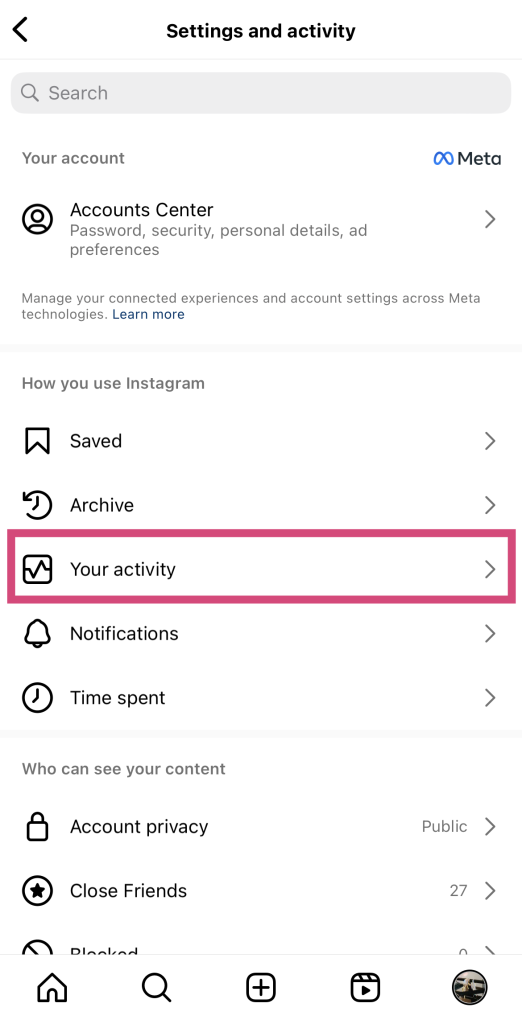
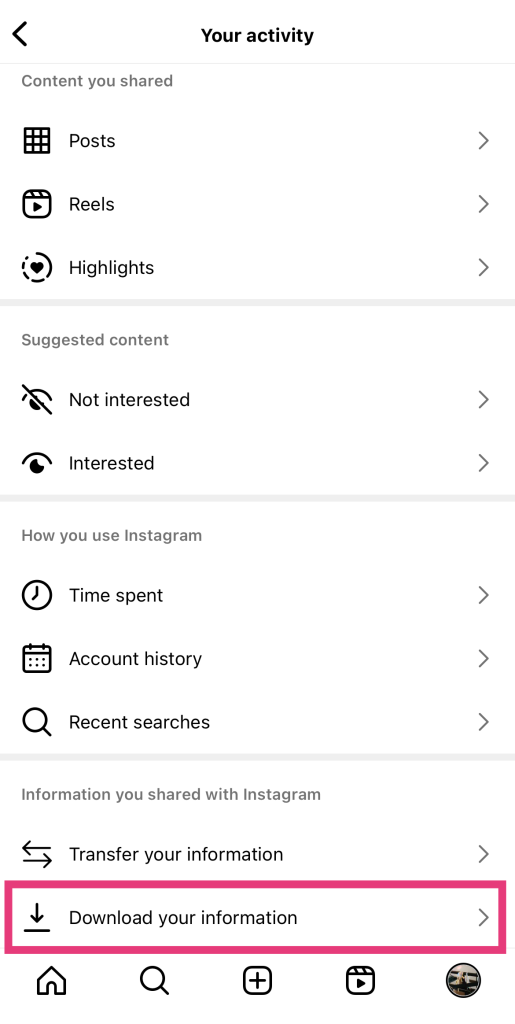
3. Choisissez Télécharger vos informations. Vous accédez alors à la section de téléchargement du Meta Accounts Center.
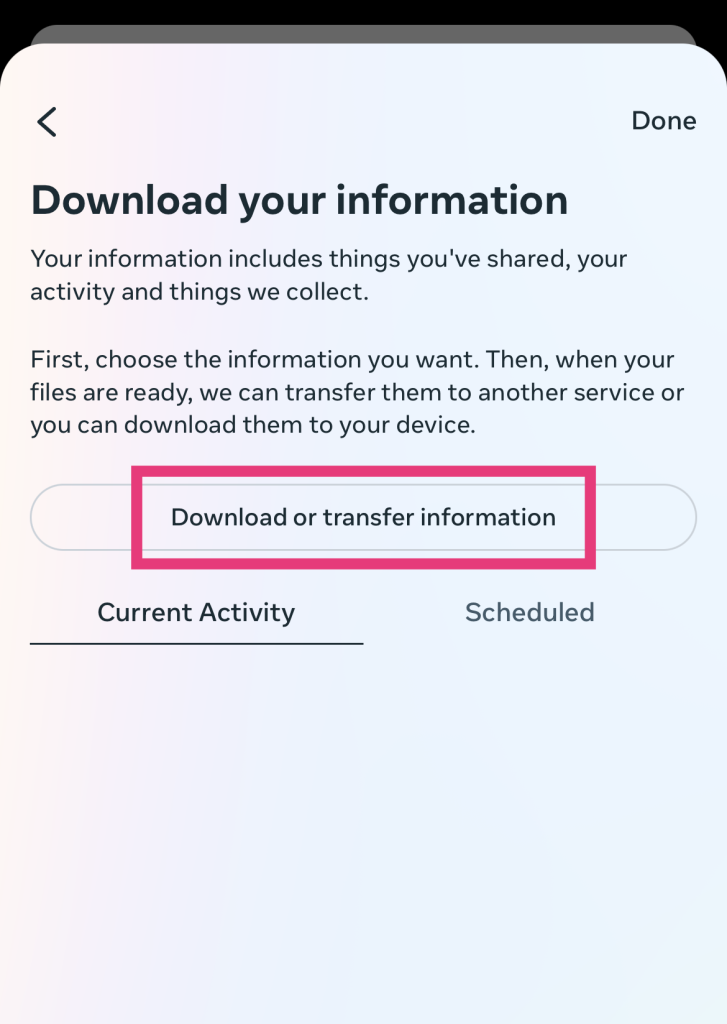
4. Appuyez sur Télécharger ou transférer des informations.
5. Sélectionnez votre profilInstagram .
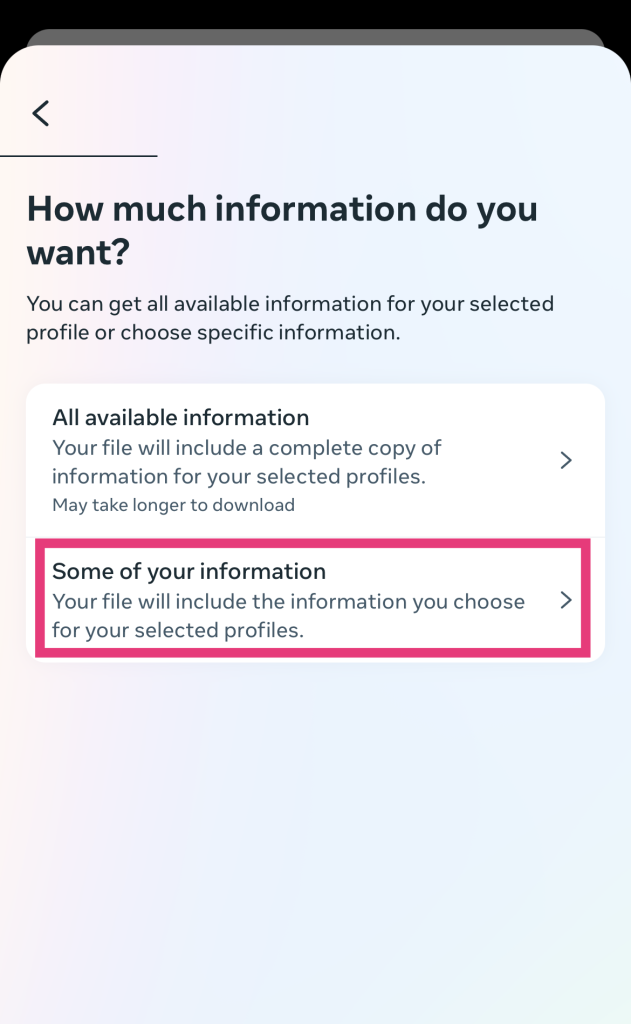
6. Choisissez la quantité d'informations que vous souhaitez extraire. Puisque vous souhaitez uniquement consulter l'activité de vos abonnés, appuyez sur « Une partie de vos informations ».
7. Sélectionnez « Abonnés » et « Personnes que vous suivez ». Cliquez ensuite sur « Suivant ».
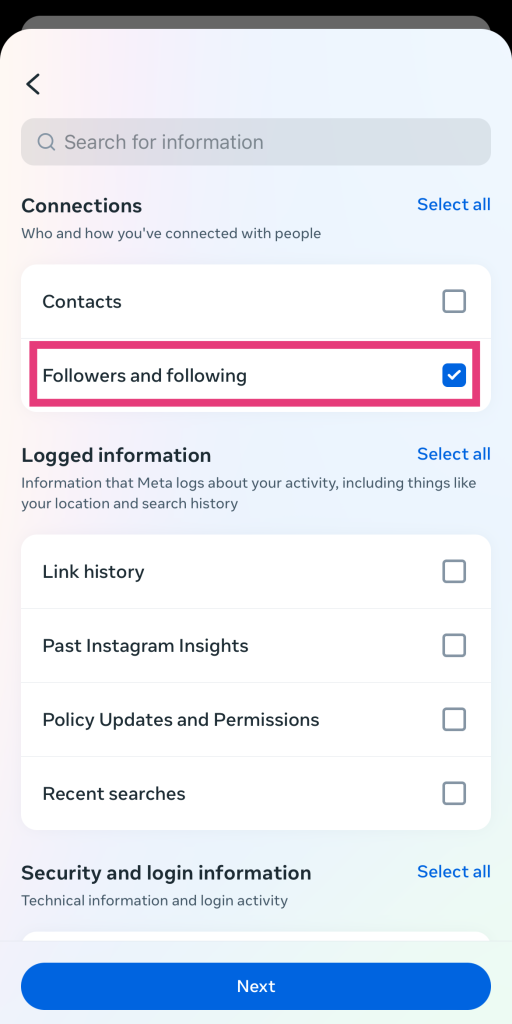
8. Sélectionnez « Télécharger sur l'appareil », puis appuyez sur « Suivant ».
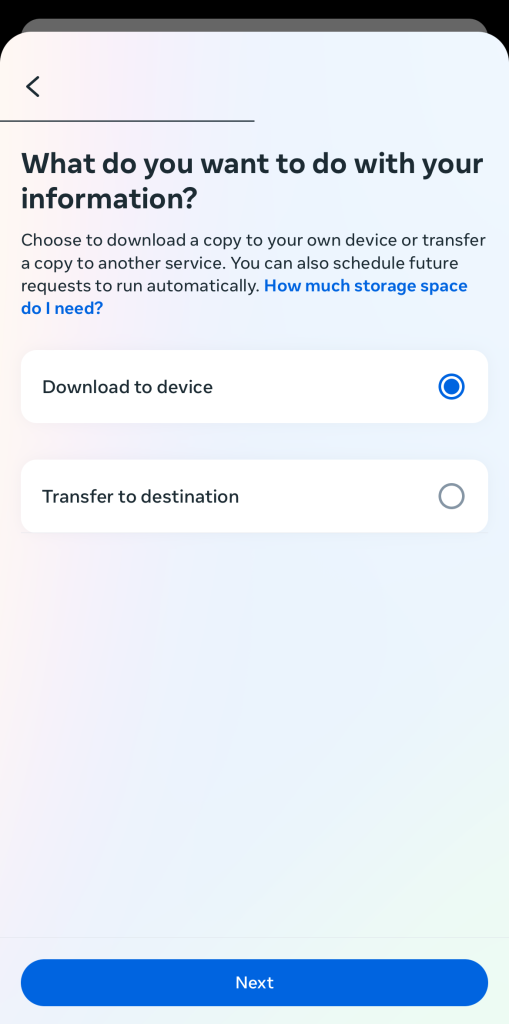
9. Cliquez sur Créer des fichiers. Vous verrez votre demande de téléchargement en attente sur la page suivante.
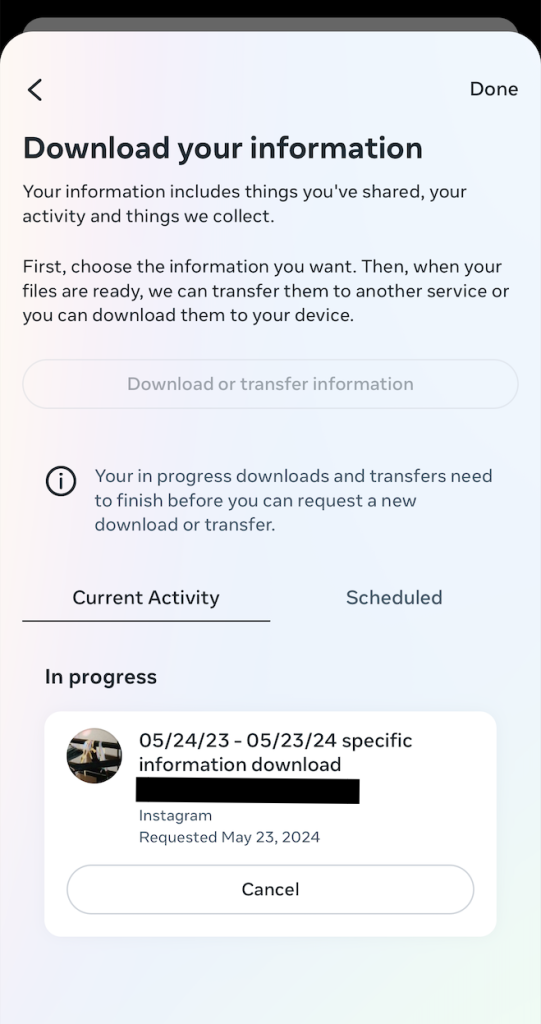
10. Lorsque votre fichier sera prêt, Instagram vous Instagram par e-mail. Téléchargez ce fichier sur votre ordinateur.
11. Ouvrez votre fichier de données et une feuille de calcul Excel.
12. Copiez-collez les noms d'utilisateur de vos abonnés dans une colonne de la feuille de calcul. Ensuite, faites de même pour les personnes que vous suivez dans la colonne suivante.
13. Sélectionnez les deux colonnes, puis cliquez sur « Mise en forme conditionnelle », puis sur « Mettre en surbrillance les cellules en double ». Cela met en surbrillance les noms d'utilisateur qui apparaissent dans les deux colonnes . Ceux qui ne vous suivent pas en retour ne figurent pas parmi les personnes mises en surbrillance dans votre liste de personnes que vous suivez.
Conseils pour maintenir l'intérêt de vos followers pour votre page
Instagram une limite au nombre de comptes que vous pouvez ne plus suivre chaque jour. Ce nombre est fixé à environ 200. C'est un chiffre énorme, assez difficile à atteindre, même lorsque vous faites le tri dans votre liste d'abonnés. Cela signifie que chaque jour, il y a de fortes chances que quelqu'un cesse de vous suivre.
Il est donc extrêmement important de tout mettre en œuvre pour que vos abonnés actuels continuent à s'intéresser à vous. Ainsi, ils n'auront aucune raison de cliquer sur le bouton « Se désabonner ». Voici quelques mesures que vous pouvez prendre pour maintenir l'intérêt de vos abonnés et les inciter à suivre votre contenu, afin d'éviter qu'ils ne se désabonnent :
- Publiez régulièrement, mais sans exagérer. Respectez un rythme de publication régulier, idéalement plusieurs fois par semaine. L'essentiel est de toujours proposer du contenu original lorsque vos abonnés attendent de nouvelles publications de votre part. Évitez de publier plusieurs fois par jour, car une fréquence trop élevée peut être envahissante ou rebutante pour certains.
- Publiez du contenu intéressant et de grande qualité. Évitez de publier des photos et des vidéos de mauvaise qualité ou pixélisées qui pourraient gêner vos abonnés. Ne publiez que du contenu de grande qualité, visuellement saisissant et qui apporte une valeur ajoutée à la vie de vos fans.
- N'hésitez pas à tester différents formats créatifs. Utilisez les Reels et les publications en carrousel pour varier les formats de votre contenu. Plus votre contenu sera utile, intéressant et divertissant, moins les utilisateurs seront enclins à se désabonner de votre page.
- Engagez-vous auprès des personnes qui vous suivent et créez un lien fort avec elles. Répondez aux commentaires sur vos articles ou aux messages directs envoyés dans votre boîte de réception. Publiez des histoires interactives où les gens peuvent partager leurs pensées et leurs commentaires sur votre marque. Maintenez une communication forte entre vous et vos abonnés.
- Publications en collaboration. Vous pouvez utiliser la fonctionnalité « PublicationInstagram pour attirer davantage d’abonnés vers vos publications. En collaborant avec un influenceur plus populaire sur Instagram, vous pouvez élargir votre audience et gagner davantage d’abonnés ; ainsi, en théorie, vous pouvez compenser les abonnés que vous auriez pu perdre.

Ne perdez plus de followers et gagnez des fans fidèles grâce à Path Social
Perdre des abonnés peut être source de stress, surtout lorsqu’on ne parvient pas à identifier précisément ce qui les a poussés à quitter votre communauté. Mais pour mieux comprendre les raisons de cette perte d’abonnés, il faut avant tout déterminer qui part. Vous pouvez le faire manuellement, par exemple en utilisant la barre de recherche dans votre liste d’abonnés. Vous pouvez également utiliser une application tierce qui vous permettra d’identifier les personnes qui se sont désabonnées de votre page et d’obtenir d’autres informations importantes concernant vos abonnés.
Savoir comment identifier les personnes qui ne vous suivent plus sur Instagram utile lorsque vous devez analyser les points faibles de votre page. Mais il est tout aussi important, avant tout, de savoir comment attirer des abonnés fidèles. Ainsi, vous n'aurez pas à vous inquiéter outre mesure du fait que des personnes cessent de vous suivre.
Travailler avec Path Social est un excellent moyen d'acquérir une base de fans fidèles. Notre algorithme de ciblage pousse votre contenu vers les personnes les plus susceptibles de l'apprécier et d'y trouver un écho. Cela signifie que vous gagnerez de nouveaux fans qui sont réellement intéressés par votre page et qui ne sont pas susceptibles de la quitter. Obtenez des fans authentiques et fidèles grâce à notre aide dès aujourd'hui !





Vous souhaitez développer naturellement votre Instagram ?
Découvrez une plateforme conçue pour aider les créateurs à toucher un public authentique et engagé, sans prendre de raccourcis.
Explorez la plateforme




