


Revoir les bobines aimées sur Instagram: Revisiter un contenu de qualité

Ouvrir l'onglet Instagram , c'est comme entrer dans un petit univers de vidéos courtes divertissantes et captivantes. Grâce à sa sélection de vidéos sympas, passer des heures à faire défiler les Reels semble être une expérience universelle. Il est également courant de cliquer sur « J'aime » pour les Reels que l'on apprécie le plus. Mais une fois que c'est fait, existe-t-il un moyen de consulter la liste des Reels que l'on a aimés sur Instagram?
Il est en fait assez facile de retrouver les bobines que vous avez aimées précédemment sur l'application. Mais beaucoup de gens ne savent pas comment s'y prendre.
Dans ce guide, nous allons vous expliquer comment retrouver les Reels que vous avez aimés sur Instagram pouvoir les revoir. Nous vous donnerons également quelques astuces pour accéder facilement à des Reels sympas que vous avez vus, sans avoir à les aimer. Poursuivez votre lecture pour découvrir tout cela et bien plus encore !

Comment voir les bobines aimées sur Instagram: Un processus pas à pas
Il se peut que vous souhaitiez revisiter un Reel que vous avez aimé par le passé pour de nombreuses raisons. Il peut s'agir d'un article informatif contenant des données que vous souhaitez consulter à nouveau. Ou peut-être souhaitez-vous simplement partager un mème vidéo amusant avec votre meilleur ami.
Quoi qu’il en soit, il est très facile de revoir les vidéos que vous avez aimées par le passé. Voici comment retrouver les Reels que vous avez aimés sur Instagram, étape par étape :
1. Ouvrez l'application Instagram et cliquez sur votre icône de profil en bas à droite de l'écran.
2. Cliquez sur l'icône du menu hamburger (ces trois lignes horizontales) en haut à droite de votre profil.
3. Dans la section « Comment vous utilisez Instagram », appuyez sur « Votre activité ».

4. Sélectionnez « J'aime ». Vous accéderez alors à une page où vous pourrez voir toutes les publications que vous avez aimées. Les carrousels sont signalés par l'icône représentant des couches en haut à droite de la publication, tandis que les Reels sont signalés par l'icône représentant une vidéo.
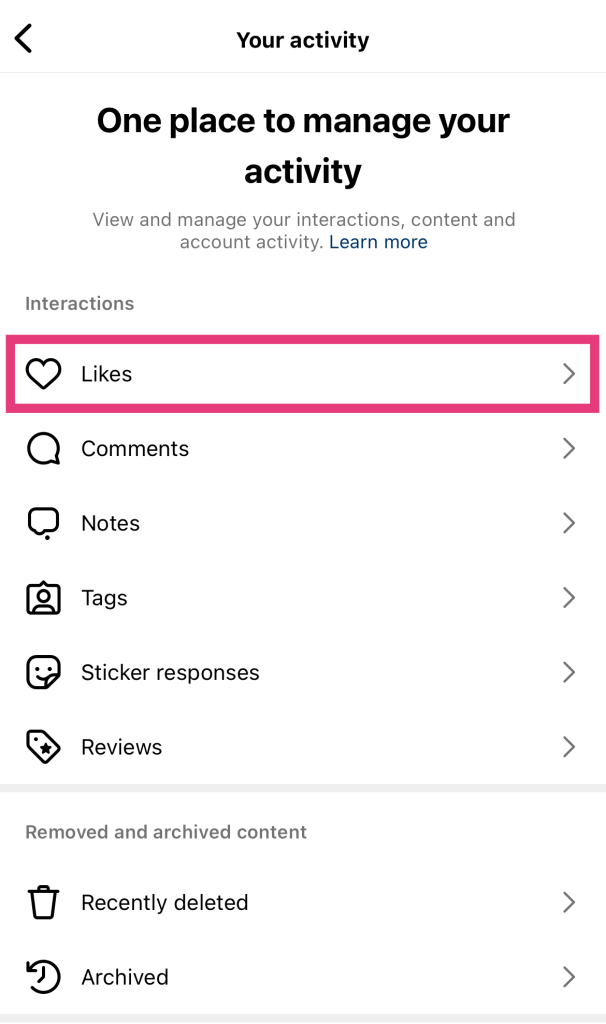
5. Pour afficher uniquement les Reels, cliquez sur le menu déroulant intitulé « Tous les types de contenu ».
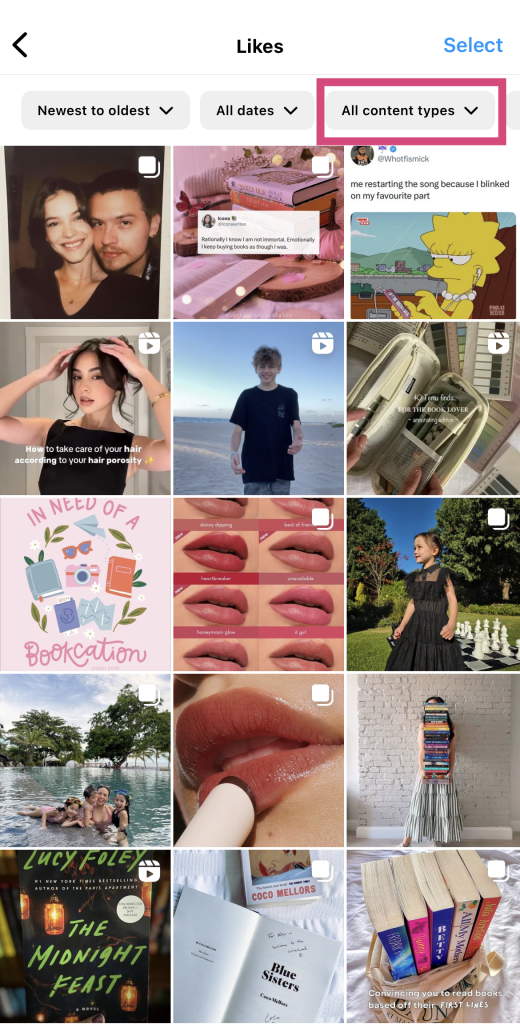
6. Désélectionner les postes pour ne sélectionner que les bobines.
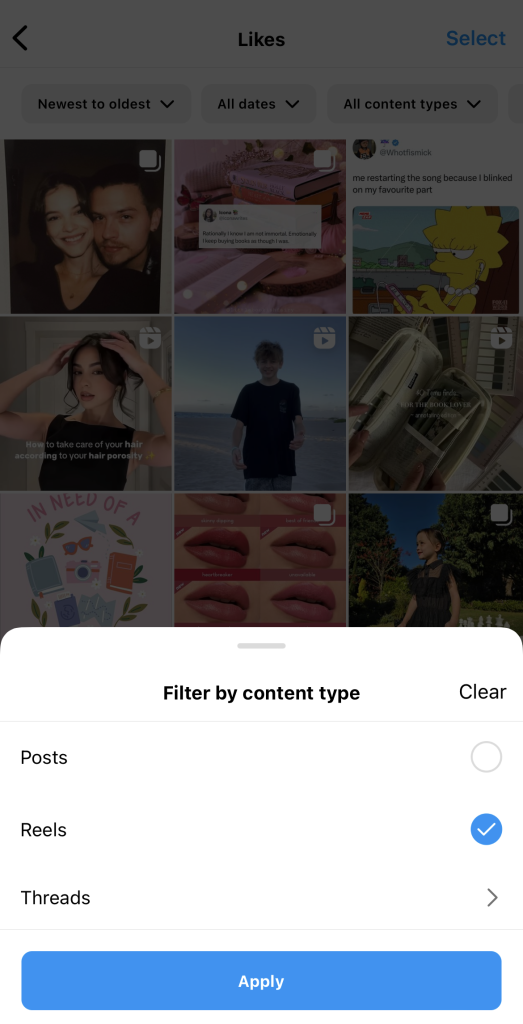
7. Cliquez sur Appliquer . Vous verrez alors toutes les bobines sur lesquelles vous avez cliqué sur "J'aime".
N'hésitez pas à filtrer vos vidéos préférées du plus récent au plus ancien et vice versa. Vous pouvez également sélectionner une plage de dates pour afficher les vidéos que vous avez aimées au cours d'une période donnée.
4 conseils pour faciliter le visionnage ultérieur des vidéos d'IG
Imaginez un peu : vous faites défiler votre fil Instagram vous tombez sur un Reel génial, qui fait réfléchir et qui est très divertissant. Vous le regardez plusieurs fois, vous riez aux éclats, puis vous passez à d’autres vidéos.
Mais quelques jours plus tard, vous vous souvenez d'un Reel qui vous avait plu et que vous aimeriez retrouver. Vous suivez les étapes décrites ci-dessus, mais vous vous rendez compte que vous n'avez jamais cliqué sur l'icône en forme de cœur sur ce Reel. Que faire ?
Il n'y a rien de plus frustrant que de ne pas parvenir à retrouver sur Instagram un Reel que l'on aimerait revoir. Tout le monde n'a pas pour habitude de « liker » chaque publication qui nous intéresse. Alors, comment faire pour retrouver d'anciens Reels que l'on a aimés et les revoir quand on le souhaite ?
Voici quatre conseils qui peuvent faciliter le retour à ces bobines sans avoir à les aimer.
1. Enregistrer la bobine et l'ajouter à une collection personnalisée
Pensez à prendre l'habitude de sauvegarder les bobines que vous appréciez. Vous pouvez même regrouper certaines bobines dans des collections personnalisées. Cela vous permet de revoir toutes les bobines que vous avez sauvegardées et qui relèvent d'un sujet ou d'une catégorie spécifique que vous avez choisi. Voici comment procéder en quelques étapes simples :
1. Ouvrez l'applicationInstagram et recherchez la bobine que vous souhaitez enregistrer.
2. Cliquez sur les trois points sur le côté de l'écran. Il doit se trouver sous le bouton Partager .
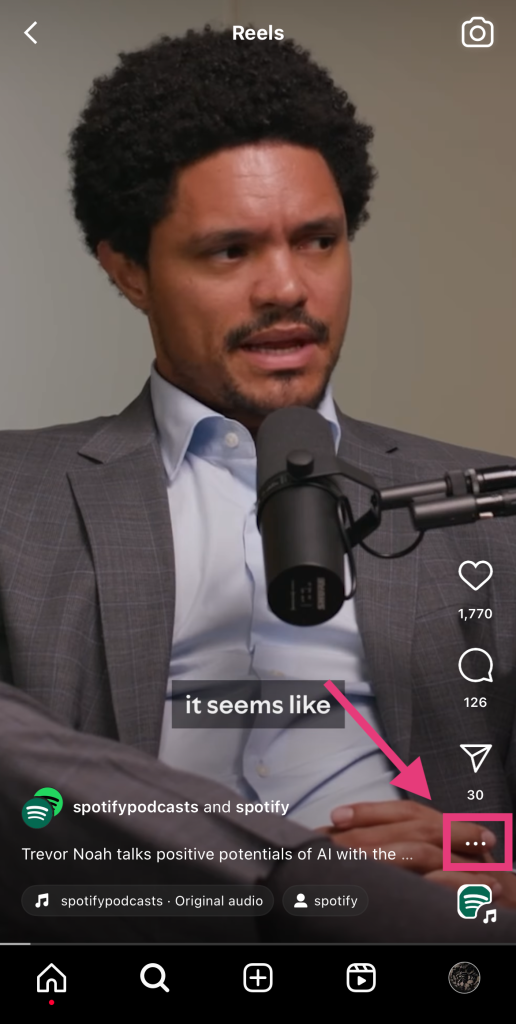
3. Sélectionnez Enregistrer.
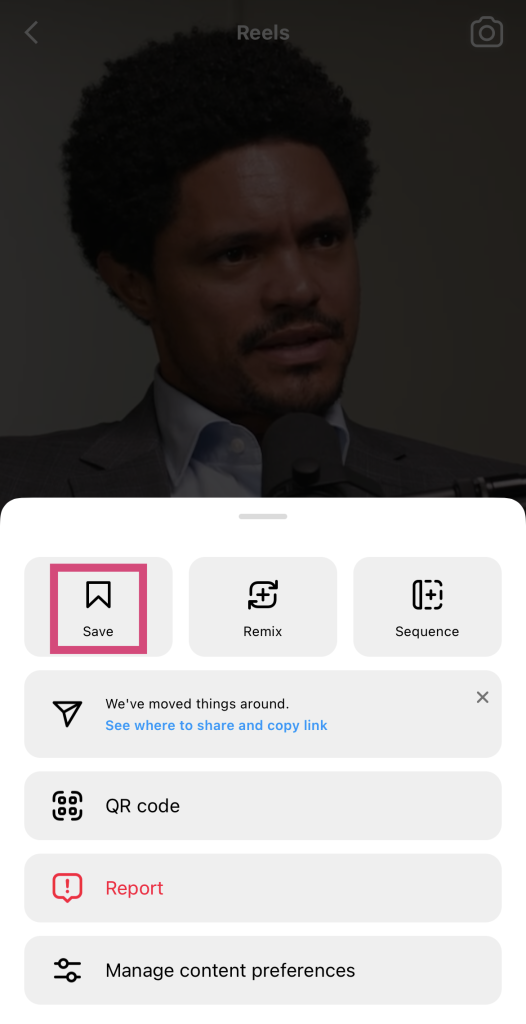
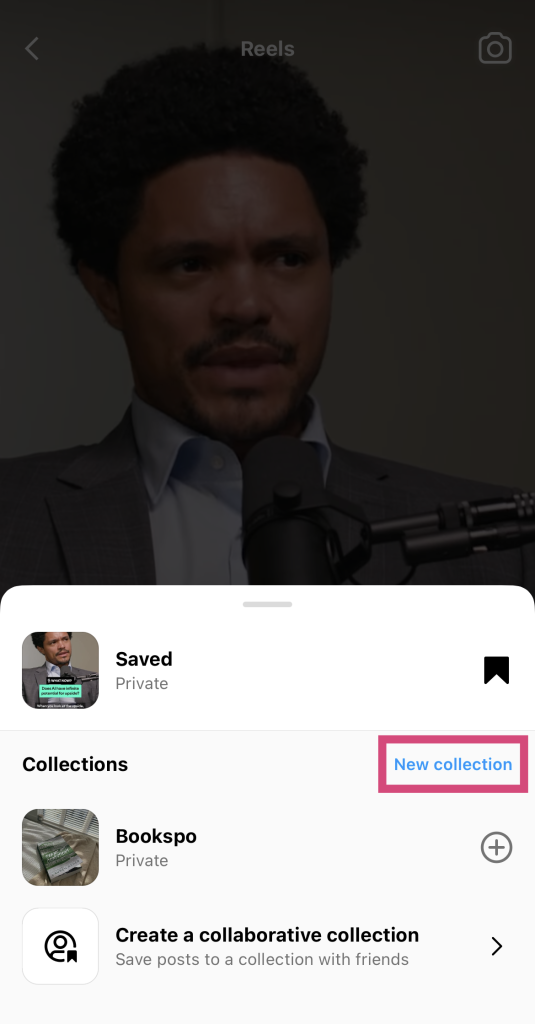
4. Si vous souhaitez enregistrer le fichier dans une collection existante, cliquez dessus. Sinon, sélectionnez « Nouvelle collection ».
5. Sur la page suivante, donnez un nom à votre nouvelle collection. Nous vous recommandons de choisir un nom simple et en rapport avec vos centres d’intérêt, comme « fitness » ou « technologie ».
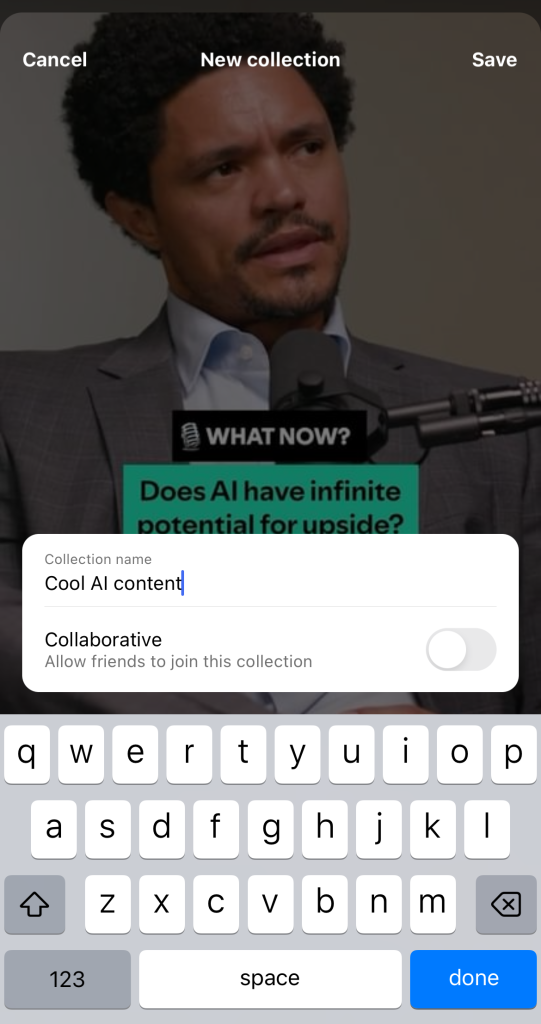
6. Pour finir, cliquez sur « Terminé ».
Maintenant, vous pouvez aller dans vos messages sauvegardés et trouver ce Reel dans votre collection personnalisée.
2. Envoyez-le à un ami (ou même à vous-même !) par DM
Une autre façon de garder à portée de main un Reel qui vous plaît consiste à l'envoyer à un ami par message privé (MP). Lorsque vous envoyez un Instagram à un ami, cette vidéo est enregistrée dans votre fil de conversation. Ainsi, si vous souhaitez la revoir, il vous suffit de retourner dans vos messages privés pour la retrouver.
C'est également un excellent moyen d'engager la conversation avec eux autour de contenus sympas en lien avec leurs centres d'intérêt. Vous pouvez facilement accéder aux Reels, que vous aurez peut-être envie de revoir tout en échangeant avec vos amis.
Voici comment envoyer un Reel à quelqu'un sur Instagram:
1. Recherchez le Reel que vous souhaitez envoyer à quelqu'un.
2. Cliquez sur l'icône de l'avion en papier à droite de l'écran.
3. Choisissez l'utilisateur à qui envoyer le Reel en vous basant sur les meilleures suggestions de Instagram. Vous pouvez également utiliser la barre de recherche pour trouver le bon utilisateur.
4. Pour finir, cliquez sur « Envoyer ».
3. Partagez-le sur votre site Instagram Stories pour qu'il se retrouve dans vos archives.
Vous pouvez également partager un Reel dans vos Instagram . C'est un excellent moyen de proposer à vos abonnés du contenu divertissant et percutant sans avoir à publier vous-même quoi que ce soit de nouveau. De plus, les Reels que vous partagez seront directement ajoutés à vos Instagram une fois que la Story aura expiré. Vous pourrez ainsi y accéder facilement en vous rendant dans vos archives si vous souhaitez les revoir.
Voici comment partager une bobine dans vos Stories en quelques étapes simples :
1. Ouvrez la bobine que vous souhaitez partager sur votre Story.
2. Cliquez sur l'icône de l'avion en papier.
3. Au lieu de le partager avec quelqu'un, cliquez sur « Ajouter à ma story » en bas de la page.
4. Personnalisez la présentation de votre Reel dans votre Story. Ajoutez des autocollants, des légendes, de la musique et bien plus encore.
5. Cliquez sur Votre histoire pour la partager publiquement ou sur Amis proches pour la partager uniquement avec votre cercle d'amis.
Une fois que cette « Story » aura expiré, vous pourrez voir la publication « Reel » partagée dans vos archives. Vous pouvez y accéder depuis vos paramètres.
4. Télécharger la bobine à l'aide d'une application tierce
Vous n'êtes pas fan des fonctions intégrées sur Instagram qui peuvent vous aider à accéder aux Reels dont vous profitiez auparavant ? Essayez d'utiliser un téléchargeur de Reels tiers réputé !
Il existe une multitude d'outils de téléchargement disponibles sur Internet. Leur principe de fonctionnement est le même dans tous les cas. Il vous suffit de saisir l'URL d'un Reel public, et l'outil se charge de le récupérer pour vous. Il génère ensuite un lien de téléchargement pour la vidéo. Vous pouvez alors télécharger le Reel directement sur votre appareil afin d'en conserver une copie hors ligne pour toujours.
Comment cacher les bobines de Liked Reels sur Instagram
Il y a de nombreuses raisons pour lesquelles vous voudriez apprendre à cacher les Reels aimés sur Instagram. Vous ne voulez peut-être pas que les autres sachent que vous aimez les contenus sensibles ou politiques. Ou peut-être êtes-vous tout simplement une personne privée qui n'aime pas que des étrangers se mêlent de ses affaires, ce qui est tout à fait légitime !
Malheureusement, il n'y a aucun moyen de cacher que vous avez « aimé » certaines publications. Lorsque vous « aimez » un Reel, son auteur reçoit une notification. De plus, toute personne pouvant voir cette vidéo peut vérifier qui l'a « aimée ».
Ils verront un message sous ce Reel indiquant quelque chose comme « Apprécié par [nom d'utilisateur] et x autres personnes ». S'ils vous suivent, votre pseudo pourrait apparaître à cet endroit. Ils peuvent également consulter la liste des personnes ayant aimé la publication, dans laquelle votre nom figurera.
Impossible de voir les likes sur les bobines Instagram : Comment voir le nombre de J'aime sur les vidéos
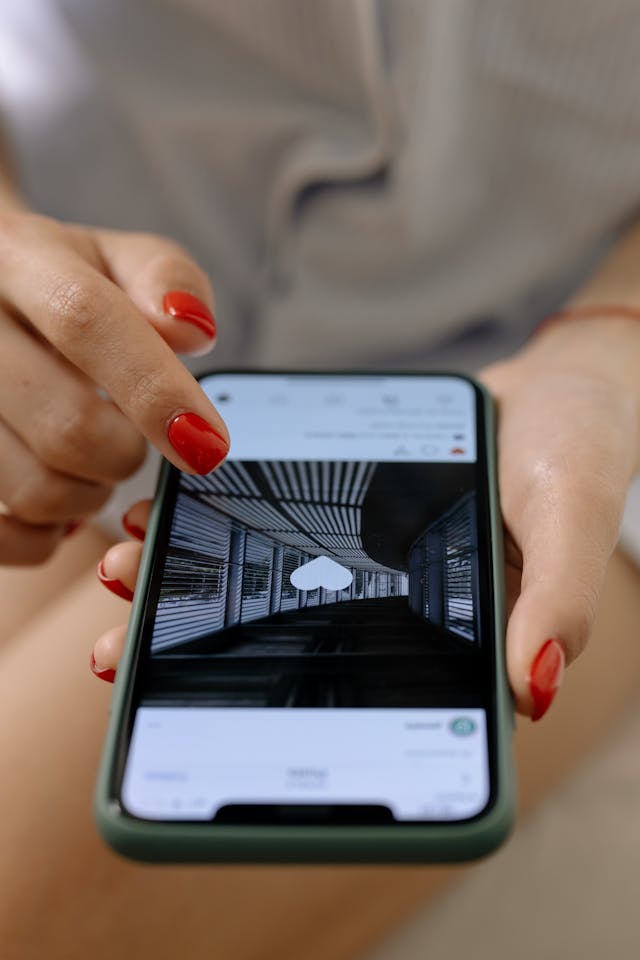
Vous vous demandez pourquoi vous ne pouvez pas voir les likes sur les bobines Instagram ? C'est probablement parce que le propriétaire de la bobine a choisi de masquer son compteur de likes. Cela signifie que personne d'autre que lui ne peut voir le nombre total de likes sur son post.
De nombreuses personnes choisissent de masquer le nombre de "like" de leur Reel afin de réduire la pression qu'elles subissent pour obtenir des tonnes de "like". Cela permet également aux spectateurs de se concentrer sur le contenu plutôt que sur la popularité de la bobine.
Bien sûr, vous pouvez simplement cliquer sur « J'aime » sous l'icône en forme de cœur d'un Reel. Cela ne vous indique pas le nombre total de « J'aime », mais vous permet de voir la liste des personnes qui ont aimé la publication. C'est un excellent moyen de savoir si des personnes que vous connaissez ont aimé ce Reel.
Si vous tenez absolument à connaître le nombre total de « J'aime » d'un Reel, pensez à utiliser un compteur de « J'aime » tiers, comme Phlanx. Il vous suffit de fournir à l'outil l'URL de n'importe quelle publication ou de n'importe quel Reel public de votre choix. L'outil calculera alors le nombre total de « J'aime » pour vous, même si l'auteur a choisi de masquer ce nombre dans l'application.
Obtenez plus de Likes sur vos bobines en développant votre page avec Path Social
Une fois que vous savez comment vous y retrouver dans vos paramètres, retrouver les Reels que vous avez précédemment aimés sur Instagram un jeu d'enfant. Ce qui peut s'avérer plus difficile, c'est de générer des « J'aime » pour vos vidéos. Vous avez du mal à susciter de l'engagement sur vos Reels ? Élargissez votre audience grâce à un service Instagram tel que Path Social.
Nous utilisons l'IA pour mettre votre contenu en avant auprès des personnes qui y seront le plus sensibles. Cela permet d'augmenter le nombre de vues et l'engagement envers votre contenu. Et le fait de gagner de nombreux abonnés authentiques n'est que la cerise sur le gâteau ! Alors, qu'en dites-vous ? Élargissez votre audience Path Social pour booster les « J'aime » sur vos publications et gagner plus d'abonnés avec Path Social !





Vous recherchez de vrais Instagram , sans artifices ?
Laissez nos stratégies de croissance organique ciblées par l'IA travailler pour vous.
Obtenir des followers Instagram maintenant




