


Volver a ver Liked Reels en Instagram: Revisitando grandes contenidos

Abrir la pestaña «Reels» de Instagram es como adentrarse en tu pequeño mundo de contenido de vídeo breve, entretenido y cautivador. Dado que cuenta con una selección de vídeos geniales, pasar horas y horas desplazándote por Reels parece una experiencia universal. También es habitual darle a «Me gusta» a los Reels que más te gustan. Pero, una vez hecho esto, ¿hay alguna forma de ver los Reels a los que has dado «Me gusta» en Instagram?
En realidad es bastante fácil encontrar los Reels que te han gustado previamente en la aplicación. Pero mucha gente no sabe cómo hacerlo.
En esta guía, te enseñaremos cómo ver los Reels a los que has dado a «Me gusta» en Instagram para que puedas volver a verlos. También te daremos algunos consejos adicionales para acceder fácilmente a Reels interesantes que hayas visto sin necesidad de darles a «Me gusta». ¡Sigue leyendo para descubrir todo esto y mucho más!

Cómo ver los carretes de Liked en Instagram: Un proceso paso a paso
Puede que quieras volver a visitar un Reel que te gustó en el pasado por muchas razones. Puede tratarse de un post informativo con datos que quieras volver a consultar. O puede que simplemente quieras compartir un meme de vídeo divertido con tu mejor amigo.
Sea como sea, volver a ver los vídeos que te gustaron en el pasado es bastante fácil. A continuación te explicamos, paso a paso, cómo encontrar los «Reels» a los que has dado a «Me gusta» en Instagram:
1. Abre la aplicación Instagram y pulsa el icono de tu perfil en la parte inferior derecha de la pantalla.
2. Haz clic en elicono del menú hamburguesa (esas tres líneas horizontales) en la parte superior derecha de tu perfil.
3. En la sección «Cómo utilizas Instagram », pulsa en «Tu actividad».

4. Selecciona «Me gusta». Esto te llevará a una página en la que podrás ver todas las publicaciones a las que has dado «Me gusta». Los carruseles tienen el icono de capas en la esquina superior derecha de la publicación, mientras que los Reels tienen el icono de vídeo.
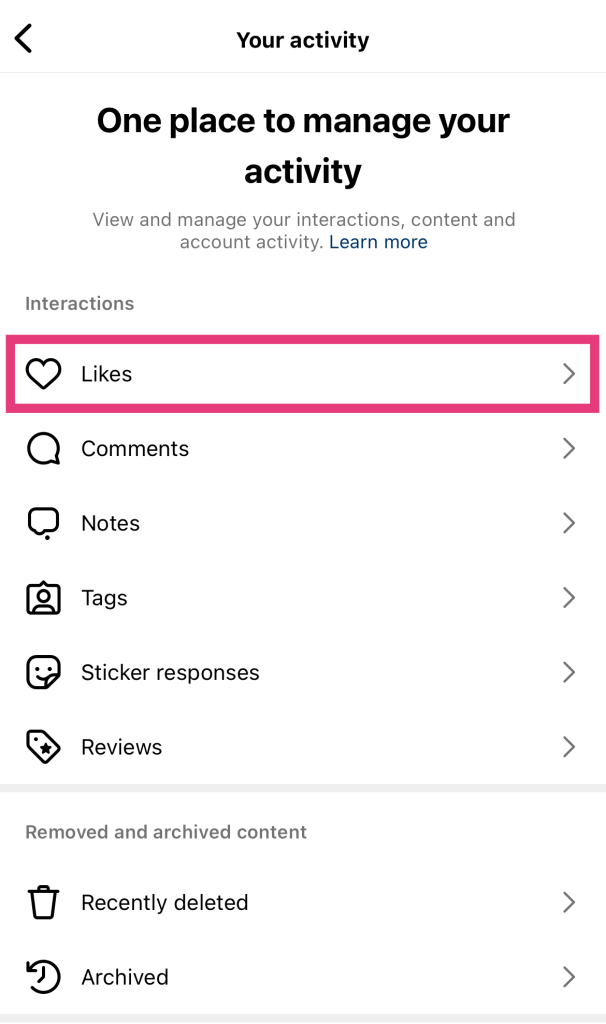
5. Para ver solo los Reels, haz clic en el menú desplegable que dice «Todos los tipos de contenido».
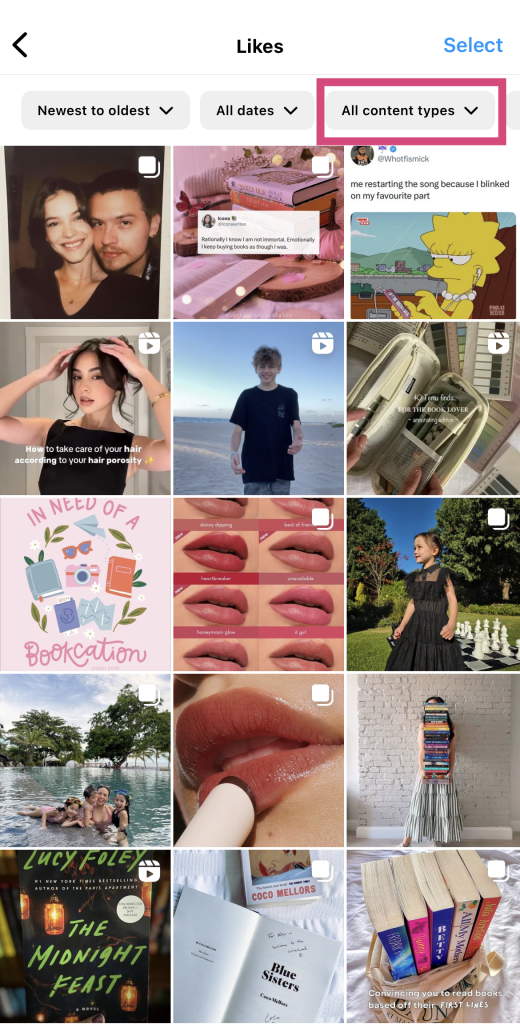
6. Deseleccione Puestos para que sólo se seleccionen Carretes.
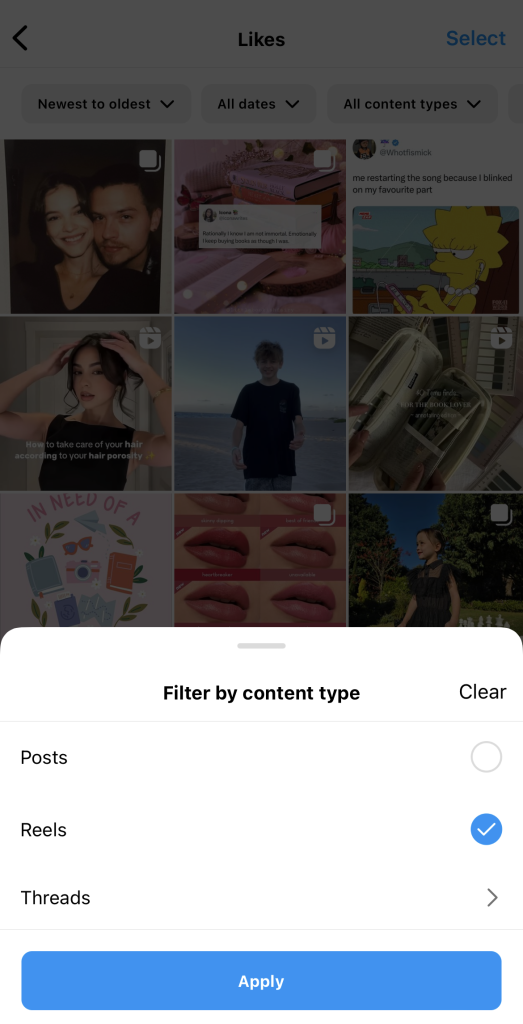
7. 7. Haga clic en Aplicar. Esto le mostrará todos los rodillos en los que ha pulsado "me gusta".
Siéntete libre de filtrar los Reels que te han gustado de más reciente a más antiguo y viceversa. También puedes seleccionar un intervalo de fechas para mostrar los contenidos de vídeo que te han gustado dentro de un marco temporal específico.
4 consejos para volver a ver los vídeos de IG más tarde
Imagínate esto: estás navegando por Instagram y ves un Reel increíble, que te hace reflexionar y te divierte. Lo ves un par de veces, te ríes a carcajadas y luego sigues desplazándote para ver otros vídeos.
Pero, unos días después, te acuerdas de ese Reel que te gustó y quieres volver a encontrarlo. Sigues los pasos anteriores, solo para darte cuenta de que nunca pulsaste el icono del corazón en ese Reel. ¿Qué haces?
No hay nada más frustrante que no poder encontrar un Reel que te gustaría volver a ver en Instagram. No todo el mundo tiene la costumbre de darle a «Me gusta» a todas las publicaciones que le parecen relevantes. Entonces, ¿cómo se supone que vas a encontrar esos Reels antiguos que te gustaron y volver a verlos cuando te apetezca?
He aquí cuatro consejos que pueden facilitar la vuelta a estos carretes sin que tengan que gustarte.
1. Guardar el carrete y añadirlo a una colección personalizada
Acostúmbrate a guardar o "marcar" los Reels que más te gusten. Incluso puedes agrupar ciertos Reels en colecciones personalizadas. Esto te permitirá volver a ver todos los Reels guardados que pertenezcan a un tema o categoría específicos que tú elijas. A continuación te explicamos cómo hacerlo en unos sencillos pasos:
1. Abra la aplicaciónInstagram y busque el Carrete que desea guardar.
2. Haz clic en los tres puntos del lateral de la pantalla. Debería estar debajo del botón Compartir .
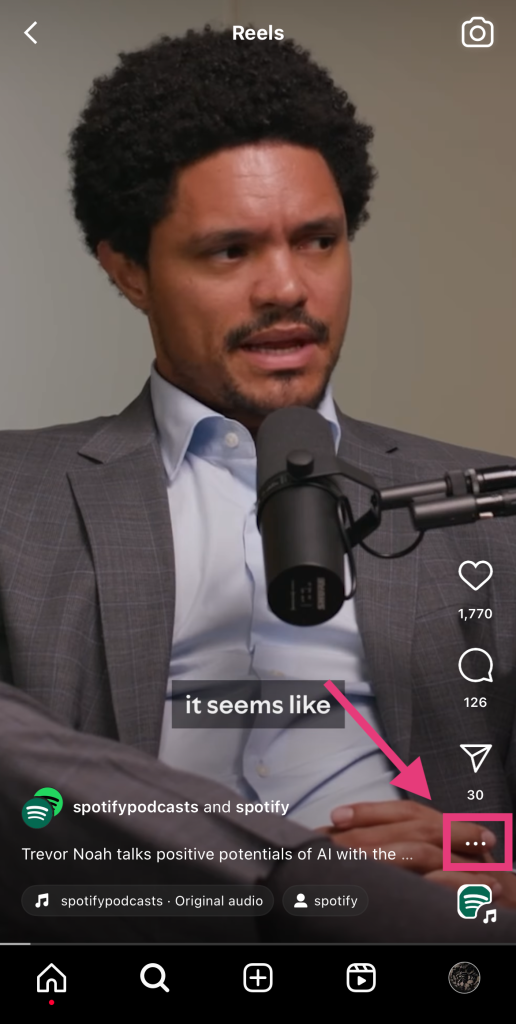
3. Seleccione Guardar.
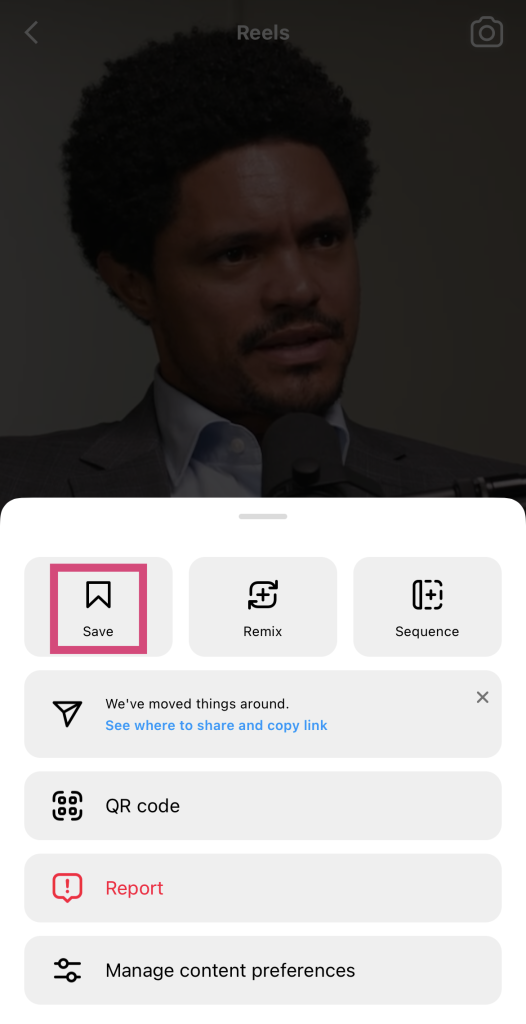
4. Si ya tienes una colección en la que quieras guardarlo, haz clic en ella. Si no es así, selecciona «Nueva colección».
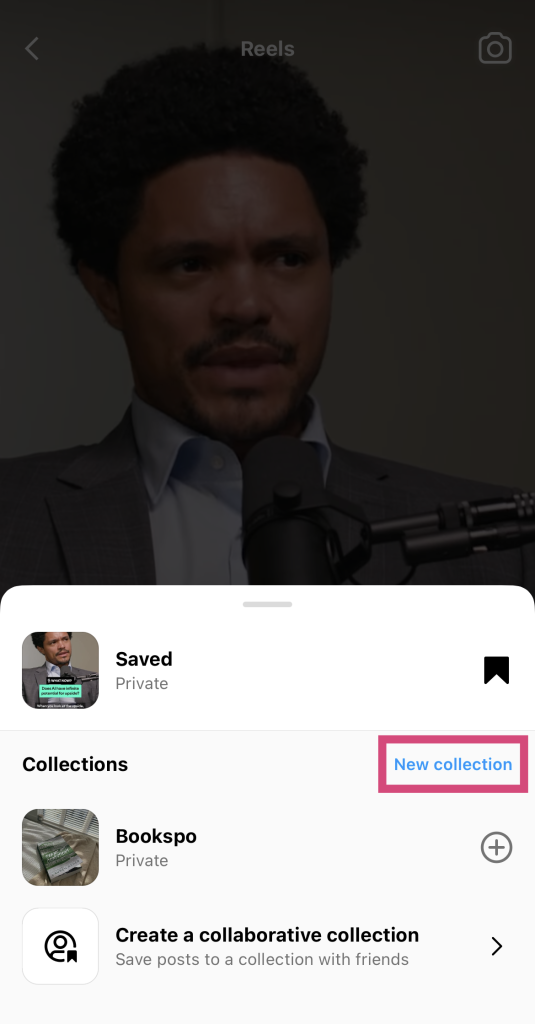
5. En la página siguiente, asigna un nombre a tu nueva colección. Te recomendamos que elijas nombres sencillos y relacionados con tus intereses, como «fitness» o «tecnología».
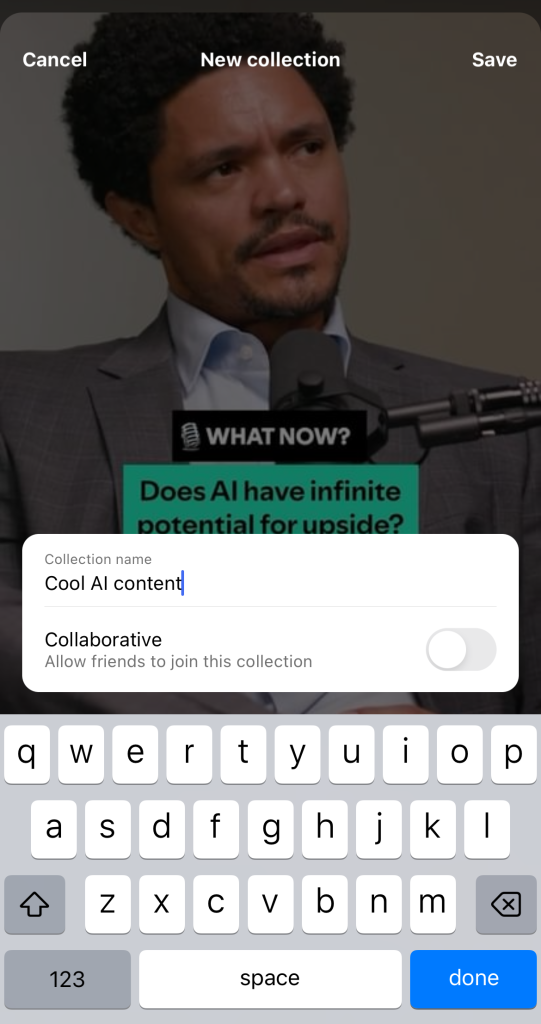
6. Por último, haz clic en «Hecho».
Ahora, puedes ir a tus entradas guardadas y encontrar este Carrete en tu colección personalizada.
2. Envíaselo a un amigo (¡o incluso a ti mismo!) en un DM
Otra forma de tener a mano un Reel que te guste es enviárselo a un amigo mediante un mensaje directo (DM). Cuando envías un Reel de Instagram a un amigo, ese vídeo se guarda en el hilo de conversación. Así, si quieres volver a verlo, puedes volver a tus mensajes directos y encontrarlo allí.
Además, es una forma estupenda de entablar una conversación con ellos sobre contenido interesante relacionado con los intereses de tus amigos. Tienes fácil acceso a los Reels, que quizá te apetezca volver a ver mientras interactúas con tus amigos.
Así es como puede enviar un Carrete a alguien en Instagram:
1. Busca el Carrete que quieres enviar a alguien.
2. Haz clic en el icono del avión de papel situado a la derecha de la pantalla.
3. Elige a qué usuario enviar el Carrete basándote en las sugerencias de Instagram. También puedes utilizar la barra de búsqueda para encontrar al usuario adecuado.
4. Por último, haz clic en «Enviar».
3. Compártelo en Instagram Stories para que acabe en tu archivo
También puedes compartir un Reel en tus historias de Instagram . Es una forma estupenda de mostrar contenido entretenido e impactante a tus seguidores sin tener que publicar nada nuevo por tu cuenta. Al mismo tiempo, los Reels que compartas pasarán directamente a tu archivo de Instagram cuando la historia caduque. De este modo, podrás acceder a ellos fácilmente desde el archivo si necesitas volver a verlos.
A continuación te explicamos cómo compartir un Carrete en tus Historias en unos sencillos pasos:
1. Abre el Carrete que quieras compartir en tu Historia.
2. Haz clic en el icono del avión de papel.
3. En lugar de compartirlo con alguien, haz clic en «Añadir a la historia», en la parte inferior de la página.
4. Personaliza cómo quieres mostrar el Reel en tu Story. Añade pegatinas, leyendas, música y mucho más.
5. Haz clic en Tu historia para compartirla públicamente o Amigos cercanos para compartirla sólo con tu círculo íntimo.
Una vez que esa «Story» caduque, podrás ver la publicación compartida en «Reel» en tu archivo. Puedes acceder a ella desde tus ajustes.
4. Descargar el carrete con una aplicación de terceros
¿No te gusta ninguna de las funciones integradas en Instagram que pueden ayudarte a acceder a los Reels que disfrutabas antes? Prueba a utilizar un programa de descarga de Reels de terceros de buena reputación.
Hay un montón de programas de descarga disponibles en Internet. Su /m es el mismo en todos los casos. Lo único que tienes que hacer es introducir la URL de un Reel público y el programa de descarga lo recupera por ti. A continuación, genera un enlace de descarga para el vídeo. Así, puedes descargar el Reel directamente a tu dispositivo para tener una copia sin conexión para siempre.
Cómo ocultar los carretes deseados en Instagram
Hay muchas razones por las que podrías querer aprender cómo ocultar los Reels que te gustan en Instagram. Quizá no quieras que los demás sepan que te gustan contenidos delicados o políticos. O puede que simplemente seas una persona reservada a la que no le gusta que los extraños se metan en tus asuntos, ¡lo cual es totalmente válido!
Por desgracia, no hay forma de ocultar que te han gustado determinadas publicaciones. Cuando le das a «Me gusta» a un Reel, la persona que lo ha publicado recibe una notificación. Además, cualquiera que pueda ver ese vídeo puede comprobar quién le ha dado a «Me gusta».
Verán un mensaje debajo de ese Reel que dice algo así como «A [nombre de usuario] y a otras x personas les ha gustado». Si te siguen, tu nombre de usuario podría aparecer aquí. También pueden consultar directamente la lista de personas a las que les ha gustado, donde aparecerá tu nombre.
No se Puede Ver Likes en Instagram Reels: Cómo ver el recuento de me gusta en los vídeos
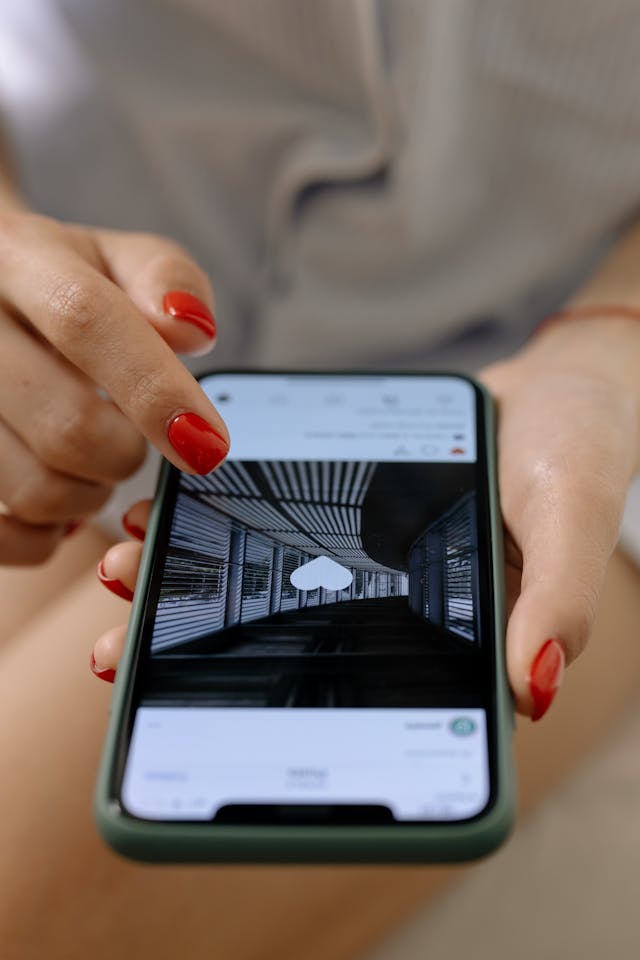
¿Te preguntas por qué no puedes ver los Me gusta en los Reels de Instagram ? Probablemente porque el propietario del Reel ha decidido ocultar su contador de Me gusta. Eso significa que nadie más que él puede ver el número total de "Me gusta" de su publicación.
Mucha gente opta por ocultar el número de "Me gusta" de sus Reels para reducir la presión sobre sí mismos de conseguir toneladas de "Me gusta". Esto también ayuda a los espectadores a centrarse en el contenido y no en la popularidad del Reel.
Por supuesto, basta con hacer clic en «Me gusta», debajo del icono del corazón de un Reel. Aunque esto no te indica el recuento total de «Me gusta», sí te muestra la lista de personas a las que les ha gustado la publicación. Es una forma estupenda de ver si a gente que conoces le ha gustado el Reel.
Si de verdad necesitas ver el recuento total de «Me gusta» de un Reel, plantéate utilizar un contador de «Me gusta» de terceros, como Phlanx. Solo tienes que introducir en la herramienta la URL de cualquier publicación o Reel público que desees. A continuación, la herramienta te mostrará el recuento total de «Me gusta», incluso si el propietario ha decidido ocultar dicho recuento en la aplicación.
Consigue más "Me gusta" en tus carretes haciendo crecer tu página con Path Social
Cuando sabes cómo moverte por los ajustes, encontrar los Reels que te han gustado anteriormente en Instagram es pan comido. Lo que quizá te resulte más complicado es conseguir «me gusta» para tus vídeos. ¿Te cuesta generar interacción en tus Reels? Amplía tu audiencia con un servicio de crecimiento de Instagram como Path Social.
Utilizamos la inteligencia artificial para promocionar tu contenido entre las personas a las que más les va a gustar. Esto aumenta el número de visualizaciones y la interacción con tu contenido. ¡Conseguir un montón de seguidores auténticos es solo la guinda del pastel! ¿Qué te parece? ¡Amplía tu alcance para aumentar los «me gusta» en tus publicaciones y conseguir más seguidores con Path Social hoy mismo!





¿Buscas Instagram reales y auténticos en Instagram ?
Deje que nuestras estrategias de crecimiento orgánico dirigidas por IA trabajen para usted.
Consigue seguidores de Instagram ahora




