


Partage sur Instagram: Diffuser du contenu engageant auprès de vos amis

Lorsque vous cherchez à susciter l'engagement de vos abonnés sur Instagram, vous pensez peut-être d'abord à générer des « j'aime » et des commentaires. Mais il existe un autre moyen pour les utilisateurs d'interagir avec votre contenu, qui permet non seulement de stimuler l'engagement, mais aussi d'élargir votre audience. Eh oui, nous parlons ici du partage sur Instagram.
Mais qu'est-ce que cela signifie de partager quelque chose sur Instagram, et comment s'y prendre ? C'est ce que nous allons aborder aujourd'hui dans ce guide. Qu'il s'agisse d'une publication sympa sur le fil d'actualité ou d'une Story dans laquelle vous êtes tagué, nous sommes là pour vous expliquer comment partager du contenu. Continuez à faire défiler la page pour découvrir comment procéder (et pour trouver les réponses aux questions courantes sur le partage Instagram !).

Qu'est-ce que le bouton "Partager" sur Instagram?
Tout d'abord, qu'est-ce que le bouton de partage sur Instagram? C'est assez explicite : ce bouton en forme de flèche est celui sur lequel vous appuyez si vous voulez partager un article sur Instagram . C'est votre porte d'entrée pour vous connecter avec d'autres personnes sur la plateforme et partager un contenu génial avec elles.
Chaque réseau social propose sa propre façon de « partager » la publication d’autrui. Sur Twitter, on parle plutôt de « citer » ou de « retweeter » le tweet de quelqu’un. Sur Facebook, on retrouve le bouton « Partager », bien connu, qui affiche littéralement le mot « Partager ». En revanche, sur Instagram, il suffit d’appuyer sur l’emblématique bouton en forme d’avion en papier pour faire découvrir du contenu sympa à ses amis et abonnés.
En cliquant sur ce bouton en forme de flèche, vous pouvez partager Instagram avec d'autres personnes de différentes manières. Vous pouvez partager la publication de quelqu'un dans votre Story ou l'envoyer par message privé à un ami. Il existe également des options permettant de l'envoyer directement vers d'autres réseaux sociaux, tels que WhatsApp, Messenger, Twitter, etc. Vous pouvez aussi simplement copier le lien vers cette publication et le coller dans l'application de messagerie de votre choix.
Pourquoi les gens aiment-ils partager sur Instagram?
Selon la Harvard Business Review, le partage sur les réseaux sociaux repose sur les mêmes motivations que le « bouche-à-oreille ». Les gens aiment partager leurs expériences parce qu’elles sont agréables, drôles et instructives. Cela leur permet de se sentir impliqués personnellement. Cela leur donne le sentiment d’avoir une certaine maîtrise sur ce qu’ils partagent.
Et c'est exactement pour cette raison que les gens partagent Instagram du contenu sur Instagram . La plupart des utilisateurs partagent des contenus qu'ils trouvent intéressants et utiles, afin de les faire découvrir à ceux qui pourraient également les apprécier. Les marques et les influenceurs, en revanche, peuvent parfois partager du contenu pour affirmer leur expertise dans leur domaine.
Voici d'autres raisons pour lesquelles les utilisateurs aiment partager du contenu sur les médias sociaux :
- Les gens peuvent voir des contenus qu'ils trouvent réalistes et les partager avec leurs amis pour rire un bon coup.
- Les marques partagent du contenu généré par les utilisateurs pour mettre en avant des articles dans lesquels les clients présentent leurs produits. Cela sert de preuve sociale qu'il s'agit d'une entreprise légitime proposant des produits de haute qualité.
- Les fans fidèles peuvent partager du contenu provenant d' influenceurs et de célébrités qu'ils aiment. C'est un excellent moyen de soutenir leurs projets et de les faire connaître.
- Les créateurs de contenu peuvent partager des publications de marques avec lesquelles ils ont collaboré par le passé. Il s'agit là d'un autre signe de soutien, cette fois-ci entre partenaires et collaborateurs.

Comment partager un article sur Instagram: Un tutoriel facile
Partager des publications avec vos abonnés vous permet de leur transmettre des informations et du contenu intéressants sans avoir à en créer vous-même. En général, les utilisateurs partagent ces publications sympas avec leurs abonnés via Instagram . Voici comment partager une publication sur Instagram, étape par étape :
1. Trouvez l'article du flux Instagram que vous souhaitez partager.
2. Cliquez sur la flèche en forme de plan de papier située sous le message.

3. Dans le menu contextuel, vous pouvez choisir d'envoyer cette publication à quelqu'un par message privé ou via d'autres applications. Mais pour l'ajouter à vos Instagram afin qu'elle soit visible par tous, cliquez sur « Ajouter à la Story ».
4. L'écran de l'éditeur d'articles s'ouvre. Vous pouvez repositionner et redimensionner le message partagé en le pinçant et en le faisant glisser n'importe où sur l'écran.
5. Personnalisez votre Story comme vous le souhaitez. Ajoutez du texte, de la musique, des autocollants et bien plus encore.
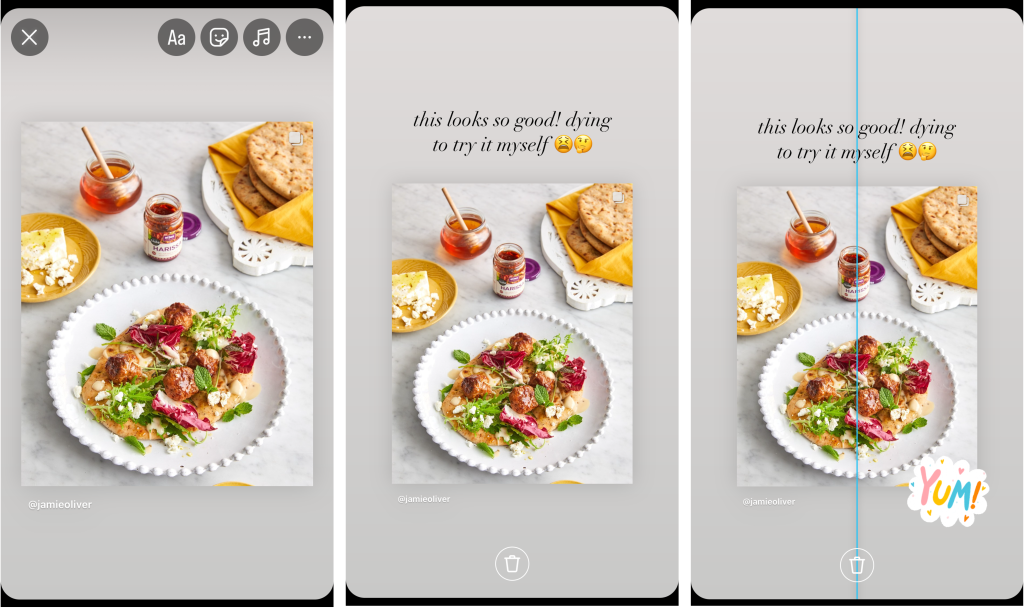
6. Lorsque vous êtes satisfait du rendu de votre publication dans les Stories, cliquez sur le bouton en forme de flèche situé dans le coin inférieur droit.
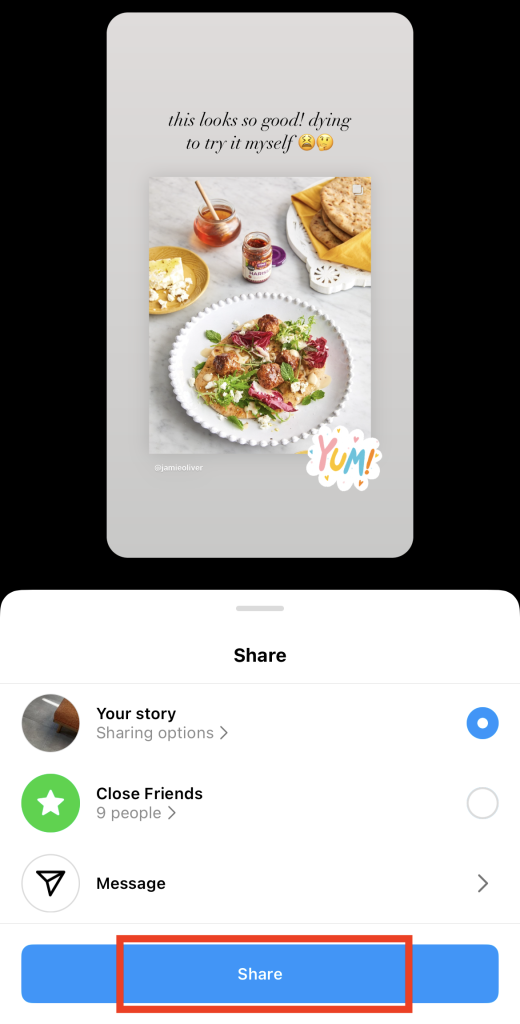
7. Choisissez l'audience de votre Story post. Vous pouvez choisir entre tous les abonnés et seulement vos amis proches.
8. Pour finir, cliquez sur « Partager ».
Comment partager un article sur Instagram avec mon fil d'actualité : Est-ce possible ?
Après avoir trouvé la publication de quelqu’un intéressante, vous vous dites peut-être : « Je me demande comment partager une publication Instagram mon fil d’actualité. » Eh bien, désolé de vous décevoir, mais ce n’est actuellement pas possible sur Instagram. Si vous souhaitez partager la publication de quelqu’un pour que vos abonnés puissent la voir, vous ne pouvez le faire que dans votre Story.
Instagram autorise Instagram les utilisateurs à partager des publications sur leur fil d'actualité afin de protéger les droits de propriété intellectuelle de l'auteur original. Si vous partagiez la publication de quelqu'un d'autre sur votre fil d'actualité, les internautes pourraient croire à tort qu'il s'agit d'une de vos propres créations. L'auteur original est toujours mentionné comme créateur du contenu partagé uniquement dans les Stories.
Comment pouvez-vous republier une publication sur Instagram en dehors de l'application ?
Encore une fois, Instagram n'a pas de fonction intégrée qui permette aux gens de réafficher le contenu de quelqu'un sur leur propre fil d'actualité. Mais c'est un secret de polichinelle que vous pouvez réafficher le contenu de quelqu'un sur son fil d'actualité en utilisant des applications de partage tierces.
Ces applications tierces peuvent télécharger pour vous les publications d'autrui. Ensuite, elles ajoutent généralement un symbole ou un filigrane à un endroit ou à un autre pour indiquer que vous republiez le contenu d'une autre personne.
Alors, comment réafficher un message Instagram sur votre fil d'actualité sans passer par l'application ? Voici comment se déroule généralement la procédure :
1. Choisissez une application ou un site web de partage en lequel vous avez confiance. Recherchez ceux qui ont de nombreuses critiques dignes de confiance.
2. Trouvez l'article Instagram que vous souhaitez réafficher dans votre fil d'actualité.
3. Cliquez sur le bouton "avion en papier".
4. Appuyez sur le lien Copier pour copier l'URL du message.
5. Retournez à l'application de partage et collez-y l'URL. L'application récupère le message original et génère une version repostable de celui-ci avec un symbole de repost.
6. Téléchargez la nouvelle photo pour l'enregistrer sur votre appareil.
7. Ouvrez Instagram créez une nouvelle publication. Ensuite, importez la photo que vous avez téléchargée depuis l'application de partage.
8. Personnalisez la publication pour lui donner une touche personnelle. Ajoutez une légende racontant comment vous êtes tombé(e) sur cette publication. Ensuite, citez correctement l'auteur original en le taguant dans la publication.
9. Pour finir, cliquez sur « Partager » pour publier le message sur votre fil d'actualité.
Cette méthode constitue une excellente solution si vous souhaitez vraiment partager la publication de quelqu’un sur votre fil d’actualité. Toutefois, il est toujours préférable de demander l’autorisation à l’auteur original avant de republier son contenu. Veillez ensuite à le citer correctement dans la légende de votre publication.
Comment partager une vidéo sur Instagram
Il existe de nombreux formats de posts vidéo intéressants sur Instagram que vous pouvez partager sur votre compte. Il s'agit notamment de Instagram Reels drôles ou pertinents, ainsi que de vidéos sur les Stories de vos amis lorsqu'ils vous mentionnent.
Voici comment partager une vidéo sur Instagram, qu'il s'agisse d'un Reel ou d'une Story.
Comment partager une bobine sur Instagram Stories
Il n'est pas rare de trouver une bobine que l'on souhaite partager avec les personnes qui nous suivent. Il peut s'agir d'une bobine mettant en scène votre chanteur préféré ou d'un sketch amusant auquel vous et vos amis pouvez vous identifier. Le partage de ces petites vidéos est un excellent moyen de susciter l'intérêt des autres et de soutenir d'autres créateurs en diffusant leur contenu.
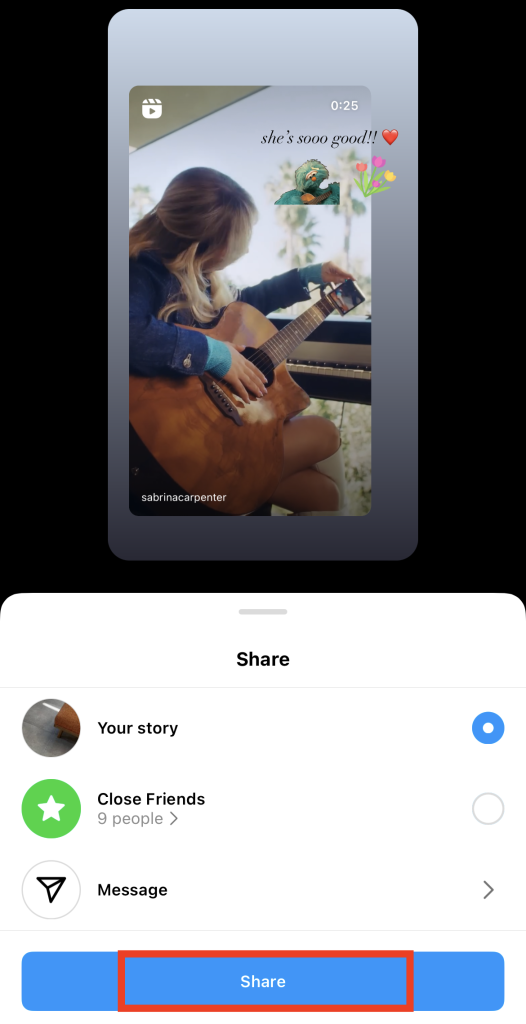
Êtes-vous prêt à partager des vidéos amusantes avec les personnes qui vous suivent ? Voici comment partager un Reel sur Instagram Stories :
1. Trouvez la bobine Instagram que vous voulez partager sur votre histoire.
2. Cliquez sur le bouton de partage en forme de plan de papier sur le côté droit de l'écran. Il doit se trouver juste en dessous de l'icône de commentaire.
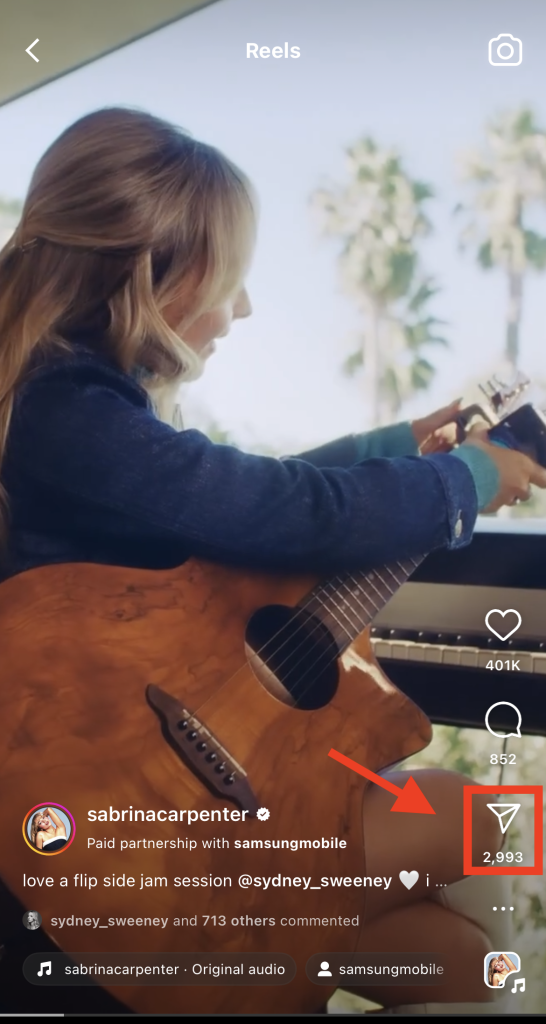
3. Appuyez sur Ajouter à l'histoire.
4. Repositionnez la bobine comme vous le souhaitez sur votre histoire.
5. Ajoutez d'autres éléments pour personnaliser votre message partagé. Vous pouvez inclure du texte et des autocollants ou même changer la couleur d'arrière-plan de votre Story.
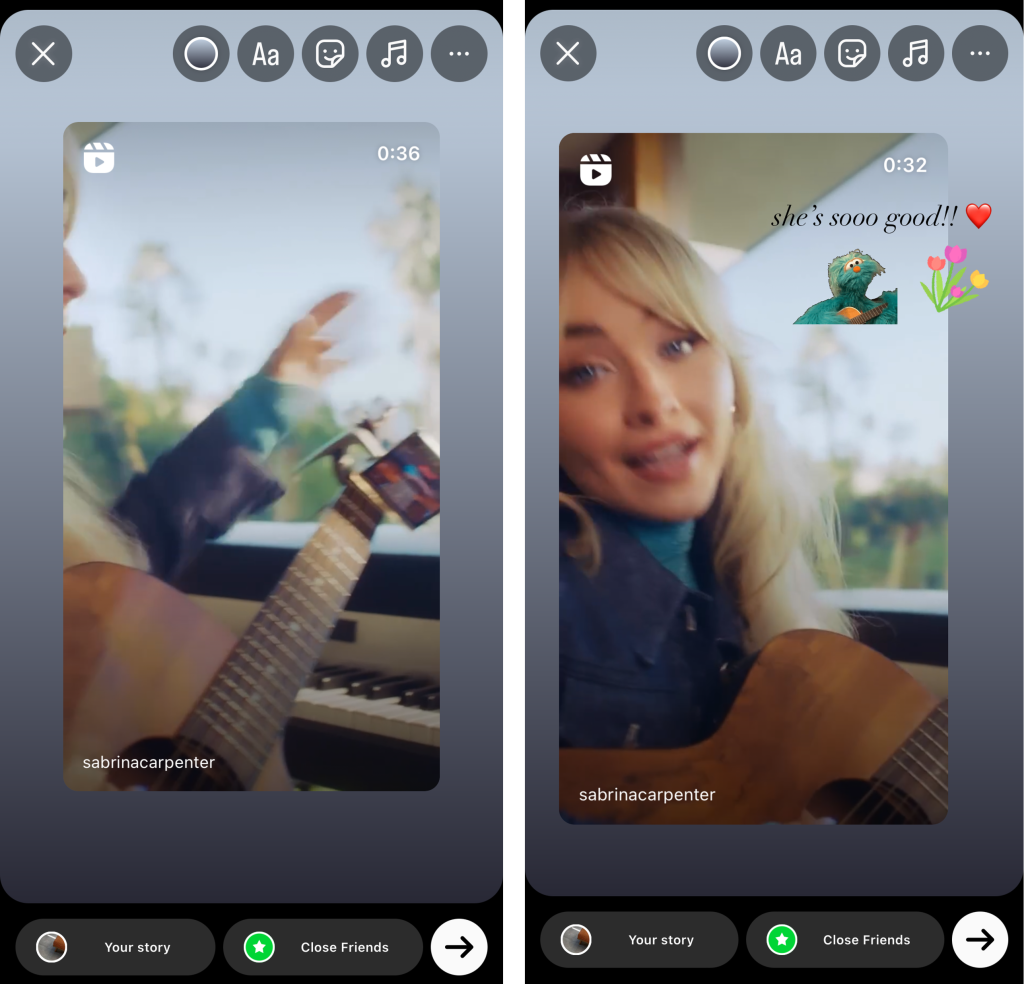
6. Cliquez ensuite sur la flèche située en bas à droite de l'écran.
7. Choisissez le public auquel vous souhaitez montrer votre Story. Cliquez ensuite sur « Partager ».
Comment partager la vidéo de l'histoire de quelqu'un Instagram avec la vôtre ?
Vous vous demandez comment partager les vidéos Instagram d'une autre personne dans vos propres Stories ? Malheureusement, cela n'est pas possible avec n'importe quelle publication de Story. Vous ne pouvez partager la vidéo d'une Story dans la vôtre que si l'auteur de la publication vous a tagué. Voici comment procéder, étape par étape :
1. Lorsqu'une personne vous mentionne dans sa vidéo « Story », Instagram une notification. Cliquez sur cette notification, ou ouvrez simplement votre conversation privée avec l'auteur de la publication.
2. Dans la discussion, vous devriez voir les Stories dans lesquelles cette personne vous a tagué. Cliquez sur « Ajouter ceci à votre Story » sous la vidéo que vous souhaitez partager dans votre Story.
3. L'écran de l'éditeur de l'histoire s'ouvre. Personnalisez votre histoire partagée comme vous le souhaitez.
4. Cliquez sur Partager lorsque vous êtes prêt à publier la mention d'histoire.
Créez vos propres partages sur Instagram : Comment inciter les gens à partager votre contenu
Les partages sont bien plus rares que les « j’aime » et les commentaires, que Instagram distribuent à tout va. Pour partager une publication, les utilisateurs doivent enregistrer ce contenu sur leur profil, généralement dans leurs Stories. De plus, il faut passer par une étape supplémentaire : personnaliser les publications partagées dans l’éditeur de Stories. Ainsi, lorsqu’une personne partage votre contenu sur son profil, vous savez que cela signifie qu’elle l’a vraiment apprécié.
Mais comment inciter votre public cible à diffuser vos articles à d'autres personnes ? Voici quelques conseils pour inciter les internautes à partager votre contenu sur leurs propres pages Instagram :
- Créez du contenu original, pertinent et novateur. Plus votre contenu est unique et captivant, plus les internautes seront enclins à le partager. Utilisez des visuels accrocheurs, au style ludique et intéressant. Vous pouvez également opter pour une approche plus pratique et créer du contenu facile à partager, comme des tutoriels, des démonstrations de produits, des infographies, etc.
- Créez des Reels auxquels les internautes peuvent s'identifier et qui suscitent des émotions. Si vous publiez des vidéos, pensez à créer du contenu drôle, divertissant, émouvant et auquel les gens peuvent s'identifier. Mettez à profit vos talents de conteur pour faire rire ou pleurer les internautes. Le fait de susciter des émotions fortes chez les spectateurs rend une publication d'autant plus susceptible d'être partagée.
- Collaborez avec d'autres marques et influenceurs. En publiant du contenu mettant en avant d'autres Instagram populaires, vous pouvez toucher leur communauté. Leurs abonnés pourraient repérer votre contenu et le partager sur leur fil d'actualité pour soutenir les marques qu'ils apprécient.
- Offrez un prix aux personnes qui partagent votre contenu. Une excellente façon de mettre en œuvre cette idée est d'organiser un jeu-concours avec un prix intéressant à gagner. Exigez des participants qu'ils partagent l'article sur leurs Stories pour faire passer le message.

Comment rendre les articles partageables sur Instagram
Même si votre Instagram est public, vous pouvez décider si les utilisateurs sont autorisés à partager vos publications. Voici comment rendre vos publications partageables sur Instagram:
1. Allez sur votre profil Instagram .
2. Cliquez sur les trois lignes horizontales dans le coin supérieur droit de la page.
3. Sélectionner Partage et remixes.
4. Activez le bouton correspondant aux publications que vous souhaitez rendre partageables. Vous pouvez le faire pour les publications du fil d'actualité, les Reels partagés dans les Stories d'autres utilisateurs et les Stories partagées par message.
Notez que si vous avez un Instagram privé, personne ne peut partager vos publications dans sa Story. En revanche, vous pouvez choisir d'autoriser ou non les utilisateurs à partager vos Stories lorsque vous les avez tagués dans ces publications.
Partagez les posts que vous pensez que vos followers aimeront pour stimuler l'engagement sur IG
Maintenant que vous savez comment partager des publications dans votre Instagram , sélectionnez celles qui sont les plus sympas et les plus pertinentes. Veillez à choisir des photos et des vidéos sympas qui intéresseront vos abonnés. Vous pourrez ainsi profiter d'un fort engagement sans avoir à publier de nouveau contenu.
Voulez-vous que plus de gens voient ce que vous partagez sur Instagram? Développez votre base de fans pour partager des contenus intéressants avec davantage d'utilisateurs. La fidèle équipe de Path Social peut vous aider à y parvenir.
Nous utilisons des algorithmes basés sur l'IA pour identifier votre public cible et lui proposer votre contenu. Les utilisateurs découvriront ainsi votre page et, espérons-le, s'abonneront à votre compte. À partir de là, ils verront l'ensemble de votre contenu dans leur fil d'actualité, qu'il s'agisse de publications originales ou partagées. Qui sait, vous pourriez même voir vos publications davantage partagées une fois que vous aurez gagné plus d'abonnés. Alors, développez votre Instagram dès aujourd'hui avec Path Social!





Vous cherchez le meilleur service de promotion Instagram ?
Bénéficiez d'un engagement réel, d'une audience ciblée et d'une croissance durable grâce à notre stratégie élaborée par des experts !
Essayez notre service de promotion Instagram




