


Partir de zéro : Comment créer un nouveau compte sur Instagram

Ce n'est pas un hasard si Instagram l'une des plateformes de réseaux sociaux les plus populaires au monde. Elle regorge de contenus visuellement époustouflants et abrite des communautés dynamiques et actives, axées sur un certain art de vivre. De plus, c'est là que les marques tendance entrent en contact avec leur public cible.
Vous envisagez de mordre la balle et de rejoindre Instagram pour explorer la plateforme vous-même ? Nous sommes là pour vous aider. Dans notre article de blog d'aujourd'hui, nous vous expliquons comment créer un nouveau compte sur Instagram.

Comment créer un nouveau compte sur Instagram
Se lancer sur un nouveau réseau social peut déjà sembler intimidant en soi. Créer un nouveau compte sur les réseaux sociaux peut paraître encore plus compliqué. Heureusement, créer un nouveau Instagram est incroyablement simple, que ce soit à des fins personnelles ou professionnelles.
Alors, allons droit au but, d'accord ? Voici comment créer un tout nouveau Instagram en partant de zéro :
1. Téléchargez Instagram depuis l'App Store ou le Google Play Store, selon votre appareil.
2. Une fois l'installation terminée, appuyez sur Instagram pour ouvrir l'application.
3. Recherchez le message " Vous n'avez pas de compte ?" sur la page de connexion. Appuyez sur le bouton S'inscrire à côté du message.
4. Indiquez votre adresse électronique ou votre numéro de téléphone. Assurez-vous de pouvoir accéder aux informations de contact que vous fournissez, car vous les utiliserez ultérieurement pour vérifier votre compte.
5. Attendez qu'Instagram vous Instagram un code de confirmation. Saisissez-le ensuite dans le champ prévu à cet effet pour confirmer votre adresse e-mail ou votre numéro de téléphone. Appuyez ensuite sur « Suivant ».
6. Saisissez votre nom et créez un mot de passe pour votre compte. Veillez à ce que ce dernier soit fort afin de sécuriser votre profil !
7. Indiquez votre date de naissance. Notez que seuls les utilisateurs âgés d'au moins 13 ans peuvent créer un Instagram . Cliquez ensuite sur « Suivant ».
8. Choisissez un nom d'utilisateur. Appuyez sur Suivant.
9. Lisez les conditions d'utilisation, puis cliquez enfin sur « S'inscrire ».
Et voilà ! Un tout nouveau compte Instagram avec lequel vous pouvez vous amuser.
La création d'un Instagram est beaucoup plus simple si vous disposez déjà d'un compte Facebook. Si l'application Facebook est installée sur votre appareil, elle peut s'afficher dès que vous accédez à la page de connexion Instagram.
Vous pouvez également choisir de synchroniser votre nouveau compte Instagram avec vos données Facebook. Cela signifie que vous aurez le même nom d'affichage et la même photo de profil pour les deux applications.
Comment créer un nouveau compte professionnel sur Instagram: Du personnel au professionnel
Il existe plusieurs types de Instagram . Vous pouvez utiliser un compte personnel, c'est-à-dire le type de compte par défaut. Mais si vous gérez une marque, vous souhaiterez peut-être passer d'un compte personnel à un compte professionnel.
Il existe deux types de comptes professionnels : les comptes d'entreprise et les comptes de créateur. Ces types de comptes vous donnent accès à des fonctionnalités exclusives, notamment la possibilité de lancer des campagnes publicitaires et de consulter les statistiques relatives à vos publications.
Les comptes « Créateur » s’adressent aux influenceurs qui souhaitent se faire un nom en tant que marque personnelle. C’est une solution idéale pour tout type de créateur de contenu ne disposant pas de boutique physique. Mais aujourd’hui, nous nous intéressons plus particulièrement aux entrepreneurs qui gèrent leur propre entreprise. Voici comment créer un nouveau compte professionnel sur Instagram, étape par étape :
1. Suivez les étapes ci-dessus pour créer un compte personnel.
2. Allez sur votre profil et cliquez sur les trois lignes horizontales en haut pour accéder aux paramètres de Instagram.
3. Dans la rubrique « Pour les professionnels », cliquez sur « Type de compte et outils ».
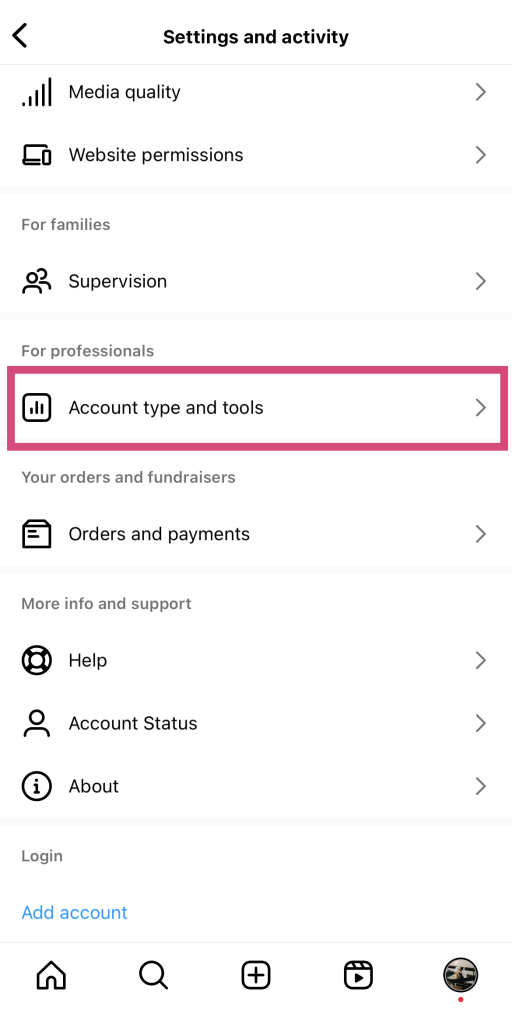
4. Sélectionnez Passer au compte professionnel sous Type de compte.
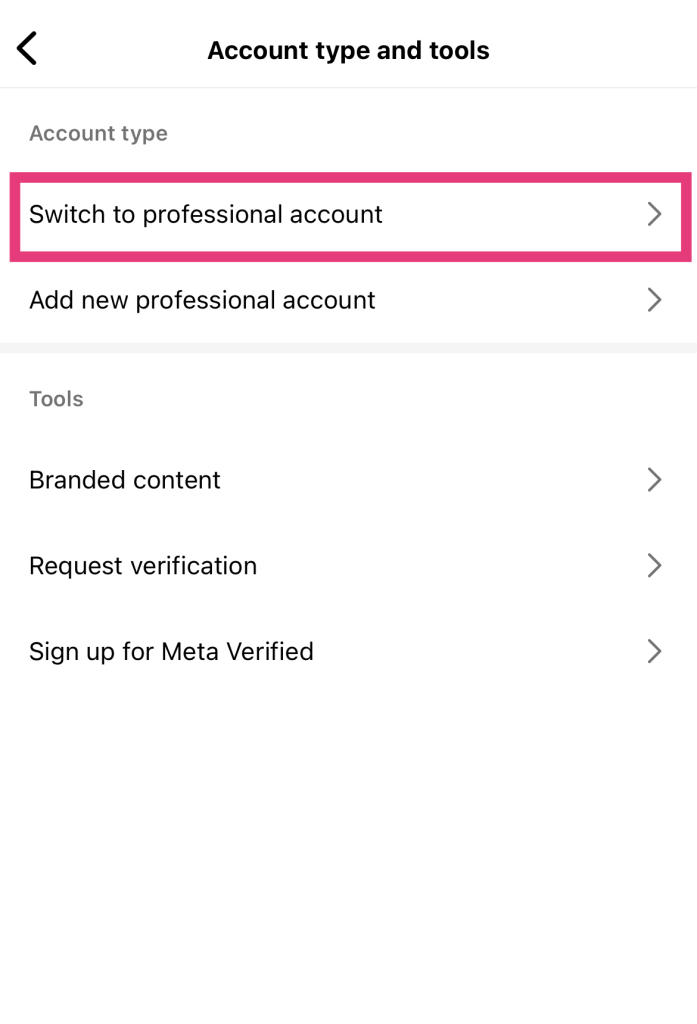
5. Lisez l'introduction aux comptes professionnels et cliquez sur Continuer.
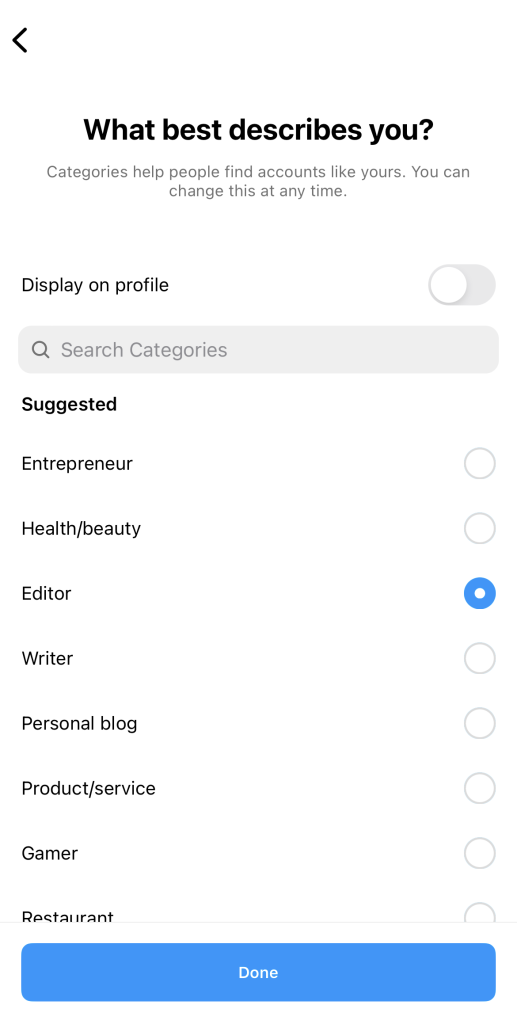
6. Choisissez la catégorie qui correspond le mieux à votre activité. N'oubliez pas d'activer l'option « Afficher sur le profil » ! Cliquez ensuite sur « Terminé ».
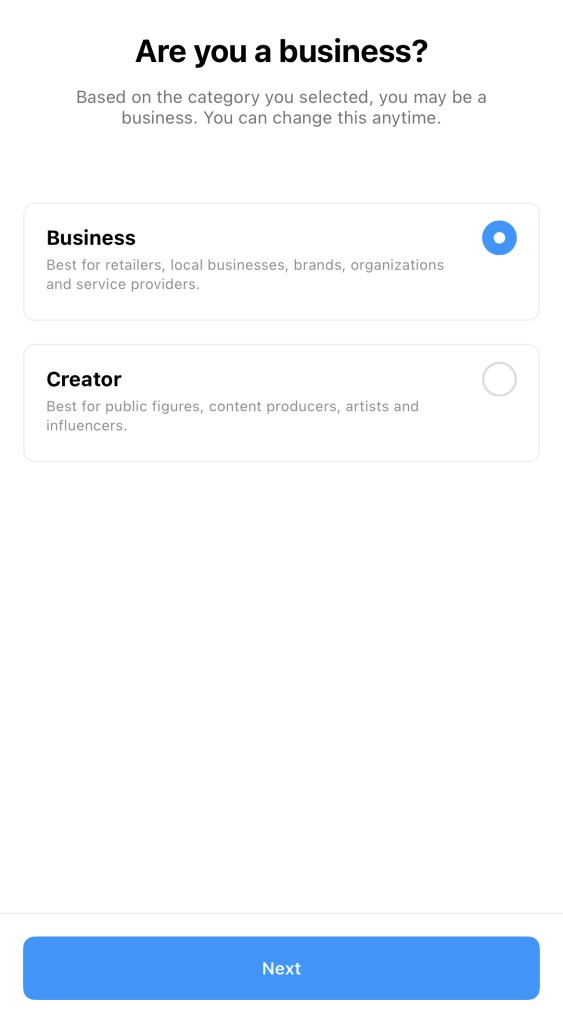
7. Lorsqu'on vous demande si vous êtes un créateur ou une entreprise, choisissez la deuxième option. Appuyez ensuite sur « Suivant ».
8. Ajoutez vos coordonnées professionnelles, notamment votre adresse e-mail, votre adresse professionnelle et votre numéro de téléphone. Si vous ne souhaitez pas que ces informations soient accessibles au public, cliquez sur « Ne pas utiliser mes coordonnées ».
9. Associez votre compte Facebook à votre page professionnelle, ou passez cette étape pour l'instant et revenez-y plus tard.
Et voilà ! Vous disposez désormais d'un compte professionnel vous donnant accès à des fonctionnalités de pointe réservées aux pages professionnelles.
Peut-on avoir deux comptes IG avec la même adresse électronique ?
Et si vous souhaitez créer plusieurs pages ? Pouvez-vous avoir deux comptes Instagram avec la même adresse e-mail ? Oui, Instagram aux utilisateurs de posséder plusieurs comptes créés avec la même adresse e-mail.
Chaque courriel peut être associé à un maximum de cinq profils Instagram . Il est ainsi plus facile d'exécuter différentes pages sans avoir à gérer un grand nombre d'adresses électroniques. Notez que chacun de ces comptes doit avoir son propre nom d'utilisateur et son propre mot de passe.
Comment créer un deuxième compte Instagram
Un deuxième Instagram peut s'avérer utile pour de nombreux utilisateurs actuels. Peut-être souhaitez-vous créer une page professionnelle tout en conservant votre compte personnel d'origine. Ou peut-être souhaitez-vous gérer un compte thématique, comme un « bookstagram » ou une page dédiée à vos animaux de compagnie adorés.
Ou peut-être envisagez-vous de créer un « finsta », c'est-à-dire un compte caché destiné à des publications plus confidentielles et personnelles. Après tout, une étude publiée dans le Journal of Computer-Mediated Communication a montré que les gens utilisent des comptes « finsta » secondaires pour paraître plus « authentiques » sur les réseaux sociaux.
Heureusement, créer un deuxième Instagram est d’une simplicité enfantine. La plateforme dispose déjà d’une grande partie des informations de votre premier compte. La procédure pour en créer un deuxième est donc très simple. Voici comment procéder :
1. Ouvrez l'applicationInstagram .
2. Appuyez longuement sur votre photo de profil dans le coin inférieur droit de l'écran. Cela vous permet de voir tous les comptes connectés à votre appareil.
3. Cliquez sur Ajouter un compte Instagram .
4. Cliquez sur Créer un nouveau compte.
5. Choisissez un nom d'utilisateur pour votre deuxième compte, puis un mot de passe.
6. Pour utiliser la même adresse e-mail et le même numéro de téléphone que pour votre premier compte, il vous suffit de cliquer sur « Terminer l'inscription ». Vous pouvez également choisir d'ajouter un nouveau numéro de téléphone ou une nouvelle adresse e-mail pour ce deuxième compte.
Et voilà ! Un Instagram secondaire pour votre nouvelle entreprise, votre compte thématique ou votre « finsta » !
Comment changer de compte sur IG : passer d'un profil à l'autre
Après avoir créé un deuxième profil, vous vous demandez peut-être comment passer d'un compte à l'autre sur Instagram. Heureusement, l'interface rend cette opération incroyablement rapide et facile pour les utilisateurs qui gèrent plusieurs comptes, ce qui garantit une expérience plus fluide et plus intuitive.
Il vous suffit d'appuyer longuement sur votre photo de profil, en bas à droite de Instagram . Tous les comptes connectés sur votre appareil s'afficheront alors. Choisissez celui vers lequel vous souhaitez basculer et appuyez dessus. Et voilà : vous êtes passé à un autre compte en quelques clics seulement !
Instagram L'inscription ne fonctionne pas : comment résoudre le problème ?
L'inscription àInstagram ne fonctionne pas? Ne vous inquiétez pas trop, cela arrive. Il y a de nombreuses raisons pour lesquelles vous pouvez avoir des difficultés à faire fonctionner la page d'inscription.
L'une des raisons les plus courantes pour lesquelles la page d'inscription ne fonctionne pas est une connexion internet instable. Vérifiez votre Wi-Fi ou vos données mobiles pour voir si vous disposez d'une connexion solide à l'internet. Envisagez de passer à une source d'accès à l'internet plus puissante.
Vous pourriez également rencontrer des problèmes techniques, comme Instagram votre adresse IP Instagram . Cela peut se produire si vous avez utilisé des outils tiers qui suscitent la méfiance et déclenchent des alertes au niveau de l'application. Pour résoudre ce problème, utilisez un réseau privé virtuel (VPN) afin de modifier temporairement votre adresse IP.
Des problèmes techniques peuvent également survenir si vous utilisez une version obsolète de Instagram , comportant des bugs et des problèmes de performances. Pour éviter ces difficultés techniques, activez les mises à jour automatiques afin de vous assurer de toujours disposer de la dernière version de l'application.
Un autre problème susceptible de se poser concerne votre adresse e-mail et votre date de naissance. N’oubliez pas que chaque adresse e-mail ne peut être associée qu’à cinq Instagram à la fois. Si vous créez un nouveau compte avec une adresse e-mail à laquelle cinq comptes sont déjà associés, la page d’inscription ne fonctionnera pas.
En ce qui concerne la date de naissance, Instagram que les utilisateurs âgés d'au moins 13 ans. Si la date de naissance que vous indiquez laisse penser que vous avez moins de 13 ans, vous ne pourrez pas vous inscrire.

Instagram Nouveau compte : Prochaines étapes importantes à suivre pour votre page
Votre nouvelle Instagram est une toile vierge, et vous pouvez en faire ce que vous voulez. Exprimez-vous à travers des publications créatives, faites-vous des amis en ligne et découvrez tout le contenu qui vous intéresse.
Mais avant tout cela, il est important de bien configurer votre profil. Voici une liste des étapes essentielles à suivre pour finaliser votre page une fois celle-ci créée :
- Téléchargez une belle photo de profil qui donnera une excellente première impression aux visiteurs de votre page. Veillez à ce qu'elle soit de haute qualité. La dernière chose que vous voulez, c'est que quelqu'un utilise un vérificateur de compte pour voir si vous êtes légitime parce que vous n'avez pas l'air digne de confiance !
- Rédigez une Instagram captivante, informative et pleine d'esprit pour vous présenter à vos abonnés potentiels.
- Créez une stratégie de contenu qui vous servira de guide pour la mise en ligne du contenu.
- Après avoir publié du contenu sur votre page, stimulez l'engagement autour de vos publications en échangeant avec les utilisateurs dans les commentaires. Cela vous permettra d'augmenter vos taux d'engagement, ce qui améliorera à son tour la visibilité de votre page dans le fil d'actualité.
Comment supprimer votre compte Instagram
Vous ne profitez plus de la plateforme ? Il est très facile de supprimer votre compte Instagram . Voici comment procéder :
1. Dans vos Instagram , cliquez sur « Centre des comptes » en haut de la page.
2. Appuyez sur Détails personnels.
3. Sélectionnez Propriété et contrôle du compte, puis Désactivation ou suppression.
4. Cliquez sur le compte que vous souhaitez supprimer.
5. Sélectionnez Supprimer le compte et appuyez sur Continuer.
6. Indiquez la raison pour laquelle vous souhaitez supprimer votre compte, puis cliquez sur « Continuer ».
7. Confirmez votre décision de supprimer votre compte.

Comment créer un nouveau compte sur Instagram: Rejoignez une communauté prospère dès aujourd'hui !
Créer un Instagram est un jeu d'enfant, ce qui signifie que tout le monde peut rejoindre la plateforme. Que vous souhaitiez créer un compte personnel ou professionnel, une nouvelle page ou un profil secondaire, c'est un jeu d'enfant. En quelques minutes seulement, à force de cliquer sur votre téléphone, vous serez déjà en bonne voie pour créer votre Instagram .
Maintenant que vous savez comment créer un nouveau compte sur Instagram, vous pouvez vous concentrer sur le développement de votre toute nouvelle page. L'un des moyens les plus rapides de développer votre communauté est de faire appel à Path Social.
Notre équipe utilise l'intelligence artificielle pour mettre votre contenu en avant auprès du public auquel il est destiné. Cela contribue à renforcer la notoriété de votre marque et à améliorer sa visibilité. En un clin d'œil, vous disposerez d'une communauté importante, active et solide, toujours réceptive à votre contenu. Utilisez Path Social gagnez plus d'abonnés dès aujourd'hui!





Prêt à booster vos followers Instagram ?
Commencez à gagner des adeptes authentiques et à augmenter l'engagement dès aujourd'hui !
Augmenter le nombre de followers Instagram




