



Instagram una de las redes sociales más populares del mundo, y por algo es así. Está repleta de contenido visualmente impresionante y de comunidades dinámicas y activas en torno a distintos estilos de vida. Además, es el lugar donde las marcas de moda conectan con su público objetivo.
¿Estás pensando en morder la bala y unirte finalmente a Instagram para explorar la plataforma por ti mismo? Nosotros te ayudamos. En nuestra entrada de blog de hoy, te explicamos cómo crear una nueva cuenta en Instagram.

Cómo crear una nueva cuenta en Instagram
Usar una nueva red social ya resulta intimidante de por sí. Crear una nueva cuenta en una red social puede resultar aún más abrumador. Por suerte, crear una nueva Instagram es increíblemente fácil, tanto si la quieres para uso personal como profesional.
Bueno, vamos a ponernos manos a la obra, ¿te parece? A continuación te explicamos cómo crear una Instagram nueva Instagram desde cero:
1. Descarga la Instagram desde la App Store o Google Play Store, según el dispositivo que tengas.
2. Una vez finalizada la instalación, pulsa el Instagram para abrir la aplicación.
3. Busque el mensaje ¿No tiene una cuenta? en la página de inicio de sesión. Pulse el botón Registrarse que aparece junto a él.
4. Indique su dirección de correo electrónico o su número de teléfono. Asegúrate de que puedes acceder a cualquier información de contacto que facilites, ya que la utilizarás más adelante para verificar tu cuenta.
5. Espera a Instagram te envíe un código de confirmación. A continuación, introdúcelo en el campo correspondiente para confirmar tu correo electrónico o tu número de teléfono. Después, pulsa «Siguiente».
6. Escribe tu nombre y crea una contraseña para tu cuenta. Asegúrate de que esta última sea segura para mantener tu perfil protegido.
7. Introduce tu fecha de nacimiento. Ten en cuenta que solo las personas mayores de 13 años pueden crear una Instagram . A continuación, selecciona «Siguiente».
8. Elija un nombre de usuario. Pulse Siguiente.
9. Lee las condiciones de uso y, por último, haz clic en «Registrarse».
Y aquí la tienes. Una nueva cuenta de Instagram para que juegues con ella.
Crear una Instagram es mucho más fácil si ya tienes una cuenta de Facebook. Si tienes Facebook instalado en tu dispositivo, es posible que aparezca en cuanto veas la página de inicio de sesión Instagram.
También puedes sincronizar tu nueva cuenta de Instagram con tus datos de Facebook. Esto significa que tendrás el mismo nombre para mostrar y la misma foto de perfil en ambas aplicaciones.
Cómo crear una nueva cuenta de empresa en Instagram: De lo personal a lo profesional
Hay varios tipos de Instagram disponibles. Puedes utilizar una cuenta personal, que es el tipo de cuenta predeterminado. Pero si gestionas una marca, quizá te interese cambiar de una página personal a una cuenta profesional.
Hay dos tipos de cuentas profesionales: las cuentas de empresa y las de creador. Con estos tipos de cuentas, tendrás acceso a funciones exclusivas, como la posibilidad de lanzar campañas publicitarias y consultar las estadísticas de las publicaciones.
Las cuentas de creador están pensadas para influencers que quieren triunfar como marca personal. Son ideales para cualquier tipo de creador de contenido que no tenga una tienda física. Pero hoy nos centramos en los emprendedores que dirigen sus propios negocios. A continuación te explicamos, paso a paso, cómo crear una nueva cuenta de empresa en Instagram:
1. Siga los pasos anteriores para crear primero una cuenta personal.
2. Accede a tu perfil y haz clic en las tres líneas horizontales de la parte superior para ir a la configuración de Instagram.
3. En la sección «Para profesionales », haz clic en «Tipo de cuenta y herramientas».
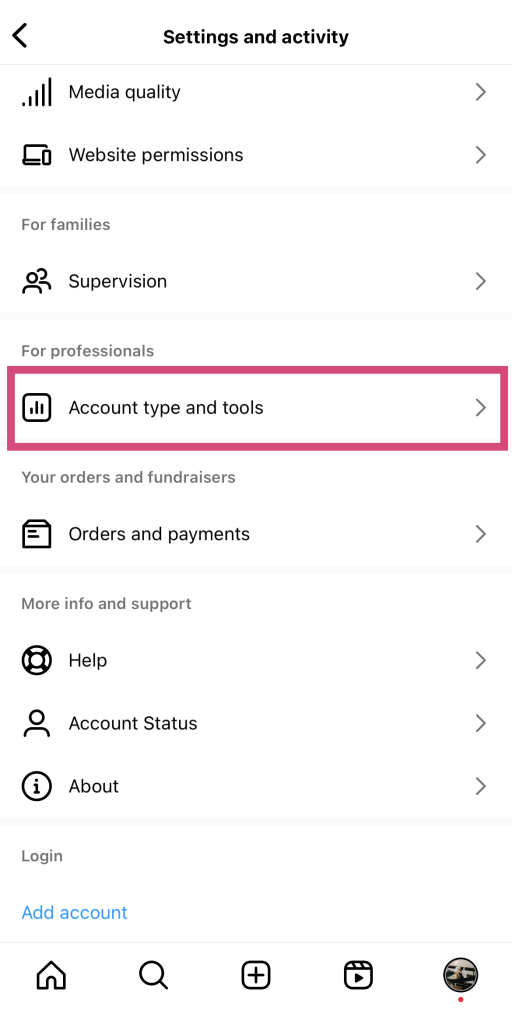
4. Seleccione Cambiar a cuenta profesional en Tipo de cuenta.
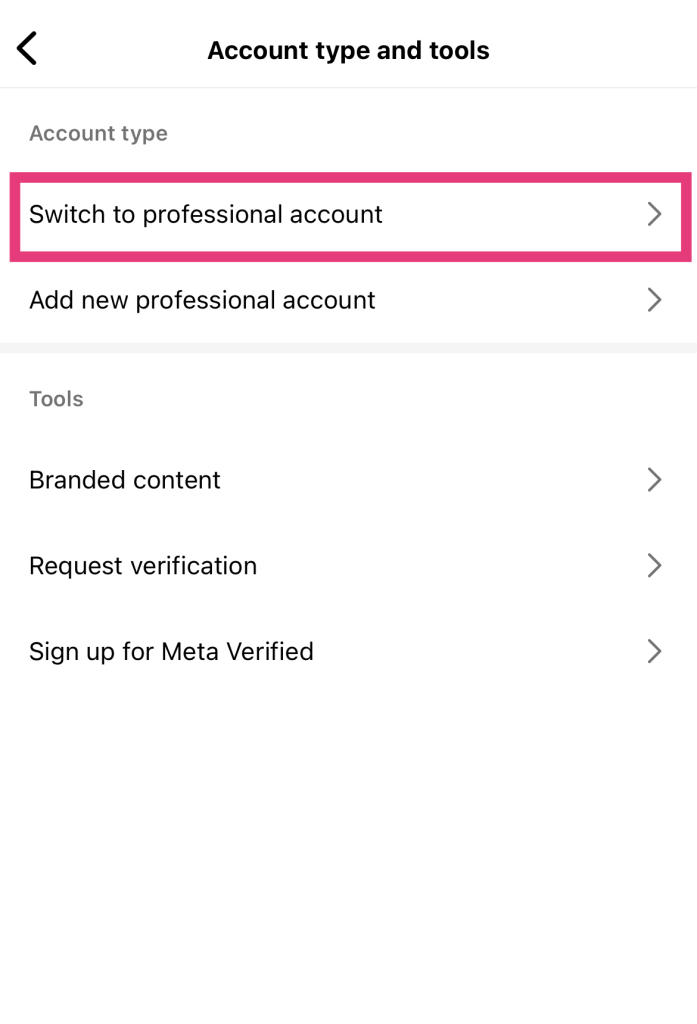
5. Lea la introducción a las cuentas profesionales y pulse Continuar.
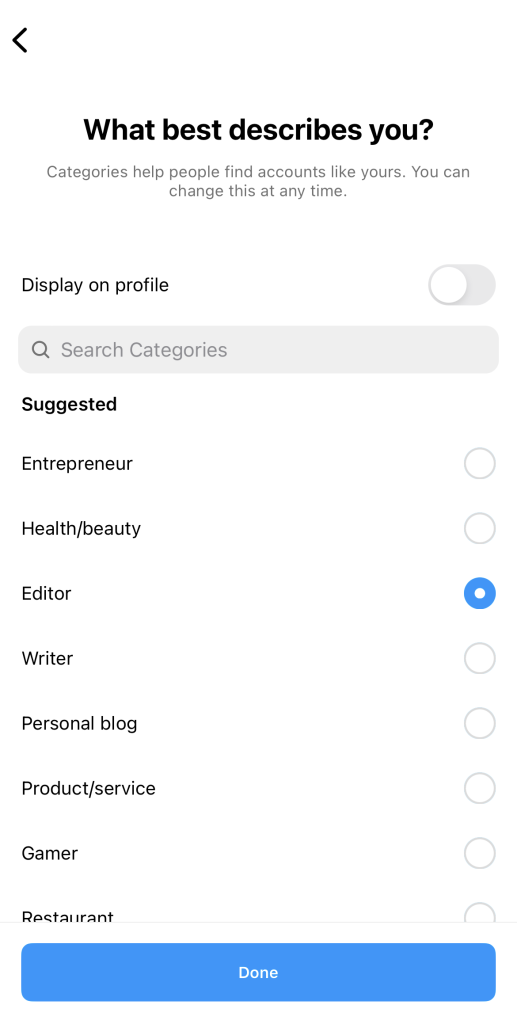
6. Elige la categoría que mejor describa tu negocio. ¡No te olvides de activar el botón «Mostrar en el perfil »! A continuación, haz clic en «Hecho».
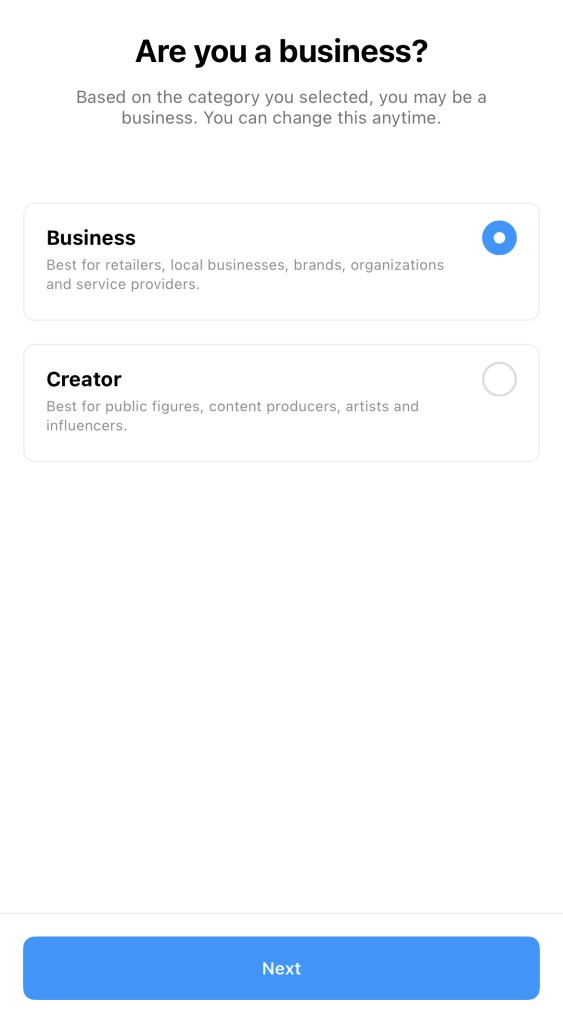
7. Cuando se te pregunte si eres un creador o una empresa, elige la segunda opción. A continuación, pulsa «Siguiente».
8. Añade la información de contacto de tu empresa, incluyendo tu correo electrónico, la dirección de la empresa y el número de teléfono. Si no quieres que esta información sea pública, haz clic en «No utilizar mi información de contacto».
9. Vincula tu cuenta de Facebook a tu página de empresa, o sáltate este paso por ahora y hazlo más tarde.
¡Y ya está! Ahora ya tienes una cuenta empresarial con acceso a funciones de última generación exclusivas de las páginas profesionales.
¿Se pueden tener dos cuentas IG con el mismo correo electrónico?
¿Y si quieres crear más de una página? ¿Se pueden tener dos cuentas de Instagram con la misma dirección de correo electrónico? Sí, Instagram los usuarios tener varias cuentas registradas con la misma dirección de correo electrónico.
Cada correo electrónico puede tener asociados hasta cinco perfiles Instagram . Eso facilita la gestión de distintas páginas sin tener que estar pendiente de tantas direcciones de correo electrónico. Ten en cuenta que cada una de estas cuentas debe tener su nombre de usuario y contraseña.
Cómo crear una segunda cuenta en Instagram
Tener una segunda Instagram puede resultar útil para muchos usuarios actuales. Quizás quieras crear una página de empresa sin dejar de mantener tu cuenta personal original. O tal vez quieras gestionar una cuenta temática, como un «bookstagram» o una página dedicada a tus queridas mascotas.
O quizá estés pensando en crear una «finsta», una cuenta oculta para publicar actualizaciones más confidenciales y personales. Al fin y al cabo, un estudio publicado en la revista *Journal of Computer-Mediated Communication* ha demostrado que la gente utiliza cuentas secundarias de tipo «finsta» para parecer más «auténtica» en las redes sociales.
Por suerte, crear una segunda Instagram es ridículamente fácil. La plataforma ya dispone de gran parte de la información de tu primera cuenta, por lo que el proceso para crear una segunda es muy sencillo. A continuación te explicamos cómo hacerlo:
1. Abre tu aplicaciónInstagram .
2. Pulsa prolongadamente tu foto de perfil en la esquina inferior derecha de la pantalla. Esto te mostrará todas las cuentas que han iniciado sesión en tu dispositivo.
3. Haga clic en Añadir cuenta Instagram .
4. Haga clic en Crear nueva cuenta.
5. Elige un nombre de usuario para tu segunda cuenta y, a continuación, una contraseña.
6. Para utilizar el mismo correo electrónico y número de teléfono que en tu primera cuenta, solo tienes que hacer clic en «Finalizar el registro». También puedes optar por añadir un nuevo número de teléfono o correo electrónico para esta segunda cuenta.
¡Y ya está! ¡Una Instagram secundaria Instagram para tu nuevo negocio, una cuenta temática o una «finsta»!
Cómo cambiar de cuenta en IG: pasa de un perfil a otro
Después de crear un segundo perfil, quizá te preguntes cómo cambiar de cuenta en Instagram. Afortunadamente, la interfaz permite hacerlo de forma increíblemente rápida y sencilla para quienes gestionan varias cuentas, lo que garantiza una experiencia más fluida y sin complicaciones.
Lo único que tienes que hacer es mantener pulsada tu foto de perfil, situada en la esquina inferior derecha de Instagram . A continuación, aparecerán todas las cuentas con las que hayas iniciado sesión en tu dispositivo. Elige la cuenta a la que quieras cambiar y pulsa sobre ella. ¡Y ya está! ¡Has cambiado a otra cuenta con solo un par de toques!
Instagram Registrarse no funciona: cómo solucionar el problema
¿No funciona el registro enInstagram ? No te estreses demasiado; suele ocurrir. Hay muchas razones por las que puedes tener problemas para que funcione la página de registro.
Una de las razones más comunes por las que la página de registro no funciona es una conexión a Internet inestable. Comprueba tu conexión Wi-Fi o de datos móviles para ver si tienes una conexión sólida a Internet. Plantéate cambiar a una fuente de internet más potente.
También podrías encontrarte con dificultades técnicas, como que Instagram tu dirección IP. Esto podría ocurrir si has estado utilizando herramientas de terceros que despierten sospechas y hagan que la aplicación te marque como sospechoso. Para solucionar este problema, utiliza una red privada virtual (VPN) para cambiar tu dirección IP temporalmente.
También pueden surgir problemas técnicos si utilizas una versión obsoleta de la Instagram que presente errores y problemas de rendimiento. Para evitar estas dificultades técnicas, activa las actualizaciones automáticas y así te asegurarás de tener siempre la última versión de la aplicación.
Otro problema que podría surgir son las dificultades relacionadas con tu dirección de correo electrónico y tu fecha de nacimiento. Recuerda que cada dirección de correo electrónico solo puede tener cinco Instagram a la vez. Si creas una nueva cuenta con una dirección de correo que ya tiene cinco cuentas, la página de registro no funcionará.
En cuanto a la fecha de nacimiento, Instagram solo Instagram usuarios mayores de 13 años. Si la fecha de nacimiento que indiques indica que eres menor de esa edad, no podrás registrarte.

Instagram Cuenta nueva: Próximos pasos importantes para su página
Tu nueva Instagram es un lienzo en blanco, y puedes hacer con ella lo que quieras. Exprésate con publicaciones creativas, haz amigos en línea y disfruta de todo el contenido que quieras.
Pero antes de nada, es importante configurar bien tu perfil. Aquí tienes una lista de algunos de los pasos esenciales que debes seguir para completar tu página una vez creada:
- Sube una bonita foto de perfil que cause una excelente primera impresión a quienes visiten tu página. Asegúrate de que sea de alta calidad. Lo último que quieres es que alguien utilice un verificador de cuentas para comprobar si eres legítimo porque no pareces de fiar.
- Escribe una Instagram atractiva, informativa y con ingenio para presentarte a tus posibles seguidores.
- Cree una estrategia de contenidos que le sirva de guía para subir contenidos.
- Después de publicar contenido en tu página, fomenta la interacción con las publicaciones interactuando con los usuarios en los comentarios. Esto ayuda a aumentar tus índices de interacción, lo que a su vez mejora la visibilidad de tu página en el feed.
Cómo eliminar su cuenta de Instagram
¿Ya no disfrutas de la plataforma? Eliminar tu cuenta de Instagram es superfácil. Aquí te explicamos cómo hacerlo:
1. En Instagram , haz clic en «Centro de cuentas», en la parte superior de la página.
2. Pulse Datos personales.
3. Seleccione Propiedad y control de la cuenta y elija Desactivación o eliminación.
4. Pulse sobre la cuenta que desea eliminar.
5. Seleccione Eliminar cuenta y pulse Continuar.
6. Indica el motivo por el que quieres eliminar tu cuenta y, a continuación, pulsa «Continuar».
7. Confirme su decisión de eliminar su cuenta.

Cómo crear una nueva cuenta en Instagram: Únase hoy a una comunidad próspera
Crear una Instagram es muy fácil, lo que significa que cualquiera puede unirse a la plataforma. Tanto si vas a crear una cuenta personal como una de empresa, una nueva página o un perfil secundario, es pan comido. En solo unos minutos, con unos pocos toques en tu móvil, ya estarás en camino de crear tu Instagram .
Ahora que ya sabes cómo crear una nueva cuenta en Instagram, puedes centrarte en hacer crecer tu nueva página. Una de las formas más rápidas de aumentar tu número de seguidores es colaborando con Path Social.
Nuestro equipo utiliza la inteligencia artificial para promocionar tu contenido entre el público al que va dirigido. Esto te ayuda a aumentar la notoriedad de tu marca y a mejorar tu visibilidad. Antes de que te des cuenta, tendrás una comunidad grande, activa y sólida que siempre interactúa con tu contenido. ¡Utiliza Path Social consigue más seguidores hoy mismo!





¿Listo para aumentar tus seguidores Instagram ?
Empieza hoy mismo a ganar seguidores auténticos y a aumentar la participación.
Aumentar seguidores de Instagram ahora




