


Le compteur de like Instagram : Une source ultime de validation

Tout le monde se sent au moins un peu étourdi lorsqu'il voit un afflux de likes sur ses posts Instagram . Un nombre élevé sur le compteur de likes Instagram est le signe que les gens apprécient et approuvent votre contenu. Cela signifie que vous faites quelque chose de bien. Cela donne à n'importe qui non seulement un regain d'estime de soi et de validation, mais aussi un sentiment d'appartenance.
Mais parfois, la course effrénée pour obtenir le plus grand nombre de « J'aime » sur Instagram peut exercer une forte pression sur les créateurs. Au lieu de se concentrer sur la création et la consommation de contenus exceptionnels, ils s'attachent à obtenir davantage de « J'aime ». Existe-t-il donc un moyen d'ignorer, voire de masquer, le nombre de « J'aime » sur une publication ?
Aujourd'hui, nous explorons tout ce que vous devez savoir sur le compteur de likes de Instagram. Continuez à défiler pour découvrir son importance pour la plateforme et comment vous pouvez personnaliser vos paramètres de like.
Qu'est-ce que le compteur Instagram Like ?
Le compteur de « J'aime » d'Instagram est la petite section d'une publication qui indique le nombre de « J'aime » qu'elle a reçus. Pour les publications du fil d'actualité, il apparaît au bas du contenu. Pour les Reels, il se trouve à droite de l'écran. Dans les deux cas, vous verrez la célèbre icône en forme de cœur à proximité du nombre de « J'aime ».
Le nombre de « J'aime » attribués à chaque publication est toujours visible par l'auteur de celle-ci. En fonction des paramètres de cet utilisateur, il peut également être visible par d'autres personnes.
Le compteur de « J'aime » augmente chaque fois qu'un utilisateur consulte votre publication et clique sur le bouton en forme de cœur. Il peut également appuyer deux fois sur la publication pour lui témoigner son appréciation.
Outre le nombre de « J'aime » recueillis par une publication, le compteur affiche également les noms d'utilisateur de toutes les personnes qui l'ont aimée. Il devrait s'afficher sous la forme « Aimé par [nom d'utilisateur] et x autres ». Si vos paramètres ne permettent pas d'afficher le nombre total, il indiquera simplement « Aimé par [nom d'utilisateur] et d'autres ».
Pourquoi est-il important d'obtenir un nombre élevé de mentions J'aime sur Instagram?
Obtenir beaucoup de likes est un simple stimulant de confiance euphorique et une source de validation pour certains. Mais les likes sont aussi incroyablement importants pour les créateurs de contenu, car ils leur permettent de suivre le niveau d'engagement Instagram que suscite leur publication. Un grand nombre de likes leur indique que leur public apprécie le contenu qu'ils publient. Ils peuvent ensuite utiliser ces informations pour s'améliorer et prendre des décisions éclairées sur leur stratégie de contenu à l'avenir.
Les « J'aime » influencent également le taux d'engagement d'une publication, un critère auquel l'algorithme d'Instagram accorde une grande importance lors du classement des publications dans le fil d'actualité. Plus votre publication recueille de « J'aime », plus elle apparaîtra en haut du fil d'actualité des utilisateurs et, potentiellement, sur la page « Explorer ». Cela signifie que davantage de personnes pourraient découvrir votre publication, ce qui améliorera la visibilité et l'engagement global de votre marque.
Un nombre élevé de « J'aime » constitue également une preuve sociale que votre contenu mérite qu'on s'y intéresse et qu'on interagisse avec lui. Si les utilisateurs voient des noms d'utilisateurs familiers et des chiffres impressionnants sur le compteur de « J'aime » de vos publications, ils seront plus enclins à vous suivre.
Notez toutefois qu'il est absolument interdit d'acheter ou de générer de faux « J'aime » pour profiter de tous ces avantages. Instagram surveille en permanence les comptes qui génèrent une activité non authentique, comme les faux « J'aime ». Ces pages sont alors généralement soumises à un « shadowban », ce qui nuit à votre présence en ligne.
Comment masquer le nombre de J'aime sur Instagram en naviguant dans les paramètres de J'aime de votre site Instagram
En 2019, Instagram a mené une sorte d'expérience. La plateforme a mis en place un fil d'actualité qui n'affichait pas le célèbre compteur de « J'aime » sur les publications. Ainsi, personne ne pouvait savoir combien de « J'aime » chaque publication avait reçus.
Selon Adam Mosseri, directeur d’ Instagram , cette mesure a « désamorcé » l’ Instagram , la rendant « moins compétitive ». Elle a été mise en place pour permettre aux utilisateurs de publier le contenu créatif qu’ils aiment sans subir le poids de la pression sociale.
Cependant, au bout de deux ans, Instagram a constaté que la suppression du compteur de « J'aime » n'avait pas pour effet de réduire considérablement la pression sur la plateforme. Les utilisateurs continuent de créer du contenu en sachant comment susciter un engagement authentique et obtenir des « J'aime ».
Désormais, Instagram permet à chaque utilisateur de choisir s'il souhaite que son compteur de « J'aime » s'affiche sur ses publications. Cela signifie que si vous ne souhaitez pas que les autres voient le nombre de « J'aime » que vous avez reçus, vous pouvez le masquer.
Voulez-vous apprendre comment cacher le nombre de like sur Instagram? Voici comment procéder, étape par étape, dans les paramètres "Like" de votre site Instagram :
1. Sur votre profil Instagram , cliquez sur les trois lignes horizontales situées en haut à droite.
2. Faites défiler jusqu'à la section Ce que vous voyez et cliquez sur J'aime et Partager les comptes.
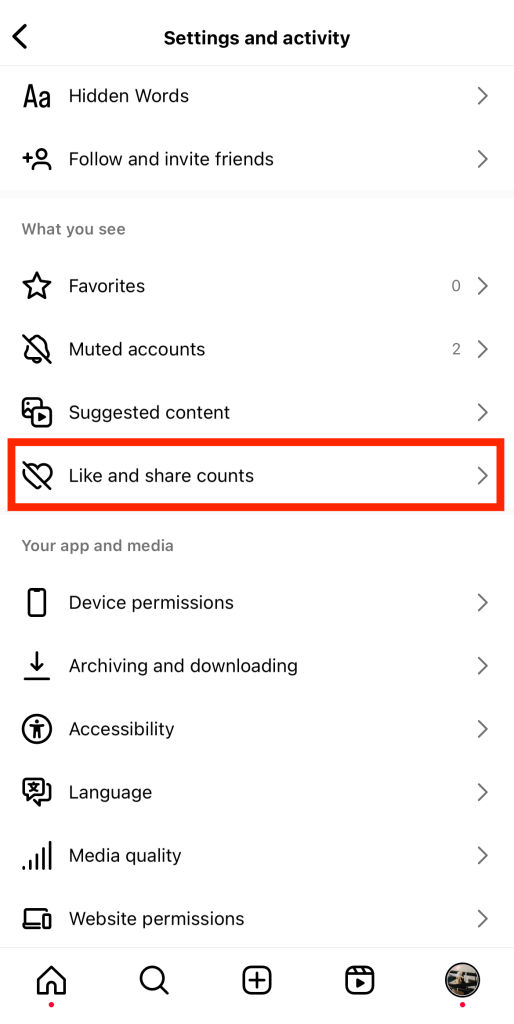
3. Activez la case à cocher pour masquer le nombre de like et de partages.
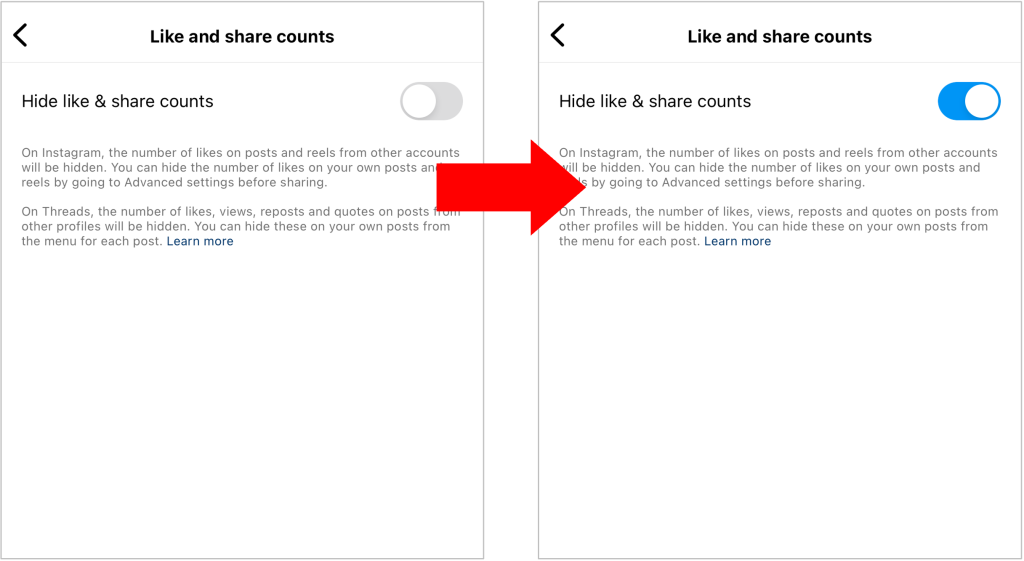
Notez que si vous masquez le nombre de « J'aime » de votre contenu, vous ne pourrez pas non plus voir celui des autres utilisateurs.
Vous pouvez également choisir de masquer le nombre de like d'un message dans la section des paramètres avancés avant de le publier.
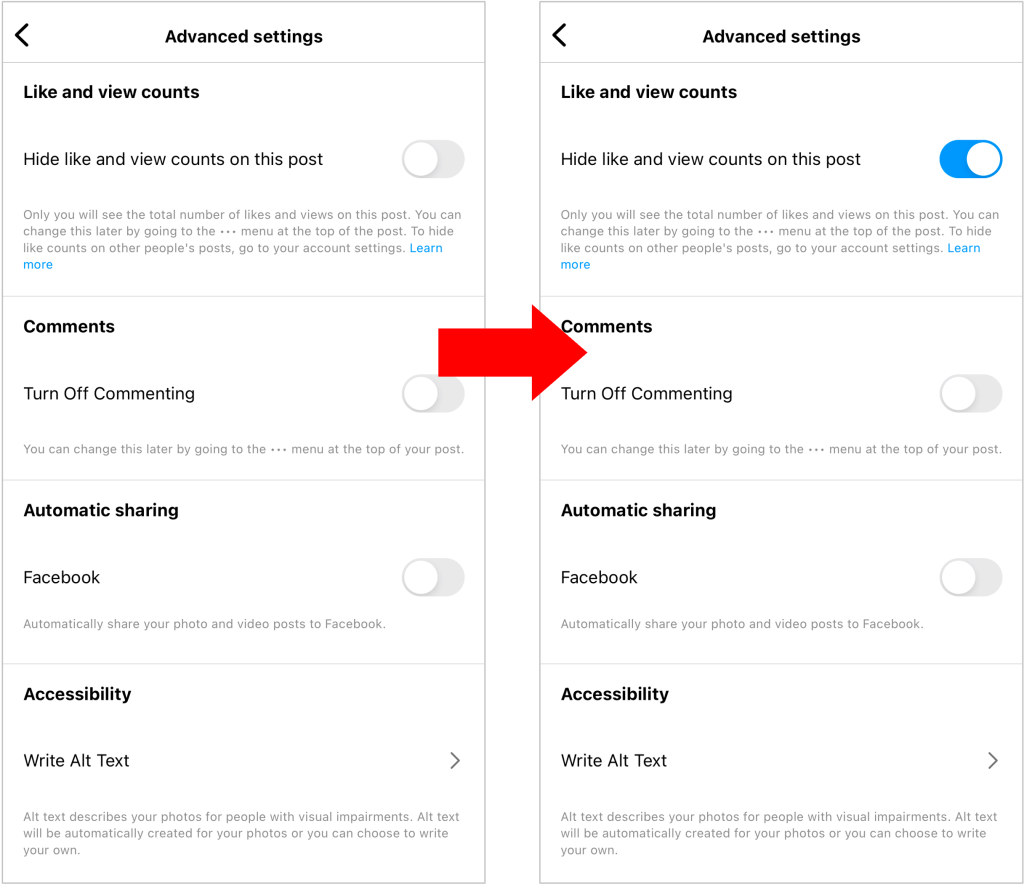
Vous souhaitez masquer le nombre de J'aime sur un article déjà publié ? Il vous suffit de cliquer sur les trois points situés en haut de l'article et de cliquer sur "Masquer le nombre de J'aime".
Comment voir les Likes de quelqu'un sur Instagram?
Vous souhaitez consulter le nombre de « J'aime » sur la publication d'un autre utilisateur ? C'est très simple, et cela ne prend que quelques secondes ! Voici comment voir les « J'aime » d'une personne sur Instagram.
Ouvrez l'application « Instagram » et recherchez la publication dont vous souhaitez consulter le compteur de « J'aime ». Si les paramètres de cette personne autorisent les autres à voir ses « J'aime », vous verrez le nombre total de « J'aime » sous la publication.
Comment voir les Likes cachés de quelqu'un sur Instagram
Vous vous demandez comment voir les « J'aime » masqués d'une personne sur Instagram? Malheureusement, il n'existe aucun moyen de connaître le nombre total de « J'aime » d'une publication si son auteur a choisi de le masquer. Si cette personne n'autorise pas les autres à voir le nombre de ses « J'aime », ses publications afficheront la mention « Apprécié par [nom d'utilisateur] et x autres ». Seul l'auteur de la publication pourra voir le nombre total de « J'aime ».
Vous pouvez toutefois voir qui a « aimé » leur publication. Cliquez sur « Autres » pour afficher la liste complète des utilisateurs qui ont « aimé » la publication. Les personnes que vous connaissez et avec lesquelles vous interagissez le plus apparaîtront en haut de la liste.
Astuce: vous pouvez utiliser un site tiers comme Phlanx pour voir le nombre de likes d'un message avec des likes cachés ! Notez que cela ne fonctionne que pour les messages publics.
Puis-je cacher ce que j'aime sur Instagram?
Si vous vous sentez gêné(e) par le contenu que vous consultez, vous vous demandez peut-être : « Puis-je masquer ce que j'aime sur Instagram? » Malheureusement, non, ce n'est pas possible — du moins, pas entièrement.
Lorsque vous « aimez » un contenu sur Instagram, la plateforme vous ajoute à la liste des personnes ayant « aimé » cette publication. Si l'un de vos abonnés consulte cette publication, votre nom d'utilisateur peut apparaître dans la liste des personnes ayant « aimé ». Cela dit, il faudrait que cette personne fasse un effort particulier pour savoir si vous avez « aimé » une publication en particulier.
Pour être honnête, il était autrefois beaucoup plus difficile de cacher ses « J'aime » sur Instagram. Il y a quelques années, la plateforme disposait d’un onglet « Abonnés ». Dans cet onglet, on pouvait voir ce que ses amis aimaient et commentaient. Cependant, dans le but de renforcer la confidentialité et de permettre aux utilisateurs de mieux contrôler ce que les autres peuvent voir à leur sujet, Instagram a supprimé cet onglet.

Comment cacher les Likes sur Instagram: Ne laissez personne savoir ce que vous aimez
Vous vous demandez comment masquer vos « J'aime » sur Instagram pour que personne ne sache quels contenus vous appréciez ? Eh bien, c'est un défi de taille, étant donné que tout le monde peut voir si vous avez aimé une publication ou non. Si vous voulez vraiment cacher ce que vous aimez, il vous faudra faire preuve de créativité pour contourner le système.
Une solution consiste à créer un « Finsta », c'est-à-dire un compte Instagram secondaire. Assurez-vous que personne de votre entourage ne vous suive sur ce compte anonyme. Vous pourrez ainsi « liker » librement tous les contenus qui vous plaisent sans vous soucier des publications avec lesquelles vous interagissez.
Un autre conseil pour ceux qui ne veulent pas que les autres voient les articles qu'ils aiment est de les sauvegarder. Prenez l'habitude d'appuyer sur l'icône du signet pour les articles que vous appréciez au lieu de les aimer littéralement.
Enregistrer du contenu sur Instagram présente de nombreux avantages, comme celui de pouvoir le consulter à nouveau plus tard. Vous pouvez également organiser vos publications enregistrées en collections personnelles pour les classer facilement. Enregistrez du contenu consacré aux voyages, à la beauté, à la gastronomie, aux chats mignons ou à tout ce qui vous plaît !
Vous souhaitez faire savoir à quelqu'un que vous appréciez son contenu sans pour autant « aimer » la publication ? Laissez un commentaire ou envoyez-lui un message privé pour le féliciter ! Même si vous exprimez votre appréciation pour la publication, personne ne verra votre nom d'utilisateur dans la liste des personnes ayant « aimé » la publication.

Conseils pour obtenir plus d'appréciations sur votre contenu
Vous essayez d'augmenter le nombre de likes sur vos posts ? Voici quelques-uns de nos conseils éprouvés pour stimuler l'engagement sous forme de likes :
- Produisez du contenu divertissant, accessible et utile. Veillez à ce que les publications que vous diffusez soient intéressantes, que ce soit parce qu’elles sont drôles ou parce qu’elles apportent une valeur ajoutée à la vie des gens. Un contenu enrichissant recueille toujours plus de « j’aime » qu’un contenu ennuyeux et sans intérêt.
- Incluez des hashtags à la mode dans la légende de votre message. Cela augmente la visibilité de votre message, de sorte que même ceux qui ne vous suivent pas peuvent le voir. Cela peut potentiellement augmenter le nombre de likes de manière significative.
- Collaborez avec des créateurs de contenu populaires dans votre domaine et mettez-les en avant dans vos publications. Il n'est pas nécessaire qu'il s'agisse d'une campagne de marketing d'influence à grande échelle. Même une simple publication ponctuelle mettant en avant un influenceur très apprécié ne manquera pas de faire grimper votre nombre de « J'aime ».
- Utilisezles statistiques d’ Instagram pour obtenir des informations précieuses qui vous aideront à améliorer votre contenu. Découvrez quels types de contenu créatif suscitent l’intérêt de votre audience. Créez-en ensuite davantage afin de recueillir plus de « J’aime » à l’avenir.

Obtenez un nombre plus élevé de Instagram Like sur vos posts avec Path Social!
Vous souhaitez obtenir davantage de « J'aime » sur les contenus que vous préparez avec tant de soin ? Suivez nos conseils ci-dessus pour produire des contenus de grande qualité qui captent l'attention et suscitent l'engagement. Mais si vous recherchez un moyen encore plus rapide d'augmenter votre nombre de « J'aime », concentrez-vous sur l'élargissement de votre audience. Plus il y a de personnes qui voient vos contenus, plus ceux-ci ont de chances de recevoir de « J'aime ».
Path Social peut vous aider à vous constituer une audience solide et engagée en augmentant votre nombre d'abonnés grâce à de véritables fans. Notre équipe utilise l'intelligence artificielle pour identifier votre public cible et lui proposer vos publications, améliorant ainsi la visibilité de votre marque. Vous constaterez ainsi une croissance significative non seulement du nombre d'abonnés, mais aussi du nombre d'Instagram s sur le compteur de « J'aime » de vos publications.
Alors, qu'attendez-vous ? Travaillez avec Path Social pour obtenir plus de followers et de Likes Instagram dès aujourd'hui !





Vous recherchez de vrais Instagram , sans artifices ?
Laissez nos stratégies de croissance organique ciblées par l'IA travailler pour vous.
Obtenir des followers Instagram maintenant




