


Yellow Duck : Votre guide pour Instagram Live Streaming

Diffuser en direct sur Instagram est un excellent moyen d'interagir avec vos abonnés et de renforcer vos liens avec eux. Vous pouvez présenter les produits de votre marque, répondre en temps réel aux questions posées par vos fans ou simplement passer un moment en ligne avec eux. Que vous soyez une entreprise ou un influenceur, Yellow Duck est une application qui trouvera sans aucun doute sa place parmi vos outils de streaming.
L'un des principaux problèmes auxquels sont confrontés les créateurs lorsqu'ils diffusent en direct sur Instagram est de devoir utiliser leur téléphone. En effet, ce sont les seuls appareils permettant de se connecter instantanément à Instagram Live. Les créateurs doivent généralement faire des concessions en termes de qualité de production, de qualité audio et bien plus encore, simplement pour diffuser depuis leur téléphone.
Heureusement, il existe aujourd’hui de nombreuses nouvelles applications et logiciels intermédiaires qui vous permettent de diffuser en direct depuis n’importe quel appareil. Ils vous offrent la flexibilité nécessaire pour diffuser de manière plus dynamique et avec une meilleure qualité, en utilisant les effets et les paramètres de votre choix. Yellow Duck fait partie de cette gamme de programmes.
Voulez-vous en savoir plus sur ce logiciel et comment il contribue à une meilleure expérience de streaming sur Instagram? Continuez à lire ce guide pour en savoir plus.

Comment la diffusion en direct sur Instagram contribue à promouvoir votre marque
La plupart des marques et des influenceurs présents sur Instagram consacrent l'essentiel de leur temps à soigner la mise en page de leur fil d'actualité. Mais les photos mignonnes et les vidéos drôles ne suffisent plus à se démarquer sur l'application. C'est une pratique courante chez tous les créateurs. Si vous souhaitez donner un coup de pouce à votre marque sur Instagram, vous devez susciter l'intérêt de vos abonnés par d'autres moyens.
L'une des meilleures stratégies pour susciter l'engagement de votre audience consiste à organiser une session en direct sur Instagram depuis votre page. Cela vous permet d'interagir avec vos fans en temps réel, et pas seulement par le biais de publications soigneusement sélectionnées dans votre fil d'actualité.
En communiquant directement avec vos abonnés via un live, vous pouvez mettre en avant votre personnalité et votre authenticité. Cela renforce également vos liens avec vos fans, car vous leur montrez que vous tenez à passer du temps avec eux.
Diffuser un IG Live permet également d'accroître votre visibilité dans le fil d'actualité de vos abonnés. Chaque fois qu'une personne que vous suivez diffuse une vidéo en direct, celle-ci apparaît tout en haut de la pile des Stories d'Instagram . Si vous animez un IG Live, vos abonnés ne pourront pas passer à côté !
Le streaming en direct offre également aux marques l'occasion de promouvoir leur activité de manière créative. Des sessions de questions-réponses aux sessions de shopping en direct, il existe de nombreuses façons d'accroître la visibilité d'une marque grâce à IG Live. Nous allons explorer les moyens de mettre ce projet en œuvre et voir comment des applications telles que Yellow Duck peuvent vous y aider.

Instagram Un producteur en direct pour une diffusion en continu
Comme mentionné précédemment, la diffusion en direct sur Instagram peut s’avérer difficile pour certains, car elle est limitée à la diffusion depuis un téléphone. Ces dernières années, Instagram a pris conscience de ce problème. C’est ainsi qu’en 2016, la plateforme a lancé «Instagram Live Producer», une fonctionnalité qui permet aux utilisateurs de diffuser en direct sur Instagram depuis n’importe quel appareil.
Live Producer fait office de site intermédiaire qui intègre votre logiciel de streaming préféré à votre compte Instagram . Vous pouvez ainsi diffuser votre « émission » en direct à l’aide d’un logiciel flexible et créatif sur des appareils tels que vos tablettes et vos ordinateurs de bureau. Cela ouvre la voie à des productions de haute qualité, à des changements de scène, à de meilleurs réglages de microphone, à des mises en page vidéo multi-sources, et bien plus encore sur Instagram Live.
Voici, étape par étape, comment utiliser Live Producer pour diffuser en direct sur Instagram à partir d'un logiciel de streaming :
1. Ouvrez votre logiciel de streaming préféré, comme OBS Studio ou Restream.
2. Assurez-vous que les paramètres vidéo de votre logiciel sont compatibles avec les spécifications d’ Instagram. Consultez le site officiel d’ pour connaître les spécifications relatives au format d’image, au nombre d’images par seconde, à la résolution, au format audio, etc.
3. Trouvez la partie de votre logiciel qui vous permet de saisir votre URL de flux unique et votre clé de flux.
4. Ouvrez le site Web Instagram sur votre bureau ou sur un autre appareil et démarrez une vidéo en direct pour accéder à Live Producer.
5. L'écran qui s'affiche avant le début de votre session en direct doit contenir une URL et une clé de diffusion. Saisissez ces informations dans votre logiciel de diffusion en continu pour relier votre compteInstagram à votre diffusion en direct.
6. Consultez la visionneuse Live Producer pour voir à quoi ressemble actuellement votre flux.
7. Une fois que vous êtes satisfait de l'affichage de votre diffusion à l'écran, cliquez sur « Go Live » pour lancer votre diffusion.
À l'heure actuelle, Live Producer n'est disponible que pour les comptes « Créateur » ou « Professionnel » Instagram . Il existe toutefois une alternative : Yellow Duck.
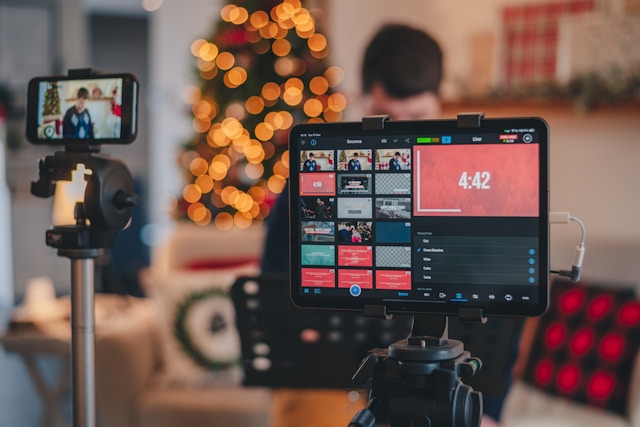
Quelle application peut être une alternative intéressante à Live Producer ?
Bien que Live Producer soit extrêmement pratique et utile pour le streaming, il n’est malheureusement pas disponible partout. Heureusement, il existe de nombreuses applications intermédiaires alternatives qui permettent de relier les plateformes de streaming à votre compte Instagram . L’une de ces applications est Yellow Duck, un programme qui vous permet de diffuser en direct depuis votre ordinateur de bureau vers Instagram Live.
Cette entreprise californienne et son application permettent à tout un chacun de diffuser depuis ses plateformes de streaming directement sur IG Live. Il s'agit en quelque sorte d'un pont entre votre application de streaming préférée et la plateforme Instagram . Elle est compatible avec Mac et Windows et fonctionne parfaitement avec les principales plateformes de streaming telles que OBS Studio, Wirecast et bien d'autres encore.
Ce qui est génial avec cette application, c’est qu’elle est entièrement gratuite. Cela signifie que vous n’avez pas besoin de dépenser une fortune pour offrir à vos abonnés une expérience de streaming agréable et pratique. Alors, si vous n’avez pas accès à Live Producer, pensez plutôt à utiliser la solution « Instagram » de Yellow Duck.
Comment utiliser Yellow Stream pour « Instagram », étape par étape
On pourrait penser que, s’agissant d’une application tierce, elle sera plus difficile à utiliser que Live Producer. Mais c’est loin d’être le cas, car ce logiciel est en réalité assez simple à configurer. Voici comment utiliser Yellow Stream pour diffuser en direct sur Instagram depuis votre Mac ou votre PC en quelques étapes simples :
1. Téléchargez l'application depuis le site officiel.
2. Exécutez l'application et installez-la sur votre bureau.
3. Une fois l'installation terminée, lancez le programme.
4. Connectez-vous au logiciel à l'aide de vos identifiants Instagram . Cette étape est cruciale car votre authentification est la clé de l'intégration de votre flux à votre compte Instagram . Ne vous inquiétez pas, l'application conserve ces informations en toute sécurité !
5. Trouvez l'URL en direct et la clé de diffusion sur l'application.
6. Ouvrez une plateforme de diffusion en continu comme OBS Studio et configurez votre flux.
7. Reconfigurez les paramètres de votre plateforme afin de pouvoir sélectionner un serveur de streaming personnalisé. Copiez-collez ensuite l'URL et la clé de streaming fournies par Yellow Duck dans votre logiciel de streaming. Attention : ces codes expirent au bout de quelques minutes, effectuez donc cette étape le plus rapidement possible !
8. Cliquez sur « Démarrer la diffusion » pour transmettre votre flux vers l'application intermédiaire et, par conséquent, vers IG Live.
Et voilà, c'est terminé ! C'est facile, n'est-ce pas ? Une fois votre diffusion terminée, il vous suffit de cliquer sur le bouton de déconnexion du programme pour le fermer.
Le téléchargement et l'utilisation de Yellow Duck sont-ils sûrs ?
Pour utiliser l'application, vous devrez fournir votre nom d'utilisateur et votre mot de passe Instagram . Pour beaucoup, cela suscite déjà des inquiétudes, car cela peut rendre votre page vulnérable au piratage et à la compromission. Vous vous demandez donc peut-être : « L'utilisation de Yellow Duck est-elle sûre ? »
Selon le logiciel, celui-ci ne conserve absolument aucune de vos informations de connexion à Instagram . Dès que vous cliquez sur le bouton de déconnexion à la fin de votre session de streaming, le lien entre votre compte et le logiciel est rompu. Un message de confirmation s'affichera également pour vous en assurer. Le logiciel n'aura pas accès à votre compte et ne pourra pas se connecter avec vos identifiants.
Cependant, on trouve encore quelques avis en ligne d'utilisateurs qui affirment avoir reçu des e-mails signalant des connexions suspectes après avoir regardé des vidéos en streaming sur Instagram. Sur son site web, l'application assure à ses utilisateurs qu'il s'agit d'un phénomène courant lors de la première utilisation de son logiciel. Cela s'explique par le fait que, au lieu de vous connecter directement depuis Instagram, vous le faites via une application tierce.
Par ailleurs, certaines personnes sur des forums en ligne émettent l'hypothèse que l'utilisation d'un logiciel intermédiaire pour le streaming pourrait déclencher des alertes sur Instagram. Après tout, l'application elle-même rappelle à ses utilisateurs qu'elle n'est en aucun cas affiliée à Instagram ni approuvée par ce site. Comme il s'agit d'une application tierce, elle pourrait potentiellement signaler à Instagram que votre diffusion enfreint leurs conditions d'utilisation.
Bien sûr, personne n'a prouvé cela. Mais il vaut mieux rester vigilant face aux problèmes qui pourraient découler de l'utilisation de ces applications tierces.
Des solutions rapides en cas de problème
Yellow Duck ne fonctionne pas pour vous, même après avoir suivi nos guides pratiques ci-dessus ? Voici quelques problèmes qui peuvent être à l'origine de difficultés techniques et comment les résoudre :
- Autorisations d'accès à la caméra et au micro de l'application : si vous n'accordez pas ces autorisations, le logiciel ne pourra pas transmettre votre flux vidéo et audio. Ouvrez les paramètres de votre ordinateur ou de votre navigateur pour vous assurer que ces autorisations sont bien activées avant de commencer la diffusion.
- Utilisation d'un logiciel obsolète : Consultez les sites web officiels de la plateforme de diffusion en continu et de l'application intermédiaire que vous utilisez pour vos diffusions. Assurez-vous que vous disposez des dernières versions de ces logiciels pour éviter les problèmes de performance et les pépins.
- Connexion Internet faible : il arrive parfois qu'une connexion Internet faible perturbe votre diffusion. Vérifiez bien que votre connexion Wi-Fi ou vos données mobiles sont stables. Vous pouvez également utiliser des outils gratuits en ligne pour tester votre débit Internet et avoir une idée de la vitesse actuelle de votre connexion. Pour les diffusions importantes ou à enjeux élevés, il est préférable d'utiliser une connexion filaire.
- Pare-feu : les applications antivirus, les pare-feu et autres fonctionnalités de protection des ordinateurs de bureau sont très efficaces pour garantir la cybersécurité. Cependant, ils peuvent parfois empêcher le bon fonctionnement de vos diffusions en direct, en particulier celles provenant d’applications tierces. N’oubliez pas d’ajouter les programmes de diffusion en direct à la liste blanche de votre appareil avant de lancer votre session IG Live.
- Problèmes techniques liés au serveur affectant vos applications : rendez-vous sur les sites officiels et les réseaux sociaux de vos applications de streaming pour vérifier s'il y a des problèmes techniques en cours de leur côté. Si c'est le cas, attendez patiemment qu'ils résolvent le problème. Vous pouvez utiliser temporairement une autre application de streaming en attendant qu'ils y remédient.
Faites en sorte que plus de fans regardent vos sessions IG Live avec Path Social!
Même avec des outils de streaming avancés et une excellente qualité de production, personne ne regardera votre Live si vous n'avez pas de fans. Alors, avant de tester différents logiciels de streaming pour IG Live, concentrez-vous d'abord sur le développement de votre page. Gagnez plus d'abonnés dès maintenant, testez Yellow Duck et lancez-vous dans le live plus tard.
C’est justement là que l’équipe d’ Path Social peut vous aider. Notre algorithme de ciblage exclusif utilise une méthode rigoureuse pour identifier votre public le plus réactif. Ensuite, nous mettrons en avant votre page Instagram afin qu’il puisse la découvrir. Cela ne se limite pas à générer un engagement massif sur les publications que ces personnes découvrent. Cela augmente également votre nombre d’abonnés, vous offrant ainsi une solide communauté de fans. Par la suite, vous pourrez compter sur des centaines, voire des milliers de fans pour suivre vos sessions en direct sur Instagram . Alors, collaborez avec nous et gagnez dès aujourd’hui davantage d’abonnés sur Instagram !
FAQ
Vous savez désormais comment Yellow Duck peut vous aider dans vos initiatives de diffusion en direct sur Instagram . Si vous avez d'autres questions concernant la diffusion en direct sur Instagram, consultez notre foire aux questions.
L'utilisation de Yellow stream est-elle gratuite ?
Oui, l'application est gratuite à télécharger et à utiliser. Elle est donc accessible à tous ceux qui souhaitent améliorer leur expérience de diffusion en direct sur Instagram .
Mes abonnés sauront-ils que je diffuse en continu avec Yellow Duck ?
Non, vos followers ne se douteront pas que vous utilisez Yellow Duck. L'outil vous permet simplement de diffuser sur IG Live avec des fonctionnalités supplémentaires.
Existe-t-il des limitations ?
Vous pourriez rencontrer certaines restrictions lors de l'utilisation de l'application de streaming Yellow. Il peut s'agir notamment de problèmes de qualité liés à votre connexion Internet. Par ailleurs, l'application doit respecter les règles de la communauté de Instagram.





Vous cherchez le meilleur service de promotion Instagram ?
Bénéficiez d'un engagement réel, d'une audience ciblée et d'une croissance durable grâce à notre stratégie élaborée par des experts !
Essayez notre service de promotion Instagram




