


Yellow Duck: Su guía para Instagram Live Streaming

Hacer Instagram es una forma estupenda de interactuar con tus seguidores y reforzar el vínculo con ellos. Puedes mostrar los productos de tu marca, responder en tiempo real a las preguntas que te envían tus seguidores o, simplemente, pasar un rato con ellos en línea. Tanto si eres una empresa como un influencer, Yellow Duck es una aplicación que no te puedes perder en tu repertorio de herramientas de retransmisión.
Uno de los mayores problemas a los que se enfrentan los creadores al retransmitir en directo en Instagram tener que utilizar sus teléfonos móviles. Al fin y al cabo, son los únicos dispositivos que se pueden usar para entrar en Instagram al instante. Por lo general, los creadores tienen que sacrificar la calidad de la producción, la calidad del audio y otros aspectos solo por retransmitir a través de sus teléfonos móviles.
Afortunadamente, hoy en día hay un montón de nuevas aplicaciones y programas intermedios que te permiten retransmitir en directo desde cualquier dispositivo. Te ofrecen la flexibilidad necesaria para retransmitir de una forma más dinámica y con mayor calidad, con los efectos y ajustes que desees. Yellow Duck forma parte de esta lista de programas.
¿Quieres descubrir más sobre este software y cómo contribuye a mejorar las experiencias de streaming en Instagram? Sigue leyendo esta guía para obtener más información.

Cómo la retransmisión en directo en Instagram ayuda a impulsar su marca
La mayoría de las marcas y los influencers de Instagram la mayor parte de su tiempo a cuidar al máximo el diseño de su feed. Pero las fotos bonitas y los vídeos divertidos ya no bastan para destacar en la aplicación. Es algo que hacen todos los creadores. Si quieres que tu marca destaque en Instagram, debes captar la atención de tus seguidores de otras formas.
Una de las mejores estrategias para captar la atención del público es organizar una sesión Instagram en tu página. Esto te permite interactuar con tus seguidores en tiempo real, y no solo a través de las publicaciones seleccionadas del feed.
Al hablar directamente con tus seguidores a través de una retransmisión en directo, puedes mostrar tu personalidad y tu autenticidad. Además, demostrar que te importa pasar tiempo con ellos refuerza tu relación con los fans.
Hacer un directo en Instagram también aumenta tu visibilidad en los feeds de tus seguidores. Cada vez que alguien a quien sigues publica un vídeo en directo, este aparece en la parte superior de la lista Instagram . Si haces un directo en Instagram, ¡tus seguidores no se lo perderán por nada del mundo!
Las retransmisiones en directo también ofrecen a las marcas la oportunidad de promocionar su negocio de forma creativa. Desde sesiones de preguntas y respuestas hasta retransmisiones de compras en directo, hay muchas formas de potenciar la visibilidad de la marca a través de IG Live. Analizaremos cómo poner en práctica este plan y cómo pueden ayudar aplicaciones como Yellow Duck.

Instagram Productor en directo para una retransmisión fluida
Como se ha mencionado anteriormente, las retransmisiones en directo en Instagram resultar complicadas para algunas personas, ya que se limitan a realizarse desde el móvil. En los últimos años, Instagram reconocido este problema. Por ello, en 2016 lanzó Instagram Producer, una función que permite a los usuarios retransmitir en directo en Instagram desde cualquier dispositivo.
Live Producer funciona como una plataforma intermediaria que integra tu software de streaming favorito con tu Instagram . De este modo, puedes llevar a cabo tu «espectáculo» en directo utilizando un software flexible y creativo en dispositivos como tabletas y ordenadores de sobremesa. Esto abre la puerta a producciones de alta calidad, cambios de escena, mejores ajustes de micrófono, diseños de vídeo con múltiples fuentes y mucho más en Instagram .
A continuación te explicamos, paso a paso, cómo utilizar Live Producer para retransmitir en Instagram un programa de retransmisión:
1. Abre tu programa de streaming favorito, como OBS Studio o Restream.
2. Asegúrate de que la configuración de vídeo de tu software sea compatible con las especificaciones Instagram. Consulta la página web oficial de Live Producer para ver las especificaciones sobre la relación de aspecto, los fotogramas por segundo, la resolución, el formato de audio y mucho más.
3. Busque la parte de su software que le permite introducir su URL y clave de flujo únicas.
4. Abra el sitio web Instagram en su ordenador de sobremesa u otro dispositivo e inicie un vídeo en directo para acceder a Live Producer.
5. La pantalla que aparece antes de iniciar la sesión en directo debe contener una URL y una clave de transmisión. Introduce esos datos en tu software de streaming para vincular tu cuenta deInstagram a tu retransmisión en directo.
6. Comprueba en el visor del Productor en Directo el aspecto actual de tu emisión.
7. Cuando estés satisfecho con el aspecto que tiene la retransmisión en la pantalla, pulsa «Go Live» para iniciar la retransmisión.
Actualmente, Live Producer solo está disponible para Instagram de creadores o profesionales. Sin embargo, existe una alternativa: Yellow Duck.
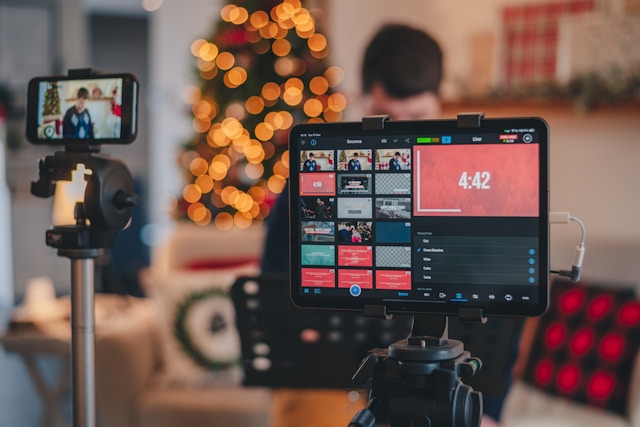
¿Qué aplicación puede ser una buena alternativa a Live Producer?
Aunque Live Producer resulta muy práctico y útil para retransmitir en directo, lamentablemente no está disponible en todas partes. Por suerte, existen numerosas aplicaciones alternativas que permiten conectar las plataformas de retransmisión en directo a tu Instagram . Una de ellas es Yellow Duck, un programa que te permite retransmitir en directo desde tu ordenador a Instagram .
Esta empresa y aplicación con sede en California permite a cualquier persona retransmitir desde sus plataformas de streaming directamente a IG Live. Básicamente, es un puente entre tu aplicación de streaming favorita y la Instagram . Es compatible tanto con Mac como con Windows y funciona bien con las principales plataformas de streaming, como OBS Studio, Wirecast y otras.
Lo mejor de esta aplicación es que es totalmente gratuita. Eso significa que no tienes que gastarte un dineral solo para ofrecer a tus seguidores una experiencia de streaming agradable y cómoda. Así que, si no tienes acceso a Live Producer, plantéate utilizar la Instagram de Yellow Duck Instagram .
Cómo utilizar Yellow Stream para Instagram, paso a paso
Se podría pensar que, al tratarse de una aplicación de terceros, será más difícil de usar que Live Producer. Pero eso no es cierto en absoluto, ya que el software es, en realidad, bastante fácil de configurar. A continuación te explicamos cómo utilizar Yellow Stream para las retransmisiones Instagram en tu Mac o PC en unos sencillos pasos:
1. Descarga la aplicación desde su web oficial.
2. Ejecute la aplicación e instálela en su escritorio.
3. Cuando haya finalizado el proceso de instalación, abre el programa.
4. Inicie sesión en el software utilizando sus credenciales de Instagram . Este paso es crucial porque tu autentificación es la clave para integrar tu stream con tu cuenta de Instagram . No te preocupes, la aplicación mantendrá estos datos a salvo.
5. Busca la URL en directo y la clave de transmisión en la aplicación.
6. Abre una plataforma de streaming como OBS Studio y configura tu stream.
7. Reconfigura los ajustes de tu plataforma para poder seleccionar un servidor de streaming personalizado. A continuación, copia y pega la URL y la clave de streaming de Yellow Duck en tu software de streaming. Ten en cuenta que estos códigos caducan al cabo de unos minutos, ¡así que realiza este paso lo más rápido posible!
8. Haz clic en «Iniciar retransmisión» para enviar tu retransmisión a la aplicación intermediaria y, por lo tanto, a IG Live.
¡Y ya está, has terminado! Es fácil, ¿verdad? Cuando hayas terminado con tu retransmisión, solo tienes que hacer clic en el botón de cerrar sesión del programa para cerrarlo.
¿Es seguro descargar y utilizar Yellow Duck?
Para utilizar la aplicación, tendrás que introducir tu Instagram y contraseña Instagram . Para muchos, esto ya es motivo de preocupación, ya que puede hacer que tu página sea vulnerable a ser pirateada y comprometida. Por eso, quizá te estés preguntando: «¿Es seguro utilizar Yellow Duck?»
Según el software, este no almacena en absoluto tus datos Instagram . En cuanto hagas clic en el botón de cerrar sesión tras tu retransmisión, se interrumpe la conexión entre tu cuenta y el software. Además, aparecerá un mensaje de confirmación para asegurarte de ello. No tendrán acceso a tu cuenta, ni podrán iniciar sesión con tus datos.
Sin embargo, todavía hay algunas reseñas en Internet de usuarios que, al parecer, han recibido correos electrónicos sobre inicios de sesión sospechosos tras ver contenido en streaming en Instagram. La aplicación asegura a los usuarios en su página web que esto es habitual cuando se utiliza su software por primera vez. Se debe a que, en lugar de iniciar sesión directamente desde Instagram, lo haces desde una aplicación de terceros.
Además, algunas personas en foros online especulan con que el uso de un software intermediario para la retransmisión en directo podría despertar las sospechas de Instagram. Al fin y al cabo, la propia aplicación recuerda a los usuarios que no está afiliada ni cuenta con el respaldo de Instagram en modo alguno. Al tratarse de una aplicación de terceros, podría alertar Instagram tu retransmisión incumple sus condiciones de uso.
Por supuesto, nadie lo ha demostrado. Pero es mejor estar atento a los problemas que podrían surgir al utilizar estas aplicaciones externas.
Soluciones rápidas para cuando algo va mal
¿No le funciona Yellow Duck incluso después de seguir nuestras guías anteriores? Estos son algunos de los problemas que pueden estar causando dificultades técnicas y cómo resolverlos:
- Permisos de cámara y micrófono de la aplicación: si no concedes estos permisos, el software no transmitirá tu vídeo ni tu audio. Abre la configuración de tu ordenador o del navegador para asegurarte de que los tienes activados antes de iniciar la retransmisión.
- Utilizar software obsoleto: Consulta los sitios web oficiales de la plataforma de streaming y de la aplicación intermediaria que utilices para tus retransmisiones. Asegúrate de tener las últimas versiones para evitar problemas de rendimiento y fallos.
- Conexión a Internet débil: A veces, una conexión débil puede afectar a la calidad de tu retransmisión. Comprueba bien si tu conexión Wi-Fi o tus datos móviles son estables. También puedes utilizar herramientas gratuitas en línea para medir la velocidad de Internet y hacerte una idea de cuál es tu velocidad actual. Para retransmisiones importantes o de alto riesgo, lo mejor es utilizar una conexión por cable.
- Cortafuegos: Las aplicaciones antivirus, los cortafuegos y otras funciones de protección del ordenador son fantásticas para garantizar la seguridad cibernética. Sin embargo, pueden llegar a bloquear tus transmisiones —especialmente las de aplicaciones de terceros— e impedir que funcionen correctamente. Recuerda añadir a la lista blanca los programas de streaming de tu dispositivo antes de iniciar tu directo en Instagram.
- Errores y fallos relacionados con el servidor en tus aplicaciones: Visita las páginas web oficiales y las redes sociales de tus aplicaciones de streaming para comprobar si hay problemas técnicos por su parte. Si los hay, espera pacientemente a que los resuelvan. Puedes utilizar temporalmente otra aplicación de streaming hasta que solucionen el problema.
¡Consigue que más fans vean tus sesiones de IG Live con Path Social!
Aunque cuentes con herramientas avanzadas de retransmisión y una producción de gran calidad, nadie verá tu directo si no tienes seguidores. Por eso, antes de probar diferentes opciones de software de retransmisión para IG Live, céntrate primero en hacer crecer tu página. Consigue más seguidores ahora, prueba Yellow Duck y retransmite en directo más adelante.
Eso es algo en lo que el Path Social puede ayudarte. Nuestro algoritmo de segmentación propio utiliza un método riguroso para identificar a tu público más activo. A continuación, promocionaremos tu Instagram para que ellos la vean. Esto no solo te proporcionará un gran número de interacciones en las publicaciones que estas personas descubran, sino que también aumentará tu número de seguidores, lo que te proporcionará una sólida comunidad de seguidores. A partir de ahí, podrás contar con cientos o incluso miles de seguidores que se conectarán a tus sesiones Instagram . ¡Así que colabora con nosotros y consigue más Instagram hoy mismo!
Preguntas frecuentes
Ahora ya sabes cómo puede ayudarte Yellow Duck con tus retransmisiones Instagram . Si tienes alguna otra duda sobre las retransmisiones en directo de Instagram, echa un vistazo a nuestras preguntas frecuentes.
¿Es gratuito el uso de Yellow stream?
Sí, la descarga y el uso de la aplicación son gratuitos. Esto la hace accesible para cualquiera que desee mejorar su experiencia de retransmisión en directo en Instagram .
¿Sabrán mis seguidores que estoy retransmitiendo con Yellow Duck?
No, tus seguidores no tendrán ni idea de que estás usando Yellow Duck. La herramienta simplemente le permite transmitir en IG Live con funcionalidades añadidas.
¿Existen limitaciones?
Es posible que experimentes algunas limitaciones al utilizar la aplicación de streaming Yellow. Entre ellas podrían figurar problemas de calidad relacionados con tu conexión a Internet. Además, también hay que tener en cuenta el cumplimiento de la aplicación de las normas de la comunidad Instagram.





¿Buscas el mejor servicio de promoción de Instagram ?
¡Consigue una interacción auténtica, un alcance específico y un crecimiento duradero con nuestra estrategia diseñada por expertos!
Pruebe nuestro servicio de promoción de Instagram




