


Encuentra DMs Perdidos: Cómo recuperar mensajes borrados de Instagram

Es normal borrar Instagram de vez en cuando. Quizá tuviste una discusión acalorada con alguien y te dejaste llevar por las emociones hasta el punto de borrar el chat. O tal vez fue un borrado accidental. Más tarde, te darás cuenta de que necesitas volver a ver esos mensajes borrados. ¿Qué haces entonces?
Entendemos tu situación y, en esta guía, te enseñaremos cómo recuperar Instagram borrados Instagram . ¡Sigue leyendo para saber más!

¿Se pueden recuperar los mensajes borrados de Instagram ?
Muchas personas actúan de forma precipitada y, a veces, borran sus mensajes, pero ¿se pueden recuperar Instagram borrados una vez que se ha hecho? Técnicamente, no, Instagram cuenta con una función integrada que permita «deshacer» el borrado de los mensajes directos.
Sin embargo, si eres lo suficientemente creativo y conoces bien las funciones de datos Instagram, puedes encontrar formas de recuperar los mensajes eliminados. Aunque no hay ningún archivo ni pestaña de «eliminados recientemente» para los mensajes directos, puedes hacerlo recuperando tus Instagram antiguos Instagram . También puedes hacerlo a través de otras aplicaciones, como Facebook y herramientas de terceros. Pero hablaremos más sobre esas estrategias ingeniosas dentro de un momento.

Cómo recuperar Instagram DMs: 5 Formas De Recuperar Esos Mensajes
¿Te estás volviendo loco porque no encuentras los mensajes de chat que habías borrado en Instagram? No te preocupes; estamos aquí para solucionar el problema y recuperar esos mensajes borrados. En un abrir y cerrar de ojos, podrás volver a revisar tus antiguos mensajes directos, incluso mucho tiempo después de haberlos borrado.
A continuación te explicamos cómo recuperar los DM de Instagram con cinco sencillas estrategias.
1. Instagram Recuperación de mensajes descargando sus datos personales de IG
La primera forma de recuperar mensajes antiguos en Instagram es utilizando la función de "descarga de datos" de la plataforma.
Puedes solicitar descargas de datos personales, desde tus seguidores hasta el contenido con el que has interactuado anteriormente. La buena noticia es que también puedes utilizar esta función para recuperar mensajes directos antiguos. A continuación te explicamos, paso a paso, cómo recuperar mensajes eliminados en Instagram descargas de datos:
1. Abre la aplicación Instagram en tu dispositivo.
2. Ve a tu perfil.
3. Haga clic en el icono del menú hamburguesa (tres líneas horizontales) situado en la esquina superior derecha de la pantalla. El menú emergente que aparece mostrará tu configuración personal de Instagram .
4. En «Cómo utilizas Instagram», selecciona «Tu actividad».
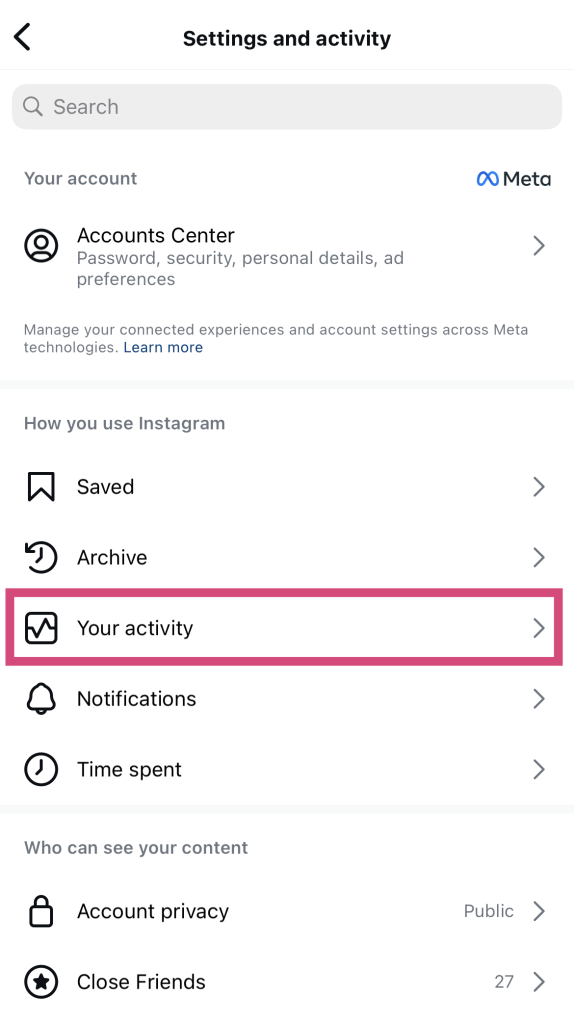
5. Desplácese hasta la parte inferior y haga clic en Descargar su información. Se abrirá el Centro de Metacuentas.
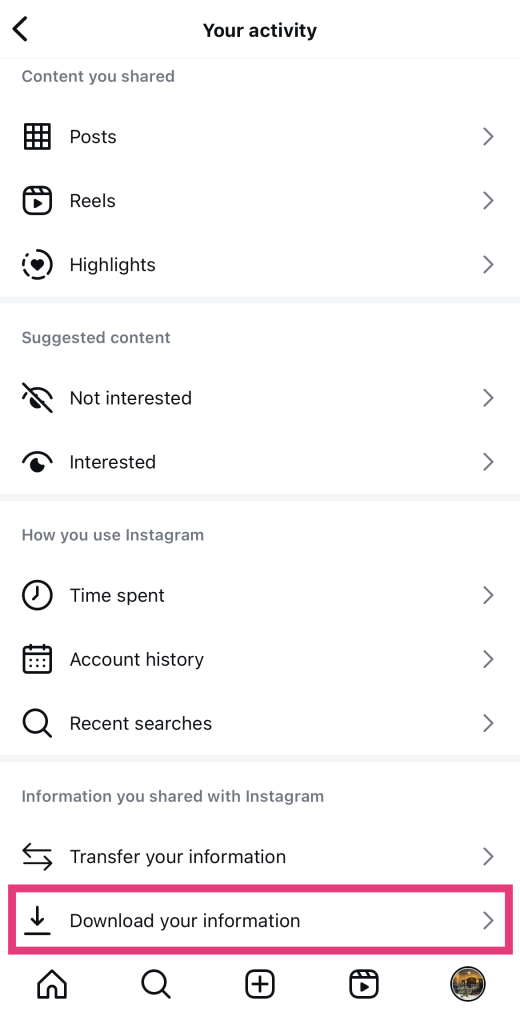
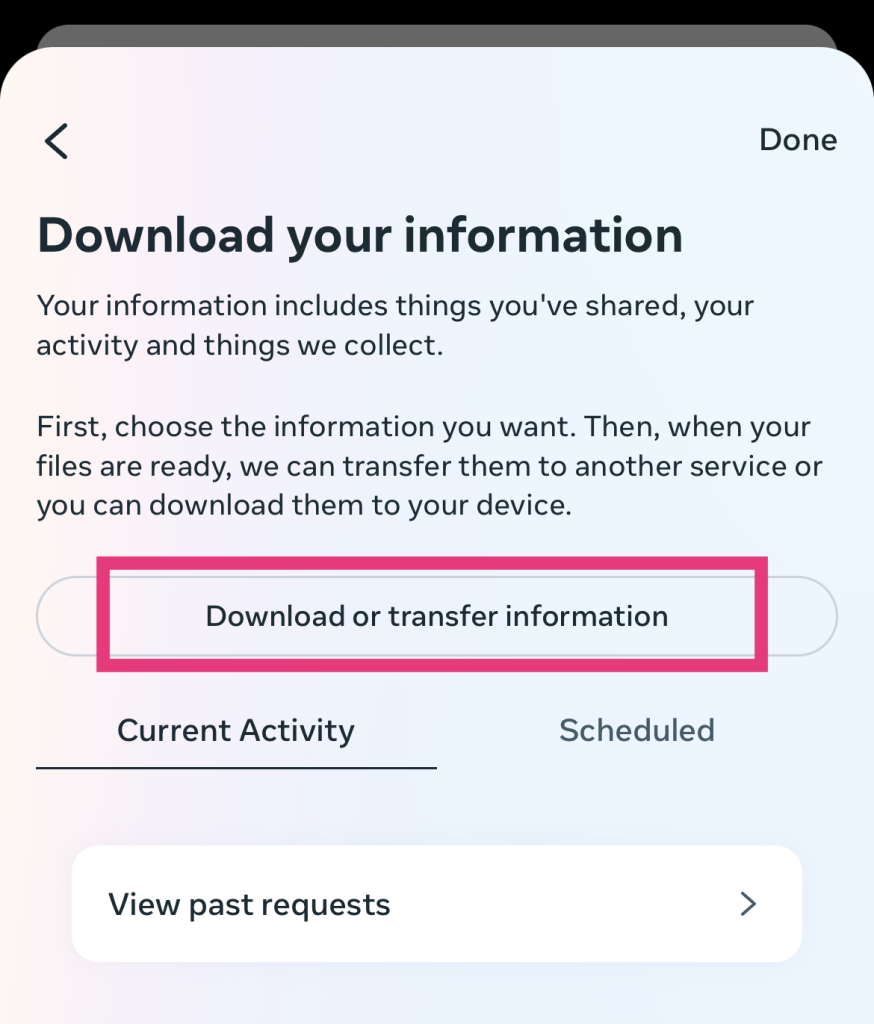
6. Pulse Descargar o transferir información.
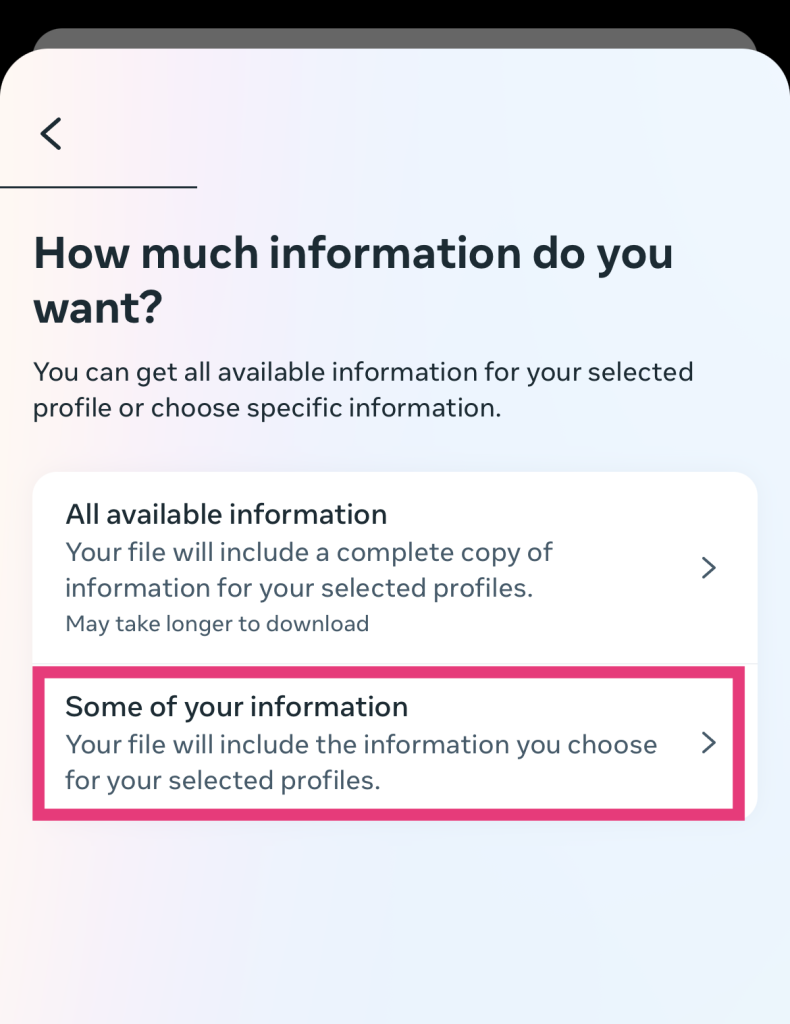
7. Como solo quieres recuperar tus mensajes, selecciona «Parte de tu información».
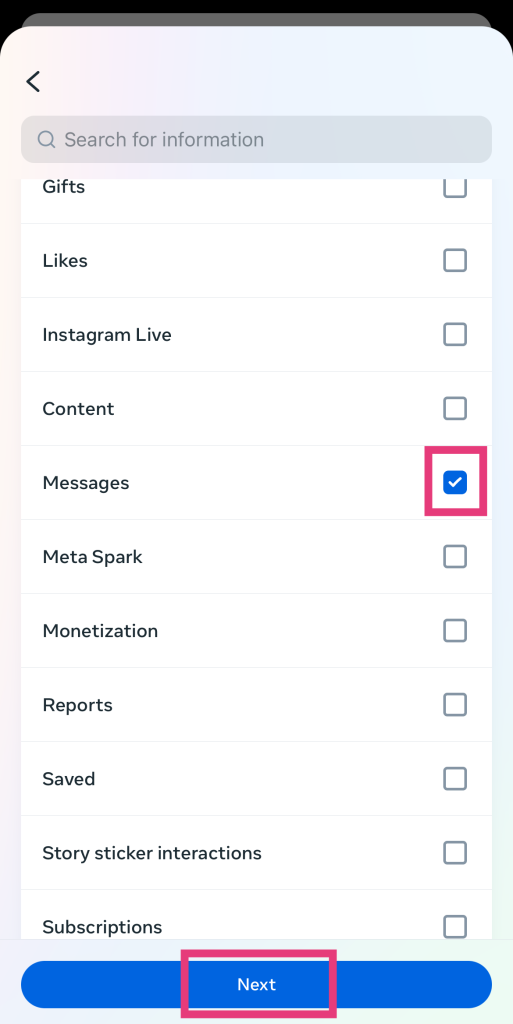
8. Marca la casilla situada junto a «Mensajes». A continuación, pulsa «Siguiente».
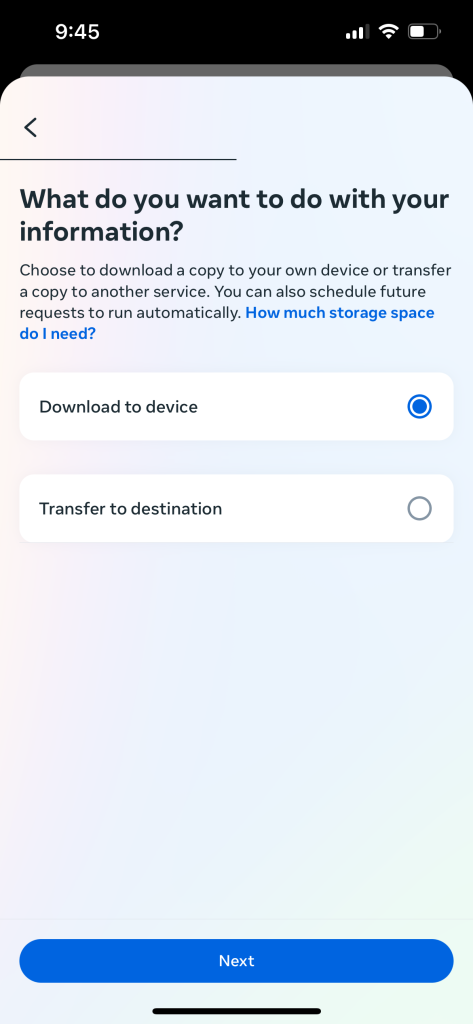
9. Asegúrate de seleccionar «Descargar en el dispositivo». A continuación, pulsa «Siguiente».
10. Pulse Crear archivos.
Ahora, solo tienes que esperar a que la descarga esté lista. Instagram te Instagram cuando los datos estén disponibles, ya sea a través de la aplicación o por correo electrónico. Tendrás cuatro días para descargar los datos.
Consejo profesional: Descarga los datos en un ordenador de sobremesa. Es mucho más fácil asimilar los datos si se ven en una pantalla más grande.
Ten en cuenta que, si eliminaste los mensajes hace meses, es posible que no se incluyan en la descarga de datos. Instagram solo Instagram los elementos eliminados en sus servidores durante un breve periodo de tiempo. Por lo tanto, si quieres recuperar Instagram de Instagram mediante este método, lo mejor es que lo hagas lo antes posible.
2. Encontrar viejos DMs Instagram en Android a través de su historial de notificaciones.
¿Estás intentando recuperar mensajes directos antiguos de tu móvil Android? ¡Estás de suerte! Hay una forma ingeniosa de ver mensajes antiguos —sí, incluso los que has borrado— en tu dispositivo Android. ¿Cómo? ¡A través del historial de notificaciones, por supuesto! Este método es perfecto si habías activado las notificaciones de Instagram recibir los mensajes que has borrado.
¿Estás listo para rebuscar entre las notificaciones antiguas y encontrar los mensajes de Instagram que eliminaste? A continuación te explicamos cómo recuperar mensajes de texto eliminados en Instagram en unos sencillos pasos:
1. En tu dispositivo Android, abre «Ajustes».
2. Pulse Notificaciones.
3. Desplácese hacia abajo y haga clic en Configuración avanzada.
4. Seleccione Historial de notificaciones.
5. BuscaInstagramy abre el menú desplegable. Allí verás todos los mensajes que has recibido en Instagram los que has recibido notificaciones.
En el historial de notificaciones de Android, podrás ver los mensajes de alguien incluso después de que esa persona los haya borrado. Sin embargo, ten en cuenta que solo podrás ver los mensajes directos que te hayan enviado otras personas. Aquí no encontrarás los mensajes que tú hayas enviado a otros.
Ten en cuenta también que este truco sólo funciona para aquellos con Android 11 y superior.
3. Cómo recuperar mensajes borrados Instagram través de Facebook
¿Sabías que las empresas y las marcas pueden vincular la función Instagram con su página de Facebook? Al hacerlo, pueden utilizar Facebook para acceder a sus Instagram y responderlos. A veces, incluso pueden recuperar mensajes directos que hayan borrado de Instagram que aún no se hayan transferido al servidor de Facebook.
Si tienes una cuenta empresarial en Instagram a Facebook, es posible que puedas recuperar tus mensajes eliminados. A continuación te explicamos, paso a paso, cómo recuperar Instagram eliminados Instagram a través de Facebook:
1. En tu ordenador, entra en la página web de Facebook.
2. Dirígete a tu bandeja de entrada de Facebook.
3. En la parte izquierda de tu bandeja de entrada, pulsa el icono de Instagram ».
Si tienes suerte, quizá aún encuentres allí algunos de tus mensajes directos borrados. Pero más vale que te des prisa. Los servidores de Meta acabarán por ponerse al día y, algún día, también eliminarán tus mensajes directos antiguos de Facebook.
4. Pide a la otra persona que comparta los mensajes contigo
Si cancelas el envío de un mensaje desde un chat, este desaparecerá tanto para ti como para la persona a la que se lo envías. Sin embargo, si borras un chat completo con alguien de tu bandeja de entrada, seguirá apareciendo en la bandeja de entrada de la otra persona. Solo desaparecerá de tu lado.
Así que, si estás deseando recuperar esos mensajes antiguos, puedes pedirle ayuda a la otra persona. Es cierto que puede resultar un poco embarazoso, sobre todo si borraste el chat en un momento de enfado o de fuerte emoción. Pero, al final, merecerá la pena cuando consigas lo que quieres: echar un vistazo a tus antiguos mensajes privados.
La persona con la que estabas chateando puede hacer fácilmente una captura de pantalla y reenviarte esos mensajes. De esa forma, podrás tener una copia de tus conversaciones anteriores.

5. Cómo recuperar mensajes borrados de IG a través de aplicaciones de recuperación de datos de terceros
Por último, puedes utilizar aplicaciones de terceros para recuperar tus mensajes antiguos que hayas borrado. ¿Quieres saber exactamente cómo recuperar mensajes borrados en Instagram con estas aplicaciones? Así es como suele funcionar.
Cuando borras mensajes en Instagram, estos no desaparecen al instante de tu dispositivo. Es cierto que ya no verás los mensajes directos en la aplicación, pero seguirán almacenados en tu dispositivo. Ahí es donde entran en juego las aplicaciones de recuperación de datos de terceros y hacen su trabajo.
Estas pequeñas y astutas aplicaciones pueden acceder a tus mensajes directos antiguos analizando los archivos de caché antiguos de tu dispositivo. Estos archivos organizan tus mensajes antiguos en carpetas separadas y, sí, también guardan un registro de Instagram eliminados. La aplicación de recuperación de terceros revisa esos archivos y recupera esos mensajes por ti.
Recuerda utilizar únicamente aplicaciones fiables y de confianza para recuperar tus mensajes antiguos. Hay muchos estafadores que crean aplicaciones falsas para intentar robar tus datos.
Desconfía siempre de estas estafas sospechosas. Además, infórmate bien antes de utilizar aplicaciones que te ayuden a recuperar mensajes antiguos. Te recomendamos que recurras a estas aplicaciones de terceros solo como último recurso cuando necesites recuperar mensajes directos borrados, para evitar Instagram .
Preguntas frecuentes
¿Se pueden hacer copias de seguridad de los mensajes de Instagram ?
Sí, puedes hacer una copia de seguridad de tus mensajes directos descargándolos periódicamente mediante la función de descarga de datos Instagram, tal y como hemos explicado anteriormente. Es una forma excelente de asegurarte de que tienes una copia de todos tus mensajes de la plataforma. Te recomendamos que lo hagas al menos una vez al mes.
¿Se borran permanentemente los mensajes no enviados en Instagram ?
Sí, cuando se retira un mensaje en Instagram, este se elimina de forma definitiva. Desaparece del chat y la aplicación no te da la posibilidad de «deshacer» la eliminación. Ten en cuenta que, al retirar mensajes individuales, estos se eliminan tanto para el remitente como para el destinatario.
¿Cómo denuncio un mensaje borrado en Instagram?
Lamentablemente, si alguien borra un mensaje que querías denunciar, ya no podrás denunciar ese mensaje concreto. Sin embargo, siempre puedes denunciar directamente a ese usuario ante Instagram cualquier mensaje ofensivo que envíe. Si previamente habías hecho una captura de pantalla de los mensajes ofensivos que te envió, incluye las imágenes en tu denuncia.
¿Puedo ver Instagram mensajes que desaparecen?
Podrás ver los mensajes que desaparecen enviados en el modo «Vanish» mientras estés en ese modo. Pero en cuanto salgas del modo «Vanish», todo el historial de chat de los mensajes que desaparecen se borrará para siempre. También desaparecerá de los servidores Instagram, por lo que no podrás recuperarlo con la función de descarga de datos.
¿Borrar un chat en Instagram lo borra para todo el mundo?
Según Instagram, si borras una conversación completa, esta se elimina de tu bandeja de entrada, pero no de la de la otra persona. Tus mensajes seguirán apareciendo en su dispositivo. Además, la otra persona no sabrá que has borrado el historial de chat que tenías con ella. Sin embargo, si retiras mensajes individuales de un chat, estos también se eliminan de la bandeja de entrada de la otra persona.
Recupera tus DMs antiguos para seguir conectando con los demás en IG
Puede que todo parezca perdido después de borrar mensajes antiguos en Instagram. Pero no te preocupes. Con nuestros cinco consejos anteriores, podrás recuperar tus mensajes directos antiguos. ¡Uf!
Recuperar mensajes antiguos te permite retomar conversaciones con personas con las que, de otro modo, la relación podría haber quedado en suspenso indefinidamente. Así que, en cierto modo, saber cómo recuperar Instagram borrados Instagram te ayuda a conectar con otros Instagram .
Dicho esto, no te quedes estancado en conectar con otras personas basándote en mensajes antiguos. Da un paso adelante y haz crecer tu Instagram también de otras formas, por ejemplo, con un servicio de crecimiento de confianza como Path Social.
Path Social tu contenido entre tu público objetivo clave. Esto puede ayudarte a atraer a muchísimos seguidores nuevos a los que les encantan tus publicaciones y con los que interactúas. Esas son las claves fundamentales para triunfar en Instagram. Así que, si quieres aumentar tus índices de interacción y ampliar tu Instagram , ¡colabora con nuestro equipo hoy mismo!





¿Buscas el mejor servicio de promoción de Instagram ?
¡Consigue una interacción auténtica, un alcance específico y un crecimiento duradero con nuestra estrategia diseñada por expertos!
Pruebe nuestro servicio de promoción de Instagram




