


Comment créer un compte professionnel sur Instagram: Un guide complet

Instagram | 4 septembre 2025
Créer une page Instagram pour votre entreprise est une première étape logique pour assurer le succès de votre marque sur Internet. Mais une simple page ne suffira pas. Seuls les profils professionnels ont accès à des fonctionnalités telles que les publicités, les indicateurs de performance des publications, les outils d'achat, et bien plus encore. Si vous ne savez pas comment créer un compte professionnel sur Instagram, vous passerez à côté d'outils professionnels très utiles.
Voulez-vous tirer le meilleur parti de ce que Instagram peut offrir aux propriétaires d'entreprises ? Lisez ce guide pour savoir comment passer d'une page personnelle à un compte professionnel.

Qu'est-ce qu'un compte professionnel sur Instagram?
Si vous débutez dans la gestion des comptes de marque sur les réseaux sociaux, vous vous demandez sans doute : « Qu’est-ce qu’un compte professionnel sur Instagram? »
La réponse est très simple : un compte professionnel est un type de profil spécialement conçu pour les entreprises et les créateurs. Tout le monde peut passer à un compte professionnel et se présenter comme l'un de ces deux types d'utilisateurs. Vous pourrez alors utiliser des outils uniques et exclusifs, conçus pour vous aider à développer votre marque avec succès sur Instagram.
Notez toutefois que si vous passez d’une page personnelle à un compte professionnel, votre compte sera soumis à certaines restrictions. Par exemple, vous ne pourrez pas configurer votre compte en mode privé. La création d’une page professionnelle vous permet également de lier votre profil Instagram à une page Facebook. Une fois cette opération effectuée, vous ne pourrez plus publier simultanément du contenu Instagram sur aucune autre page Facebook.
Comment créer un compte professionnel sur Instagram en quelques étapes simples
Vous souhaitez créer une page professionnelle pour votre marque sur Instagram? Nous sommes là pour vous aider. C'est très simple, et nous vous guiderons pas à pas tout au long du processus. Notez simplement que pour créer une page professionnelle, vous devez d'abord disposer d'un profil personnel. Vous pourrez ensuite le transformer facilement en compte professionnel.
Êtes-vous prêt à vous lancer ? Voici comment créer un compte professionnel Instagram à partir d'une page personnelle :
1. Ouvrez l'application Instagram et accédez à votre profil.
2. Cliquez sur les trois lignes horizontales en haut à droite de votre écran pour ouvrir le menu des paramètres.
3. Faites défiler la page vers le bas jusqu’à ce que vous voyiez la section « Pour les professionnels ». Cliquez ensuite sur « Type de compte et outils ».
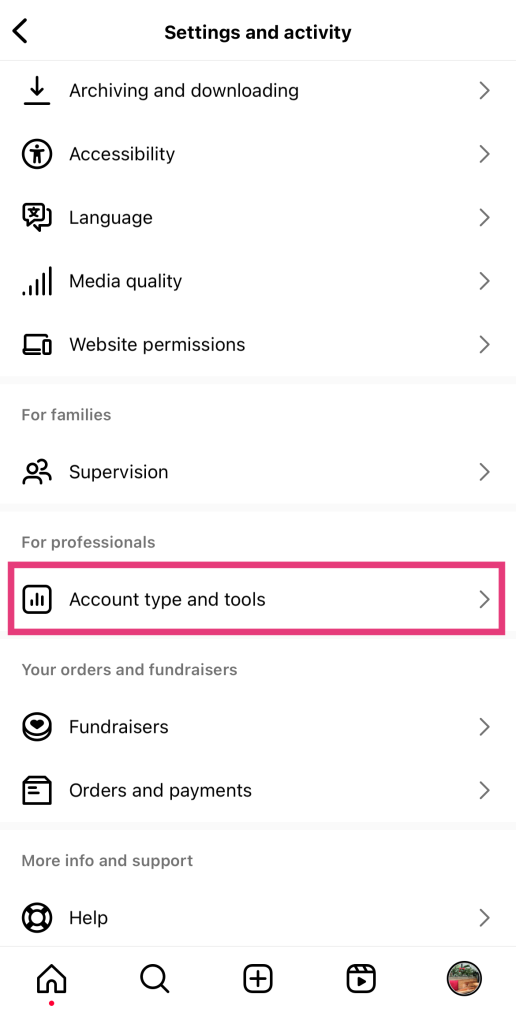
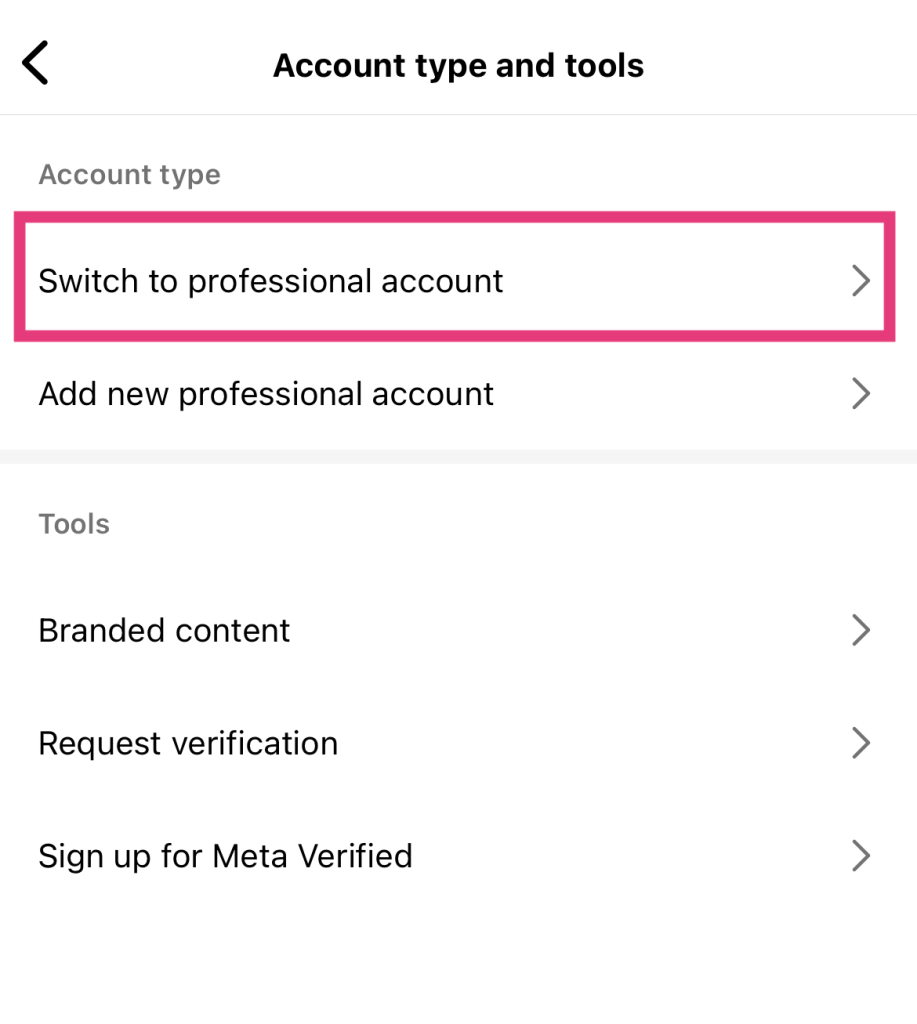
4. Sélectionnez Passer au compte professionnel. Vous pouvez également choisir d'ajouter un compte professionnel ici si vous souhaitez gérer plusieurs pages professionnelles.
5. Continuez à faire défiler vers la gauche pour lire tous les rappels et toutes les fonctionnalités liés au passage à un compte professionnel. Une fois arrivé à la fin, cliquez sur « Continuer ».
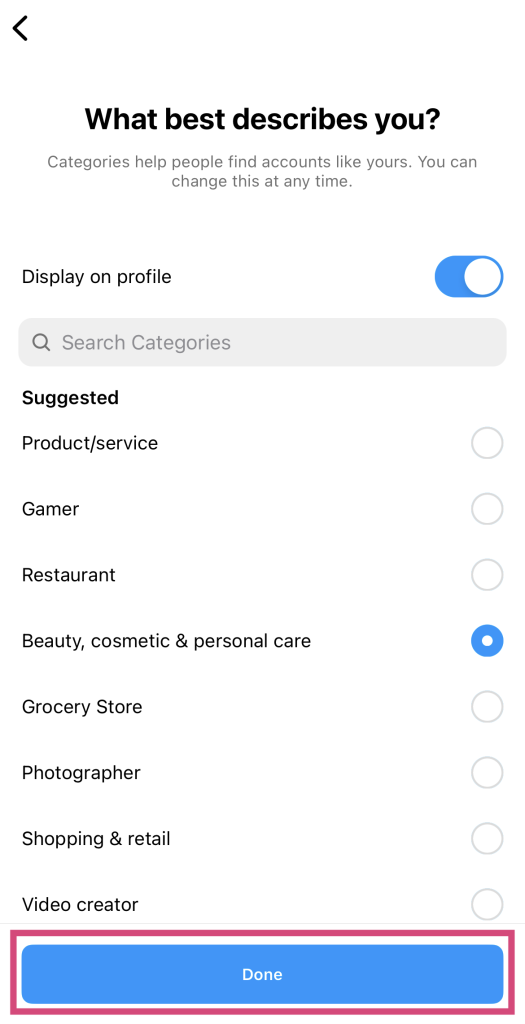
6. Choisissez la catégorie correspondant à votre activité parmi les options proposées. Vous pouvez également utiliser la barre de recherche pour trouver des catégories plus spécifiques. Une fois que vous êtes satisfait de votre choix, cliquez sur « Terminé ».
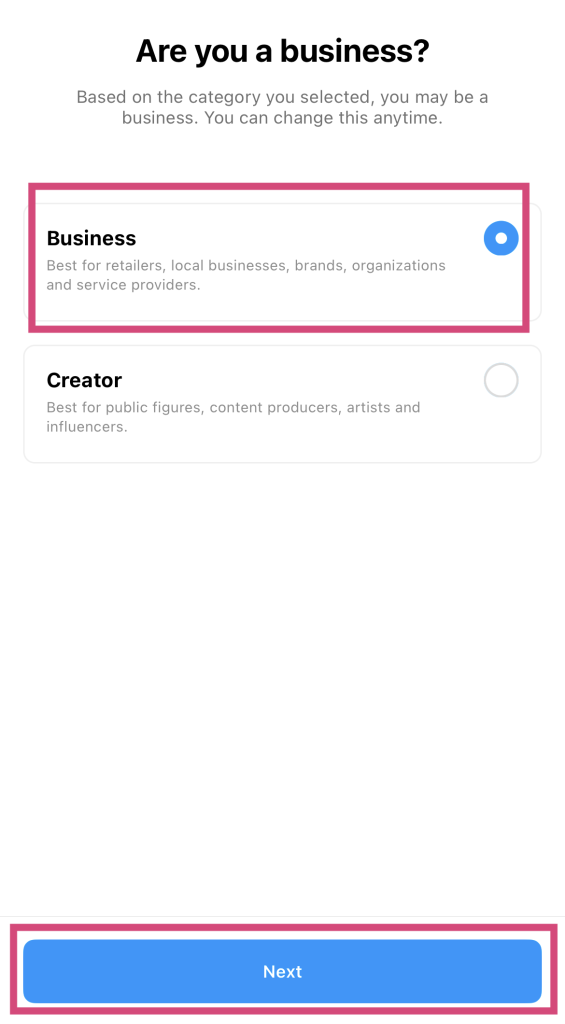
7. Sélectionnez le type de compte professionnel souhaité : « Entreprise » ou « Créateur ». Instagram vous proposera probablement une option en fonction de la catégorie que vous avez choisie précédemment. Dans tous les cas, veillez à sélectionner « Entreprise », puis cliquez sur « Terminé ».
8. Saisissez vos coordonnées, telles que votre adresse e-mail professionnelle, votre numéro de téléphone, votre numéro WhatsApp et votre adresse postale. Appuyez ensuite sur « Suivant ».
9. Si vous le souhaitez, vous pouvez associer la page Facebook de votre marque à votre nouveau compte professionnel. Vous pouvez également cliquer sur « Passer » pour effectuer cette opération plus tard.
Et voilà ! Vous disposez désormais d'un compte professionnel et d'un tableau de bord professionnel pour vous aider à développer votre marque.
Les avantages d'un compte professionnel Instagram par rapport aux pages personnelles
Le fait de conserver un compte personnel Instagram pour votre marque n'entraîne aucune conséquence négative. Cependant, vous passerez malheureusement à côté de nombreuses fonctionnalités si vous optez pour cette solution. Il existe en effet de nombreux outils professionnels très utiles, réservés exclusivement aux comptes professionnels, tels que les profils d'entreprise, dont les pages personnelles ne bénéficient pas.
Quels sont donc les avantages d'un compte professionnel Instagram par rapport à un profil personnel pour votre marque ? Voici quelques-uns des avantages dont vous et votre marque pourrez bénéficier si vous optez pour cette solution :
1. Instagram Shopping pour vendre des produits directement à partir d'IG
En tant que compte professionnel, vous pouvez créer une boutique « Instagram », c'est-à-dire une vitrine en ligne intégrée à votre page. Dans cette boutique, les utilisateurs peuvent parcourir vos produits et les acheter directement depuis Instagram.
Lorsque vous disposez d’une boutique Instagram , vous pouvez créer des pages de présentation individuelles pour chacun de vos produits. Présentez toutes les caractéristiques et les informations clés de vos produits, ainsi que vos plus belles photos. Vous pouvez même regrouper vos produits par collection pour faciliter la navigation. Ainsi, les visiteurs de votre boutique peuvent les acheter sans jamais quitter l’application !
Instagram La fonctionnalité « Shopping » permet également aux utilisateurs de taguer vos produits dans leurs photos s’ils créent du contenu les mettant en avant. C’est génial pour ceux qui aiment créer du contenu généré par les utilisateurs afin de mettre en avant les produits de leurs marques préférées. De plus, cela vous offre une visibilité supplémentaire auprès d’un public plus large — et quelle entreprise ne souhaiterait pas cela ?

2. La possibilité de diffuser des publicités sur Instagram pour promouvoir votre entreprise
Un autre avantage du compte professionnel est la possibilité de diffuser des publicités. Sur Instagram, les marques se livrent concurrence pour attirer l'attention et gagner le soutien de leur public cible. Mais comme la concurrence est féroce, de nombreuses entreprises doivent payer pour être visibles. Cela implique d'investir dans des publicités Instagram afin de promouvoir votre activité et d'atteindre les bonnes personnes sur la plateforme.
Les annonces vous permettent de diffuser votre contenu auprès d'un public cible spécifique. Vous augmentez ainsi votre portée globale tout en vous assurant que vos messages sont vus par des personnes susceptibles d'acheter auprès de votre entreprise.
Les publicités sur les réseaux sociaux restent aujourd'hui encore extrêmement efficaces pour promouvoir les entreprises en ligne. Selon Survey Monkey, 48 % des personnes ont déjà acheté un produit après avoir vu une publicité le concernant sur les réseaux sociaux. Ainsi, si vous souhaitez augmenter vos ventes, investir dans la publicité est une excellente stratégie.
Si vous souhaitez rivaliser avec vos concurrents sur les réseaux sociaux, vous devez diffuser des publicités. De plus, Statista prévoit que les dépenses publicitaires mondiales sur les réseaux sociaux augmenteront de 47,66 % au cours des cinq prochaines années. Cela signifie que la publicité en ligne est là pour durer et qu’elle est incontournable pour les entreprises qui souhaitent se faire connaître.
3. Les informations sur les messages et l'audience pour améliorer le contenu au fil du temps
Disposer d'un compte professionnel vous donne accès aux statistiques d'Instagram . Vous pouvez ainsi consulter vos indicateurs de performance au niveau des pages et des publications. Vous avez ainsi accès à des données telles que votre portée, l'engagement, les interactions, les taux de visionnage des vidéos, et bien plus encore. C'est formidable de pouvoir identifier vos points forts et vos points faibles et d'adapter votre stratégie de contenu en conséquence.
Toutefois, outre les indicateurs de performance, vous pouvez également consulter des informations sur votre audience, notamment sur vos abonnés. Le tableau de bord « Insights » d’ Instagram vous permet de visualiser les tendances de croissance du nombre d’abonnés ainsi que des données sur l’âge, le sexe et la localisation de votre communauté. Vous pouvez même découvrir à quel moment de la journée vos abonnés sont les plus actifs.
Ces informations peuvent vous aider à déterminer si vous atteignez votre public cible. Elles vous donnent également une idée du moment le plus propice pour télécharger du contenu.
4. Boutons de contact pour permettre aux partenaires potentiels de vous joindre plus rapidement
Les pages professionnelles peuvent également choisir d'ajouter un bouton « Contact » sur leur profil. Lorsque des clients potentiels cliquent sur ce bouton, ils accèdent directement à votre numéro de téléphone ou à votre adresse e-mail. Il leur suffit ainsi d'un simple clic pour vous contacter.
Cette facilité de communication peut contribuer à stimuler les demandes de renseignements et les conversions pour votre marque. Comme il est facile de vous contacter, cela peut déboucher sur davantage d’opportunités de vente ou de demandes de collaboration. C’est aussi une façon d’affirmer votre engagement : cela montre aux gens que vous êtes toujours prêt à les servir.

5. Instagram Catégories de comptes professionnels dans votre biographie
Comme vous l'avez vu dans notre guide sur la création d'une page professionnelle, chaque compte professionnel peut afficher une catégorie spécifique. Ces catégories professionnelles apparaissent en haut de votre profil, à côté de votre biographie « Instagram ». Ainsi, les internautes sauront immédiatement quel type d'entreprise vous êtes et quels services vous proposez. C'est un excellent moyen de faire une bonne première impression auprès de clients potentiels !
La plateforme propose une liste exhaustive de catégories d'activités parmi lesquelles les marques peuvent choisir. Instagram Les catégories de comptes professionnels couvrent des secteurs courants tels que la beauté, l'art, la mode, la restauration, les agences de marketing, etc. Mais elles peuvent également être très spécifiques. Les studios de décoration d'intérieur, les zoos pour enfants, les équipes sportives, les services d'organisation de mariages et d'autres entreprises de niche y trouvent également leur place.
6. Liens "Swipe-Up" sur Instagram Stories
Enfin, les profils professionnels peuvent publier des liens cliquables grâce à la fonctionnalité « glisser vers le haut » disponible dans les Stories d’ Instagram . C’est un moyen très simple de générer du trafic vers les sites web de votre marque, vos articles de blog et d’autres pages de destination importantes.
Une façon de tirer pleinement parti de cette fonctionnalité consiste à l'utiliser pour stimuler les ventes sur votre site e-commerce. Il vous suffit de créer une Story captivante mettant en avant les produits de votre marque. Ajoutez ensuite le lien « glisser vers le haut ». Rédigez un petit texte superposé invitant vos abonnés à glisser vers le haut pour en savoir plus sur le produit. Et hop ! D'un simple glissement, vous les redirigez vers votre site web !
Rendez vos stories encore plus captivantes et intéressantes pour inciter les internautes à faire glisser vers le haut sur vos liens. Ajoutez des stickers sympas, racontez des anecdotes captivantes et utilisez des hashtags pertinents pour augmenter votre audience et le nombre de vues.
Comment revenir à une page personnelle à partir d'un profil professionnel ?
Même si le passage à un compte professionnel est extrêmement utile pour les marques, il ne convient pas à tout le monde. Vous cessez de gérer une marque ou vous préférez peut-être conserver un compte personnel en tant qu’influenceur ? Ne vous inquiétez pas : vous pouvez à tout moment repasser d’un compte professionnel à un compte personnel. Heureusement, c’est encore plus simple que d’apprendre à créer un compte professionnel sur Instagram . Voici comment procéder en quelques étapes faciles :
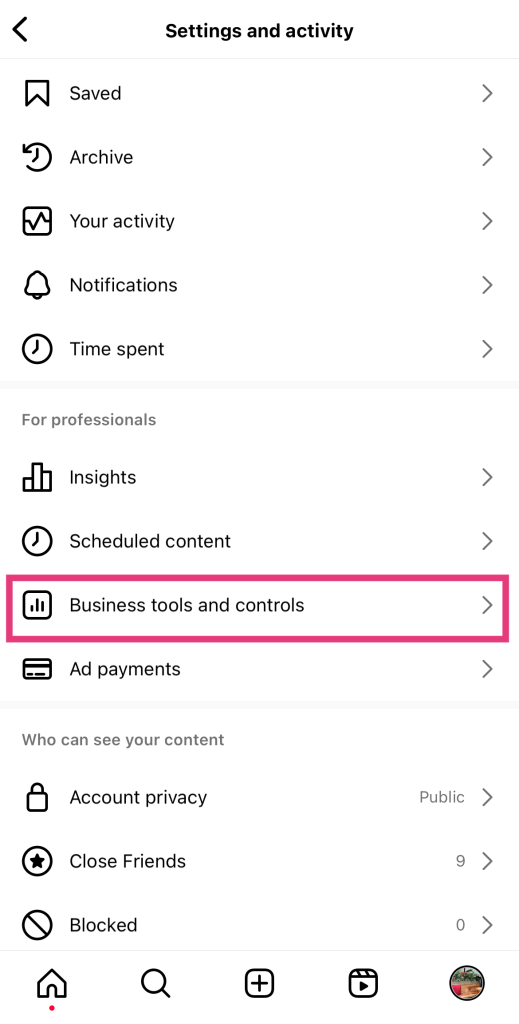
1. Allez dans le profil de votre compte professionnel et cliquez sur les trois lignes horizontales pour ouvrir le menu des paramètres.
2. Dans l'onglet « Outils professionnels », cliquez sur « Outils et contrôles professionnels ».
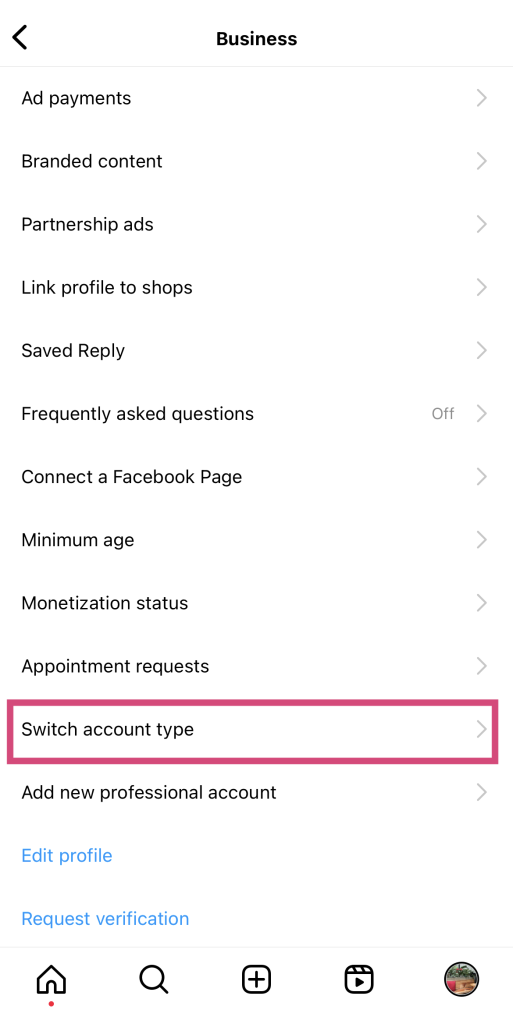
3. Sélectionnez le type de compte Switch.
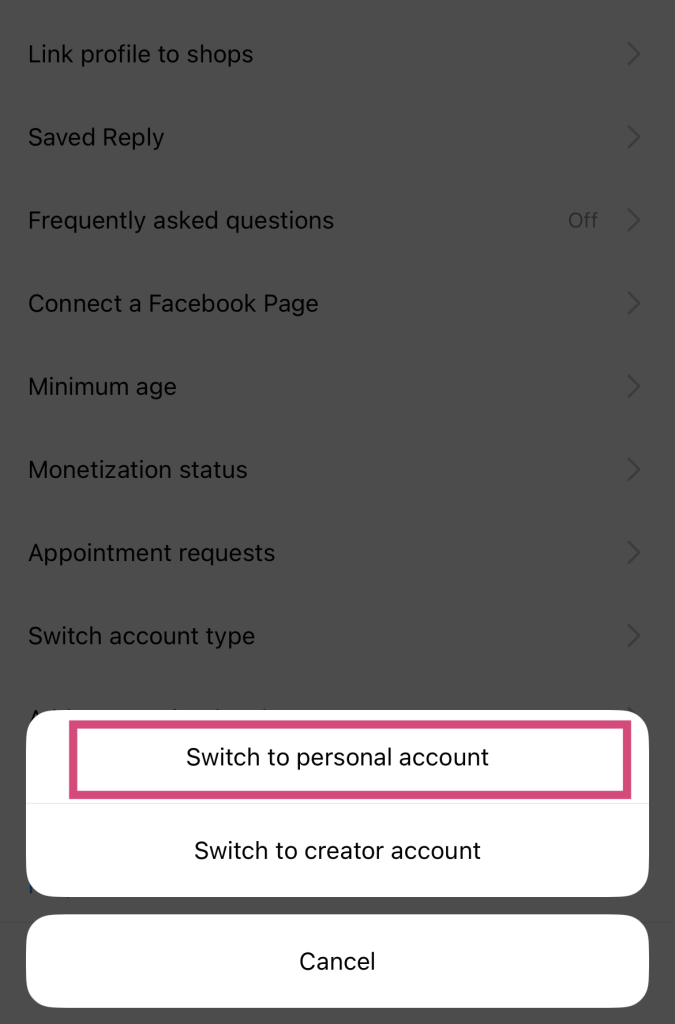
4. Sélectionnez « Passer à un compte personnel ». Vous pouvez également passer à un compte de créateur en suivant cette procédure.
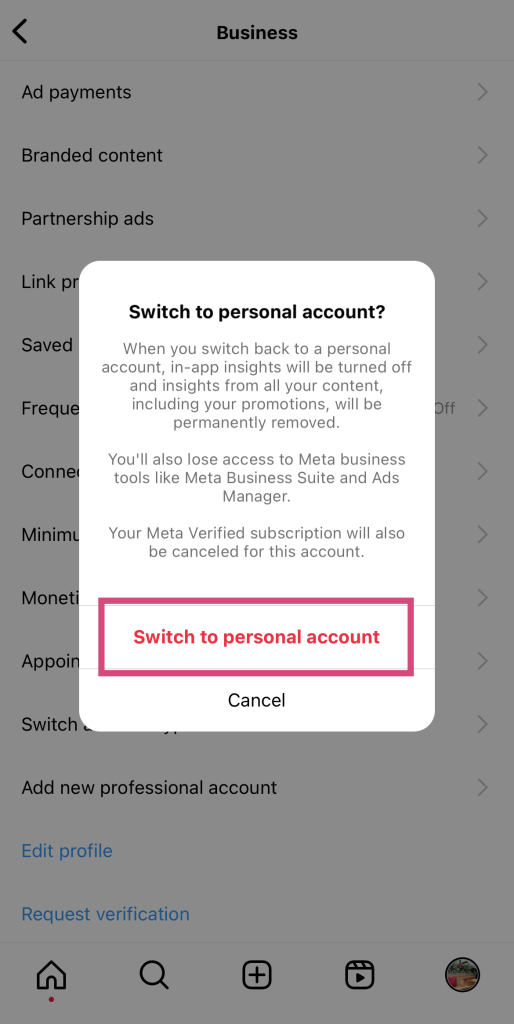
5. Lisez les rappels de Instagram concernant les implications du retour à un compte personnel. Si vous êtes sûr de votre décision, cliquez sur « Passer à un compte personnel » pour valider le changement.
Instagram pourrait mettre quelques secondes ou quelques minutes pour rétablir votre compte et le transformer à nouveau en profil personnel. Une fois cette opération terminée, vous serez redirigé vers le menu des paramètres. À ce stade, vous êtes revenu avec succès à un profil personnel.
Passez à un compte Biz sur Instagram dès aujourd'hui !
Tirez pleinement parti des outils Instagram spécialement conçus pour répondre aux besoins des marques en passant dès aujourd’hui à un profil professionnel. Quelques étapes suffisent pour accéder à des outils tels qu’ Instagram Shopping, les publicités, les liens « swipe-up » et bien d’autres encore.
Après avoir appris à créer un compte professionnel sur Instagram, consacrez toute votre énergie à promouvoir votre contenu. Pour ce faire, vous pouvez utiliser les outils professionnels mis à votre disposition. Mais si vous avez besoin d'aide supplémentaire pour développer votre page, pensez à faire appel à Path Social.
Notre équipe exploite la puissance de l'IA pour promouvoir votre page auprès de votre public cible. Ainsi, votre contenu touche les personnes avec lesquelles il trouvera le plus d'écho. Davantage de personnes découvrent le profil de votre entreprise, ce qui signifie que davantage d'utilisateurs suivent votre marque. Gagnez plus d'abonnés et développez votre communauté grâce aux stratégies promotionnelles éprouvées d'Path Social!





Prêt à booster vos followers Instagram ?
Commencez à gagner des adeptes authentiques et à augmenter l'engagement dès aujourd'hui !
Augmenter le nombre de followers Instagram




