Le pouvoir des balises : Pourquoi taguer quelqu'un sur Instagram?


Réponse rapide
Mentionner quelqu’un sur Instagram un excellent moyen d’attirer son attention, d’augmenter la portée de votre publication et d’entrer en contact avec son public. C’est idéal pour citer ses sources, collaborer ou simplement interagir avec votre communauté. De plus, cela renforce votre visibilité et vous aide à nouer des relations avec des utilisateurs partageant les mêmes centres d’intérêt.
Cliquez ici pour
Essayez Path Social maintenant
Pourquoi marquer quelqu'un sur Instagram? Le marquage est-il différent de la mention ? Quelle est la meilleure façon d'utiliser le marquage sur Instagram pour atteindre un public plus large ? Comment étiqueter les messages sur Instagram ? Voici votre guide complet du marquage sur Instagram afin que vous ne manquiez jamais une occasion d'attirer l'attention sur vos posts !

Quelle est la différence entre le marquage et la mention ?
Que signifie « taguer » quelqu’un sur instagram? Et en quoi cela diffère-t-il d’une « mention » ? En réalité, la plupart des gens utilisent ces deux termes de manière interchangeable, car ils fonctionnent de la même façon. Lorsque vous taguez quelqu’un dans vos publications sur Instagram ou que vous le mentionnez dans une légende ou un commentaire, votre publication touche un public plus large, notamment les abonnés des comptes tagués ou mentionnés. Pour les marques et les entreprises, le taggage et la mention constituent des moyens simples d’attirer davantage d’abonnés sur Instagram. Voici les principales différences entre la mention et le taggage sur Instagram.
Que se passe-t-il lorsque vous taguez quelqu'un sur Instagram?
Le marquage d'un compte sur Instagram est une fonction disponible sur la photo que vous publiez. Elle est généralement utilisée pour les photos représentant des groupes de personnes ou si la photo que vous publiez est celle de quelqu'un d'autre ou pour quelqu'un d'autre. Les tags identifient les personnes présentes sur l'image.
Seule la personne qui a partagé la photo ou la vidéo peut taguer. N'importe qui peut mentionner d'autres utilisateurs dans la section des commentaires d'une publication. Pour Instagram publiques, les Instagram tagués sont visibles par tout le monde.
Vous vous demandez s'il existe un moyen de consulter les publications Instagram privé? Eh bien non, car les comptes tagués ne sont visibles que par les abonnés de la personne qui a partagé la photo ou la vidéo, ainsi que par les abonnés des comptes tagués. Cette personne peut également limiter l'affichage de la publication taguée sur le profil de la personne taguée. Les fonctionnalités d'archivage et de désarchivage Instagram ont également une incidence sur la visibilité, car les abonnés ne peuvent pas voir les images archivées.
Qu'est-ce que la mention et comment la faire ?
Par ailleurs, pour mentionner quelqu’un, il faut taper le symbole @ suivi du Instagram de la personne. Utilisez Instagram dans la légende ou dans les commentaires. Si vous vous demandez ce qu’est un Instagram , sachez qu’il s’agit simplement d’une autre façon de désigner votre Instagram .
Le marquage et les mentions peuvent tous deux faire l'objet de restrictions de la part de la personne que vous marquez ou mentionnez. L'auteur d'une publication peut limiter les mentions dans les commentaires. Il peut notamment décider si la publication est visible ou non par la personne mentionnée et/ou ses abonnés.

Pourquoi étiqueter quelqu'un sur Instagram?
Commençons par répondre à la question suivante : « Pourquoi taguer quelqu’un sur Instagram? » Voici les raisons :
Si vous avez créé une Instagram , les balises produit fournissent davantage d'informations sur les produits concernés. Cela facilite les achats des clients. Apprendre à promouvoir vos produits ou votre entreprise sur Instagram un autre moyen de stimuler votre croissance.
Comme mentionné précédemment, l'utilisation des tags sur Instagram la visibilité de votre publication. Encouragez les utilisateurs à partager votre contenu sur Instagram pour élargir votre audience et stimuler l'engagement. Les tags constituent un outil qui vous aide à atteindre cet objectif. Vous pouvez également apprendre à mettre en avant une Instagram .
Le fait de taguer sur Instagram favorise les conversations dans la section des commentaires. Savoir qui taguer sur Instagram pour se faire remarquer est une compétence importante pour gagner plus de followers et de likes. Vous pouvez obtenir plus d'engagement sur un post tagué de la part des followers des personnes que vous avez marquées.
Le contenu étiqueté apparaît dans un onglet distinct du profil du compte Instagram étiqueté. Cet onglet sert essentiellement de galerie de contenu généré par les utilisateurs pour les entreprises.
Vous pouvez également utiliser une balise de lieu cliquable. Cela permet aux personnes qui effectuent une recherche sur Instagram pour ce lieu de vous découvrir. N'oubliez pas de marquer les lieux des événements auxquels vous participez.
Même si votre entreprise ne dispose pas de lieu physique, vous pouvez tout de même géolocaliser une zone géographique plus étendue. Cela est possible quel que soit l'endroit où vous vous trouvez, par exemple votre ville, voire des zones plus générales où vos produits sont en vente. Découvrez quel est le meilleur moment pour publier sur Instagram afin que vos publications géolocalisées bénéficient d'une visibilité optimale.
Instagram Les histoires prennent en charge à la fois les tags et les mentions. En apprenant à réafficher une histoire sur Instagram et en vous identifiant ou en identifiant votre entreprise, vous créez une communauté avec les personnes qui vous suivent.

Pourquoi étiqueter quelqu'un sur Instagram au lieu de le mentionner ?
Voyons maintenant pourquoi vous devriez étiqueter quelqu'un sur Instagram au lieu de le mentionner :
- Les comptes mentionnés reçoivent une notification dans leur fil d'activité. Les notifications du fil d'activité n'affichent toutefois que les 100 activités les plus récentes. Vous taguez un influenceur, une célébrité ou une entreprise ? N'oubliez pas que votre mention peut facilement se perdre parmi les centaines de notifications qu'ils reçoivent généralement.
- Les mentions, quant à elles, apparaissent dans une notification distincte. Par défaut, une photo ou une vidéo dans laquelle une personne est mentionnée s'affiche automatiquement sur le profil de cette personne. Les utilisateurs peuvent également choisir d'approuver et d'ajouter manuellement les publications dans lesquelles ils sont mentionnés. Dans tous les cas, vous pouvez être sûr que la personne mentionnée verra votre publication.
- Il faut limiter le nombre de mentions dans une légende afin qu'elle reste captivante et en lien avec le contenu. En revanche, vous pouvez ajouter plusieurs tags à une photo ou une vidéo sans que cela n'altère la qualité du contenu.
- Les mentions figurant dans la légende ou les commentaires d'une publication ne feront pas apparaître cette dernière sur le profil de la personne mentionnée. En fonction des paramètres de confidentialité de cette dernière, la mention peut être automatiquement visible par ses abonnés. Elle peut également n'être visible que lorsqu'elle répond à la mention.
- Avez-vous déjà entendu parler de l'achat Instagram ou vous a-t-on déjà recommandé cette pratique ? Acheter Instagram n'est pas un risque qui vaut la peine d'être pris. Il n'existe aucun site fiable permettant d'acheter Instagram . De plus, vous risquez d'exposer votre compte Instagram ainsi que ceux de vos abonnés à des bots ou à de faux comptes. Soyez vigilant, car cela peut nuire à votre crédibilité. En fin de compte, c'est un gaspillage d'argent et d'efforts. Investissez plutôt votre temps dans des activités plus productives pour stimuler la croissance et la visibilité de votre compte.
Si vous vous demandez : «Pourquoi je n'arrive pas à taguer quelqu'un sur Instagram?», cela peut être dû à vos paramètres de confidentialité ou à des restrictions liées à votre compte.
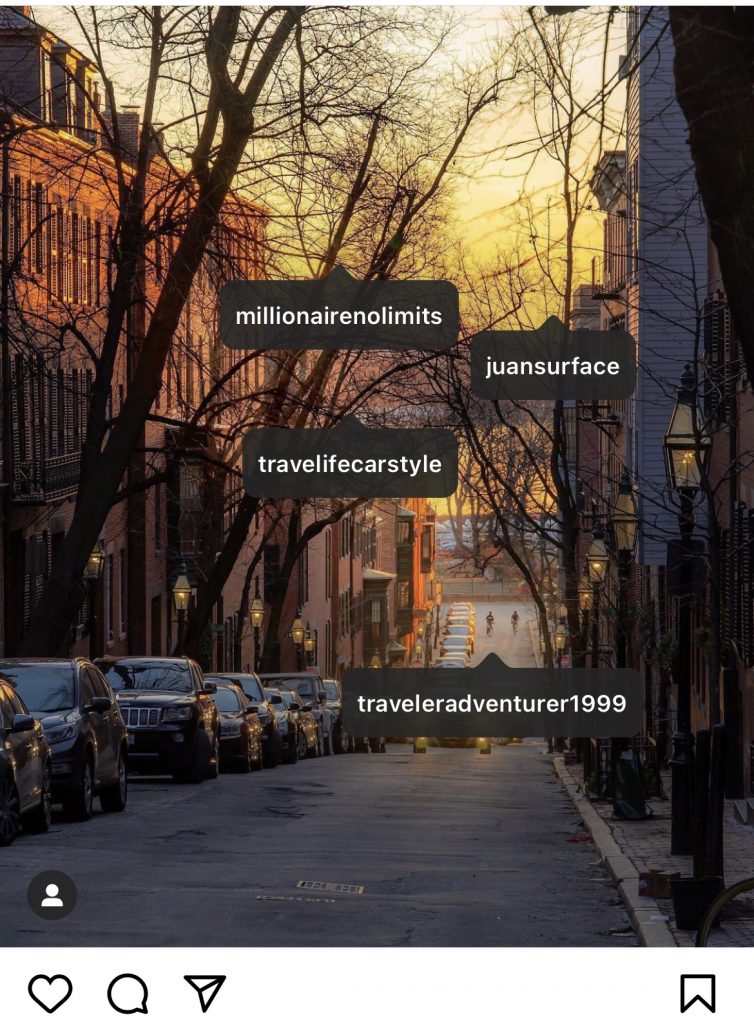
Meilleures pratiques pour le balisage sur Instagram: Ce qu'il faut faire et ce qu'il ne faut pas faire
Vous avez donc découvert pourquoi le marquage sur Instagram est important. Comment taguer sur instagram de manière efficace ? Nous allons vous présenter les principales choses à faire et à ne pas faire en matière de marquage sur Instagram afin de vous assurer que vous utilisez cette fonctionnalité de manière optimale.
Les bonnes pratiques en matière de balisage Instagram
- Mentionnez les comptes pertinents : veillez à ce que les mentions que vous utilisez soient en rapport avec votre contenu. Il est tout aussi important de bien vérifier les comptes que vous mentionnez. Il est en effet très facile de mentionner le mauvais compte. Comme de nombreux noms d'utilisateur se ressemblent, assurez-vous de mentionner le bon dans votre publication.
- Utilisez les balises de localisation : celles-ci peuvent améliorer la visibilité de vos Instagram . C'est particulièrement important pour les entreprises et les événements locaux. En indiquant votre localisation, vous aidez les utilisateurs qui recherchent du contenu lié à un lieu précis à trouver votre publication.
- Organisez vos tags : veillez à ce qu'ils soient faciles à lire. Choisissez également les bons hashtags. Enfin, évitez d'encombrer votre image avec des tags. Cela peut détourner l'attention de votre public cible et le rebuter.
- Soyez cohérent : adopter une stratégie de balisage cohérente vous aidera à optimiser la portée de votre contenu au fil du temps. En revanche, veillez à renouveler régulièrement vos balises. Utiliser sans cesse les mêmes balises ne constitue pas une stratégie avisée sur les réseaux sociaux.
Les règles à ne pas suivre en matière de balisage Instagram
- Taguer des personnes sans leur autorisation : c'est à proscrire. Avant de taguer quelqu'un sur Instagram qu'il ou elle soit d'accord. Cela vaut aussi bien pour les publications du fil d'actualité que pour les Reels et les Stories. Certaines personnes ont également activé leurs paramètres de confidentialité. Vous ne pourrez donc pas les taguer de toute façon. En cas de doute, mieux vaut toujours demander.
- Identifier des personnes dans des publications qui ne les concernent pas : non seulement cela prête à confusion, mais c'est aussi agaçant. Être identifié dans une publication sans rapport peut donner l'impression d'un spam. Vous ne voulez pas que vos abonnés remettent en question la crédibilité de votre compte. Cela pourrait entraîner une baisse des taux d'engagement, voire des désabonnements.
- Vous pensez que les mentions sont définitives ? Saviez-vous que vous pouvez supprimer une mention ? Si quelqu’un vous a mentionné dans une publication inappropriée, ce n’est pas la fin du monde. Vous pouvez supprimer cette mention. Il vous suffit d’appuyer sur la publication, puis sur votre nom d’utilisateur, et enfin sur « Me retirer de la publication». Il en va de même pour les autres : ils peuvent se retirer eux-mêmes de vos Instagram . Même s’il vaut toujours mieux qu’ils n’aient pas à le faire en premier lieu.
- Utilisez les hashtags comme un raccourci vers l'engagement : attention, spoiler , il n'y a pas de raccourci ! Utiliser des hashtags uniquement pour attirer l'attention, sans contenu de qualité pour les étayer, ne fait pas bonne impression. Cela pourrait nuire à votre stratégie sur les réseaux sociaux et les internautes pourraient vous juger hypocrite.
Dernières réflexions : Pourquoi marquer quelqu'un sur Instagram? Pour rendre votre profil plus visible
Si vous êtes une marque ou une entreprise, la première raison pour laquelle vous devriez taguer quelqu'un sur Instagram est la visibilité. C'est un excellent moyen de promouvoir votre message auprès d'un public plus large et éventuellement d'attirer de nouveaux adeptes.
Si vous souhaitez devenir Instagram , augmenter votre nombre d'abonnés est une étape cruciale. Choisir les bons hashtags sur Instagram vous permet Instagram d'améliorer votre visibilité organique. Vous souhaitez en savoir plus sur la manière de gagner des abonnés ? Voici comment obtenir 1 000 Instagram en 5 minutes. Si vous souhaitez alléger votre fil d'actualité, voici tout ce qu'il faut savoir sur la façon de se désabonner sur Instagram.
Si vous souhaitez continuer à améliorer vos compétences en matière de balisage, gardez simplement à l'esprit les conseils suivants :
- N'utilisez pas les mêmes balises dans chaque message.
- Élaborez une stratégie de balisage adaptée à votre contenu, à votre public cible et à vos objectifs commerciaux.
- Mélangez différents tags dans un même message pour maximiser la portée et la visibilité.
Vous connaissez désormais la réponse à la question « pourquoi taguer quelqu’un sur Instagram? » Découvrez d’autres secrets. Identifiez les personnes qui consultent votre Instagram ou apprenez-en davantage sur la promotion de votre marque sur les réseaux sociaux. Si vous avez besoin de l’aide d’experts pour développer votre marque ou votre entreprise sur Instagram, vous avez tout intérêt à faire appel à un partenaire de croissance fiable. Recherchez-en un qui possède une vaste expérience en matière de stratégie Instagram — une entreprise comme Path Social. Vous pouvez atteindre une croissance organique et durable grâce à l’algorithme de ciblage par IA Path Socialet à son équipe d’experts. Commencez dès aujourd’hui à développer votre compte et à gagner Instagram !
FAQ
Pourquoi taguer quelqu’un sur Instagram? Maintenant que vous savez exactement pourquoi, vous pouvez passer à l’étape suivante pour devenir une star des réseaux sociaux. Toutefois, si vous avez encore quelques questions, vous êtes au bon endroit. Consultez notre foire aux questions pour en savoir plus.
Puis-je marquer quelqu'un dans un message s'il n'a pas de compte Instagram ?
Non, vous ne pouvez taguer que les personnes qui possèdent un Instagram actif. Si vous essayez de taguer quelqu’un qui n’a pas de compte, Instagram pourra Instagram le trouver.
Quelle est la précision de ces applications de suivi des followers ?
Oui, vous pouvez taguer des personnes dans Instagram . Après avoir mis en ligne votre Reel, avant de le partager, appuyez sur « Taguer des personnes » et ajoutez les noms d'utilisateur correspondants. Vous pouvez taguer plusieurs personnes dans une même publication Reel.
Puis-je marquer quelqu'un dans un message après sa publication ?
Oui, vous pouvez toujours marquer quelqu'un sur Instagram après avoir publié un message. Il vous suffit de suivre les étapes suivantes :
- Enregistrez les modifications en appuyant sur "Terminé".
- Allez sur le message et appuyez sur les trois points (...) dans le coin supérieur droit.
- Appuyez sur "Modifier".
- Sélectionnez « Identifier des personnes », puis appuyez sur la zone où vous souhaitez identifier quelqu'un et saisissez son nom d'utilisateur.
Pourquoi ne reçois-je pas de notifications lorsque je suis étiqueté dans un message ?
Si vous ne recevez pas de notifications lorsque vous êtes identifié dans une publication, cela peut être dû à :
- Paramètres de notification : Assurez-vous que les paramètres de notification de Instagram sont activés pour les mentions et les tags.
- Instagram ou comptesInstagram masqués : si vous avez masqué le compte qui vous a tagué, vous ne recevrez pas de notifications.
- Confidentialité du compte : si votre compte est défini comme privé, il se peut que vous ne receviez pas de notifications lorsqu'un compte privé vous identifie.





Vous cherchez le meilleur service de promotion Instagram ?
Bénéficiez d'un engagement réel, d'une audience ciblée et d'une croissance durable grâce à notre stratégie élaborée par des experts !
Essayez notre service de promotion Instagram