


Cómo Archivar Instagram Cuenta: Desaparecer por un tiempo en IG

Pasar demasiado tiempo en Instagram hacer que a cualquier creador le dé vueltas la cabeza. Y, a veces, resulta muy tentador ocultar tu perfil y simplemente hacer una desintoxicación digital alejándote de la aplicación. Desconectar un rato es una forma estupenda de mantener la tranquilidad o de dedicar tiempo a replantearte tu estrategia de contenido. Por eso, hoy te enseñamos cómo archivar el contenido Instagram .
¿Desesperado por darle a la "pausa" en el abrumador ritmo de Instagram pero no quieres borrar tu cuenta? Sigue leyendo para saber cómo mantenerte alejado de los focos y tomarte un merecido año sabático en las redes sociales.

Razones para archivar una cuenta de IG
La función de archivo Instagrampermite a los usuarios ocultar temporalmente publicaciones de su feed sin eliminarlas de forma definitiva. La mayoría de la gente solo la utiliza para ocultar determinados contenidos, dependiendo de si quieren que esas publicaciones sigan apareciendo en su feed. Pero a veces, incluso los creadores más experimentados pueden sentirse abrumados por la aplicación y sentir la necesidad de archivar todo su perfil.
Y esto no sorprende en absoluto. Mucha gente está empezando a tomar distancia de las redes sociales. Según informa *The Wall Street Journal*, ahora hay menos gente que publica en Internet, sobre todo porque los bots y la desinformación hacen que la experiencia sea menos agradable.
Entonces, ¿por qué querría un creador de Instagram aparcar su carrera y archivar su página? He aquí algunas de las razones:
- Reconsiderar la estrategia general de estética y contenido: si quieres renovar el aspecto de tu feed, quizá te interese archivar tu página mientras planificas tus próximos pasos.
- Como descanso para la salud mental: Estar conectado constantemente a Internet puede ser divertido, pero a veces resulta increíblemente agotador. Archivar tu perfil y tomarte un respiro es imprescindible si tu salud mental y tu bienestar así lo requieren.
- Evita a los acosadores: Ocultar tu perfil del ojo público durante un tiempo puede despistar a cualquier acosador que te haya estado molestando.

¿Se puede archivar una cuenta de Instagram ?
Pero ahora llegamos a la verdadera pregunta: ¿se puede archivar una Instagram ? Técnicamente, no, no se puede. No existe ninguna función que permita archivar el perfil de forma deliberada.
Afortunadamente, hay opciones que puedes considerar si quieres ocultar tu página durante un tiempo sin borrarla. Puedes desactivar temporalmente tu cuenta o archivar en masa tus publicaciones hasta que tu perfil quede completamente en blanco. Hablemos de cada opción en profundidad.
Cómo archivar la cuenta Instagram desactivándola temporalmente
Desactivar tu Instagram es una forma estupenda de ocultarla al público. Mientras tu perfil esté desactivado, nadie podrá encontrar tu página en la aplicación. Sin embargo, se trata de una medida temporal, por lo que podrás reactivar tu página cuando quieras y todo tu contenido se recuperará.
He aquí una guía paso a paso sobre cómo archivar una cuenta Instagram mediante su desactivación temporal:
1. Abra la aplicación Instagram y haga clic en el icono de perfil situado en la parte inferior derecha de la página.
2. Haga clic en el menú hamburguesa (tres líneas) situado en la parte superior de su perfil.
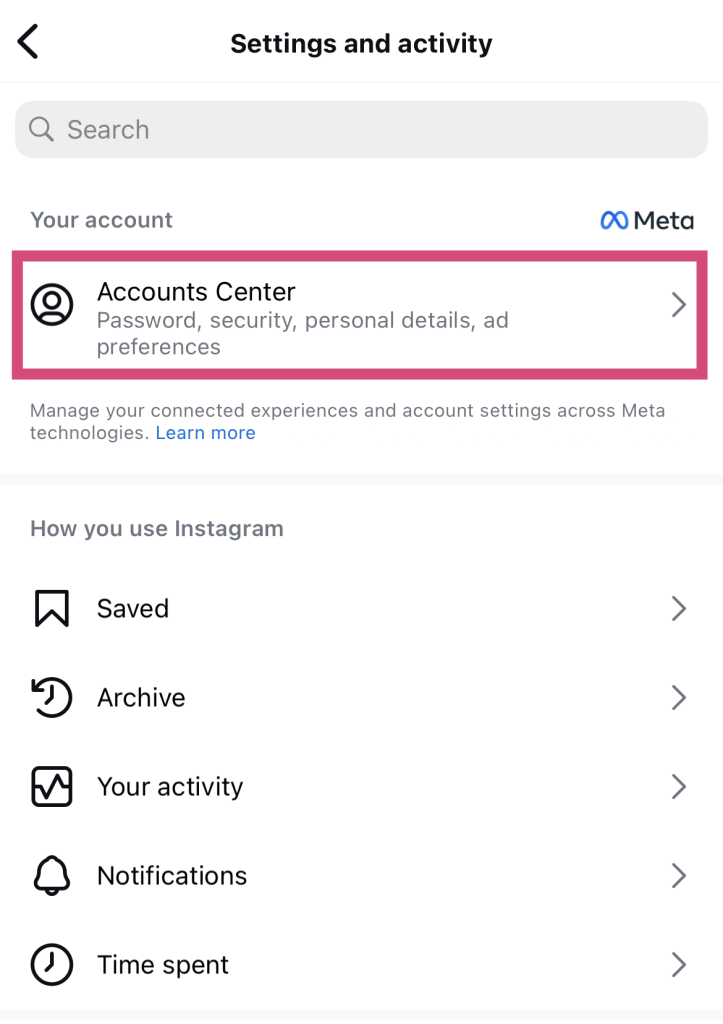
3. Seleccione Centro de cuentas.
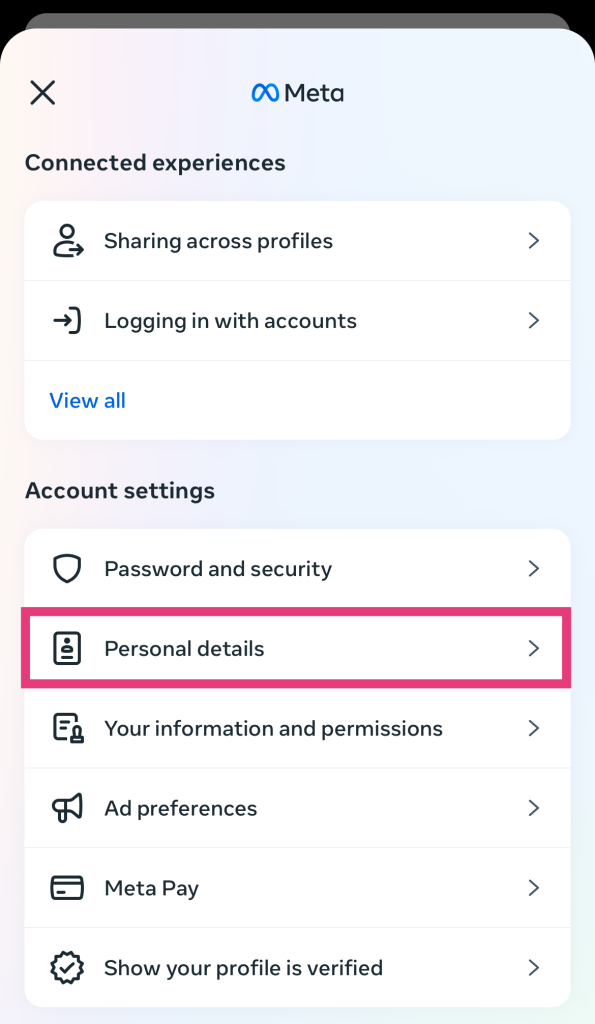
4. En el menú emergente que aparece, pulsa en «Datos personales».
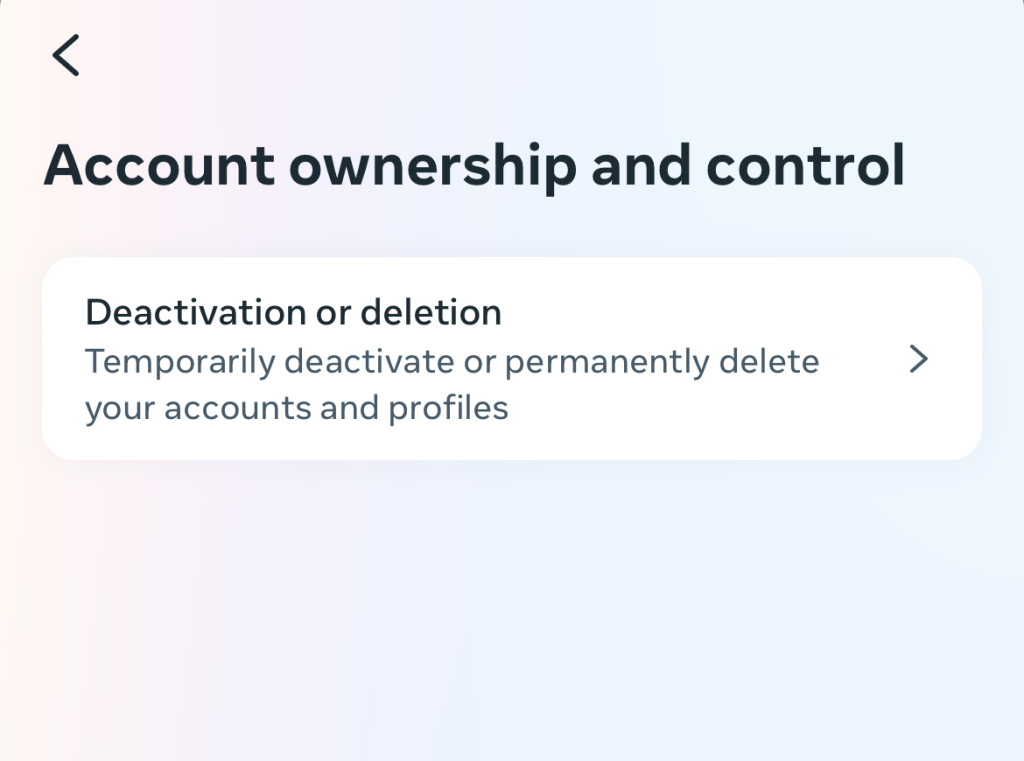
5. Selecciona «Propiedad y control de la cuenta» y, a continuación, «Desactivación o eliminación».
6. Seleccione la cuenta Instagram que desea desactivar temporalmente.
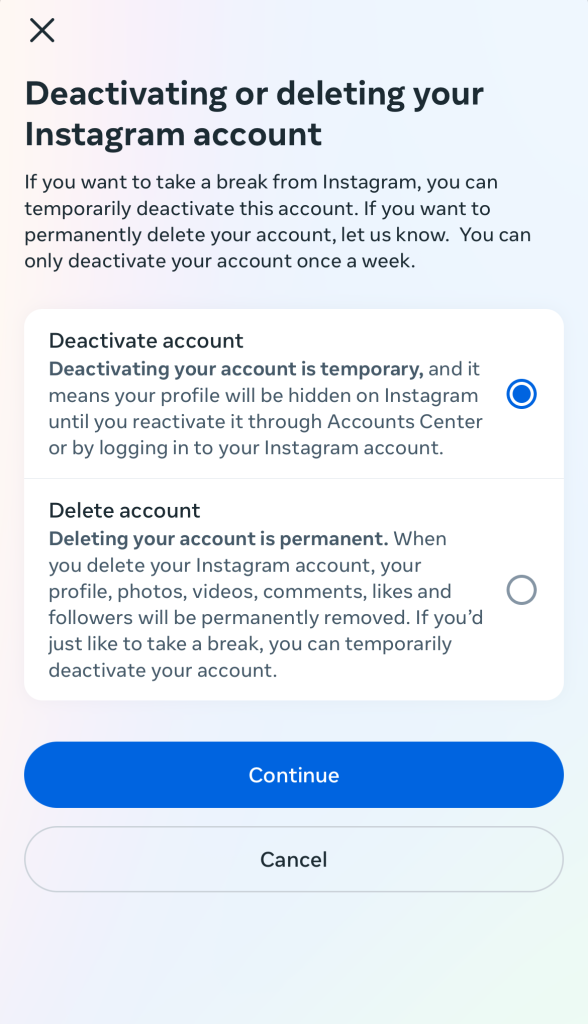
7. Selecciona «Desactivar cuenta» y, a continuación , pulsa «Continuar».
8. Introduzca su contraseña para confirmar su identidad.
9. Seleccione una de las razones enumeradas por las que desea desactivar su cuenta.
10. Confirme su decisión de desactivar su página.
Los contras de desactivar su cuenta
Lo que pasa con desactivar tu cuenta es que no podrás entrar en Instagram, ni siquiera para echar un vistazo. En cuanto vuelvas a iniciar sesión en la aplicación, Instagram tu perfil. No podrás ver libremente los Reels de otras personas ni enviar mensajes directos a tus amigos.
Otra desventaja de desactivar tu cuenta es que Instagram elimina automáticamente todos tus comentarios en las publicaciones de otros usuarios. Es como si nunca hubieras existido. Pero no te preocupes, estos comentarios se restaurarán en cuanto vuelvas a activar tu página.
Desactivar tu página temporalmente puede ser una forma cómoda de alejarte de la aplicación. Pero, en muchos casos, quizá te convenga más archivar el contenido Instagram para limpiar tu feed. De esa forma, al menos podrás seguir utilizando tu cuenta para echar un vistazo a la aplicación, pero con un perfil en blanco.
Cómo archivar en masa todo su contenido en Instagram
Aprovecha la opción de archivar y oculta el contenido de tu feed de forma masiva. A continuación te explicamos paso a paso cómo archivar contenido de forma masiva, como fotos de Instagram, por ejemplo:
1. En Instagram , pulsa en «Tu actividad».
2. Haz clic en Entradas para ver todo el contenido de tu feed
3. Pulsa en «Seleccionar» en la parte superior de la página. A continuación, pulsa en cada una de las publicaciones que quieras ocultar (es decir, todas ellas).
4. Haga clic en Archivar en la parte inferior.
En este momento, tu feed debería estar impecable, sin ningún tipo de contenido (a menos que hayas dejado publicaciones sin archivar a propósito). Recuerda también ocultar o eliminar tus «Destacados», para que tu perfil quede completamente vacío.
Una vez archivadas todas Instagram , ¿cómo se pueden volver a ver?
Así que ya has terminado de archivar todas Instagram , pero quieres ver el contenido que has ocultado. Puedes encontrar todas tus publicaciones archivadas en —redoble de tambores, por favor— tu archivo Instagram . A continuación te explicamos cómo acceder a él:
1. En tu perfil, pulsa las tres líneas horizontales de la parte superior para acceder a la configuración.
2. Pulsa en «Archivo» en la sección «Cómo utilizas InstagramAsí accederás al archivo de Instagram, donde podrás ver todo tu contenido archivado.
3. Cambia entre tu entrada y el archivo de Historias en la parte superior de la página.
Preguntas frecuentes
¿Cómo puedo archivar toda mi cuenta de Instagram ?
Actualmente, Instagram no cuenta con ninguna función Instagram permita a los usuarios archivar toda su cuenta con solo pulsar un botón. Sin embargo, desactivar temporalmente tu cuenta para ocultarla al público durante un tiempo es una excelente alternativa. También puedes archivar todas tus publicaciones a la vez para ocultar tu contenido.
¿Puede archivar temporalmente su cuenta Instagram ?
Aunque no puedes archivar tu cuenta, sí que puedes desactivarla temporalmente. Reactivar tu página es muy fácil. Solo tienes que volver a iniciar sesión en tu Instagram . ¡ Y listo! Instagram vuelve a activar tu cuentaInstagram .
¿Cómo desactivo temporalmente mi cuenta Instagram ?
Aquí tienes un rápido resumen de cómo desactivar temporalmente tu perfil si necesitas un descanso de Instagram:
1. Vaya al Centro de Cuentas en su configuración.
2. Haz clic en «Datos personales» y, a continuación, en «Titularidad y control de la cuenta».
3. Siga los pasos para desactivar su cuenta.
¿Cómo elimino o archivo mi cuenta de Instagram ?
La eliminación definitiva y la desactivación temporal son opciones disponibles en la configuración de propiedad y control de la cuenta Instagram. Las encontrarás en el Centro de cuentas de Meta, al que puedes acceder desde Instagram .
¿Terminaste tu descanso de IG? ¡Vuelve con fuerza con Path Social!
Aunque no hay forma directa de archivar tu perfil en Instagram, existen alternativas ingeniosas. Puedes desactivar tu cuenta temporalmente o archivar de forma masiva todas las publicaciones de tu feed. Cualquiera de estas opciones te permitirá «ocultar» tu Instagram quieres tomarte un descanso de la aplicación.
Es importante saber cómo archivar una Instagram para mantener la tranquilidad. Pero si te tomas en serio tu presencia en Internet, también tienes que saber cómo volver a la carga tras tu descanso.
Eso es algo en lo que, en Path Social ayudarte. Promocionamos tu contenido entre las personas con más probabilidades de disfrutarlo e interactuar con él, para ayudarte a ganar más seguidores. Ya lo hemos hecho con Hailey’s Clothing, una marca que consiguió más de 20 000 seguidores con nuestra ayuda. ¿Quién dice que no podamos hacerlo por ti? ¡Recupera el impulso de tu página y aumenta tu Instagram con Path Social!





¿Quieres seguir el crecimiento de tu cuenta de Instagram ?
Analice su progreso y obtenga información valiosa con nuestra herramienta de seguimiento gratuita.
Comprueba ahora el crecimiento de tu cuenta de Instagram




