


Comment archiver un compte Instagram : Disparaître un peu sur IG

Passer trop de temps sur Instagram peut donner le tournis à n’importe quel créateur. Et parfois, la tentation est grande de masquer son profil et de faire une « détox numérique » loin de l’application. Prendre un peu de recul est un excellent moyen de préserver sa tranquillité d’esprit ou de prendre le temps de repenser sa stratégie de contenu. C’est pourquoi, aujourd’hui, nous allons vous expliquer comment archiver le contenu de votre compte Instagram .
Vous voulez absolument faire une pause dans le rythme effréné de Instagram , mais vous ne voulez pas supprimer votre compte ? Poursuivez votre lecture pour apprendre comment rester à l'écart des projecteurs et prendre un congé sabbatique bien mérité sur les médias sociaux.

Raisons de vouloir archiver un compte IG
Instagram La fonctionnalité d’archivage de permet aux utilisateurs de masquer temporairement des publications de leur fil d’actualité sans les supprimer définitivement. La plupart des gens s’en servent uniquement pour masquer certains contenus, selon qu’ils souhaitent ou non que ces publications apparaissent sur leur fil d’actualité. Mais il arrive parfois que même les créateurs les plus expérimentés se sentent submergés par l’application et aient envie d’archiver l’intégralité de leur profil.
Et cela n'a rien de surprenant. Beaucoup de gens commencent à prendre leurs distances par rapport aux réseaux sociaux. Le Wall Street Journal indique que les publications en ligne sont désormais moins nombreuses, d'autant plus que les bots et la désinformation rendent cette expérience moins agréable.
Alors, pourquoi un créateur de Instagram voudrait-il mettre sa carrière entre parenthèses et archiver sa page ? Voici quelques-unes des raisons :
- Repenser la stratégie globale en matière d'esthétique et de contenu: si vous souhaitez rafraîchir l'apparence de votre fil d'actualité, vous pouvez envisager d'archiver votre page le temps de planifier vos prochaines actions.
- Pour préserver votre bien-être mental: passer tout son temps en ligne peut être amusant, mais cela peut parfois s'avérer extrêmement épuisant. Il est indispensable de mettre votre profil en pause et de prendre un peu de recul si votre santé mentale et votre bien-être l'exigent.
- Éviter les harceleurs: En cachant votre profil aux yeux du public pendant un certain temps, vous pouvez décourager les harceleurs qui vous importunent.

Pouvez-vous archiver un compte Instagram ?
Mais venons-en maintenant à la vraie question : est-il possible, tout d’abord, d’archiver un compte Instagram ? Techniquement, non, ce n’est pas possible. Il n’existe aucune fonctionnalité permettant d’archiver son profil par commande.
Heureusement, il existe des options que vous pouvez envisager si vous souhaitez vraiment cacher votre page pendant un certain temps sans la supprimer. Vous pouvez soit désactiver temporairement votre compte, soit archiver en masse vos publications jusqu'à ce que votre profil soit complètement vide. Voyons chacune de ces options en détail.
Comment archiver le compte Instagram en le désactivant temporairement ?
La désactivation de votre compte Instagram est un excellent moyen de le soustraire au regard du public. Tant que votre profil est désactivé, personne ne peut trouver votre page sur l'application. Il s'agit toutefois d'une mesure temporaire : vous pouvez réactiver votre page quand vous le souhaitez, et tout votre contenu sera restauré.
Voici un guide étape par étape sur la manière d'archiver un compte Instagram par le biais d'une désactivation temporaire :
1. Ouvrez l'application Instagram et cliquez sur l'icône de profil en bas à droite de la page.
2. Cliquez sur le menu hamburger (trois lignes) en haut de votre profil.
3. Sélectionnez Centre de comptes.
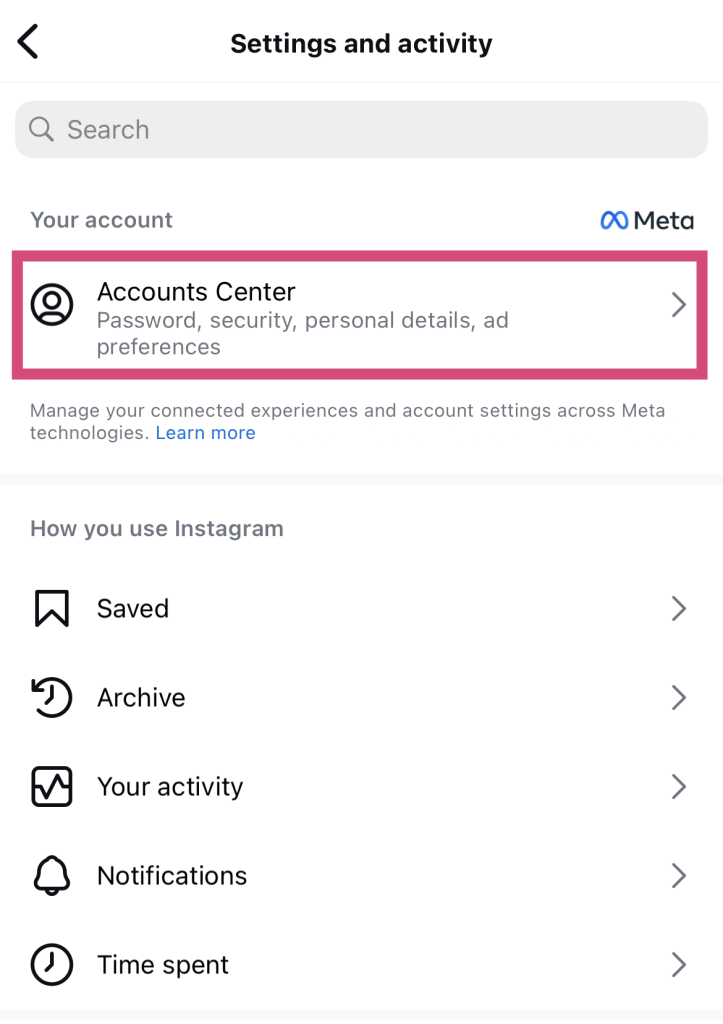
4. Dans le menu contextuel qui s'affiche, appuyez sur « Informations personnelles ».
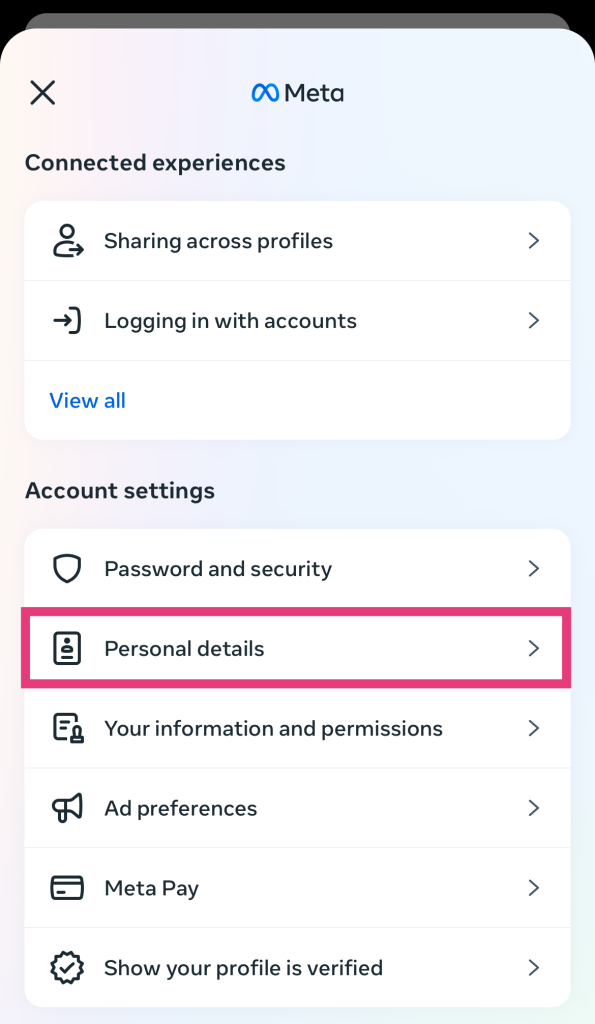
5. Sélectionnez « Propriété et contrôle du compte », puis « Désactivation ou suppression ».
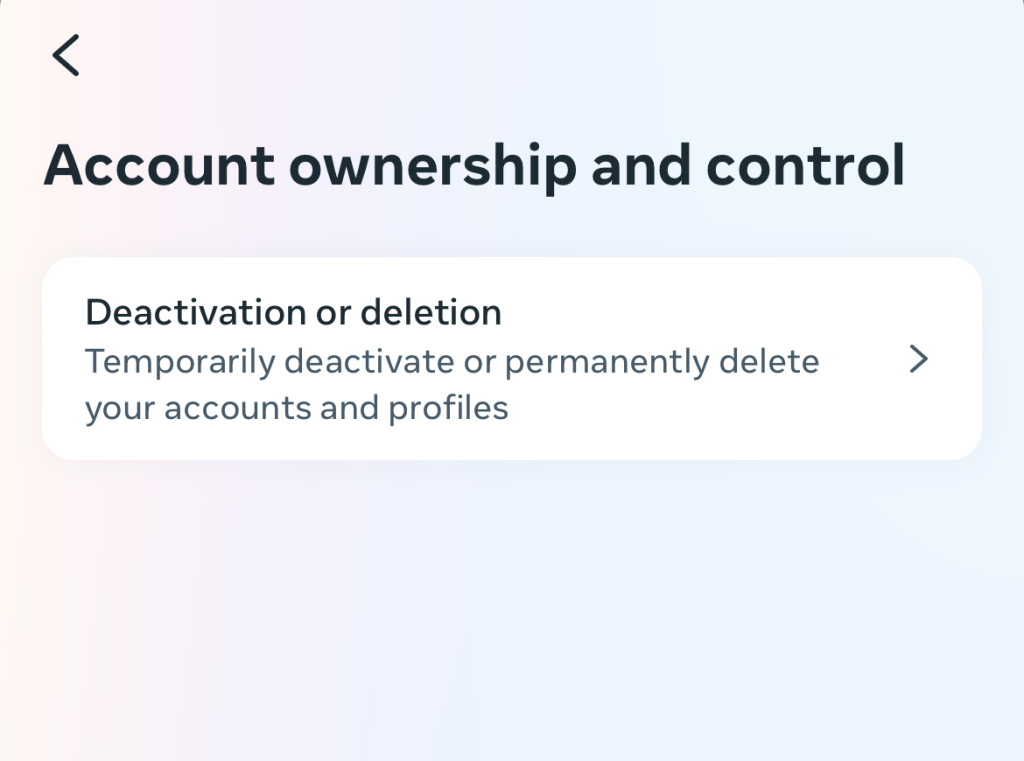
6. Sélectionnez le compte Instagram que vous souhaitez désactiver temporairement.
7. Sélectionnez « Désactiver le compte », puis appuyez sur « Continuer ».
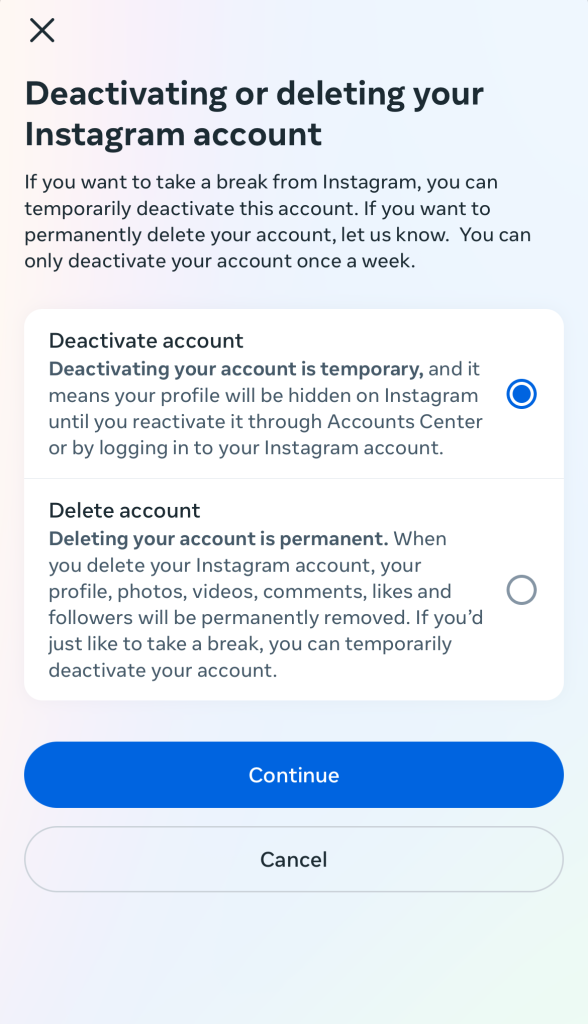
8. Saisissez votre mot de passe pour confirmer votre identité.
9. Sélectionnez l'une des raisons énumérées pour lesquelles vous souhaitez désactiver votre compte.
10. Confirmez votre décision de désactiver votre page.
Les inconvénients de la désactivation de votre compte
Le problème, quand on désactive son compte, c’est qu’on ne peut plus accéder à Instagram, même simplement pour naviguer. Dès que l’on se reconnecte à l’application, Instagram rétablit notre profil. On ne peut donc plus regarder librement les Reels des autres ni envoyer de messages privés à ses amis.
Un autre inconvénient de la désactivation de votre compte est que Instagram supprime automatiquement tous vos commentaires sur les messages des autres utilisateurs. C'est comme si vous n'aviez jamais existé ! Mais ne vous inquiétez pas, ces commentaires seront rétablis dès que vous réactiverez votre page.
Désactiver temporairement votre page peut être un moyen pratique de prendre vos distances avec l'application. Mais dans bien des cas, il vaut peut-être mieux archiver le contenu de votre compte Instagram pour faire le vide dans votre fil d'actualité. Ainsi, vous pourrez au moins continuer à utiliser votre compte pour naviguer discrètement sur l'application, mais avec un profil vide.
Comment archiver en masse tout votre contenu sur Instagram
Tirez parti de l'option d'archivage pour masquer en bloc le contenu de votre fil d'actualité. Voici comment archiver en masse du contenu, comme des photos Instagram par exemple, étape par étape :
1. Dans les paramètres d'Instagram , appuyez sur « Votre activité ».
2. Cliquez sur Posts pour afficher tout le contenu de votre flux
3. Appuyez sur « Sélectionner » en haut de la page. Ensuite, appuyez sur chaque publication que vous souhaitez masquer (c'est-à-dire toutes).
4. Cliquez sur Archive en bas.
À ce stade, votre fil d'actualité devrait être impeccable, sans aucun contenu (à moins que vous n'ayez laissé volontairement des publications non archivées). N'oubliez pas de masquer ou de supprimer également vos « Story Highlights », afin que votre profil soit complètement vide.
Une fois que tous les messages d'Instagram ont été archivés, comment peut-on les consulter à nouveau ?
Vous avez donc fini d’archiver tous vos articles « Instagram », mais vous souhaitez consulter votre contenu masqué. Vous trouverez tous vos articles archivés dans — roulement de tambour, s’il vous plaît — les archives de votre blog « Instagram ». Voici comment y accéder :
1. Sur votre profil, appuyez sur les trois lignes horizontales situées en haut pour accéder à vos paramètres.
2. Appuyez sur « Archive » dans la section « Comment utilisez-vous Instagram? ». Vous accédez alors à l'archive de Instagram, où vous pourrez consulter l'ensemble de vos contenus archivés.
3. Passez de votre article à l' archive de l' article en haut de la page.
Questions fréquemment posées
Comment puis-je archiver l'ensemble de mon compte Instagram ?
Il n'existe actuellement aucune fonctionnalité sur Instagram permettant aux utilisateurs d'archiver l'intégralité de leur compte d'un simple clic. Cependant, désactiver temporairement votre compte pour le masquer au public pendant un certain temps constitue une excellente alternative. Vous pouvez également archiver en masse vos publications afin de masquer votre contenu.
Pouvez-vous archiver temporairement votre compte Instagram ?
Même si vous ne pouvez pas archiver votre compte, vous pouvez le désactiver temporairement. La réactivation de votre page est un jeu d'enfant. Il vous suffit de vous reconnecter à votre compte Instagram . Et voilà ! Instagram réactive automatiquement votre compte.
Comment puis-je désactiver temporairement mon compte Instagram ?
Voici un bref aperçu de la manière de désactiver temporairement votre profil si vous avez besoin d'une pause sur Instagram:
1. Accédez au centre de comptes dans vos paramètres.
2. Cliquez sur « Informations personnelles », puis sur « Propriété et contrôle du compte ».
3. Suivez les étapes pour désactiver votre compte.
Comment supprimer ou archiver mon compte Instagram ?
La suppression définitive et la désactivation temporaire sont des options disponibles dans les paramètres de propriété et de contrôle du compte sur Instagram. Vous les trouverez dans le Centre des comptes Meta, accessible depuis vos paramètres sur Instagram .
Finie la pause IG ? Revenez en force avec Path Social!
Bien qu’il n’existe aucun moyen direct d’archiver votre profil sur Instagram, il existe des solutions astucieuses. Vous pouvez soit désactiver temporairement votre compte, soit archiver en masse toutes les publications de votre fil d’actualité. Ces deux options vous permettront d’« masquer » votre Instagram si vous souhaitez faire une pause sur l’application.
Il est important de savoir comment désactiver un compte Instagram pour préserver votre tranquillité d'esprit. Mais si vous prenez votre présence en ligne au sérieux, vous devez également savoir comment rebondir après cette pause.
C’est justement là que nous, chez Path Social , pouvons vous aider. Nous mettons votre contenu en avant auprès des personnes les plus susceptibles de l’apprécier et d’interagir avec lui, afin de vous aider à gagner davantage de fans. Nous l’avons déjà fait pour Hailey’s Clothing, une marque qui a gagné plus de 20 000 abonnés grâce à notre aide. Qui dit que nous ne pourrions pas faire de même pour vous ? Redonnez de l’élan à votre page et développez votre communauté d’ Instagram s avec Path Social!





Vous voulez suivre la croissance de votre compte Instagram ?
Analysez vos progrès et obtenez des informations précieuses grâce à notre outil de suivi gratuit !
Vérifiez la croissance de votre compte Instagram dès maintenant




