Instagram Atención al cliente: Formas de contacto Instagram

Instagram | 4 de septiembre de 2025
¿Tienes problemas técnicos al utilizar Instagram? ¿No puedes iniciar sesión en tu cuenta? ¿Necesitas enviar una denuncia sobre contenido inapropiado en la plataforma? Estos son problemas que suelen requerir ponerse en contacto con el servicio de atención al cliente de Instagram . Si quieres hablar con un representante, sigue leyendo para conocer tus opciones.

Preguntas frecuentes sobre el servicio de atención al cliente de Instagram
Seguro que ya has buscado en Internet cómo ponerte en contacto con el servicio de atención al cliente de Instagram . Vamos a responder a las preguntas más comunes y frustrantes que se hacen los usuarios de Instagram cuando necesitan ayuda urgente deInstagram .
¿Tiene Instagram un número de atención al cliente?
No. Instagram no dispone de un número de atención al cliente. No se ofrece asistencia telefónica a los usuarios que puedan necesitar ayuda con cuestiones técnicas u otros problemas habituales de la plataforma. En su lugar, Instagram utiliza herramientas de notificación en línea para ayudar a los usuarios a resolver fallos técnicos o a tratar las infracciones.
¿Cuál es el número de atención al cliente de Instagram?
No tienen un número 1-800 de atención al cliente Instagram . Ten en cuenta que los supuestos números directos de atención al cliente de Instagram que se comparten en Internet son falsos. Según un informe, los ciberdelincuentes publican estos números para engañar a los usuarios de Internet y hacer que les llamen. Actúa con cautela y realiza una búsqueda inversa de números de teléfono en Google para determinar si el número es legítimo.

¿Cómo puedo ponerme en contacto con el servicio de atención al cliente de Instagram ?
Si no puedes llamarles, ¿cómo puedes ponerte en contacto con el servicio de atención al cliente de Instagram ? Por desgracia, enviar un correo electrónico al servicio de asistencia tampoco es una opción. Una vez más, es posible que veas a algunas personas compartiendo la dirección de correo electrónico support@instagram.com. Esta dirección de correo electrónico ya no está activa. Según algunos informes, los usuarios no suelen recibir respuesta cuando envían un mensaje a esta dirección. Aunque ocurre en contadas ocasiones, las respuestas por correo electrónico simplemente redirigen a los usuarios al Centro de ayuda de Instagram.
Tampoco hay disponible un servicio de atención al cliente mediante chat automatizado o en directo. Puedes intentar enviar un mensaje directo a la cuenta oficial de Instagramen la plataforma. Sin embargo, es muy probable que, si recibes respuesta, te remitan también al Centro de ayuda.
¿Cómo puede obtener ayuda de Instagram?
Si necesitas ayuda del servicio de atención al cliente de « Instagram », la plataforma te ofrece las herramientas necesarias para encontrar respuestas y resolver problemas. Estas herramientas están disponibles en la aplicación, o bien puedes encontrar soluciones paso a paso en el Centro de ayuda de « Instagram ».
Instagram Centro de ayuda
Encontrarás todas las soluciones de atención al cliente de Instagram en el Centro de ayuda de Instagram . Si accedes al Centro de ayuda a través de un navegador, podrás explorar los temas generales que aparecen a la izquierda. Haz clic en cada tema para desplegarlo y ver los subtemas relacionados. O escribe en la barra de búsqueda aquello con lo que necesites ayuda.
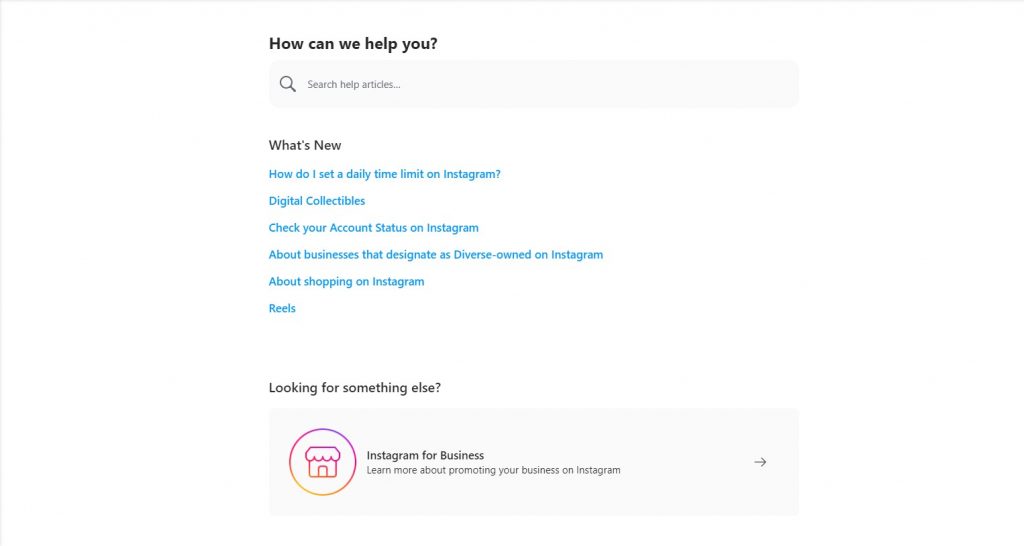
A continuación se indican los temas que puede explorar para encontrar respuestas a los problemas más comunes de Instagram .
- Instagram Funcionalidades. Aquí encontrarás respuestas a dudas relacionadas con tu perfil, cómo compartir fotos y vídeos, los mensajes directos y los problemas técnicos con los mensajes directos, las Stories, los Reels, las retransmisiones en directo, la tienda y mucho más.
- Gestiona tu cuenta. Obtén ayuda para registrarte y dar tus primeros pasos, ajustar la configuración de tu cuenta, añadir cuentas y utilizar los anuncios de « Instagram », entre otras cosas.
- Cómo mantenerse a salvo. En esta sección encontrarás artículos sobre diversas prácticas de seguridad y sobre cómo afrontar ciertos comportamientos problemáticos con los que te puedas encontrar en Internet.
- Privacidad, seguridad y notificación de incidencias. Aquí encontrarás información sobre cómo gestionar tu configuración de privacidad, tus datos de acceso y contraseñas, y cómo enviar notificaciones de incidencias.
- Condiciones y políticas. Puedes obtener más información sobre las Directrices de la comunidad, la Política de privacidad, las Condiciones de uso, la Política de la plataforma y mucho más de Instagram.
5 preocupaciones comunes del servicio de atención al cliente de Instagram y soluciones para cada una de ellas
Desde problemas básicos de acceso o de carácter técnico hasta cuestiones de seguridad más graves, veamos cuáles son los motivos más habituales por los que los usuarios pueden solicitar ayuda al servicio de atención al cliente de Instagram y cómo solucionarlos.
Instagram Preocupación del servicio de atención al cliente nº 1: Instagram Seguridad
Lo que le pueda faltar a la plataforma en cuanto a un servicio de atención al cliente Instagram , lo compensa con su página exhaustiva y específica sobre seguridad Instagram . La plataforma se toma muy en serio su compromiso de «mantener Instagram como un lugar seguro y solidario» para todos.
Instagram ha diseñado las siguientes herramientas de ayuda pensando en la seguridad del usuario:
- Herramientas para las familias. Entre ellas se encuentran la Guía para padres y el Centro familiar. Puede acceder a diversas herramientas de supervisión e información útil que le ayudarán a crear una experiencia en línea positiva para su familia.
- Herramientas de seguridad de la cuenta. Obtén más información sobre la autenticación de dos factores, los inicios de sesión sospechosos, los correos electrónicos de Instagram y cómo configurar contraseñas seguras, entre otros.
- Funciones de privacidad. Explora las herramientas que te ayudarán a controlar tu privacidad.
- Herramientas de seguridad. Encontrarás una lista de opciones para mantener tu cuenta a salvo de comportamientos no deseados y acoso.
- Denuncia de abusos. Explora las formas de denunciar contenidos y cuentas que puedan infringir las Normas de la Comunidad de Instagram.
- Herramientas para luchar contra el acoso. Más información sobre las funciones y herramientas desarrolladas específicamente para proteger a los usuarios del acoso.
- Gestiona tu experiencia. Encuentra herramientas que te ayuden a gestionar tu tiempo en Instagram.
- Proteger a nuestra comunidad. Encuentra formas de actuar si crees que alguien puede estar luchando contra un trastorno alimentario o puede estar en riesgo de autolesionarse.
- Biblioteca de vídeos. Encuentra vídeos útiles que responden a las preguntas más frecuentes de la comunidad de « Instagram ». Puedes ver vídeos sobre qué hacer si te hackean la cuenta, cómo eliminar o desactivar los comentarios, o cómo eliminar seguidores.
La página de seguridad también enumera recursos por país para personas que puedan necesitar apoyo en un momento difícil.

Instagram Inquietud en el servicio de atención al cliente nº 2: Cómo actualizar la información de su perfil en Instagram
No es necesario que te pongas en contacto con un representante del servicio de atención al cliente de Instagram para que te ayude a actualizar la información de tu perfil en Instagram . A continuación te ofrecemos una guía paso a paso para actualizar tu nombre, nombre de usuario o dirección de correo electrónico.
- Toca tu foto de perfil en la parte inferior derecha para ir a tu perfil.
- Pulse Editar perfil.
- Actualice la información de su perfil cuando sea necesario.
- Pulse la marca de verificación azul en la parte superior derecha para guardar los cambios.
Ten en cuenta que, si cambias tu nombre de usuario, es posible que Instagram tenga que revisar este cambio en función del número de seguidores que tengas. En caso contrario, el cambio suele surtir efecto de forma inmediata, siempre y cuando el nuevo nombre de usuario esté disponible. Instagram también podría notificar el cambio a tus seguidores.
Instagram Preocupación del servicio de atención al cliente nº 3: Cómo cambiar la contraseña de Instagram
Si pierdes el acceso a tu cuenta, normalmente necesitarás la ayuda del servicio de atención al cliente de Instagram . Si has olvidado tu contraseña o simplemente quieres actualizarla, puedes cambiarla fácilmente siempre que sigas teniendo acceso al correo electrónico o al número de teléfono asociados a tu cuenta de Instagram . También deberías cambiar tu contraseña si crees que tu cuenta ha sido pirateada.
- Si has olvidado tu contraseña, solicita un restablecimiento de contraseña desde la pantalla de inicio de sesión. Introduce tu dirección de correo electrónico o tu número de teléfono para recibir el enlace de restablecimiento de contraseña.
- Si has iniciado sesión en tu cuenta y recuerdas tu contraseña actual, pero quieres cambiarla, pulsa en tu foto de perfil, situada en la esquina inferior derecha, para acceder a tu perfil.
- Pulsa en «Menú» en la esquina superior derecha y, a continuación, pulsa en «Ajustes».
- Pulsa en «Seguridad» y, a continuación, pulsa en «Contraseña».
- Escriba su contraseña actual y, a continuación, la nueva.
- Pulse Guardar o Listo en la parte superior derecha.
Recuerda crear una contraseña segura que contenga una combinación de al menos seis letras, números y signos de puntuación.
Instagram Preocupación del servicio de atención al cliente nº 4: Cómo silenciar las notificaciones push en Instagram
Si no quieres que aparezcan notificaciones de « Instagram » en tu pantalla, puedes desactivarlas ajustando la configuración de notificaciones:
- Ve a tu perfil y toca Menú en la parte superior derecha.
- Pulsa en «Ajustes» y, a continuación, pulsa en «Notificaciones push».
- Puedes optar por pausar todas las notificaciones push, activar el «Modo silencioso» para silenciar las notificaciones por la noche o seleccionar qué notificaciones quieres activar o desactivar.

Instagram Preocupación del servicio de atención al cliente nº 5: Cómo añadir varias cuentas Instagram
No pierdas tiempo buscando un número de atención al cliente o una dirección de correo electrónico de Instagram si necesitas añadir varias cuentas de Instagram . Sólo tienes que seguir los pasos que se indican a continuación. Ten en cuenta que sólo puedes tener hasta cinco cuentas Instagram . Puedes cambiar de una a otra sin tener que cerrar sesión en una e iniciar sesión en otra.
- Ve a tu perfil y toca tu nombre de usuario.
- Pulse Añadir cuenta.
- Seleccione si desea iniciar sesión en una cuenta existente o crear una cuenta nueva.
- Si vas a iniciar sesión en una cuenta ya existente, introduce el nombre de usuario y la contraseña y, a continuación, pulsa en «Iniciar sesión».
- Si quieres crear una nueva cuenta, introduce un nombre de usuario, pulsa «Siguiente», escribe tu contraseña y pulsa «Siguiente». Completa el proceso de registro. También puedes actualizar el número de teléfono o la dirección de correo electrónico asociados a la nueva cuenta.
Si quieres cambiar de cuenta, solo tienes que ir a tu perfil y pulsar en tu nombre de usuario. A continuación, selecciona la cuenta de Instagram que quieras utilizar.
Cómo acceder a las herramientas de ayuda de Instagram en la aplicación
Instagram El servicio de atención al cliente no existe en el sentido tradicional, pero las herramientas de ayuda disponibles en la aplicación permiten resolver los problemas de forma adecuada y sin complicaciones. A continuación te explicamos cómo acceder a las herramientas de ayuda de la aplicación.
- Ve a tu perfil y pulsa Menú.
- Pulsa en «Ajustes», desplázate hacia abajo y pulsa en «Ayuda».
- Desde la pantalla de Ayuda, puedes informar de un problema, consultar el estado de tu cuenta, acceder al Centro de ayuda, ver las aplicaciones y sitios web autorizados y activos, consultar la ayuda sobre privacidad y seguridad, o comprobar el estado de tus solicitudes de asistencia.
Instagram Servicio de atención al cliente para tiendas Instagram
Si has creado una tienda en Instagram con una página de Facebook asociada y necesitas que el servicio de atención al cliente de Instagram te ayude a gestionar tu tienda, puedes consultar la sección de ayuda de Meta Business para Facebook y las tiendas de Instagram . Encontrarás orientación y asistencia sobre los siguientes temas:
- Crea una tienda en Facebook y Instagram
- Navegar por Commerce Manager
- Acerca de los catálogos
- Formas de añadir artículos a su catálogo
- Mejores prácticas para un catálogo de alta calidad
- Personaliza la página de inicio de tu tienda
Si necesitas ayuda con los anuncios de « Instagram », visita el Centro de ayuda para anunciantes para obtener más información sobre lo siguiente:
- Publicidad en Instagram
- Instagram colocación de anuncios
- Instagram formatos publicitarios
- Instagram objetivos publicitarios
- Instagram requisitos de la cuenta
- Anuncios en Instagram Explore
- Requisitos de Facebook para los anuncios de Instagram
- Anuncios en carrusel en Instagram Reels
- Transformación de una sola imagen para Instagram Reels
- Cómo crear anuncios
- Cómo gestionar los anuncios
El Centro de ayuda principal de Meta Business es otro recurso útil. Puede buscar en el Centro de ayuda para empresas preguntas o problemas específicos o consultar los problemas más comunes y cómo solucionarlos.
Dónde obtener el servicio de expertos para el crecimiento de expertos Instagram
Si eres creador o influencer, o tienes un negocio en Instagram, necesitarás algo más que la ayuda que te puedan ofrecer las herramientas automatizadas del servicio de atención al cliente de Instagram . Necesitarás un servicio especializado que te ayude a lograr un crecimiento profesional en Instagram .
Puedes contratar a un especialista en marketing, a un gestor empresarial o a ambos. O bien, puedes asociarte con Path Social para acceder a un conjunto completo de soluciones de crecimiento en Instagram . Path Social es un experto de confianza enestrategias de crecimiento en
Instagram . Gracias a la tecnología avanzada y patentada de inteligencia artificial de Path Socialy a su equipo interno de especialistas en redes sociales, crecerás con usuarios reales que estén genuinamente interesados en lo que ofreces.
Path SocialLos especialistas y el equipo de atención al cliente de Instagram también pueden ayudarte con cualquier problema que puedas tener al utilizar . Puedes centrar todo tu tiempo y esfuerzo en crear contenidos de calidad y dejar de preocuparte por el crecimiento de tu audiencia y el engagement. Puede estar seguro de que conseguirá seguidores adecuados para su marca y que le proporcionarán un engagement de calidad de forma constante.
Con la confianza de más de 20 000 Instagram de todos los sectores y nichos, Path Social tu mejor opción para lograr un crecimiento duradero y gratificante. ¡Empieza hoy mismo a crecer y a ganar Instagram !





¿Quieres seguir el crecimiento de tu cuenta de Instagram ?
Analice su progreso y obtenga información valiosa con nuestra herramienta de seguimiento gratuita.
Comprueba ahora el crecimiento de tu cuenta de Instagram