


Instagram Soutien : Que faire lorsque vous avez besoin d'aide ?

Pour plus d'un milliard de personnes à travers le monde, Instagram occupe une place essentielle dans leur quotidien. Les utilisateurs consultent la plateforme pour suivre l'actualité de leur famille, de leurs amis, ainsi que de leurs personnalités et marques préférées. D'innombrables personnes utilisent Instagram pour faire leurs achats. Des personnalités, des entreprises et des communautés utilisent la plateforme pour interagir avec leurs publics cibles.
Alors, quand un bug survient dans la matrice d'Instagram, vous pouvez avoir l'impression que votre monde est sens dessus dessous. Voici tout ce que vous devez savoir pour contacter Instagram et remettre les choses en ordre.

Quand contacter l'assistance Instagram
L'un des problèmes les plus courants rencontrés par Instagram actifs Instagram est de ne pas se sentir tout à fait à la hauteur. Malheureusement, vous ne pouvez pas contacter Instagram pour cela ; votre chien vous serait d'une plus grande aide. Alors, dans quels cas est-il judicieux de solliciter les conseils et l'expertise Instagram? Voici quelques raisons valables de demander Instagram :
- Problèmes de connexion Instagram
- Compte Instagram piraté
- Signaler les abus (tels que les menaces ou les propos haineux) ou le spam
- Signaler un contenu inapproprié
- Une Instagram ne fonctionne pas correctement, comme Instagram
- Obtention d'un message d'erreur
- Violations de la propriété intellectuelle
- Signaler des activités illégales
Comment rechercher le soutien de Instagram
La plateforme propose plusieurs moyens d'obtenir Instagram . Mais si vous souhaitez parler à un conseiller, mieux vaut poster une question sur Quora ou Reddit. Blague à part, les fonctionnalités d'aide Instagramsont en réalité, disons, plutôt utiles. Vous pouvez explorer ces options pour obtenir de l'aide de la part Instagram.
Instagram Centre d'aide
Le Centre d'aide est la page principale Instagram de la plateforme. Saisissez le problème que vous rencontrez avec votre compte ou la plateforme elle-même. S'il existe une solution à votre problème ou une réponse à votre question, vous la trouverez rapidement parmi les résultats.
Si vous utilisez l'application, vous pouvez accéder au Centre d'aide en vous rendant sur votre profil et en appuyant sur le menu situé dans le coin supérieur droit. Appuyez sur « Paramètres », faites défiler vers le bas, puis appuyez sur « Aide ». Le Centre d'aide apparaîtra parmi les options proposées.
Si vous utilisez un navigateur pour accéder au Centre Instagram , vous trouverez les rubriques principales suivantes sur le côté gauche de la page d'accueil. Il vous suffit de cliquer sur chacune d'entre elles pour afficher davantage d'options et obtenir plus d'informations.
- Instagram caractéristiques
- Gérer votre compte
- Rester en sécurité
- Confidentialité, sécurité et signalement
- Conditions et politiques
Le Centre d'aide est également l'endroit où vous trouverez tous les liens pour soumettre des rapports sur des problèmes spécifiques à Instagram . Voici les différents types de rapports que vous pouvez soumettre :
- Contenu à signaler. Vous pouvez signaler Instagram , la diffusion en direct ou le Reel d'un utilisateur Instagram . Vous pouvez également signaler un message privé que vous avez reçu, un vendeur ou un produit, ou encore une vidéo inappropriée.
- Signaler une atteinte à la propriété intellectuelle. Il peut s'agir d'une violation de droits d'auteur ou d'un problème de marque déposée.
- Types particuliers de signalements. Ces signalements peuvent concerner, par exemple, une personne qui partage une photo intime vous représentant sans votre autorisation, ou un compte qui usurpe votre identité sur la plateforme. Parmi les autres types particuliers de signalements, on peut citer ceux concernant le harcèlement ou les brimades, le chantage, un délinquant sexuel condamné, des menaces, des comportements abusifs ou offensants, l’exploitation sexuelle des enfants ou un risque d’automutilation.

Instagram Support sur l'application mobile
Outre le Centre d'aide, vous pouvez facilement accéder à d'autres fonctionnalités Instagram depuis l'application Instagram . Là encore, il vous suffit de suivre les étapes suivantes :
- Allez sur votre profil et appuyez sur le menu dans le coin supérieur droit.
- Appuyez sur « Paramètres », faites défiler vers le bas, puis appuyez sur « Aide ».
Vous trouverez ces options sur la page d'aide principale :
- Signaler un problème
- Situation du compte
- Centre d'assistance
- Applications et sites web
- Aide à la protection de la vie privée et à la sécurité
- Demandes de soutien
Voici une astuce pratique ! Lorsque vous utilisez Instagram , secouez votre téléphone jusqu'à ce qu'une fenêtre contextuelle s'affiche. Cette fenêtre contextuelle est un raccourci qui vous permet de signaler un problème à Instagram. Vous pouvez également activer ou désactiver cette fonction à l'aide du bouton situé en bas du message.
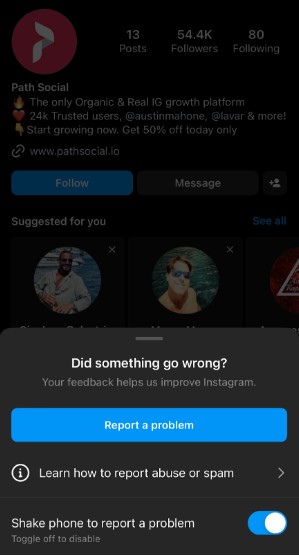
Appeler ou envoyer un courriel à l'assistance Instagram
Malheureusement, il n'est pas possible de contacter Instagram par téléphone ou par e-mail. La plateforme traitait auparavant les e-mails envoyés à instagram, mais celle-ci a été désactivée. Vous pouvez toujours essayer de contacter Instagram en envoyant un e-mail à cette adresse, mais les utilisateurs ont signalé qu'ils n'avaient jamais réussi à joindre quelqu'un ni à obtenir de réponse.
Il n'existe pas non plus de numéro de téléphone permettant de contacter Instagram . L'option « Nous contacter » est introuvable sur Instagram. Une solution consiste à envoyer un message privé au Instagram officiel Instagram ou à laisser un commentaire sous l'une de ses publications. Vos chances d'être remarqué, et encore moins de recevoir une réponse, sont toutefois pratiquement nulles.
Instagram Assistance par chat
Tout comme l'assistance par e-mail, l'assistance Instagram est également inexistante. Cela peut paraître étrange, étant donné qu'il s'agit d'une plateforme de réseau social qui utilise une technologie d'IA avancée pour suivre l'activité des utilisateurs. Il est donc ironique Instagram même Instagram une assistance par chat automatisée. Là encore, la meilleure solution consiste à envoyer Instagram message privé Instagram via son compte officiel.

Comment s'aider soi-même
Comme le dit le dicton bien connu, si vous voulez que quelque chose soit fait, il faut le faire soi-même. Le Centre d’aide Instagramfacilite en effet considérablement le dépannage en autonomie des problèmes courants. On pourrait dire que Instagram vous aide à vous débrouiller tout seul. Si vous êtes du genre à tout régler vous-même, vous pouvez essayer ces solutions pour résoudre un petit problème par vous-même.
DIY Instagram Support lorsque quelque chose ne fonctionne pas correctement dans l'application
Voici quelques solutions classiques et évidentes, qui fonctionnent généralement !
- Redémarrez votre appareil.
- Vérifiez votre connexion internet.
- Videz votre mémoire cache.
- Vérifiez les mises à jour de l'application et installez la dernière version si votre téléphone ne le fait pas automatiquement. Allez sur l'App Store si vous utilisez un iPhone/iPad ou sur le Google Play Store si vous avez un téléphone Android pour vérifier si une nouvelle version de l'application est disponible au téléchargement.
Essayez de réinstaller Instagram
Si aucune des étapes ci-dessus ne fonctionne, vous pouvez essayer de supprimer/désinstaller puis de réinstaller l'application sur votre appareil.
Pour les appareils iPhone/iPad, il suffit de suivre les étapes suivantes :
- Depuis l'écran d'accueil, appuyez longuement sur l'icône Instagram jusqu'à ce qu'elle se mette à trembler.
- Tapez X sur l'application pour la supprimer. Instagram enregistre vos photos et les informations de votre profil.
- Rendez-vous sur l'App Store, réinstallez Instagram, puis connectez-vous avec votre nom d'utilisateur et votre mot de passe.
Pour les appareils Android, voici comment procéder :
- Accédez aux Paramètres de votre téléphone ou de votre tablette, puis appuyez sur « Applications ». Appuyez sur Instagram, puis sur « Désinstaller ».
- Vous pouvez également rechercher l'application sur votre écran d'accueil, appuyer longuement sur Instagram , puis sélectionner « Désinstaller ».
- Rendez-vous sur le Google Play Store, réinstallez Instagram, puis connectez-vous avec votre nom d'utilisateur et votre mot de passe.
Si ces étapes de dépannage ne permettent pas de résoudre le problème que vous rencontrez, Instagram précise : « Il se peut également que vous rencontriez un problème si une fonctionnalité n'est pas encore disponible pour tout le monde. »

Instagram Assistance en cas de problèmes de connexion
Vous rencontrez des difficultés pour vous connecter ? Instagram propose des étapes de dépannage de base en cas d'oubli du mot de passe ou du nom d'utilisateur, de lien de réinitialisation du mot de passe ne fonctionnant pas dans l'e-mail, ou de compte piraté.
Comment réinitialiser votre mot de passe
Si vous avez oublié votre mot de passe, vous pouvez le réinitialiser à l'aide de l'adresse e-mail, du numéro de téléphone portable ou du compte Facebook associé Instagram votre Instagram .
- Sur l'écran de connexion, cliquez sur « Mot de passe oublié ? »
- Saisissez votre nom d'utilisateur, votre adresse e-mail ou votre numéro de téléphone, ou cliquez sur « Se connecter avec Facebook ».
- Cliquez sur « Suivant », puis suivez les instructions à l'écran.
- Instagram vous enverra un lien par courriel ou par téléphone pour vous aider à réinitialiser votre mot de passe.
Comment se connecter si vous avez oublié votre nom d'utilisateur ?
Si vous ne vous souvenez plus de votre nom d'utilisateur, vous pouvez vous connecter à l'aide de votre numéro de téléphone portable ou de votre adresse e-mail. Une fois connecté, appuyez sur votre photo de profil dans le coin inférieur droit pour accéder à votre profil. Vous trouverez votre nom d'utilisateur en haut de la page, juste au-dessus de votre photo de profil.
Instagram Assistance si le lien de réinitialisation du mot de passe ne fonctionne pas
Si vous ne trouvez pas l'e-mail de réinitialisation du mot de passe dans votre boîte de réception principale, il se peut qu'il ait été redirigé vers votre dossier de spam ou que vous ayez mal saisi votre adresse e-mail lors de votre inscription sur Instagram. Si c'est le cas, vous n'avez malheureusement aucune chance de récupérer votre mot de passe.
Si la réinitialisation du mot de passe ne fonctionne pas, Instagram vous recommande de suivre les étapes suivantes :
- Vous pouvez demander un nouvel e-mail de réinitialisation du mot de passe. L'e-mail précédent a peut-être expiré.
- Assurez-vous de choisir de réinitialiser votre mot de passe en sélectionnant "réinitialiser votre mot de passe Instagram " dans l'e-mail. Notez que vous ne devez pas vous connecter directement à partir de l'e-mail.
Instagram Assistance si vous pensez que quelqu'un a piraté votre compte
Si vous ne parvenez pas à accéder à votre compte et que vous pensez que quelqu'un l'a piraté, vous pouvez demander l'aide de Instagram pour sécuriser votre compte.
Vous pouvez également essayer les étapes de récupération suivantes pour retrouver l'accès à votre compte en toute sécurité :
- Vérifiez l'adresse e-mail associée à votre compte pour voir si vous avez reçu un message deinstagram vous informant que votre adresse e-mail a été modifiée. Si vous n'avez pas effectué cette modification, cliquez sur « Sécuriser mon compte » dans le message pour annuler la modification.
- Que faire si vous ne parvenez pas à modifier votre adresse électronique ou si votre mot de passe a été modifié ? Vous devez demander un lien de connexion ou un code de sécurité à Instagram.
Instagram Soutien à la croissance des experts Instagram
Pouvez-vous faire appel à Instagram pour toucher un public plus large et augmenter votre engagement ? La plateforme peut vous offrir de meilleures capacités de ciblage d'audience grâce aux publications boostées ou aux campagnes Instagram . Vous pouvez également vous renseigner sur le programme Meta Business Partners, qui vous permet de collaborer avec des « experts de confiance qui aident les entreprises à se développer ».
Si vous recherchez un expert de confiance en stratégie de croissance sur Instagram , rendez-vous sur Path Social. Path Social peut vous aider à vous développer grâce à de vrais utilisateurs réellement intéressés par ce que vous avez à offrir. Tirez parti de leur technologie d’IA avancée et exclusive pour cibler le public qui convient à votre marque. Profitez du savoir-faire en marketing des spécialistes des réseaux sociaux de Instagram pour promouvoir votre marque et votre contenu auprès de votre public cible.
Quel que soit votre secteur d'activité, Path Social identifiera les abonnés les plus adaptés pour vous aider à connaître une croissance durable et fructueuse. Vous pouvez être sûr de gagner des abonnés qui ont véritablement hâte de découvrir davantage de contenu de votre part et qui vous apporteront un engagement de qualité.
Reconnu par plus de 20 000 Instagram , tous secteurs et domaines confondus, Path Social votre meilleur allié pour une croissance durable et fructueuse. Commencez dès aujourd’hui à développer votre audience et à gagner Instagram !





Vous voulez suivre la croissance de votre compte Instagram ?
Analysez vos progrès et obtenez des informations précieuses grâce à notre outil de suivi gratuit !
Vérifiez la croissance de votre compte Instagram dès maintenant




